
Svennis AI
11 min read

An MCP server for your own internal system and how to scope it

A plain guide to building an MCP server for a home-grown app or database: when it pays off, what to expose and never expose, authentication, and the first tool to write.

Abstract lines converging through a narrow gateway into an ordered grid of blocks, suggesting controlled access

What an MCP server for your own internal system actually is

This guide explains when to build an MCP server for your own internal system, so that Claude can read from a home-grown app or database and act on it. It also covers how to decide which actions Claude may perform before anyone writes code. Off-the-shelf connectors will not reach customer records, job sheets or stock levels that live in software your team built. A small custom server is often the bridge.

Some terms first. The Model Context Protocol, or MCP, is described in its documentation as "an open-source standard for connecting AI applications to external systems". The same page compares it to a USB-C port for AI applications. The idea is one standard plug, instead of a different cable for every device.

An MCP server is the piece you build. It exposes your data and tools. An MCP client is the application that connects to it. Examples are Claude Desktop or your own program calling the Claude API. A tool is one named action the server offers, such as "look up an order" or "add a note to a job". Claude sees the list of tools and decides when one would help. It then asks the server to run that tool, and the server does the work against your system and returns the result.

For a manager, the point that matters is this: Claude can only do what the server's tools allow. The tool list is your control surface, and everything else in this post follows from it.
When a custom server is worth building

Build your own server only when three conditions hold. First, the data lives in a system that no existing connector covers. That might be an in-house database, a bespoke order system or a line-of-business app written years ago. Second, people ask questions of that data, or re-key from it, often enough for the time to add up. Third, you can name a handful of specific actions that would help. "Let Claude see everything" does not count.

If the data already sits in a mainstream product, check for a ready-made server first. For Zoho CRM, our guide to connecting Claude to Zoho CRM with MCP covers the setup. The equivalent for other CRMs is in Claude with HubSpot or Salesforce via MCP. Writing your own server for a system that already has one only gives you more code to maintain.

The MCP documentation says the standard "reduces development time and complexity" when you build or integrate with an AI application. That holds when you compare it with writing a separate integration for each AI tool. You write the server once, and any MCP client can use it. The documentation lists Claude, ChatGPT, Visual Studio Code and Cursor among the applications that support MCP. The server is still software, though. It needs an owner, a hosting location and a security review.

When not to build

Skip the project if the task is a one-off report, or if a scheduled export would answer the question. Also skip it if nobody can say who will own the server after launch. It is also the wrong tool when the only valuable action would be a decision about a person with legal or similarly significant effect, because the law then requires safeguards and a route to human review that a quick custom server rarely provides. The section on UK obligations has the detail.

Scope the actions before any code is written

Scoping means writing down, in plain language, every action the server will offer, who may trigger it and what it may change. Do this on paper with two people: the owner of the internal system and the person who will use Claude day to day. A developer joins once the list is agreed.

For each candidate action, answer five questions:

  1. Read or write? Does it only return data, or does it change a record?
  2. Which records? Does it touch one record by ID, a filtered list or the whole table?
  3. Whose permissions? Does it act as the signed-in person, or as a shared service account?
  4. Reversible? Can a person undo a mistake quickly, inside the app?
  5. Personal data? Does the result contain names, contact details or anything else about individuals?

Keep each tool narrow. "Get the status of one job" is a tool. "Run any database query" is not, because it hands the model the whole database and the tool list stops working as a control. UK government guidance, summarised in the Ministry of Justice interoperability guidance, says APIs should provide pagination, filtering and rate limiting. Those are good habits here too. Return one page of results at a time, apply filters on the server, and cap how often a tool can be called.

At Svennis we put the agreed tool list on a single page and have the system owner sign off each action before development starts. When we see these projects go wrong, it is usually because someone added a broad catch-all tool late "for flexibility".

What to expose and what never to expose

The table below turns the scoping questions into a decision. Start at the top and move down only once the tools above have run cleanly for a while.

Action typeExampleExpose?Condition
Look up one record by IDJob status, order statusYes, firstRead-only; return only the fields the task needs
Search with filtersOpen jobs for one engineer this weekYesServer applies the filters and a page size
Add a note or a draftNote on a job, draft replyYes, after read tools prove outLogged, attributed to the user, easy to undo
Change a status or an amountClose a job, change a priceOnly with confirmationClaude proposes; a person approves
Delete recordsRemove a customerNeverKeep deletion in the app, under its own permissions
Raw queries or admin functionsFree-form SQL, user management, full exportsNeverThese bypass every scoping decision
Decisions about individualsApprove credit, reject an applicantNot solely automatedA person decides; UK GDPR Articles 22A to 22D require safeguards for automated significant decisions
Payment card dataCard numbersNever through the serverKeep it inside the systems built for it

The payment card row reflects PCI DSS v4.0.1, published in June 2024. It sets strict controls, including encryption and access control, for any system that stores, processes or transmits card data, and network segmentation is the usual way to keep that scope small. Once an MCP server returns card numbers, it becomes one of those systems, along with everything it talks to.

Be just as strict with fields. A lookup tool for job status does not need the customer's home address. Leave out whatever the task does not use.

Authentication and where the server runs

An MCP server can run in one of two places, and that choice drives how it authenticates.

Local, on the user's computer

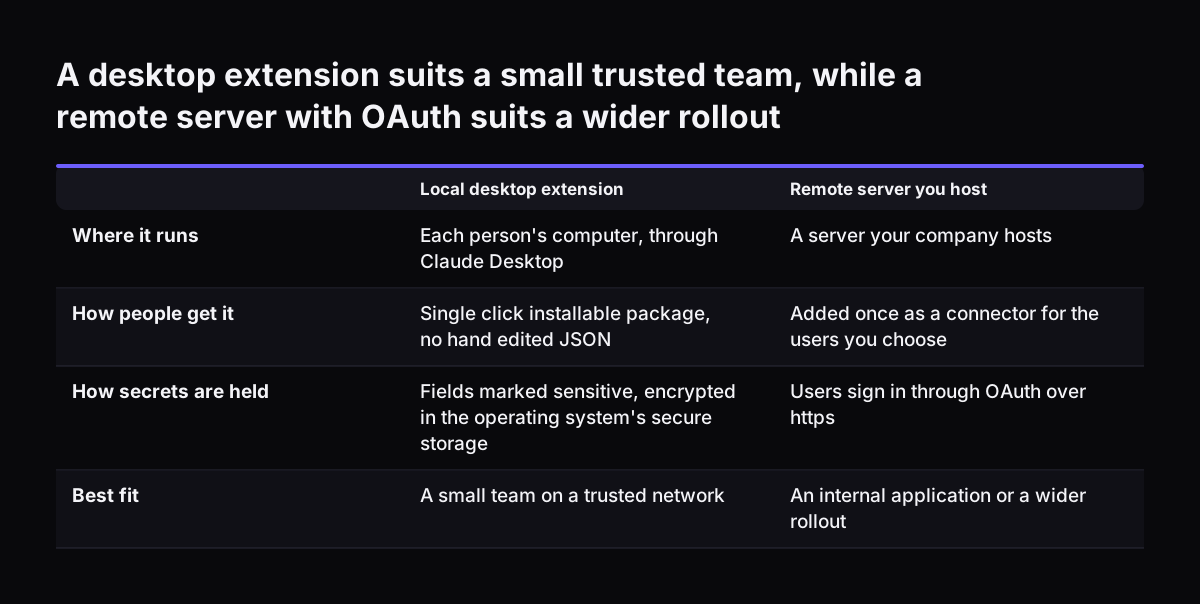
A local server runs on each person's machine and is used through Claude Desktop. The Claude Help Center describes desktop extensions as single-click installable packages for local MCP servers. They replace hand-edited JSON files. You can mark configuration fields as sensitive, such as a database password or API key. Claude Desktop then encrypts them using the operating system's secure storage: Keychain on macOS, Credential Manager on Windows and the distribution's keychain manager on Linux. Local suits a small team on a trusted network.

Remote, on a server you host

A remote server runs once, centrally, and every client connects to it over the network. Anthropic's MCP connector documentation sets the rules for using it from the Claude API. The server must be publicly exposed over HTTP, and its URL must start with https://. Local STDIO servers cannot be connected this way. The calling application handles the OAuth flow. It obtains an access token before the call and refreshes it as needed.

UK government API standards require TLS 1.2 or above, and the NCSC advises planning a move to TLS 1.3. Commercial firms are not bound by that, but it is a sensible bar. The NCSC's Securing HTTP-based APIs collection, updated in April 2025, covers authentication, threat modelling, testing and API lifecycle security. Give it to whoever builds the server.

Whichever route you choose, the server should act with the least access possible. Ideally it uses the signed-in person's own rights. If it uses a service account, give that account only the tables the tools need, and never an administrator login.

A desktop extension suits a small trusted team, while a remote server with OAuth suits a wider rollout. Local desktop extension / Remote server you host. Where it runs: Each person's computer, through Claude Desktop / A server your company hosts; How

A worked example: a job-tracking database

Take a field service company with a job database built in-house. Its coordinators spend part of each morning answering "what is outstanding for this engineer?" and typing notes from phone calls into job records. After scoping, they agree on three tools:

  • get_job: takes a job ID and returns status, engineer, due date and the last note.
  • list_open_jobs: takes an engineer and a date range and returns one page of open jobs.
  • add_job_note: takes a job ID and note text and saves the note under the user's name.

Nothing closes, reassigns or deletes a job. Those actions stay in the app.

Route A: a desktop extension for the coordinators

The developer adds a manifest.json file to the server directory and packages it with the mcpb pack command, as the Help Center describes. Extensions support Node.js, Python and binary servers, and Claude Desktop includes its own Node.js environment. The database password is marked sensitive, so it is stored in the operating system's secure storage. On a Team or Enterprise plan, Owners and Primary Owners can upload the custom extension for the team. Individuals install a .mcpb file under Settings, Advanced settings, Extension Developer, "Install Extension". Each coordinator can then click the "+" button in the chat box and choose "Connectors" to check the three tools are present.

Route B: a remote server called from your own application

If Claude runs inside an internal web page instead, the application calls the Messages API. The request includes an entry in the mcp_servers array with the https URL and the access token. An MCPToolset in the tools array enables only the three agreed tools. The current beta header is mcp-client-2025-11-20, which replaced mcp-client-2025-04-04. If the developer uses Anthropic's Python MCP helpers, they need Python 3.10 or later.

The first tool to build

Build the single-record lookup first: get_job in the example, or its equivalent in your system. It is read-only, it touches one record, and a coordinator can check every answer against the app in seconds. If the lookup returns the wrong record, the wrong fields or a slow response, you want to find out before any write tool exists.

Test it with three kinds of question. Ask directly for a known job and compare the answer with the screen. Ask for a job that does not exist and confirm the server returns a clear "not found", not an error dump. Then ask a general question about the kind of work you do. The connector documentation states that Claude does not call an MCP tool for general knowledge questions about a connected service, so no call should appear. If one does, the tool's description is too broad and needs rewriting.

Run the lookup with real users for a few weeks before adding the filtered list. Add the note-writing tool last, and only once the log shows the read tools are called for sensible reasons. Each new tool is a change to your control surface, so treat it as one. It goes back on the one-page list and gets a fresh sign-off.

This order is slower than building all three at once, but it gives you evidence at each step. The team also learns to trust the answers on data they already know well.

What this means for a UK company

An MCP server moves data from your system into Claude's context, so UK GDPR applies to whatever personal data the tools return. The ICO's innovation advice answers several questions that bear directly on this.

  • Who is the processor. A third-party AI provider that acts under your instruction is likely to be a processor, and the law requires a written contract between you and any processor. That covers an outside developer who runs the server or otherwise handles personal data for you.
  • When a supplier becomes a controller. If a provider processes the data beyond your instructions, for example to build another model, the ICO says it becomes a controller or joint controller for that processing.
  • Anonymisation. Removing names or ID numbers is not enough to anonymise data. A tool that "hides the name" but returns postcode, job history and phone notes still returns personal data.
  • Automated decisions. Since 5 February 2026, Articles 22A to 22D of the UK GDPR allow a solely automated decision with a legal or similarly significant effect on someone only if you have safeguards in place: you tell them about the decision, let them make representations, let them get a person to step in, and let them contest it. Decisions based on special category data face tighter limits still. That is why the table keeps such decisions with a person.

Check retention too. Anthropic states that the MCP connector is not covered by zero data retention arrangements. Tool definitions and results exchanged through it are kept under Anthropic's standard retention policy. Record that in your data protection impact assessment and your privacy notice.

The ICO also notes that this guidance is under review because of the Data (Use and Access) Act, so check the current version before you sign off. MCP itself is not unusual in the public sector: UK government guidance on AI-ready datasets cites MCP and agentic workflows as a modern approach to data interoperability.

Keeping control after launch

A server that was well scoped on day one can drift. Someone adds a tool for a quick fix, the database schema changes, or a new starter installs an old version. Plan for three controls.

Freeze what Claude sees

The connector documentation describes a newer beta header, mcp-client-2026-09-15. It records the tool list each server returns and lets you pin it. A server that changes its tools then cannot change what Claude sees partway through a conversation. Use it where your application supports it, and treat any change to the pinned list as a release.

Control who has which version

Extensions from the official directory update automatically by default. Privately distributed extensions, which includes yours, must be updated by installing the new .mcpb file manually. Keep a note of who has which version. On Team and Enterprise plans, Owners can enable or disable public desktop extensions. Enterprise policy set on user machines overrides the in-app allowlist and blocklist. If you want the in-app controls to work, isDesktopExtensionEnabled and isDesktopExtensionDirectoryEnabled must not be set to "false".

Log every call

Log each tool call on the server side: which tool, which user, which record and when. Review the log monthly against the one-page tool list. A tool nobody uses should be removed, and a tool used in unexpected ways should be tightened.

Practical next steps

  1. Confirm there is no ready-made server. If your data is in a mainstream product, use its existing connector and stop here.
  2. Write the one-page tool list. Take each action through the five scoping questions and the decision table, and get the system owner's signature.
  3. Choose local or remote. A desktop extension suits a small team. A remote server with OAuth and https suits an internal application or a wider rollout.
  4. Settle the paperwork. Check that your data processing terms with the AI provider cover this use, including any transfer of personal data outside the UK, put a written processor contract in place with anyone else who runs the server or handles its data for you, update your impact assessment, and note the connector's retention terms.
  5. Build the read-only lookup. Test it against known records, missing records and general questions, then run it with real users before adding the next tool.
  6. Set up logging and version control before the first write tool goes live.

If you want to see where a custom server fits among other options, read AI for small business built into your existing systems. When you are ready to choose who builds it, our guide on judging an AI consultancy by systems in production lists the questions to ask before you commission any code.

Sources

  1. 1. What is the Model Context Protocol (MCP)?
  2. 2. MCP connector, Claude Platform Docs
  3. 3. Getting Started with Local MCP Servers on Claude Desktop, Claude Help Center
  4. 4. Interoperability, Ministry of Justice Developer Portal
  5. 5. Previously asked questions, ICO

Related articles