
Svennis AI
10 min read

What Claude costs a ten person company per year: seats, usage and setup

What Claude costs a ten person company per year depends on three lines: seats, metered API usage and setup work. This guide explains each and builds three yearly budgets.

Abstract composition of ten small blocks feeding into a larger stacked column that grows in steps

Three cost lines, not one price

This guide explains what Claude costs a ten person company per year, and why the answer is never a single number. Most owners start with the price list and multiply by ten. That misses two of the three lines that end up on the invoice.

The first line is seats. A seat is a named licence that lets one person use Claude in the browser, the desktop app or on mobile. You pay for seats per user, per month, whether or not people use them heavily.

The second line is API usage. The API (application programming interface) is how software, rather than a person, talks to Claude. It is metered: you pay for the text Claude reads and writes, measured in tokens, plus any paid tools such as web search.

The third line is setup work. This means connecting Claude to your CRM, helpdesk or accounts, writing the instructions it follows, agreeing a usage policy and training staff. It is a one-off cost with a smaller running cost for upkeep.

A company that only buys seats has a predictable bill and a limited result. A company that connects Claude to its own systems pays more in the first year and gets work done inside the tools it already uses. The rest of this post takes each line in turn, then puts them together in three worked budgets.
Seats: what the Enterprise plan requires

Anthropic's help centre describes how seats work on its Enterprise plan. Usage-based Enterprise plans use a single seat type, the Enterprise seat, priced per user per month and billed annually. That seat includes Claude on web, desktop and mobile, as well as Claude Code, Anthropic's coding tool.

The detail that matters most for a ten person company is this: Enterprise plans require a minimum of 20 seats. If you choose Enterprise, you pay for 20 seats even though only ten people will use them. Your effective cost per user is double the seat price.

Put as a formula, with S standing for the monthly Enterprise seat price on your quote:

  • Ten people on Enterprise: 20 seats × S × 12 months = 240 × S per year.
  • Cost per actual user: 240 × S ÷ 10 = 24 × S per person per year, not 12 × S.

This guide does not quote a seat price, because the pack of sources behind it does not include one and list prices change. Take S from Anthropic's current pricing page or your quote, and check whether a plan below Enterprise fits a team of your size before committing to the 20-seat minimum.

Older seat types no longer apply to new buyers. Chat-only seats and Standard or Premium seats are not available for new contracts, and those legacy plans move to the single Enterprise seat at renewal. If you read an older comparison that talks about Premium seats, it no longer describes what you can buy.

Seat rules that change the yearly bill

The seat price is only half of the seat cost. The rules for adding and removing seats decide what you actually pay over twelve months. Anthropic's help centre sets out several that a small company should know before signing.

  • Seats cannot be removed mid-term. On self-serve Enterprise plans you can add seats at any time, but reductions only take effect at renewal. If someone leaves in month three, you keep paying for that seat.
  • Added seats are charged immediately. New seats are prorated for the rest of the billing cycle and billed straight away.
  • Removing a person does not reduce the bill. Their seat becomes free to assign to someone else, but your total allocation stays the same.
  • Pending invitations count. An invitation nobody has accepted still uses a seat. Members set to "no seat assigned" do not.
  • Automatic provisioning can stall. Users created through JIT or SCIM, the single sign-on methods many IT teams use, get a seat only if one is free. Otherwise provisioning waits until an owner buys another.
  • Cancellation waits for the term to end. Access continues until the end of the annual cycle.

Only Owners and Primary Owners can buy seats. In a ten person company that is usually the founder or the office manager, so decide who holds that role before the first invoice arrives.

The practical effect is that you commit to a seat count for a year. Size it for the headcount you expect at renewal, not for the most optimistic hiring plan.

API usage: what is metered and what is free

On most plans, seats cover people typing into Claude. On usage-based Enterprise plans, as the name suggests, usage is charged on top of the seat, so check with Anthropic how your team's chat use is billed and add it to the Enterprise budget. As soon as software calls Claude, for example to sort incoming email or draft replies inside your helpdesk, you pay for API usage. Tokens are the unit: roughly, pieces of words that Claude reads as input and writes as output. You pay per token at the model's published rate.

Some tools add their own charges on top. Anthropic's documentation for the web search tool gives a clear example:

  • Web search costs $10 per 1,000 searches, plus standard token costs for the content the search brings back.
  • Each search counts as one use, however many results it returns.
  • If a search fails, it is not billed.
  • The citation fields (the quoted text, title and URL) do not count towards token usage.
  • Searches through the Messages Batches API, which processes requests in bulk, are priced the same as ordinary requests.

Two settings keep this line under control. The max_uses parameter sets a hard cap on searches per request. And with newer models, dynamic filtering lets Claude write and run code that filters search results before they reach its working memory, which the documentation says reduces token use on search-heavy requests. The code execution this uses carries no extra charge beyond standard token costs.

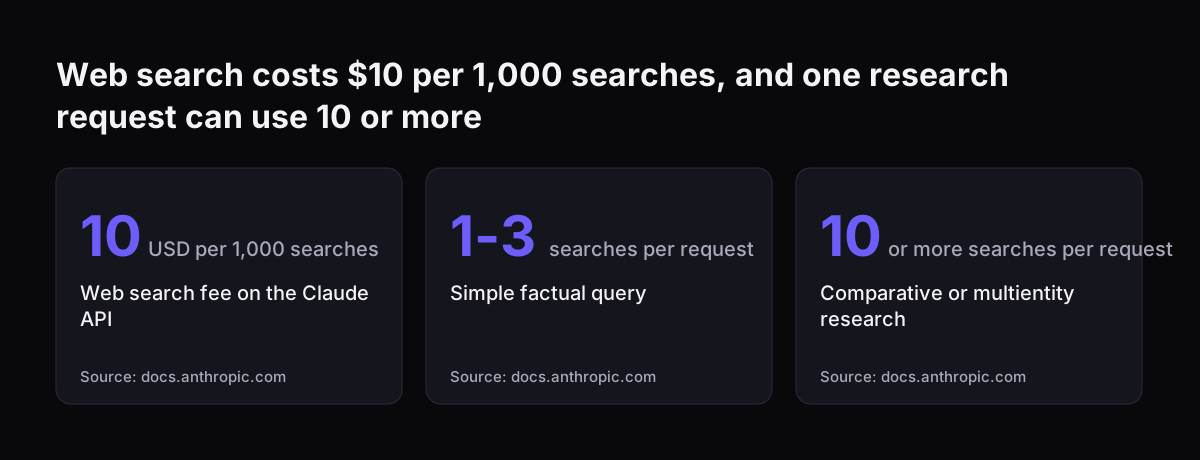
The documentation also gives a planning range: simple factual queries typically use one to three searches, while comparative research across several companies or products can use ten or more. That range is what the worked budgets below rely on.

Web search costs $10 per 1,000 searches, and one research request can use 10 or more: Web search fee on the Claude API 10 USD per 1,000 searches, Simple factual query 1-3 searches per request, Comparative or multientity research 10 or more searches p
Source: docs.anthropic.com

Setup work: price it as scope, not as a line item

Setup is the line owners most often leave out, and the one that varies most. It is better described as scope than as a price, because the cost follows from what Claude must connect to.

What the scope usually contains

  • Connections. Each system Claude reads from or writes to, such as Zoho CRM, Zoho Desk or your accounts package, needs a connector, permissions and testing.
  • Instructions. Shared projects, reusable skills and prompts that encode how your company works. Our guide to Claude Projects and Skills for a small team covers this part.
  • Policy. A written rule on what staff may paste into Claude and what stays out.
  • Checking. Someone reviews outputs until you trust them. The UK government's adoption research found around two thirds of AI users (67%) report significant human input or checking of AI outputs.
  • Upkeep. Connectors and instructions need adjusting when your processes or fields change.

When Svennis scopes a Claude system, we list every system Claude must read from or write to, and who approves each action, before anyone discusses seats. We do it in that order because the connection work, not the licence, is what usually decides the first-year budget.

A seat-only rollout has almost no setup scope. A single connected workflow has a small, defined one. Several connected systems with write access have the largest, and that is where most of the first-year spend goes.

What Claude costs a ten person company per year: three worked budgets

Here is how the three lines combine for the same ten person company. S is your monthly seat price and T is your token spend; both come from your own quote and usage. The search figures use the documentation's ranges and the $10 per 1,000 rate. The request volumes are assumptions for illustration, so replace them with your own.

Setup A: seats only

Ten people use Claude in the browser for drafting and summarising. No API, no connections. Yearly cost: 10 × S × 12 on a plan that allows ten seats. Setup scope is a policy and a short training session.

Setup B: seats plus one connected workflow

The same ten seats, plus one API workflow that researches incoming leads. Assume 500 requests a month, capped at three searches each with max_uses. That is at most 1,500 searches a month, or 18,000 a year: $180 a year in search fees, plus T. If the workflow does comparative research at ten searches per request, the same volume becomes 60,000 searches and $600 a year, plus T. Setup scope is one connection, its instructions and testing.

Setup C: Enterprise with several connections

Enterprise seats at the 20-seat minimum, plus API workflows connected to your CRM and helpdesk. Yearly seats: 20 × S × 12 = 240 × S. Add any usage charges for your team's chat use under the usage-based plan, search fees and T for each workflow, and the largest setup scope of the three.

SetupSeats per yearUsage per yearSetup scope
A: seats only120 × SNonePolicy, training
B: one workflow120 × S$180 to $600 search + TOne connection
C: Enterprise, connected240 × SChat usage, plus search + T per workflowSeveral connections

Choosing between the setups

The right setup depends on where the time goes in your company, not on which plan sounds most complete. The table below turns the three budgets into a decision.

If this is true for youStart withWhy
Staff mainly write, summarise and research on their ownASeats cover it; nothing to connect
One repeated task eats hours every week, such as triage or lead researchBA single metered workflow is cheap and measurable
You need single sign-on, central administration and Claude Code for everyoneCEnterprise includes these, but you pay for 20 seats
Headcount may fall during the yearA or B on a flexible planEnterprise seats cannot be removed mid-term
Your data rules are not yet written downA with a policy firstConnections should wait until access is agreed

For most ten person companies, B is the sensible first year. It keeps seat costs at ten, adds one workflow whose cost you can count in searches and tokens, and produces a result you can measure before spending more. If you want Claude working on files and tasks on a desktop rather than through an API, our guide to Claude Cowork covers that route.

Move to C when the administration and security features are worth paying for twice your headcount, or when your team grows towards 20.

Seats suit solo writing, one metered workflow suits a repeated task, Enterprise suits central control
Setup A: seats onlySetup B: seats plus one workflowSetup C: Enterprise
You pay forTen seatsTen seats plus metered API useEnterprise seats at the plan minimum
Best fitStaff who mainly write, summarise and researchOne repeated task such as triage or lead researchSingle sign on, central administration and Claude Code for all
Setup scopeA usage policy and a short training sessionOne connection, instructions, policy and output checksAdministration setup plus the scope of any workflows
Cost grows withNumber of seatsRequests and searches per monthSeats bought, whatever the number of users
If headcount fallsPick a plan that lets seats changePick a plan that lets seats changeSeat count stays fixed until renewal

What this means for a UK company

The UK government's AI adoption research, commissioned by the Department for Science, Innovation and Technology and based on 3,500 interviews in early 2025, puts the budget question in context. Around 1 in 6 UK businesses (16%) currently use at least one AI technology, and micro businesses are less likely to (14%) than mid-sized (23%) or large ones (36%).

Cost is a real concern. Among businesses citing barriers, high costs were rated significant by 76%, second only to ethical concerns at 80%. Most businesses that did adopt AI bought ready-to-use solutions rather than building in house, and the most common planned investments are off-the-shelf applications (65%) and embedding AI into existing tools (59%). That matches setup B: a bought product plus one connection to a system you already run.

Expect the return to take time. Over three quarters of adopters (77%) had not yet seen a change in revenue, while three quarters (75%) reported improved workforce productivity. Budget for productivity first.

Training does not need to be a large line. The government's AI Skills Boost programme offers free courses to every adult in the UK, some taking under 20 minutes. That matters because the same government research found limited AI skills and expertise among the most frequently cited reasons businesses do not adopt AI. Before connecting anything, check your data position with our GDPR checklist for Claude.

Where the yearly budget usually goes wrong

The seat price is rarely the surprise. The surprises come from the rules and the scope around it. Four mistakes account for most overruns in a first year.

  1. Buying Enterprise for ten people without noticing the minimum. The 20-seat floor doubles the cost per user. Decide whether you need its features before you accept it.
  2. Sizing seats for a hiring plan. Added seats are charged straight away and cannot be removed until renewal. Buy for the team you have and add later.
  3. Leaving searches uncapped. A research workflow without max_uses can drift from three searches per request to ten or more. At $10 per 1,000, the fee is modest, but the token cost of the extra content grows with it.
  4. Treating setup as free. Connecting Claude to your CRM with write access needs permissions, testing and someone checking outputs. If that time is not budgeted, it comes out of someone's week unplanned.

Each has a simple fix: read the seat rules before signing, cap tools per request, and write the setup scope down as a list of systems and approvals. Our post on what staff may put into Claude helps with the policy part of that scope.

Next steps

You can build a first-year budget for your own company in an afternoon. Work through these in order.

  1. Count real users. List who will use Claude daily in the next twelve months. If the number is well below 20, check whether a plan below Enterprise fits before accepting the minimum.
  2. Get S. Take the current seat price from Anthropic's pricing page or a quote and fill in the seat column of the table above.
  3. Pick one workflow. Choose the single repeated task that costs the most staff time. Estimate requests per month and searches per request, then multiply by the $10 per 1,000 rate.
  4. Write the scope. List each system that workflow must read from or write to, and who approves each action.
  5. Set the controls. Cap searches with max_uses, agree the usage policy and book the free AI Skills Boost courses for staff.
  6. Review at month three. Compare actual token and search spend with your estimate before adding a second workflow.

If you are still deciding which task to start with, our guide on how any company can use AI walks through the options by department.

Sources

  1. 1. Anthropic Claude Help Center: Purchase and manage seats on Enterprise plans
  2. 2. Anthropic: Web search tool, Claude Platform Docs
  3. 3. GOV.UK (DSIT): AI Adoption Research
  4. 4. GOV.UK (DSIT): Free AI training for all, 10 million workers by 2030

Related articles