Skip to content
SVENNISAIWe speak Claude.
Blog · Claude API

Checkable Claude answers with citations in support and sales assistants

A practical guide to the Claude citations feature: how it ties each statement to a source passage, how to show it to staff, and how to catch answers with no source.

10 min read

Book a 30-minute call · with a Claude Certified Architect from our team.

Article · 10 min read
Abstract lines linking short text fragments back to larger blocks, suggesting answers traced to their sources

Checkable Claude answers with citations: what they are and how you get them

Checkable Claude answers with citations come from one API setting and one habit. The setting is the citations feature of the Claude API, which ties each statement in an answer to a passage in a document you supplied. The habit is showing that passage to the person who acts on the answer.

A checkable answer is an answer in which every statement points to the exact source behind it. That source is a knowledge-base article, a CRM record or a policy document. A support agent, a salesperson or a customer can open it and confirm the statement before acting.

The difference matters most when an assistant sits in front of a help desk such as Zoho Desk or a sales pipeline. An uncited answer asks people to trust the model. A cited answer asks them to trust your own article, record or policy, which they already do.

This guide is for teams that must trust an answer before they send it. If you are still deciding whether a service desk assistant makes sense at all, the overview of AI customer service for UK SMEs covers the wider choices.
How the Claude citations feature ties a statement to a passage

The Claude citations feature splits each document you send into chunks and lets Claude cite those chunks in its answer. Chunking is the division of a document into pieces that set the smallest unit Claude can cite. With sentence chunking, Claude can cite a single sentence or chain several consecutive sentences together.

Every citation carries a field called cited_text, which holds the exact text being cited. Your interface can show that text next to the statement it supports. Nobody has to search the source to find the relevant line.

Three document types are supported for citations, among them PDFs and custom content documents. A custom content document is one where you supply the content blocks yourself, and Claude uses them as they are with no further chunking. Each type reports the location of a citation in its own way:

  • PDF citations give page numbers, counted from 1, with an exclusive end page.
  • Character positions are counted from 0, with an exclusive end index.
  • Custom content citations give a range of content block indices, counted from 0.

Each document can also carry a context field. The context field is an optional field that Claude reads but never cites, so it suits metadata such as an article title or a link, written as text or stringified JSON. According to Anthropic's citations documentation, all active Claude models support citations.

Which sources a support or sales assistant should cite

A support or sales assistant should cite the three kinds of source your staff already rely on: knowledge-base articles, CRM records and written policies. Each kind fits one of the citation document types, and the fit decides how precise the citation can be.

Knowledge-base articles

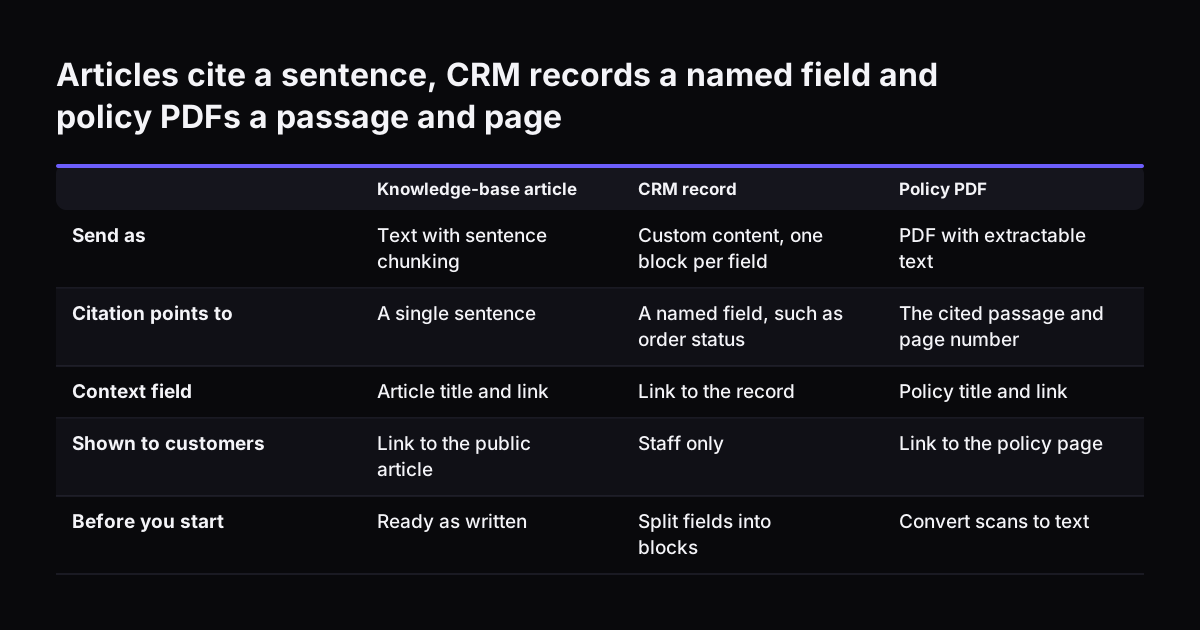
Articles are prose, so sentence chunking suits them. Put the article title and its link in the context field. The citation then points to a sentence, and the link takes the reader to the full article.

CRM records

A record in Zoho CRM is a set of fields, not a paragraph. Send it as a custom content document with one field per content block. A citation then names the exact field, such as the order status or the contract end date, rather than a vague stretch of text.

Policies

Returns, warranty and pricing terms often live as PDFs, for example in Zoho WorkDrive. A PDF citation gives the page, which is what a customer or a manager will ask for.

At Svennis we put the title and the direct link of every article, record and policy in its context field before an assistant goes live. We then test it on real questions until each citation opens the right source in one step. The same sources serve a sales assistant, as the guide to building an AI-native sales team with Claude shows.

Articles cite a sentence, CRM records a named field and policy PDFs a passage and page. Knowledge-base article / CRM record / Policy PDF. Send as: Text with sentence chunking / Custom content, one block per field / PDF with extractable text; Citation

Worked example: a returns question answered from an article and an order record

A worked example shows how a cited answer is put together. A customer writes to the help desk: "Can I still return the item I ordered?" The assistant needs two sources to answer: the returns policy article and the customer's order record.

The request sends both as documents, with citations enabled on each. Enabling it on only one would fail, because citations must currently be enabled on all or none of the documents in a request. The two documents are set up like this:

  1. Returns policy article: the article text, with sentence chunking. The context field holds the article title and its link.
  2. Order record: a custom content document with one block each for the order number, the product, the delivery date and the order status. The context field holds the record link.

Claude answers in two statements. The first says what the returns window is and cites the sentence from the policy article. The second says when the order was delivered and cites the delivery date block. The agent sees something like this:

Answer: Returns are accepted within the period set out in our returns policy.

Source: Returns policy, the cited sentence, with a link to the article.

Answer: Your order was delivered on the date shown in your order record.

Source: Order record, field "Delivery date", with a link to the record.

The agent reads both cited passages, works out whether the date falls inside the window, and replies. If either statement had no source, the agent would know to check before replying.

Showing citations to agents and customers

Show each citation right next to the statement it supports, never in a list at the bottom. Staff read an answer statement by statement. A source placed beside each one lets them check as they read, with no matching up afterwards.

For agents and salespeople, show three things with every statement:

  • the cited passage, taken from cited_text;
  • the source title, taken from the context field;
  • a link that opens the article, record or policy itself.

For customers, show less. A link to the public article or the policy page is enough. Keep internal CRM citations for staff only, because a customer should see your answer and not your record layout.

Streaming needs one extra step in your interface. In streaming responses, citations arrive as a citations_delta type inside content_block_delta events. Your front end should attach each citation to its statement as the text appears, so staff never see an unsourced sentence that later gains a source.

When the assistant cannot answer from its sources, a person should take over. The guide to handing support conversations from Claude to people covers how to pass the conversation on with its context intact.

Spotting answers with no source before anyone acts on them

An answer with no source is the one to stop, and your interface should flag it automatically. Treat any statement without a citation as unchecked. Mark it visibly so the agent knows to verify it before sending.

Three situations produce answers with few or no citations:

  • JSON-only prompts. A prompt that asks for nothing but JSON still succeeds, but the response might contain few or no citations.
  • Field extraction. When Claude fills in fields, check that each field has a value and at least one citation. The API guarantees neither.
  • Questions outside your sources. If no document covers the question, the assistant has nothing true to cite.

A useful label comes from academic tooling. The Citation Check skill for Claude Code marks verification status as "NOT CHECKED" when it cannot look a source up, rather than guessing. Apply the same rule in a support or sales assistant. An unsourced statement is labelled "not checked", never presented as fact.

Re-test these flags whenever you change the prompt or the sources. A prompt edit can quietly turn off citations, for instance by asking for JSON only. The guide to changing a live Claude assistant safely sets out how to test before a change reaches staff.

Limits of Claude citations: scans, images and mixed requests

Claude citations work only on text, and four limits decide which of your sources need preparing first. Check each one before you promise staff that every answer will carry a source.

  • Scanned PDFs. PDFs that are scans and contain no extractable text are not citable. Old signed policies and supplier terms are often scans. Convert them to text-based documents first.
  • Images. Only text citations are supported, and image citations are not yet possible. A product diagram or a screenshot in an article cannot be cited, even though current models can read images.
  • All or none. Citations must be enabled on all or none of the documents in a request. You cannot mix cited policies with uncited background notes in the same call.
  • Managed Agents. Citations are not available in Managed Agents. Plan the assistant on the API features that support them.

The practical step is a source audit before launch. List every article, policy and record type the assistant will use. Mark which are scans, which rely on images, and which need a text version. Fixing those sources costs less than explaining later why an answer had no citation.

What citations add to cost, and which Claude model to run them on

Citations add only a slight increase in input tokens, caused by system prompt additions and document chunking. Tokens are the units Claude's usage is measured and billed in. The cited text itself is free: the cited_text field does not count toward output tokens. When passed back in later conversation turns, it does not count toward input tokens either.

Citations also work alongside prompt caching, token counting and batch processing. Prompt caching lets Claude reuse documents it has already read in earlier requests. Your source documents can be cached, though the citation blocks in responses cannot. A support assistant that cites the same policy articles all day benefits most from caching them.

Model choice follows the task, since citations are available on every model. Anthropic's models overview prices them per million tokens:

  • Claude Sonnet 5.5: $2 input and $10 output.
  • Claude Opus 5.5: $4 input and $20 output.
  • Claude Haiku 5.5: from $0.10 input and from $0.50 output.

Anthropic suggests starting with Claude Opus 5.5 for most workloads if you are unsure. Claude Haiku 5.5 is aimed at high-volume, latency-sensitive tasks such as classification, extraction and routing. Those tasks often sit in front of a cited answer, sorting tickets before the answering step.

Checklist: what staff do with each kind of answer

Staff need a simple rule for each kind of answer the assistant produces. The table sets out what they see and what they do, so the rule is the same for every agent and salesperson.

Answer typeWhat staff seeWhat staff do
Cited from a knowledge-base articleThe cited sentence, the article title and a linkRead the sentence, then send or adapt the answer
Cited from a CRM recordThe named field and its value, with a link to the recordConfirm the field is current, then act
Cited from a policy PDFThe cited passage and the page numberQuote the page if the customer asks for terms
Extracted field with no citationA "not checked" flag on the fieldCheck the field in the source before using it
Statement with no citationA "not checked" flag on the statementVerify it or remove it before sending
Question no source coversNo cited answerHand the conversation to a person

Put this table in the onboarding notes for the assistant. Review it after the first weeks of use, once staff have seen which answers they check most often.

What checkable answers mean for a UK company

For a UK company, checkable answers let staff stand behind the wording they send. A customer who disputes a refund or a delivery term can be shown the exact policy page. That page is your own document, not a summary written by a model.

Data handling is the next question your team will raise. Citations are eligible for zero data retention, a setup in which the provider does not keep your request data. Switching citations on therefore does not rule out a zero data retention arrangement. Confirm the setting for your own account as part of your data protection review.

Many UK firms also serve customers in other languages. All current Claude models support multilingual use. A cited answer in another language still points to the passage in your source, so a British agent can check the original wording.

Finally, keep your sources in British English and up to date. A citation is only as good as the article behind it. If the article is out of date, the assistant will cite the out-of-date text accurately. Assign an owner to each policy and article the assistant uses.

Next steps for a checkable support or sales assistant

Start with one process and one set of sources, not the whole help desk. A returns queue or a quotation queue is a good first choice, because the answers depend on a few clear policies and records.

  1. List the articles, records and policies the process relies on.
  2. Mark scanned PDFs and image-only content, and prepare text versions.
  3. Decide what goes in each context field: at least a title and a direct link.
  4. Agree the "not checked" rule and the handover rule with the team.
  5. Test on real past questions and count how many answers carry a source.

Connecting Claude to the systems that hold those sources is a separate decision. For each connection, Svennis builds a connector, an MCP server, a plugin or a skill. We show the options with their cost, and you choose.

The work follows four steps: a Workshop, then Pilot Claude A (an AI agent on Claude for one process) or Pilot Claude B (Claude Team for the whole team), then the department Activation, then monthly operations. The guide to what Claude for business costs and how to start is the place to plan your first step.

Sources

  1. Citations - Claude Platform Docs
  2. Models overview - Claude Platform Docs
  3. Citation Check (Grade A) - Claude Skill | Skills Directory
Free, 30 minutes

Pick a time. Bring the process this article made you think of.

You leave with a clear yes or no on putting Claude on it, and the step that fits from our published prices. You speak to someone who builds the agents, not a salesperson.

Prefer to call? +44 7588 772736 · Not ready to talk? See it on your business first.

30 minutes · video call · free
  1. 1Time
  2. 2Details
  3. 3Booked