Skip to content
SVENNISAIWe speak Claude.
Blog · Claude API

Bulk document processing with the Claude Batch API for business systems

The Claude Batch API processes thousands of similar documents at half the standard price within 24 hours. This guide covers when to use it and how to write results back into your CRM, books or helpdesk.

10 min read

Book a 30-minute call · with a Claude Certified Architect from our team.

Article · 10 min read
Abstract cover of many small identical shapes flowing into one channel and leaving it as an ordered stream

Bulk document processing with the Claude Batch API: the short answer

Bulk document processing with the Claude Batch API suits any backlog of similar invoices, contracts or tickets where nobody is waiting for each answer. You submit thousands of requests at once and pay 50 percent of standard API prices. Results arrive within 24 hours. Live calls remain the right choice whenever a person is waiting.

The Message Batches API is Anthropic's endpoint for sending many Claude requests together for asynchronous processing. Asynchronous means you do not get an immediate reply. You hand over the whole set, Claude works through it, and you collect the results later.

The hard part is rarely the batch itself. The hard part is getting thousands of results back into your CRM, accounting or helpdesk system without someone fixing them by hand. This guide covers both halves: when a batch is the right tool, and how to write the results back cleanly.

If you need the flow for one document at a time inside Zoho, the guide on processing invoices and contracts with Claude in a Zoho workflow covers it. This post deals with the backlog: the thousands of records that built up before that flow existed, or that arrive in bulk every month.
What the Message Batches API does, and its limits

The Message Batches API accepts a large set of ordinary Claude requests and processes them in the background. Anthropic describes it as its first implementation of the batch processing pattern. Any request you could send to the standard Messages API can go into a batch, including different types of request in the same batch.

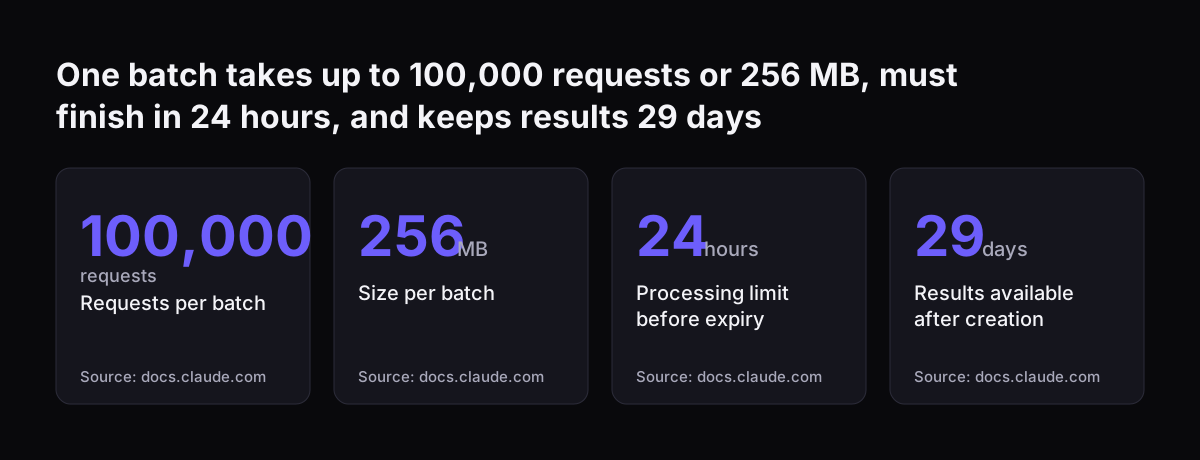
These are the limits from Anthropic's batch processing documentation:

  • A batch holds at most 100,000 requests or 256 MB, whichever you reach first.
  • A batch expires if processing does not complete within 24 hours.
  • Results stay available for download for 29 days after the batch is created.
  • All active Claude models support the Message Batches API.
  • Batch requests cannot use the stream, speed (Fast mode), fallbacks or max_tokens: 0 parameters; these return a validation error.

The 24 hours is a ceiling, not a typical wait. Anthropic's own documentation says most batches finish in under an hour. You should still plan as if the full day could pass.

Batch usage also does not count against your rate limits in the Messages API. Your live assistant keeps its full capacity while a large batch runs alongside it. That separation matters when the same company runs a live service desk and an overnight clean-up on the same account.

One batch takes up to 100,000 requests or 256 MB, must finish in 24 hours, and keeps results 29 days: Requests per batch 100,000 requests, Size per batch 256 MB, Processing limit before expiry 24 hours, Results available after creation 29 days
Source: docs.claude.com

When an overnight batch beats live calls

A batch beats live calls when the work is large, repetitive and nobody is waiting on a single result. A live call wins when a customer or colleague needs an answer in seconds. One technical guide puts the rule simply: if you can tolerate a few hours of delay, use the batch.

The table below sorts common business workloads by that test.

WorkloadBatch or liveWhy
Backlog of supplier invoices to extractBatchNo one waits on each invoice; the same fields come out of every document
Contract archive to review against a checklistBatchThe same instructions apply to every contract, so shared instructions can be cached
Closed support tickets to classify or tagBatchClassification at volume, with results needed by the next working day at the latest
New ticket arriving now that needs routingLiveThe customer is waiting and the agent needs the route in seconds
Website or staff chat assistantLiveA user-facing conversation cannot wait hours for a reply

The split is often within one process. New tickets go through a live assistant. The three years of old tickets you want tagged for reporting go through a batch. Treat these as two jobs with two designs, even if they use the same instructions.

What a batch costs compared with live calls

A batch costs half of the standard API price on both input and output tokens. Tokens are the pieces of text a model processes. The count for the same text depends on the model's tokenizer, the language and the type of content.

The Claude pricing page lists Claude Sonnet 5.5 at $2 per million input tokens and $10 per million output tokens. In a batch, the same model costs $1 and $5. Claude Opus 5.5 drops from $4 and $20 to $2 and $10.

Four further points change the bill:

  • Prompt caching stacks with the batch discount. Prompt caching reuses a repeated part of a prompt, such as your extraction instructions. A cache hit costs 10 percent of the standard input price. In batches, cache hits are best effort, with typical hit rates of 30 to 98 percent.
  • Failed requests are free. Errored, canceled and expired requests are not billed.
  • Spend limits can be overshot. Because of high throughput, a batch may go slightly over the spend limit set in the Claude Console for your Workspace.
  • Newer models count more tokens. The newest models use a tokenizer that produces approximately 30 percent more tokens for the same text, so estimate on a real sample.

Who holds the API key and the spend limit is a company decision. The guide to a Claude API key for a company covers setup and spend controls.

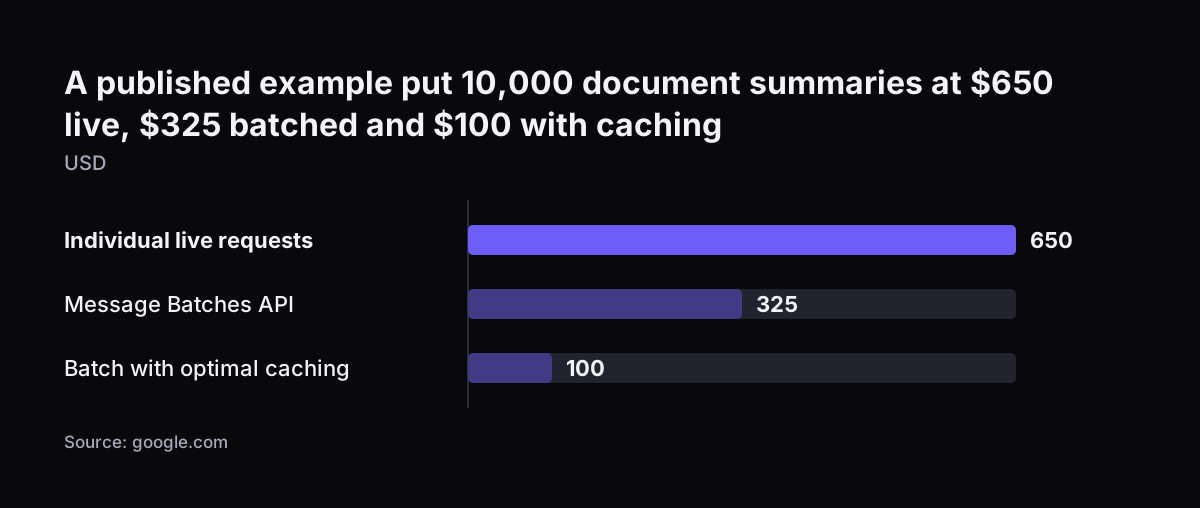
A published example put 10,000 document summaries at $650 live, $325 batched and $100 with caching: Individual live requests 650, Message Batches API 325, Batch with optimal caching 100 (USD)
Source: google.com

Choosing a Claude model for a document batch

The right model for a document batch depends on how much judgement each document needs. Every current model reads text and images, handles several languages and supports tool use. Every active model also runs in a batch, so the choice is about quality and price, not availability.

Anthropic positions Claude Haiku 5.5 for high-volume tasks such as classification, extraction and routing. Its input price starts at $0.10 per million tokens for prompts up to 100,000 tokens. Longer prompts pay higher prices, which matters for long contracts. Claude Sonnet 5.5 is described as the best combination of speed and intelligence.

Anthropic's general advice is to start with Claude Opus 5.5 if you are unsure. Claude Fable 5.1 is meant for demanding reasoning, and a routine extraction job rarely needs it.

A practical approach is to run the same sample through two models and compare the results field by field. If the cheaper model gets the fields right, the price difference across the full backlog is yours to keep.

Worked example: a supplier invoice backlog into Zoho Books

A supplier invoice backlog in Zoho Books shows how the pieces fit. Picture several thousand bills with scanned invoices attached, where nobody has keyed in the invoice number, VAT or due date. The goal is to fill those fields without anyone retyping them.

  1. Define the output. Write one set of instructions that asks for fixed fields: supplier name, invoice number, invoice date, net amount, VAT and total. Ask for the same structure every time.
  2. Build one request per bill. Each request carries the instructions and the scanned invoice as an image. Put the instructions first so they can be cached across requests.
  3. Set the custom_id to the bill's record ID. A custom_id is the unique label for each request in a batch. It is 1 to 64 characters long and may contain only letters, numbers, hyphens and underscores.
  4. Submit within the limits. Keep each batch under 100,000 requests and 256 MB. Smaller batches are easier to monitor.
  5. Wait for the status to change. The batch's processing_status starts as in_progress and changes to ended once every request has finished.
  6. Match, check and write back. Match each result to its bill by custom_id, run the checks described below, then update the bill.

The same six steps fit contracts in a document store or old tickets in Zoho Desk. Only the fields in step one change.

Handling batch results: succeeded, errored, canceled and expired

Every request in a finished batch carries one of four result types, and your job must handle each one. The failure of one request does not affect the others in the same batch. A single unreadable scan will not sink the whole run.

Result typeWhat happenedBilledWhat your job does next
succeededClaude returned a responseYes, at the batch priceValidate the fields, then write back
erroredThe request failedNoFix the request and submit it in a new batch
canceledYou cancelled the batch before this request reached the modelNoResubmit if the record still needs processing
expiredThe 24-hour limit passed before this request reached the modelNoResubmit, ideally in a smaller batch

Results do not come back in the order you sent them. That is why the custom_id matters: it is the only reliable link between a result and the record it belongs to. Use an ID that already exists in your system, never a row number from a list.

Download and store the results promptly. They are available for 29 days after the batch is created. After that you can still view the batch, but the results can no longer be downloaded.

Writing batch results back into the CRM, accounting or helpdesk system

Writing batch results back without manual clean-up depends on three rules: match by record ID, validate before writing, and write to a holding state first. A batch that produces good answers can still leave a mess if the write-back step is careless.

The checks are plain business logic. Net plus VAT should equal the total. The invoice number should not already exist on another bill. The supplier should exist as a contact.

In Zoho CRM, an extracted company name should match an existing account before it updates anything. Any result that fails a check goes to a review list, not into the record.

Write passing results into a status such as "extracted, awaiting approval" rather than straight into a posted ledger or a closed ticket. A person then approves in bulk, with the source document one click away.

The connection itself is a design choice. For each system, Svennis builds a connector, an MCP server, a plugin or a skill, shows you the options with their cost, and you choose. The job reads records from the system and writes results back to the same records, so nothing passes through a spreadsheet in between.

Checking a sample before you run the full backlog

A sample check is a small test batch whose every result a person compares with the source document before the full backlog runs. It costs little and shows you whether the instructions work before thousands of records depend on them.

When Svennis sets up a batch job, we send a small sample first and compare each result field by field with the original document before releasing the rest. That check is where we usually find a field the instructions left ambiguous, such as which date counts as the invoice date, and fixing it there is far cheaper than correcting records afterwards.

A useful sample covers the awkward cases, not just the clean ones:

  • Poor scans and photographed pages
  • Documents in another language
  • Credit notes mixed in with invoices
  • Your largest suppliers, whose layouts appear most often
  • Documents with several pages or several totals

Run the sample through the real write-back step as well, into a test environment if you have one. Many problems appear only when a result meets the target system's field formats.

The overview of AI for document processing describes which document types tend to work well at volume.

What batch processing means for a UK company

For a UK company, batch processing raises four practical questions: data retention, international transfer, currency and how you buy access. None of them blocks the approach, but each belongs in your planning.

Data retention

Batch processing stores request and response data for up to 29 days after the batch is created. It is not eligible for zero data retention. Record this in your data protection documentation, and decide which documents may go into a batch at all. Payroll or health records may belong in a different process.

International transfer

Sending documents that contain personal data to Anthropic is normally a restricted transfer under the UK GDPR. Before the first batch, check that the transfer is covered by UK adequacy regulations or by the IDTA or UK Addendum. For the US, adequacy applies only if the recipient is certified under the UK Extension to the Data Privacy Framework. If you rely on the IDTA or the Addendum, complete a transfer risk assessment first. Record the transfer alongside the retention period.

Currency and location

Anthropic's pricing page quotes every price in US dollars, so budget in dollars and apply your own exchange rate. If a policy requires US-only inference through the inference_geo parameter, newer models add a 1.1x multiplier to all token prices.

Buying through a cloud marketplace

If your company already buys through Microsoft or AWS, Claude in Microsoft Foundry and Claude Platform on AWS bill through those marketplaces. Usage is converted into Claude Consumption Units at $0.01 each.

Language is less of a concern. Many UK businesses receive invoices from European suppliers, and every current Claude model handles several languages. Token counts do vary by language, which is one more reason to estimate costs on a real sample.

Next steps for your own document backlog

The next step is to size your backlog and pick one document type to start with. A single, well-defined type gives you a clean test of the instructions, the checks and the write-back.

  1. Count the records. Note how many documents are waiting, where they live and which fields you need from each.
  2. Decide batch or live. Use the table above. Backlogs go to a batch; anything a person waits on stays live.
  3. Write the checks. List the rules a result must pass before it touches a record.
  4. Run a sample. Compare every field by hand, adjust the instructions, then release the full batch.
  5. Plan the ongoing flow. Once the backlog is cleared, new documents may suit a live process instead.

Svennis works in four steps: a Workshop, then Pilot Claude A (an AI agent on Claude for one process) or Pilot Claude B (Claude Team for the whole team), then the department Activation, and then monthly operations. A document backlog is a natural fit for Pilot Claude A, an AI agent on Claude for one process, planned to go live within 30 days. For costs and how to begin, see what Claude for business costs and how to start.

Sources

  1. Claude Platform Docs: Batch processing
  2. Claude Platform Docs: Pricing
  3. Claude Platform Docs: Models overview
  4. Claude Platform Docs: Batch processing (Russian edition)
  5. DevOpsBoys: LLM Batch Processing with Anthropic Message Batches API
  6. Steve Kinney: Anthropic Batch API with Temporal
Free, 30 minutes

Pick a time. Bring the process this article made you think of.

You leave with a clear yes or no on putting Claude on it, and the step that fits from our published prices. You speak to someone who builds the agents, not a salesperson.

Prefer to call? +44 7588 772736 · Not ready to talk? See it on your business first.

30 minutes · video call · free
  1. 1Time
  2. 2Details
  3. 3Booked