
Svennis AI
10 min read

Processing invoices and contracts with Claude in a Zoho workflow

A practical guide to processing invoices and contracts with Claude: schema-based extraction for invoices, cited review for contracts, real costs, data location and the human checks that matter.

Abstract flow of layered sheets separating into ordered rows and a single checkpoint before a final stack

Processing invoices and contracts with Claude: the short answer

Processing invoices and contracts with Claude works best as two separate jobs. One call extracts invoice fields into a fixed schema. A second call reviews contract clauses and points each finding to its page. A person checks totals and key terms before anything reaches your accounts or your CRM.

Document extraction is the step where a model reads a file and returns named fields, such as supplier, VAT number, date, lines and totals, in a format another system can store. Claude does the reading. Your workflow decides what gets written, and when.

The split into two jobs is not a style choice. Anthropic's documentation states that structured outputs, the feature that returns clean fields, cannot be combined with citations in one request. The API returns an error if you try. So an invoice run and a contract review are built as two calls with different settings.

This guide covers how Claude reads a PDF, how to set up each call, a worked example with Zoho, what it costs, where a person must check, and what data location means for a UK company. Every limit and price comes from Anthropic's own documentation.
How Claude reads a PDF invoice or contract, and the file limits

Claude reads each PDF page twice: once as an image and once as extracted text. According to Anthropic's PDF support documentation, the system converts every page into an image and supplies the page's text alongside it. That is why Claude can read tables, stamps and layouts, not only running text.

Limits on the API

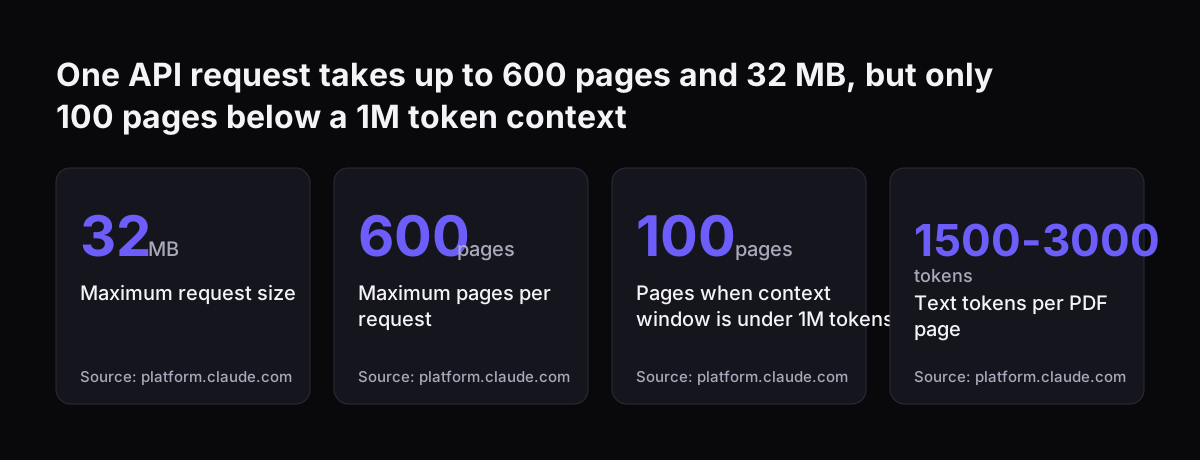
  • A request can be up to 32 MB, and the documentation notes this varies by platform.
  • A request can hold up to 600 pages, or 100 pages when the model's context window is under 1M tokens.
  • PDFs must be standard files with no password or encryption.
  • Both limits apply to the whole request, including any other content you send with the PDF.

The context window matters for model choice. Claude Opus 5.5, Claude Sonnet 5 and Claude Fable 5.1 have 1M-token windows. Claude Haiku 4.5 has a 200K-token window, so the 100-page limit applies to it. You can send a PDF as a URL, as base64-encoded content, or by a file_id from the Files API.

Limits in the Claude apps

The Claude apps have their own limits, set out in the Claude Help Center article on uploading files. A chat takes up to 20 files, each up to 500 MB. Project files are capped at 30 MB each. Claude analyses both text and visuals in PDFs of 100 pages or fewer.

From 101 to 1,000 pages, the Claude apps read text only, and they reject anything larger. The apps suit a one-off contract check. A monthly invoice run belongs on the API.

One API request takes up to 600 pages and 32 MB, but only 100 pages below a 1M token context: Maximum request size 32 MB, Maximum pages per request 600 pages, Pages when context window is under 1M tokens 100 pages, Text tokens per PDF page 1500-3000
Source: platform.claude.com

Structured outputs turn an invoice into fields Zoho can use

Structured outputs are a Claude API feature that constrains the response to a JSON schema you define. The structured outputs documentation says this guarantees schema-compliant responses through constrained decoding. You set it through output_config.format. For an invoice, the schema lists supplier name, VAT number, invoice number, date, line items, net, VAT and gross totals.

Schema compliance means the shape is right. It does not mean the numbers are right. A perfectly formed JSON object can still hold a misread total. The checks in your own code and the person reviewing the batch are what catch that.

Schema rules that affect invoice design

  • Numerical constraints such as minimum and maximum are not supported, so validate amounts in your own code.
  • String length constraints are not supported, so check VAT number formats after extraction.
  • Capitalisation of enum values is not guaranteed, so normalise fields such as currency codes before matching.
  • An unsupported schema feature returns a 400 error with details, which you will see in testing.

Two practical notes. The first request with a new schema is slower while the grammar compiles, and compiled grammars are cached for 24 hours from last use. If Claude refuses a request, the response carries stop_reason "refusal" with a 200 status, and you are billed for the tokens generated. Your code should treat that as a failed extraction, not a blank invoice.

Citations tie every contract finding to a page number

Citations are a Claude API feature that makes each statement in an answer point to the passage it came from. The citations documentation says that for PDFs, each citation includes a page number range, counted from page 1. For contract review, that means a reviewer can open the exact page behind "the notice period is 90 days" instead of trusting a summary.

Claude chunks PDFs and plain text into sentences, so a citation can quote one sentence or a run of consecutive ones. The quoted passage arrives in a cited_text field. That field does not count toward output tokens, and it does not count toward input tokens when you pass it back in a later turn.

Where contract citations fail

  • A scanned PDF with no extractable text cannot be cited, so run text recognition first or send the contract as plain text.
  • Only text citations exist; Claude cannot cite an image such as a signature block.
  • Citations must be on for all documents in a request or for none.
  • Citations cannot run in the same request as structured outputs.

Enabling citations adds a small number of input tokens for system prompt additions and chunking. Citations work with prompt caching and batch processing. The source contract can be cached; the citation blocks in the answer cannot.

Worked example, part one: a month of purchase invoices into Zoho Books

The first half of the worked example takes a month of supplier invoices and turns them into draft bills in Zoho Books, with nothing posted until a person approves. The invoices arrive by email and are saved as PDFs.

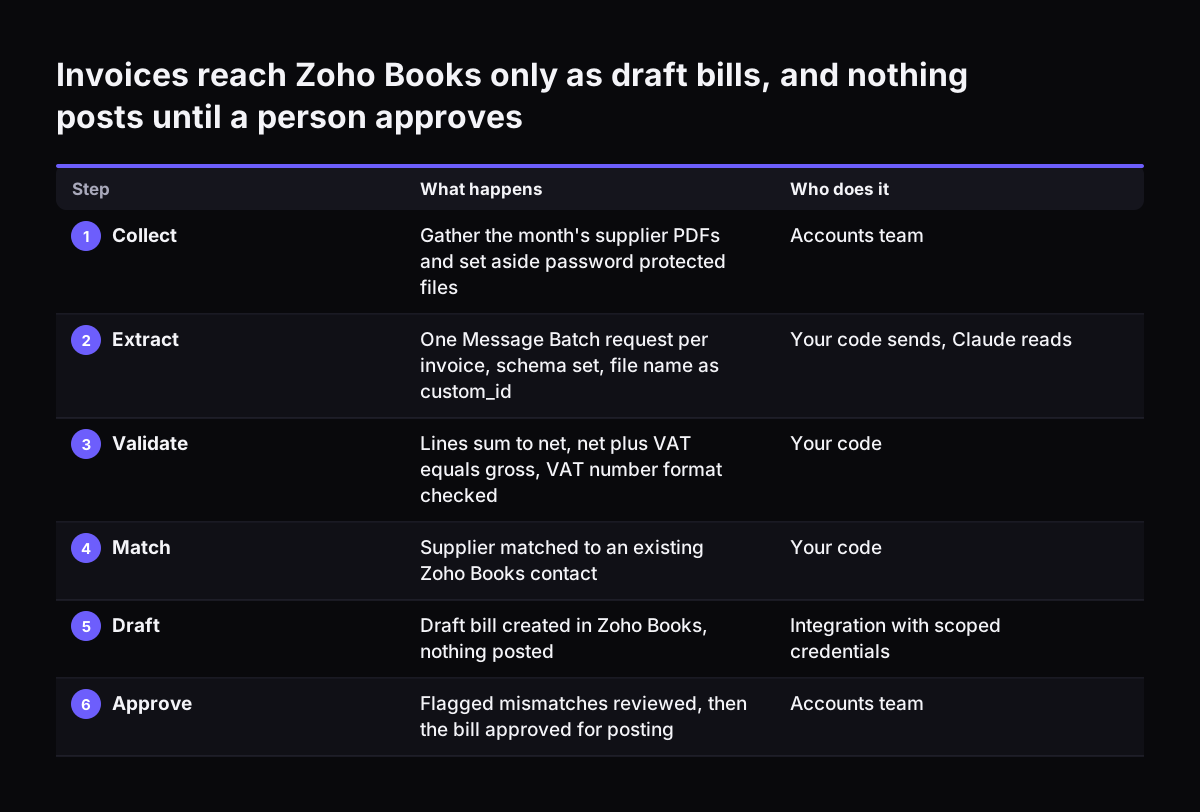
  1. Collect. At month end, gather the PDFs and reject any with a password, since the API cannot read them.
  2. Extract. Send each invoice as one request in a Message Batch, with output_config.format set to your invoice schema. Give each request a custom_id, such as the file name, so results match back to files.
  3. Validate. Your code checks that line items add up to the net total, that net plus VAT equals gross, and that the VAT number has the expected form.
  4. Match. Look up the supplier and any purchase order in Zoho Books. Flag new suppliers and amounts that differ from the order.
  5. Review. A person works through the flagged invoices first, then samples the clean ones.
  6. Post. Approved invoices become draft bills through a separate integration that holds the Zoho credentials.

The Batch API fits this job because nothing is urgent. Most batches finish in under an hour, a batch expires if not complete within 24 hours, and results stay available for 29 days. One batch holds up to 100,000 requests or 256 MB. For step 2, tell Claude it may return null for any field it cannot read. Anthropic's guide to reducing hallucinations says permission to admit uncertainty can drastically reduce false information.

Invoices reach Zoho Books only as draft bills, and nothing posts until a person approves. What happens / Who does it. 1. Collect: Gather the month's supplier PDFs and set aside password protected files / Accounts team; 2. Extract: One Message Batch r

Worked example, part two: a supplier contract reviewed clause by clause

The second half of the worked example reviews a new supplier contract before it is signed or filed, for example in Zoho WorkDrive. The goal is a short list of the clauses your team cares about, each with a page reference.

  1. Check the file. Confirm the PDF has extractable text. If it is a scan, citations will not work.
  2. Ask for quotes first. For documents over 20,000 tokens, Anthropic's guide recommends asking Claude to extract word-for-word quotes before doing the task. A long contract easily passes that size at 1,500 to 3,000 text tokens per page.
  3. Review by clause. Ask about payment terms, notice periods, renewal, liability caps and termination rights, with citations enabled.
  4. Restrict sources. Instruct Claude to use only the contract, not its general knowledge.
  5. Verify. Ask Claude to find a supporting quote for each finding and retract any it cannot support.
  6. Record. A person reads the cited pages and writes the agreed terms, such as renewal date and notice period, into the supplier record.

Prompt caching makes the follow-up questions cheaper. Mark the contract as cacheable and each later question on the same document reads it from the cache. The default cache lasts five minutes and refreshes each time it is used, which suits a reviewer asking questions in one sitting.

Where a person must check before anything posts

A person must check every total before an invoice posts to the accounts, and every contract term before it becomes a date in your systems. Anthropic's own guide states that even the most advanced language models, Claude included, can sometimes generate text that is factually incorrect or inconsistent with the context. The techniques in that guide reduce the risk. They do not remove it.

The table below sets out who does what at each step of the flow.

StepWhat Claude doesWhat your code checksWhat a person checks
Invoice totals and VATExtracts net, VAT and gross to the schemaLines add up; net plus VAT equals grossEvery flagged mismatch before posting
Supplier identityExtracts name and VAT numberMatches an existing supplier recordNew suppliers and changed details
Purchase order matchExtracts order reference and linesCompares amounts with the orderAny difference from the order
Contract termsAnswers clause questions with page citationsRejects answers with no citationReads each cited page before recording
Unreadable filesReturns null fields or a refusalRoutes them to a manual queueKeys them in by hand

Two extra checks help on high-value documents. Best-of-N verification means running the same prompt several times and comparing the results, since inconsistencies can indicate a hallucination. A follow-up prompt that asks Claude to verify its earlier answer can also catch errors.

What processing invoices and contracts with Claude costs

Processing invoices and contracts with Claude is billed at standard token prices, with no separate PDF fee. Each page typically uses 1,500 to 3,000 text tokens depending on density. Because every page is also an image, image token costs apply on top. Anthropic's example shows roughly 7,000 tokens for a three-page PDF with full visual reading.

Current prices per million tokens, from the models overview and the batch processing documentation:

ModelInputOutputBatch inputBatch output
Claude Opus 5.5$4$20$2$10
Claude Sonnet 5$2$10$1$5
Claude Haiku 4.5$1$5$0.50$2.50

As a worked sum: 1,000 dense pages at 3,000 text tokens each is three million input tokens. On Claude Sonnet 5 in batch, that text costs $3, before image tokens and output. Invoice output is short, since it is a few dozen fields.

Prompt caching cuts the cost of repeated contract questions. According to the prompt caching documentation, cache reads cost 10% of the base input price on most models. Cache writes cost 25% more than base input for the five-minute cache. Caching and batch discounts can stack.

Prompts below a minimum length are not cached: 512 tokens on Claude Opus 5.5, 1,024 on Claude Sonnet 5 and 4,096 on Claude Haiku 4.5. Anthropic lists Haiku 4.5 for retirement not sooner than 15 October 2026, so plan a model change if you build on it.

Keep the step that reads the PDF away from write access

A supplier PDF is untrusted content, so the step that reads it should not be able to write to your accounting system. Anyone can put text in a PDF, including text written to look like instructions. If the same agent that reads the invoice can also create payments or edit supplier records, a crafted document becomes a risk to your books.

The safer design has three parts. The extraction call has no tools at all and returns only JSON. Plain code, not a model, validates that JSON against your rules. A separate integration, with its own narrowly scoped credentials, writes approved records into Zoho.

At Svennis we build these flows so the Claude step only ever returns data, and a small integration holding the Zoho credentials creates draft bills after a person has approved them. It adds one hand-off, and it means instructions hidden in a supplier's PDF cannot make the model create or change anything in Zoho. The figures it extracts still pass through your checks and a person before they reach the ledger.

The same thinking applies when Claude connects to your CRM through tools. Our guide to connecting Claude to Zoho CRM with MCP covers scoping permissions so a reading task cannot also edit records.

What this means for a UK company: data location and retention

Anthropic's own API does not offer a UK or EU data location. The data residency documentation describes two settings. Inference geo controls where the model runs for each request; the default is "global", meaning any available geography, and "us" is the alternative. Workspace geo controls where data is stored at rest, and "us" is currently the only option. US-only inference costs 1.1 times the standard rate on the models that support it.

Retention is a separate question. Anthropic offers zero data retention, or ZDR, by arrangement: it does not store prompts or responses at rest after the response is returned. Some models are designated Covered Models that require 30-day retention, so ZDR is not available for them unless Anthropic expressly authorises it. The API and data retention page lists batch processing with 29-day retention, which matters if you run invoices through the Batch API.

The same page lists the Claude apps and the Console as outside ZDR. Even under ZDR, Anthropic may retain data where the law requires it or where its safety systems flag it.

Claude is also available through Amazon Bedrock and Google Cloud, where the cloud provider is the data processor and sets its own regional pricing. Invoices carry personal data about sole traders and contacts, and contracts often name individuals. Before you send them, work through our GDPR checklist for Claude with whoever handles data protection in your company.

Next steps for invoice and contract processing with Claude

Start small and measure before you connect anything to your ledger. The steps below take a team from a first test to a supervised monthly run.

  1. Pick twenty real invoices from different suppliers, including a scan and a multi-page one.
  2. Write the schema with only the fields your accounts team keys in today.
  3. Before you send any real invoices, decide on data handling: inference geo, retention, whether ZDR is needed, and how the transfer of personal data to a US provider is covered under UK GDPR.
  4. Run them through structured outputs on Claude Sonnet 5 and compare every field with what was posted. Try Claude Opus 5.5 on the invoices that fail, since Anthropic recommends it as the starting point when unsure.
  5. Write the validation rules for totals, VAT and supplier matching in your own code.
  6. Test one contract with citations enabled and check each cited page by hand.
  7. Only then connect Zoho, through a separate integration that creates drafts for approval.

If you want to see how this fits alongside other document types, such as delivery notes, forms and correspondence, read our overview of AI for document processing. It sets out which documents are worth automating first and how the review step fits your team.

Sources

  1. 1. PDF support - Claude Platform Docs
  2. 2. Structured outputs - Claude Platform Docs
  3. 3. Citations - Claude Platform Docs
  4. 4. Batch processing - Claude Platform Docs
  5. 5. Prompt caching - Claude Platform Docs
  6. 6. Reduce hallucinations - Claude Platform Docs
  7. 7. Upload files to Claude - Claude Help Center
  8. 8. Data residency - Claude Platform Docs
  9. 9. API and data retention - Claude Platform Docs
  10. 10. Models overview - Claude Platform Docs

Related articles