
Svennis AI
10 min read

Claude with Zoho Books for month-end close, and where people stay in charge

A practical guide to using Claude with Zoho Books at month-end: what it can prepare through the connector, and which reconciliation and reporting steps stay with your finance team.

Abstract cover of stacked horizontal bands converging on a single checkpoint, suggesting a reviewed monthly close

Claude prepares the month-end close in Zoho Books, and the accountant signs it off

Claude with Zoho Books for month-end close works best as a preparer. Through the Zoho Books connector, Claude can list unreconciled transactions, flag exceptions, draft chasing emails and draft variance notes. Your accountant keeps every decision that changes the ledger, every estimate and the final sign-off.

That split is not a matter of caution for its own sake. Zoho designed the connection around admin control. Anthropic and Zoho both document how the connection works. Independent writing on AI in the close describes the same division of labour: the AI prepares, a human reviews.

This guide walks through what each close step looks like with Claude involved. It covers the connection itself and the three tasks where Claude saves the most effort. A decision table shows who signs off what. A worked example follows, with the settings you will actually meet. The last sections cover model choice, what it means for a UK or European company, and the first steps to take.
Month-end close in Zoho Books: the tasks, the order and the time it takes

Month-end close is the set of tasks a finance team completes after a month ends, so that the books for that month are complete, checked and ready to report on. In Zoho Books that means reconciling bank accounts, chasing what is missing, posting adjustments, reviewing the figures and explaining the movements.

The work is longer than most managers assume. Andrew Rudchuk, writing on how AI agents handle month-end close, describes the close as a checklist of 30 to 80 tasks. They must happen in a specific order, with dependencies and handoffs. He puts the typical close at 5 to 10 business days. He also observes that the tools have improved while the timelines have not moved much.

Rudchuk splits close tasks into two kinds:

  • Rule-based, repetitive tasks, which he puts at roughly 70% of the close.
  • Tasks that need judgment, which he puts at the remaining 30%.

Treat those percentages as one author's estimate, not a measurement of your firm. The useful point is the shape. Most close effort goes into gathering, matching and listing. That is exactly the part Claude can prepare. The judgment part is where your accountant's time should go.

How Claude connects to Zoho Books through MCP

Claude connects to Zoho Books through MCP. MCP (Model Context Protocol) is an open protocol that defines how apps communicate with large language models. Zoho Books MCP uses that protocol to connect your Zoho Books organisation to AI models. Claude can then read data and perform actions such as recording expenses or reconciling bank transactions.

According to Zoho's help page for the Zoho Books MCP server, Zoho Books is available as a default connector in Claude. The default connector supports only the actions listed under Tools. For anything else you configure a custom connector using Zoho MCP. Zoho describes Zoho MCP as a centralised hub that connects Zoho apps and third-party tools to any AI client that supports MCP.

Three controls matter for a finance team:

  • Zoho Books MCP works with permission-based access and requires admin approval before users can perform any action.
  • Admins decide which tools are enabled and what data AI assistants can access.
  • You can connect multiple Zoho Books organisations to Claude, which suits a group with several entities.

Zoho Books MCP also connects with tools such as Zoho CRM, so Claude can pull data across apps from one place. If you already use Claude with your sales data, the steps in our guide to connecting Claude to Zoho CRM with MCP will feel familiar. Developers who build their own integration can reach remote MCP servers through Anthropic's MCP connector API, with the server's own authentication credentials.

Bank reconciliation exceptions: Claude matches and lists, the accountant decides

Bank reconciliation is where Claude takes the most routine work off the close. Zoho lists reconciling bank transactions among the actions available through Zoho Books MCP. Claude can list the month's unreconciled transactions, propose matches against recorded entries and set aside the ones it cannot match.

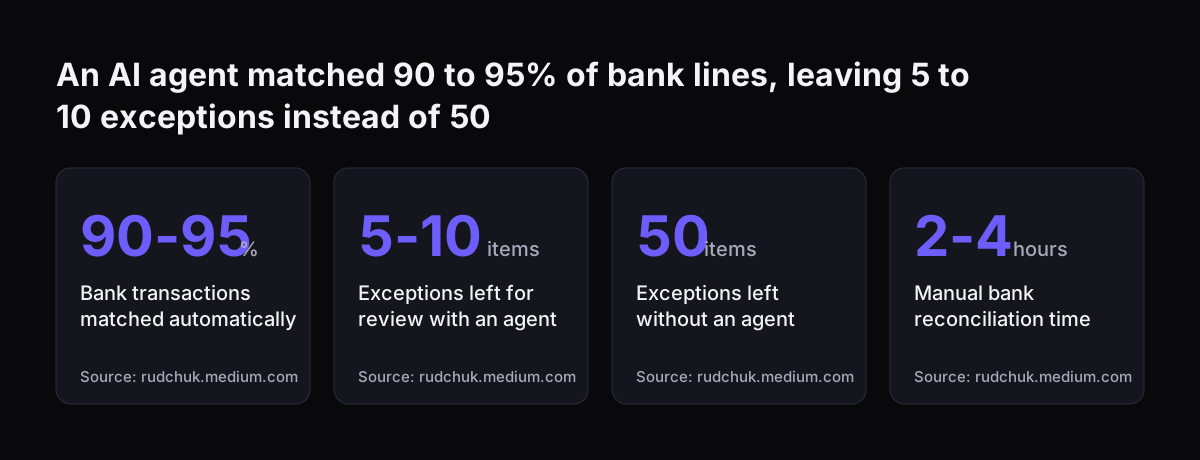
Rudchuk describes an agent that matches bank transactions against the general ledger in three passes: exact match, fuzzy match and pattern match. In his account, the agent matches 90 to 95% of transactions automatically. The exceptions list is usually 5 to 10 items instead of 50. He puts the manual process at 2 to 4 hours, against minutes for the agent.

The exceptions are the accountant's work. A payment with no matching invoice can mean a missing bill or a duplicate. It can also be something nobody has told finance about yet. Claude can suggest a likely reason, but a person confirms what happened and decides the treatment.

Review proposed matches by category, not only one by one. Rudchuk notes that AI errors tend to be systematic: a wrong rule applied to a whole category of transactions. One wrong pattern can repeat across dozens of lines, and a category view exposes it quickly.

At Svennis we keep the reconciliation action switched off in the connector for the first assisted close, so Claude can only list and propose. Once the proposals hold up against the accountant's own review, the admin enables the action for that user.

An AI agent matched 90 to 95% of bank lines, leaving 5 to 10 exceptions instead of 50: Bank transactions matched automatically 90-95 %, Exceptions left for review with an agent 5-10 items, Exceptions left without an agent 50 items, Manual bank reconc
Source: rudchuk.medium.com

Missing documents and overdue invoices: Claude drafts the chasing, a person sends it

Chasing is the second place where Claude saves time at month-end. Zoho states that Zoho Books MCP lets an AI assistant track outstanding invoices and send payment reminders to customers. For the close, that means Claude can list overdue invoices at month-end and draft a reminder for each one.

Zoho also points out that Zoho Books already has workflow automation that sends payment reminder alerts. Keep standard, rule-based reminders there. Use Claude for the cases a workflow handles badly, such as these:

  • A customer with several overdue invoices and a part payment.
  • A dispute noted in the invoice comments.
  • A key account where the tone of the reminder matters.

Missing supporting documents follow the same pattern. Ask Claude to list the month's expenses and bank payments that lack a receipt or bill, and to draft a short request to the colleague responsible. First check in the connector's Tools list which fields and actions it exposes. Use a custom connector through Zoho MCP if the default one does not cover what you need.

A person reviews and sends every message. Claude prepares the list and the wording. Our post on email triage and drafting with Claude covers how to keep drafts in a reviewer's queue rather than in a customer's inbox. If no document arrives, the accountant decides the accounting treatment, not Claude.

Variance notes: Claude drafts the commentary, the accountant supplies the reasons

Variance notes are the third task Claude can prepare. Flux analysis is comparing the current period with the prior period and the budget, calculating the variances and drafting commentary for the significant ones. Rudchuk lists flux analysis among the tasks an AI agent can take on.

With the Zoho Books connector, Claude can pull the month's figures and the comparison period, calculate the movements and draft a note for each line above your threshold. You set the threshold, for example a percentage change or an amount. A draft note might read: "Freight costs rose against last month; the increase sits in three supplier bills dated in the last week."

The draft explains what moved. Only your team knows why it moved. A price rise, a timing difference or a one-off order often sits outside the ledger. The accountant edits each note before it reaches a manager or the board.

Agent Skills keep the notes consistent from month to month. Anthropic defines Agent Skills as organised folders of instructions, scripts and resources that extend Claude's capabilities. Organisations use them to structure notes and reports around company templates and to run company-specific analytical procedures. One caution: Agent Skills are not covered by zero data retention arrangements. The same preparer and reviewer split applies to sales reporting, as our post on which Zoho CRM numbers Claude should report explains.

Who signs off each close step: a decision table for Claude and your finance team

Each month-end close step needs a named owner. Claude prepares the work, and a person signs it off. Rudchuk puts it plainly: the control framework of review, approval and segregation of duties still applies. The AI is the preparer and a human is the reviewer. He adds that segregation of duties, management review and audit trail integrity all require human accountability.

Use this table to agree the split before your first assisted close:

Close stepWhat Claude preparesWho signs off
Bank reconciliationList of unreconciled items and proposed matchesAccountant confirms matches before any are posted
Reconciliation exceptionsUnmatched items with a suggested reasonAccountant investigates and decides the treatment
Overdue customer invoicesList of overdue invoices and draft remindersCredit controller edits and sends
Missing documentsTransactions lacking support and draft requestsStaff member sends; accountant decides if nothing arrives
Accruals and provisionsPrior entries and supporting figuresFinance lead sets assumptions and posts
Variance notesMovements above threshold with draft commentaryAccountant adds the reasons and approves
Final reviewStatus of every checklist taskFinance lead signs off the month

Accruals stay with people for a clear reason. Rudchuk notes that legal reserves, warranty provisions and bonus pools require judgment about future outcomes. Claude can gather last month's figures. It cannot own the assumption.

Worked example: preparing a September close with the Zoho Books connector

This worked example follows a company with one Zoho Books organisation. It prepares its September close with Claude for the first time. The settings come from Zoho's help page for the Zoho Books MCP server.

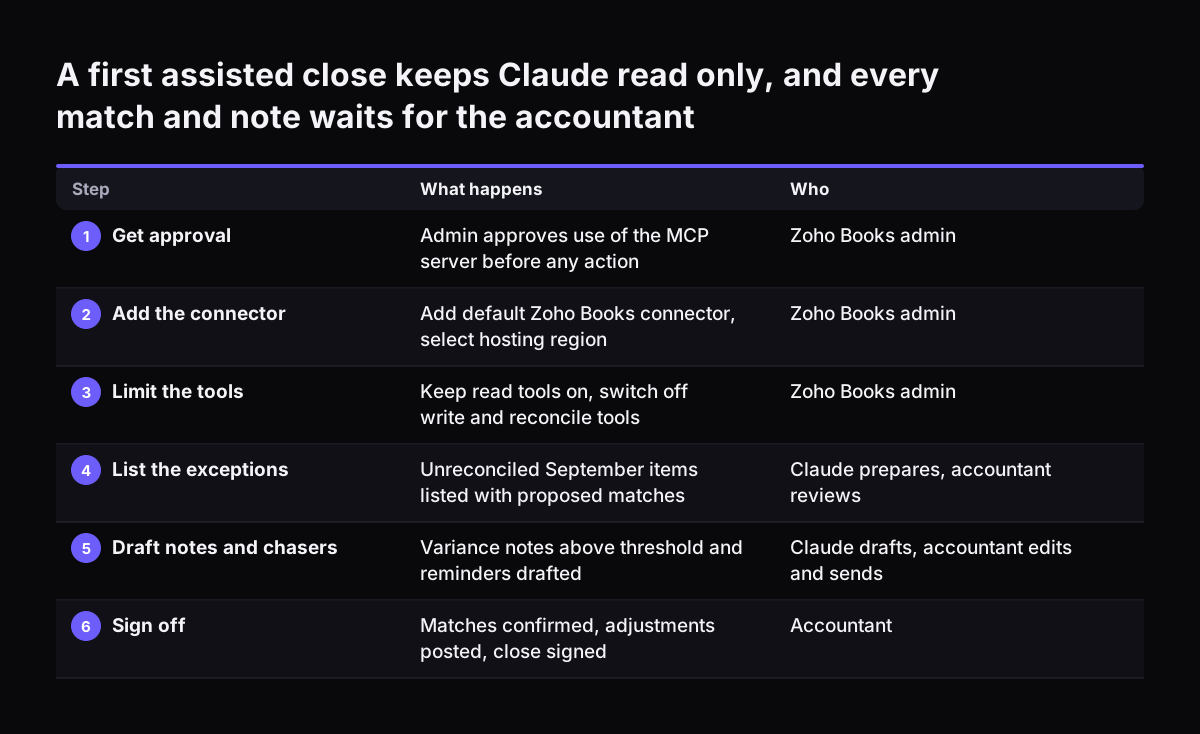
  1. Get admin approval. Zoho advises getting approval from your organisation's admin before you perform any actions through the MCP server.
  2. Add the connector. In Claude, add the default Zoho Books connector. In the Install Zoho Books pop-up, select the region where your account is hosted, and click Continue.
  3. Limit the tools. The admin reviews which tools are enabled. For the first close, keep the actions that read data and switch off those that write or reconcile.
  4. List the exceptions. The accountant asks: "List every unreconciled transaction in the main current account for September, grouped by counterparty, with your proposed match for each."
  5. Review the proposals. The accountant checks the proposed matches by category, then reconciles in Zoho Books as usual.
  6. Draft the chasing. The accountant asks for overdue invoices at 30 September with a draft reminder for each. The credit controller edits and sends them.
  7. Draft the variance notes. The accountant asks Claude to compare September with August and draft notes for movements above the agreed threshold, then adds the reasons.
  8. Sign off. The finance lead reviews the checklist and signs off the month in the usual way.

The change from a normal close is small on purpose. Claude does the listing and the drafting. Every approval stays exactly where it was. You widen the enabled tools only after a close or two shows the proposals are reliable.

A first assisted close keeps Claude read only, and every match and note waits for the accountant. What happens / Who. 1. Get approval: Admin approves use of the MCP server before any action / Zoho Books admin; 2. Add the connector: Add default Zoho B

Which Claude model to run the close on, and what it costs per million tokens

Claude Opus 5.5 is the sensible starting model for month-end work. Anthropic's models overview says that if you are unsure which model to use, you should start with Claude Opus 5.5 for most workloads. Opus 5.5 costs $4 per million input tokens and $20 per million output tokens.

Claude Sonnet 5.5 costs half that, at $2 per million input tokens and $10 per million output tokens. It suits high-volume listing work, such as pulling unreconciled transactions or overdue invoices. Anthropic recommends Claude Fable 5.1 for demanding reasoning and long-horizon agentic work. It also recommends Fable 5.1 when evaluations on Opus 5.5 at higher effort still fall short. Fable 5.1 costs $10 per million input tokens and $50 per million output tokens.

All three models have a 1M token context window. That is enough to hold a month of transactions for a typical small business in one conversation. A token is a unit of text the model processes, roughly a short word or part of one.

Test before you settle on a model. Run one past month's close through each candidate model and compare its proposed matches with what your accountant actually posted. Choose the cheapest model whose proposals your accountant accepts without rework.

What Claude with Zoho Books means for a UK or European company

For a UK or European company, the first practical decision is the region. When you install the Zoho Books connector in Claude, you select the region where your Zoho Books account is hosted. Make sure that choice matches your existing account before anyone runs a prompt.

Data protection comes next. Your bank lines and customer names pass through Claude when it prepares the close. Work through our GDPR checklist for European firms using Claude before go-live. Note that Agent Skills are retained under Anthropic's standard data retention policy rather than under zero data retention arrangements.

Groups with several entities benefit most from the connector. Zoho lets you connect multiple Zoho Books organisations to Claude. A UK parent with subsidiaries in Germany, Romania or Italy can prepare each entity's exceptions list from one place, while each local accountant signs off their own entity.

Language is not a barrier. Anthropic states that all current Claude models support multilingual capabilities. A German or Italian finance team can prompt in its own language and receive draft notes in that language. The controls do not change by country: admin approval, enabled tools chosen by the admin and a named person signing off each step.

Next steps: set permissions and plan your first assisted month-end close

The first assisted month-end close should change as little as possible. Start with preparation only, and widen Claude's role once the proposals prove reliable. These steps take you there:

  1. Agree the sign-off table above with your finance lead, with one named owner per close step.
  2. Ask your Zoho Books admin to approve the connector and enable read-only tools for the first close.
  3. Run one past month through Claude and compare its exceptions list with what your accountant found.
  4. Write down your variance threshold and your note format, so every month's drafts look the same.
  5. Review after two closes, then decide whether to enable reconciliation actions for named users.

The step that most often slips is the second one. Before anyone connects Claude to your books, read our guide to Zoho permissions for what Claude sees, set before go-live. It shows how to decide which data and actions each user's connection can reach.

Sources

  1. 1. Set Up MCP Server for Zoho Books, Zoho Books Help
  2. 2. What is Zoho Books MCP? Zoho Blog
  3. 3. How AI agents handle month-end close, Andrew Rudchuk
  4. 4. Models overview, Claude Platform Docs
  5. 5. Remote MCP servers, Claude Platform Docs
  6. 6. Using Agent Skills with the API, Claude Platform Docs

Related articles