
Svennis AI
9 min read

AI receptionist for small business: why routing matters more than the voice

An AI receptionist earns its keep by routing each enquiry to the right person and CRM record first time. How to design that routing, measure it and compare UK prices.

Abstract lines branching from a single point into separate paths, each ending at a distinct marked node

AI receptionist for small business: routing decides the value

An AI receptionist for small business is worth paying for when it sends every enquiry to the right person and the right CRM record the first time. The voice, the greeting and the tone come second. Most products on the market sound acceptable. The real differences sit in what happens after the caller stops talking.

An AI receptionist is software that answers your business phone, works out why the caller rang and acts on it. BT Business describes its version as a system that assists callers by answering calls, booking meetings, capturing leads and triaging to the relevant human. Each of those four actions is a routing decision. Each one either lands in the right place or creates work for someone else.

A misrouted call costs more than a missed one. The caller has already explained the problem once. A colleague now has to find the call, work out who should own it and ring back. If the details sit in an email instead of the customer's record, the next person to speak to that customer starts from nothing.

The routing logic therefore has to be designed around how your business actually works. That means your enquiry types, your people, your opening hours and your CRM. The rest of this post covers how to do that, how to measure it and what it costs.
What an AI receptionist does with each call

An AI receptionist handles four jobs on a typical call: it answers questions, books appointments, takes details and passes the call on. Vendors describe the same core set in slightly different words.

The products in the market cover these jobs as follows:

  • Answering routine questions. GoTo says its receptionist uses FAQ and knowledge-base resources built from documents you upload.
  • Booking. IONOS links its receptionist to Google Calendar, Outlook, Cal.com or Calendly, so it suggests free slots and books them during the call.
  • Capturing details. IONOS sends an email with a full summary after every call. GoTo records the purpose of each call to support handoffs.
  • Transferring. GoTo's Transfer by Name routes a call when the caller says an employee's name, using a live sync with the company directory. IONOS supports custom forwarding rules for calls that need personal attention.

An AI receptionist can also take several calls at once. BT Business and IONOS both state that their systems handle multiple calls simultaneously and run around the clock.

The list shows where the effort really goes. Answering a question is a single exchange. Booking, capturing and transferring all depend on the receptionist knowing who the caller is, what they want and who in your business owns that kind of request. Those three facts are the routing problem.

Missed calls are the cost an AI receptionist removes

Unanswered calls are the main cost a small business recovers with an AI receptionist. The figures published by vendors and researchers point the same way.

NextPhone's review of AI receptionists cites several studies:

  • Invoca found that 74.1% of calls to home-services businesses go unanswered.
  • The Clio 2024 Legal Trends Report found that only 40% of law firms answered the phone when secret-shopped.
  • Intake consultant Gary Falkowitz found that 42% of legal consumers hire the first firm that responds.
  • Falkowitz also found that 35% or more of legal leads call after hours, while only 25% of firms answer then.

Anyreach puts after-hours volume at 27% of business calls received outside standard working hours. The exact share will differ in your sector. The pattern is consistent: a meaningful slice of enquiries arrives when nobody is at the desk.

Answering those calls only recovers the value if each one ends up somewhere useful. An after-hours call that produces a summary email at 9pm still needs a person to read it, find the customer and decide who acts. If the receptionist creates or updates the right record and assigns the right owner, the work is ready when your team starts in the morning. That difference is routing, not voice quality.

Why voice quality matters less than routing accuracy

Voice quality has become a solved problem for most small business use, while routing accuracy has not. IONOS offers up to 10 voices with a formal or friendly tone. GoTo supports more than 10 languages with customisable tones and greetings. A pleasant voice is now the baseline.

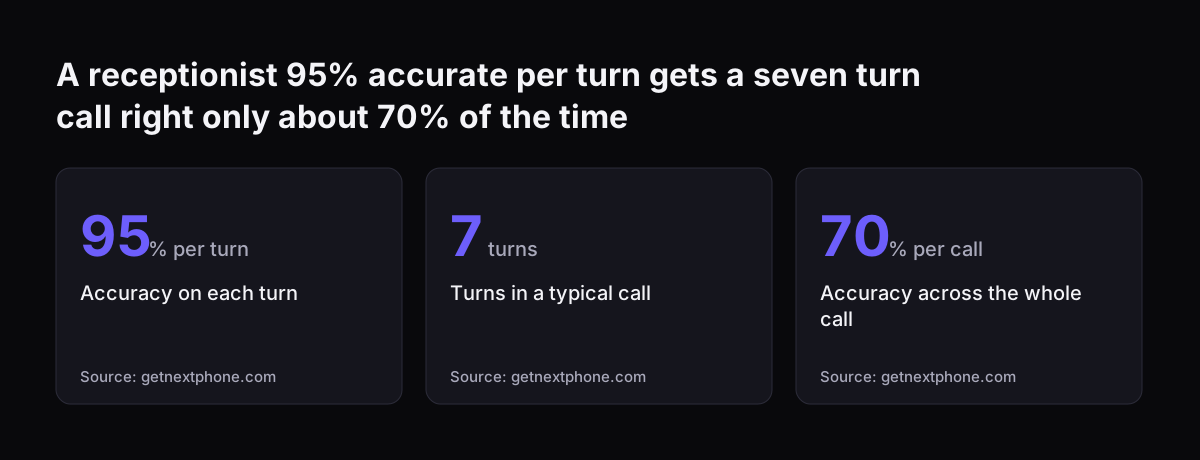
Accuracy is harder, and it compounds. NextPhone breaks AI receptionist accuracy into four separate measures: intent recognition, task completion, escalation accuracy and latency. It also notes that a 95% per-turn accuracy compounds to roughly 70% across a seven-turn call. A receptionist that sounds natural but mishears one detail in three calls will send work to the wrong place often enough to matter.

Latency is the one point where voice and routing meet. NextPhone defines latency as the time from the caller finishing speaking to the AI responding. Under one second is good, and over three seconds feels broken.

Routing design affects latency directly. Anthropic's customer support agent guide describes adding a separate intent classifier to route queries. It warns that this method requires an additional call to the model, which can increase latency. The same guide notes that streaming can sometimes allow more capable models with higher base latency. Every extra lookup or classification step you add for better routing has to fit inside that one-second budget.

A receptionist 95% accurate per turn gets a seven turn call right only about 70% of the time: Accuracy on each turn 95 % per turn, Turns in a typical call 7 turns, Accuracy across the whole call 70 % per call
Source: getnextphone.com

Designing routing rules around how your business works

Good routing rules start from your real enquiry types, not from the vendor's default call flow. Before you configure anything, write down why people ring you and who should deal with each reason.

NextPhone analysed 1,446,980 inbound business calls across 2,074 businesses. Booking, confirming or rescheduling an appointment was the most common reason to call. For many small firms, that means the diary is the first routing target. If you already run appointments in Zoho Bookings or a similar tool, the receptionist should book into that system, not a separate calendar.

For each enquiry type, settle these points:

  1. The words callers actually use for the request, taken from real calls or messages.
  2. The person or team that owns the outcome, by name or role.
  3. The record the call should create or update, such as a contact, a deal, a case or a booking.
  4. The condition that sends the call straight to a human, such as a complaint or an urgent safety issue.
  5. What happens outside opening hours.

The answers differ sharply by trade. A garage routes MOT bookings, repair estimates and collection calls to different people, as our guide to AI for garages sets out. A building firm separates new quote requests from site queries on live jobs, covered in AI for builders. A generic call flow serves neither well.

Matching each call to the right CRM record

An AI receptionist is only as useful as the CRM record it writes to. A call summary in an inbox is not a record. Someone still has to copy it across, and details get lost in the copying.

Several products now connect to a CRM. IONOS says its receptionist connects to your CRM to retrieve customer data automatically. GoTo describes syncing contact interactions across CRMs. The VoIP Shop names Salesforce, HubSpot, Zoho and Microsoft Dynamics as platforms AI receptionist systems integrate with. A connector on a feature list does not tell you which record gets updated, or how the caller is matched.

Matching is the step that goes wrong. A caller may ring from a new mobile number, give a nickname or call on behalf of a colleague. Your receptionist needs a rule for each case: look up by number, confirm by name or postcode, and create a new contact only when no match exists. In Zoho CRM, that rule decides whether a returning customer's history appears or a duplicate is born.

Live data needs a live lookup. Anthropic's guide states that embedding-based retrieval is not sufficient for queries that need real-time information, such as account balances or policy details. The receptionist must query your system during the call, not answer from documents uploaded months ago. Our piece on building AI into the systems you already use covers why that connection matters more than the front end.

Measuring routing accuracy before and after go-live

Routing accuracy should be measured with numbers, not judged by how calls sound. Anthropic's customer support guide gives concrete targets you can adopt for an AI receptionist.

The guide's suggested targets include:

  • Query comprehension accuracy of 95% or higher.
  • Escalation accuracy of 95% or higher.
  • A deflection rate of typically 70% to 80%, depending on how complex enquiries are.
  • A customer satisfaction score of 4 out of 5 or higher.
  • 100% accuracy for introductory company and product information, such as opening hours.

Deflection rate is the percentage of enquiries handled without human intervention. Escalation efficiency is the share of conversations correctly passed to a person against those that should have been passed but were not. Anyreach is plain that some situations still need human intervention. Track both numbers weekly from real calls, and read a sample of transcripts against each routing rule.

First-time-right routing is achievable in production with this kind of discipline. We built an IT service desk on Claude inside Microsoft Teams that fronts Zoho Desk for Asset Services Group, and its Head of Technology reports 99.7% first-time-right routing and a 40% efficiency gain in the published case study. That desk handles typed requests rather than phone calls, but the routing problem and the way it is tested are the same.

AI receptionist prices in the UK and what the plans leave out

UK AI receptionist plans start at tens of pounds a month, but the allowance model matters more than the headline price. Plans cap calls or minutes, and the overage rate decides what a busy month costs.

PlanMonthly priceIncludedBeyond the allowance
The VoIP Shop Premium£3050 calls£0.30 per call
IONOS entry£3930 calls, 1 call forwarding£0.49 per call
IONOS mid£69100 calls, 5 call forwardings£0.39 per call
IONOS top£99Unlimited calls and forwardingsNot applicable
The VoIP Shop Ultimate£120200 calls£0.30 per call
BT BusinessVaries by bundle100 to 14,000 minutes a monthOverage off by default

Prices were taken from each vendor's UK website in October 2026 and may have changed since. IONOS and The VoIP Shop prices exclude VAT at 20%, so check the VAT position of each plan with the vendor before you compare totals.

Three details in the small print affect routing directly. The VoIP Shop charges additional fees for transfer to a live agent on its Premium and Ultimate plans. BT Business turns the service off at 100% usage unless you buy more minutes or enable overage. NextPhone notes that most per-minute plans round every call up to the next 60 seconds, so a 20-second call bills as a full minute.

The VoIP Shop puts a human receptionist at £18,000 to £25,000 a year. However, a full-time adult paid the National Living Wage of £12.71 an hour costs at least about £24,800 a year for a 37.5-hour week, before employer National Insurance and pension. The saving is real, provided the transfers and record updates you need are inside the plan you choose.

Setup time: minutes for the phone line, longer for the routing

Connecting an AI receptionist to your phone line is quick, but designing the routing behind it takes longer. Vendors quote setup times that reflect only the first part.

IONOS says its receptionist is ready in under 15 minutes, and you keep your existing number by forwarding it. The VoIP Shop states 24 to 48 hours. Smash, which tested eight answering services, reports one simple service set up in under an hour. The same review warns that hybrid AI and human services can take days or weeks of configuration and training.

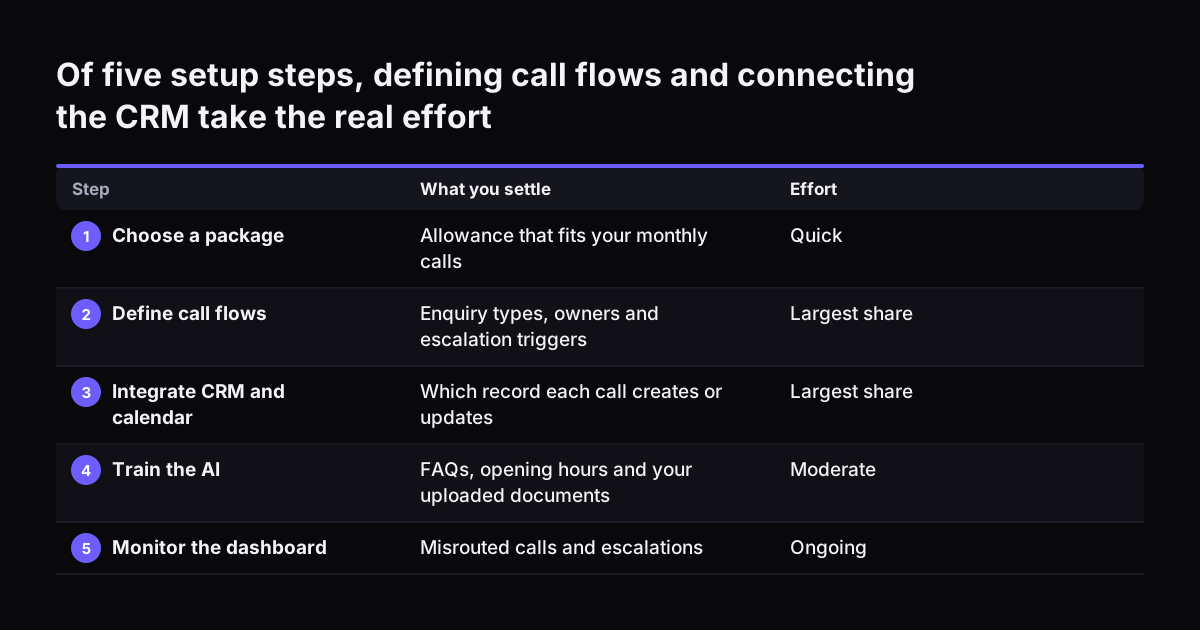
The VoIP Shop lists five implementation steps: choose a package, define call flows, integrate CRM and calendar, train the AI, and monitor the dashboard. Steps two and three hold most of the effort. Defining call flows means agreeing your enquiry types and owners. Integrating the CRM means settling matching rules and which records each call creates.

BT Business offers a one-hour education session for £150, delivered by a third-party partner, as optional professional services. A session of that length covers the product. It cannot map your business. Budget your own time for the routing design, and treat the first fortnight of live calls as a test period. Our overview of AI automation for growing businesses describes how to stage that kind of rollout.

Of five setup steps, defining call flows and connecting the CRM take the real effort. What you settle / Effort. 1. Choose a package: Allowance that fits your monthly calls / Quick; 2. Define call flows: Enquiry types, owners and escalation triggers /

Next steps for choosing and setting up an AI receptionist

The practical route to a working AI receptionist runs from your call data to a tested routing plan, then to a product. Choosing the product first tends to bend your processes around its defaults.

  1. Pull a month of call records. Note why people rang, when, and who dealt with each call.
  2. Write the routing table. List each enquiry type, its owner, the CRM record it touches and its escalation trigger.
  3. Check the CRM connection. Ask each vendor which record a call creates or updates, and how it matches returning callers.
  4. Price your real volume. Apply your monthly call count, call lengths and transfers to each plan's overage rules.
  5. Set targets. Use 95% escalation accuracy and 100% accuracy on opening hours and basic company facts as starting points.
  6. Review transcripts weekly. Correct routing rules from real calls during the first month.

Two further checks are worth making before go-live. Answering, transcribing and recording calls all involve personal data. Tell callers at the start of each call that they are speaking to an AI system and that the call is recorded, and point them to your privacy notice for the detail. Read our summary of AI law in the UK for businesses. If you want to see how routing works for other tasks, browse AI by business task for comparable examples.

Sources

  1. 1. Anthropic: Customer support agent guide
  2. 2. NextPhone: Best AI Receptionist for Small Business
  3. 3. GoTo Connect: AI Virtual Receptionist
  4. 4. BT Business: AI Receptionist
  5. 5. The VoIP Shop: AI Receptionist UK
  6. 6. IONOS: AI Receptionist
  7. 7. Smash: Best AI Answering Services for Small Business
  8. 8. Anyreach: Top 10 Virtual Receptionist Services for Small Businesses

Related articles