
Svennis AI
9 min read

Measuring an AI assistant by outcomes, not conversations

Chat volume and satisfaction scores show that an AI assistant is used, not that it works. Measure first-time-right outcomes instead, and set the baseline before go-live.

Abstract paths branching from a single point, with one line running straight to its target on the first attempt

Measuring an AI assistant: count right first-time outcomes, not chats

To measure an AI assistant, count how many requests reach the right outcome the first time, with no re-routing, reopening or rework. Chat volume and satisfaction scores show that people use the assistant. They do not show that it works. Take the first-time-right figure from your current process before go-live, so you have a fair comparison.

A business AI assistant is software, usually built on a large language model such as Claude, that takes requests from staff or customers and acts on them. It might answer a question, route a ticket or update a record. Each of those requests has an outcome you can check: the right team, the right answer, the right change to a record.

Public bodies in the UK frame evaluation the same way. The Ministry of Justice built an AI Lifecycle for its own use. It helps teams use evidence to decide whether a product should change, scale or stop. A business can use the same discipline with much less ceremony.
First-time-right: the definition to agree before you measure

First-time-right is the share of requests that reach the correct outcome at the first attempt. Nobody has to re-route, reopen or redo them afterwards. It is a count of finished work, not of conversations. For a service desk, the outcome is the ticket reaching the team that resolves it. For a sales assistant, it might be a lead record created in Zoho CRM with the right owner and fields.

Write the definition down per request type before you count anything. "Right" has to mean something a colleague could check without asking you. For a routed ticket, a workable rule is that the first team assigned closes the ticket, and nobody reassigns it on the way. For an answered question, the rule might be that the user did not ask again the same day.

Also decide which cases do not count. Test messages, duplicates and requests outside the assistant's scope should be excluded, and labelled as excluded. A request the assistant correctly hands to a person is not a failure if your rules say it must go to a person.

The vendor expects you to have this kind of measure. Anthropic's models overview advises starting with Claude Opus 5.5 for most workloads. It suggests moving to Claude Fable 5.1 "when your evals on Claude Opus 5.5 at higher effort still fall short". An eval is a repeatable test of the model against known correct answers. Without a first-time-right definition, you have nothing to base that model choice on.

Chat volume and satisfaction scores measure activity, not outcomes

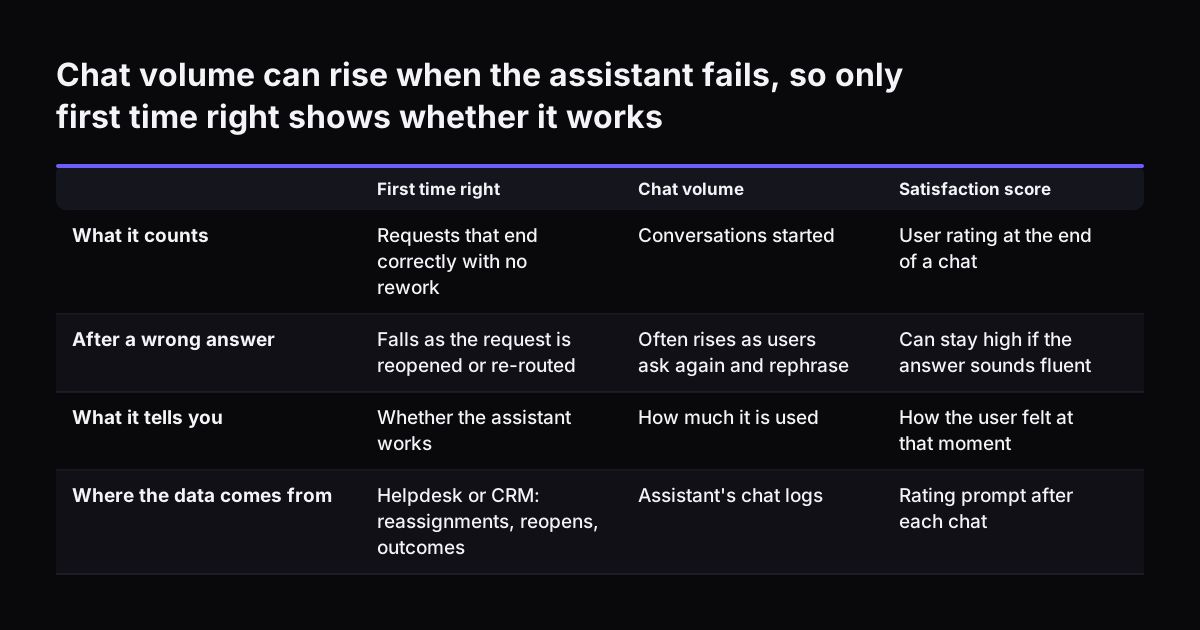
Chat volume and satisfaction scores describe how much an assistant is used and how people feel about it. They say little about whether requests ended well. Volume can even rise because the assistant is failing. A user who gets a wrong answer asks again, rephrases, and then asks a colleague. That produces three conversations and no outcome.

Satisfaction scores have a similar blind spot. A polite, fluent answer can score well and still be wrong. The UK Government's AI Playbook states plainly that AI systems "are also not guaranteed to be accurate". A thumbs-up at the end of a chat records the user's mood at that moment, not what happened to the request afterwards.

Vendor dashboards are built around activity because activity is what the vendor can see. Anthropic's analytics for Claude Code show usage and, on Teams and Enterprise plans, contribution metrics. Anthropic calls these metrics "deliberately conservative". It also says Console spend figures are estimates, and points you to the billing page for actual costs.

Those figures are useful for licences and budgets. On the Enterprise plan, the Claude Enterprise Analytics API adds per-user engagement, usage and cost reports; it is not available on the Teams plan. None of this data can tell you whether a ticket reached the right team, because the outcome lives in your own systems. You have to join the two yourself.

Chat volume can rise when the assistant fails, so only first time right shows whether it works. First time right / Chat volume / Satisfaction score. What it counts: Requests that end correctly with no rework / Conversations started / User rating at t

Handling time and escalation rate: the two measures beside first-time-right

Handling time and escalation rate are the two measures that explain a first-time-right figure. Handling time is the elapsed time from receiving a request to confirming its outcome. Escalation rate is the share of requests the assistant hands to a person instead of completing itself. Read together with first-time-right, they show what kind of assistant you have.

How the three measures read together

Low escalation combined with low first-time-right means the assistant is confidently wrong. It keeps work it should pass on. High escalation with high first-time-right on the work it keeps means it is cautious. That may be acceptable, but the saving will be smaller. Falling handling time with steady first-time-right is the result you want.

Escalation by design is not failure

Some escalation should happen every time. The UK Government's AI Playbook says humans should validate any high-risk decisions influenced by AI, and that you need strategies for meaningful intervention. List the request types that must always go to a person, such as refunds above a limit. Report their escalation separately, so a correct handover does not count against the assistant.

Measure handling time to the confirmed outcome, not to the assistant's first reply. A reply in two seconds that leads to a two-day detour is slow.

What to log for every request the assistant handles

Logging the right fields is what makes an AI assistant measurable after the event. If a field is missing, you cannot rebuild it later. Agree the fields before go-live and store them next to the ticket or record, not only in the assistant's chat history.

The minimum set for each request:

  • a request ID and the time it arrived
  • the channel, such as Microsoft Teams, email or a website chat
  • the request text, or a reference to it where the text is sensitive
  • what the assistant decided: category, destination team, action taken
  • the model and prompt version in use at the time
  • whether it escalated, and the stated reason
  • every reassignment or reopening, with timestamps
  • the confirmed outcome, who confirmed it, and when

The model version field matters more than it looks. Models retire on the vendor's schedule. Anthropic's overview lists a retirement date for Claude Haiku 4.5 of not sooner than 15 October 2026. When you move to another model, you want to compare results before and after, request type by request type, and that needs the model on every log line.

Request text can contain personal data, so settle retention with whoever owns data protection in your company. Our overview of AI law in the UK and what applies to your business is a good starting point for that conversation.

Setting the baseline before go-live, from requests you already handled

A baseline is the first-time-right, handling time and escalation figure for your current process, measured before the assistant goes live. Without it, any number the assistant produces floats free. You cannot tell whether it beats what your team already achieves.

Build the baseline from history, not from memory:

  1. Export a sample of recent, closed requests from your helpdesk or inbox.
  2. Have the people who resolved them label the correct outcome for each one.
  3. Measure how often your current process got it right first time, how long each request took, and how many went to a senior person.
  4. Run the assistant against the same labelled sample, in shadow mode, before it touches live work.

Shadow mode means the assistant makes its decision and logs it, but a person still does the real work. You compare the two afterwards. At Svennis we build the baseline this way: the client's own service team labels a sample of past requests with their correct destination. We then score the assistant against those labels, never against its own stated confidence.

The Ministry of Justice applies a similar gate. It requires all AI tools to be tested for bias, accuracy, reliability, fairness and security before they are scaled and deployed more widely. For a business, the labelled sample is your version of that test. Rerun it whenever you change the prompt, the model or the routing rules.

Worked example: one Teams request routed into Zoho Desk

Consider an IT assistant in Microsoft Teams that sits in front of Zoho Desk, the helpdesk where the IT team works its tickets. An employee writes in Teams: "Since this morning's update my laptop won't connect to the VPN."

What the assistant does

The assistant reads the message and classifies it as a network problem. It sets a priority and creates a ticket in Zoho Desk, assigned to the network team. It replies in Teams with the ticket reference. Each decision goes into the log: category, destination team, model and prompt version, and the time.

How the request is scored

Two paths follow. On the first, the network team finds a VPN client setting changed by the update, fixes it and closes the ticket. Nobody reassigned it, so it counts as first-time-right. Handling time runs from the Teams message to the closure the network team confirms.

On the second path, the network team finds the update broke the laptop's network driver. They reassign the ticket to the desktop team. The assistant's category looked sensible, but the request was not right first time. The reassignment timestamp shows exactly where the time went.

What you learn from many such requests

One request tells you little. Several hundred, grouped by category, show a pattern. If "after an update" messages keep bouncing from network to desktop, change the routing rule or the prompt. Then rerun the baseline sample to check that the fix did not break another category.

Measures compared: what each tells you and where the data comes from

The measures below differ in what they tell you and where their data lives. Cost belongs in the comparison too, calculated per right outcome rather than per chat. A cheaper model that gets fewer requests right first time can cost more per finished request once you add the rework.

MeasureWhat it tells youWhere the data comes fromUse it to decide
First-time-rightWhether requests end correctly without reworkYour helpdesk or CRM: reassignments, reopens, confirmed outcomesWhether to go live, scale or stop
Handling timeHow long a request takes to reach its confirmed outcomeTimestamps in your log and ticket historyWhere time is lost, and to which team
Escalation rateHow much work the assistant passes to peopleThe assistant's log, split by request typeWhether the assistant is too cautious or too bold
Cost per right outcomeWhat a correctly finished request costsVendor billing plus your first-time-right countWhich model to use for which request type
Chat volumeHow much the assistant is usedVendor usage dashboardsLicence and capacity planning only
Satisfaction scoreHow users felt at the end of a chatA rating prompt in the chatTone and wording, not accuracy

If your tickets already live in a Zoho system, a reporting tool such as Zoho Analytics can hold the first four measures on one dashboard. Chat volume can then sit in a corner of the same dashboard, where it belongs.

Automated scoring needs a human check, as AISI's tests show

Using an AI model to score an AI assistant's work is tempting, and it is only safe with regular human checks. The UK's AI Security Institute (AISI) found this in its own evaluations. Its Long-Form Task method pairs a prompt with an autograder, a model that scores answers against a rubric written by domain experts.

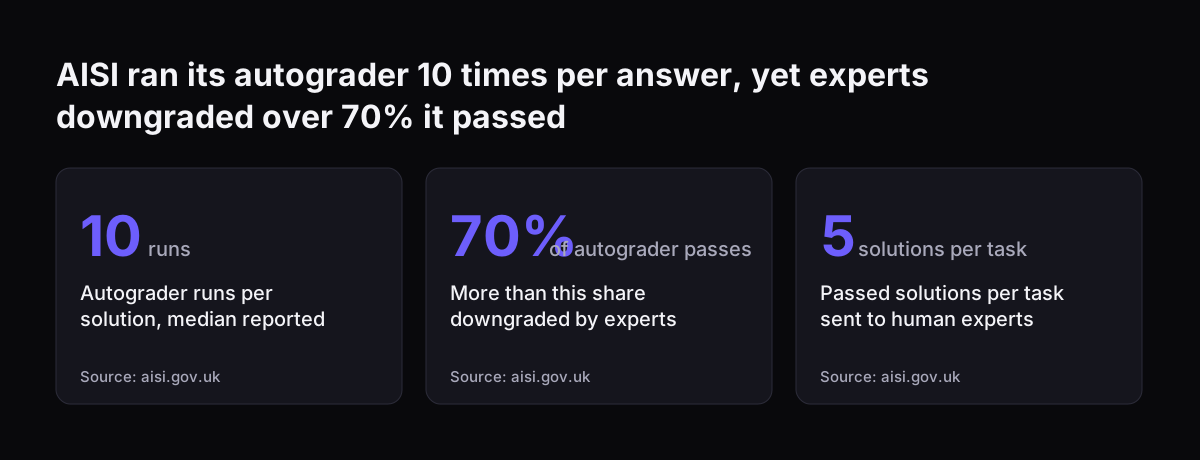
AISI took care over the grader. It ran the autograder 10 times on each solution and reported the median score to reduce the effect of outliers. Even so, domain experts downgraded more than 70% of the solutions the autograder had rated feasible. AISI also notes that the grader "occasionally hallucinates information which was not present in the solution submitted" and cannot fact-check answers.

AISI describes a Human Uplift Study, which measures how much AI improves a person's task performance, as the gold standard for measuring helpfulness. It also says these studies are slow, expensive and not easy to deploy at scale. Most businesses cannot run one either.

The practical middle path is simple. Let an automated check pre-score your logs if it saves time. Then have a person who knows the work review a random sample of scored cases on a fixed schedule. When the person and the score disagree often, trust the person and fix the scoring rule.

AISI ran its autograder 10 times per answer, yet experts downgraded over 70% it passed: Autograder runs per solution, median reported 10 runs, More than this share downgraded by experts 70% of autograder passes, Passed solutions per task sent to huma
Source: aisi.gov.uk

What UK public-sector guidance means for a UK business measuring AI

UK government guidance on AI does not bind a private company, but it shows what "measured properly" is coming to mean in Britain. The AI Playbook for the UK Government updates the Generative AI Framework for HMG, published in January 2024. It sets out 10 core principles for AI use in government and public sector organisations.

Three points from the playbook translate directly to a business assistant:

  • Humans should validate any high-risk decisions influenced by AI, which is why escalation by design gets its own line in your figures.
  • Automated responses to the public should be identified as automated, with wording like "this response has been written by an automated AI chatbot".
  • Central government departments and in-scope arm's length bodies must use the Algorithmic Transparency Recording Standard (ATRS), a published record of how an algorithmic tool is used.

The playbook says the ATRS is not yet a requirement for all public sector institutions. If you supply the public sector, keeping the logs described here puts you in a good position if a customer asks for that kind of record.

The Ministry of Justice shows the same direction of travel. Its action "Evaluate success regularly and adjust our approach as we go" was marked Progressing in its Year One snapshot. For Year Two it plans clearer standards for evaluating AI products over time. For a UK business, the lesson is to decide your measures early and keep measuring after launch.

Next steps: pick one request type, label past cases, then measure

Measuring an AI assistant starts small. One request type, measured well, teaches you more than a dashboard covering everything. These steps get you from no measure to a baseline you can defend:

  1. Choose one request type with a clear outcome, such as IT tickets routed to a team or website enquiries booked as meetings.
  2. Write the first-time-right rule for that type in one or two sentences, including what is excluded and what must always escalate.
  3. Agree the log fields from the list above, and confirm with your data protection owner what you may keep.
  4. Label a sample of past requests with the people who resolved them, and measure your current first-time-right, handling time and escalation.
  5. Run the assistant in shadow mode against that sample, and go live only when it matches or beats the baseline.
  6. Review a random sample by hand on a fixed schedule after launch, and rerun the labelled sample after every change of model or prompt.

If the assistant faces customers on your website, the outcome to count is usually a booked meeting, not a chat. Our post on a website AI assistant that takes visitors from FAQ to booked meeting covers that case. To see which request types are worth measuring first, browse AI by business task. When you are ready to build, our page on AI automation for growing businesses explains how that work is scoped.

Sources

  1. 1. Anthropic: Models overview, Claude Platform Docs
  2. 2. Anthropic: Track team usage with analytics, Claude Code Docs
  3. 3. Ministry of Justice, Justice AI Unit: Action 2.7, Evaluate success regularly
  4. 4. AI Security Institute: Long-Form Tasks
  5. 5. Government Digital Service: Artificial Intelligence Playbook for the UK Government

Related articles