
Skip to content
SVENNISAIWe speak Claude.
Blog · AI helpdesk

Setting up an AI helpdesk assistant: knowledge, routing and escalation

A step by step guide to the three decisions behind an AI helpdesk assistant: which knowledge it uses, how it routes requests into your helpdesk, and when a person takes over.

10 min read

Book a 30-minute call · with a Claude Certified Architect from our team.

Article · 10 min read
Abstract flow of lines splitting into three paths, one curving back towards a single point of hand-over

Setting up an AI helpdesk assistant: the three decisions in short

Setting up an AI helpdesk assistant comes down to three decisions: knowledge, routing, escalation. You decide which documents it may answer from. You decide how it files each request into the right helpdesk queue. And you decide which cases go straight to a person. Get those three right and the rest is configuration.

An AI helpdesk assistant is software that answers colleagues' requests from the company's own documents and hands sensitive cases to a colleague. It differs from an AI agent, which takes over a whole process, such as orders. A service desk, in this guide, is where colleagues' internal requests arrive.

This post is part 2 of 3 in our series on the AI service desk assistant. Part 1, on AI ticketing, covered what an AI service desk assistant does and who it suits. Part 3 explains why service desk automation pays, through first-time-right routing and fewer escalations. This part is the how: the stages, what you prepare, who is involved on each side, and how each step is checked.

The three decisions are not equal in effort. Knowledge takes the most preparation on your side. Routing takes the most precise rules. Escalation carries the most risk if you get it wrong, because a case that should reach a person and does not is worse than no assistant at all.
Knowledge: which documents the AI helpdesk assistant answers from

An AI helpdesk assistant should answer only from a short list of documents you trust, not from everything on the shared drive. The reason is simple. Retrieval lets a chatbot search selected knowledge bases, but, as Deskhero's guide to support chatbots puts it, retrieval does not make incorrect or outdated source material reliable. A chatbot grounded in stale information delivers a polished but wrong answer.

A helpdesk knowledge base is a central library of information that helps users find answers on their own. Thunai describes two types:

  • External knowledge base: for customers and the public, with FAQs, how-to guides and product documentation.
  • Internal knowledge base: for employees and support agents, with technical guides, standard operating procedures (SOPs) and internal policies.

An internal service desk assistant draws on the second type. If your questions come mainly from customers, the AI customer assistant for web and WhatsApp is the closer fit, and it draws on the first.

Start with the request types that suit automation. Servia lists frequently asked questions, basic product guidance, password and account instructions, documentation questions and simple troubleshooting as good candidates. Passwords alone matter: DRUID AI's helpdesk roadmap reports that forgotten logins and passwords account for up to 40% of IT service desk requests. One clear, current password guide can therefore cover a large share of the traffic.

Preparing the knowledge base before kickoff: owners, dates and gaps

Preparing the knowledge base means giving every document an owner and a review date before the assistant reads it. Servia's guide states the risk plainly: outdated documentation leads to outdated answers. The assistant cannot tell that a policy changed last month unless someone updated the page.

Work through your sources in this order:

  1. List every document the service desk team actually uses to answer requests today.
  2. Remove duplicates, so that each question has one answer in one place.
  3. Name an owner for each document, usually the person who owns the policy behind it.
  4. Set a review date, and mark anything older as out of scope until it is checked.
  5. Note the questions your team answers from memory, because those are the gaps.

A knowledge base is not a one-time project. Thunai recommends scheduled reviews and updates to keep content correct. It also notes two habits that keep the base alive once the assistant runs. Linking tickets to knowledge base articles shows which articles work best and which are missing or need updates. And some systems let agents create new articles from resolved tickets.

For more on keeping company knowledge usable by an assistant, see our page on AI for knowledge management. The practical point for setup is that the owner list matters more than the document count. A small, owned set of guides beats a large, unowned archive.

Routing: how each request lands in the right helpdesk queue

Routing is the step where the assistant reads a request, decides its category and urgency, and creates or updates the ticket in the helpdesk for the right team. Ticket categorisation is on Servia's list of tasks that suit automation. It is also the step where a mistake costs most time later, because a misfiled ticket waits in the wrong queue.

Anthropic positions its small model for exactly this work. The Claude models overview describes Claude Haiku 5.5 as built for high-volume, latency-sensitive tasks such as classification, extraction and routing. All current Claude models support multilingual input and tool use, which is what lets the assistant write into your helpdesk.

Svennis's assistant works in Zoho Desk or Microsoft Teams. To link Claude to the helpdesk, we build a connection for each program. That connection can be a connector, an MCP server, a plugin or a skill. MCP, the Model Context Protocol, is a standard way for AI applications to connect to external tools and data. We show you the options with their cost, and you choose.

This puts the assistant in the second of two families that eesel AI describes. One family is the all-in-one platform that requires migration. The other is an AI layer that plugs into the tools you already use. Your helpdesk stays where it is.

What you prepare for routing is a category list as your team actually uses it, the team that owns each category, and a written definition of urgent. Vague categories produce vague routing.

Escalation: when the assistant hands a case to a person

Escalation is the rule set that sends a conversation from the assistant to a colleague. On our service, sensitive cases always go to a colleague: personal data, complaints, and anything about money or security. Servia's list adds complex technical problems, account ownership issues, billing disputes and requests that need an exception to company policy.

Zendesk's escalation guide, as summarised by eesel AI, names six considerations: complexity, urgency, sensitivity, agent availability, hours and channel volume. The last three are easy to forget. They decide what happens when the rule says "hand over" but nobody is there to take it.

Plan the failed handoff

A handoff needs a fallback. In Salesforce Agentforce, if no human agent is available, the routing flow ends and the AI agent picks the conversation back up. Salesforce documentation describes fallbacks such as telling the person about a delay, creating a case for later, or offering to wait in line. Zendesk can check operating hours with an availability block, so an out-of-hours path offers email follow-up instead.

Pass the context with the case

A Zendesk escalation path can collect information and update fields or tags before the transfer. Whatever helpdesk you use, the colleague who takes over should see a summary, so the requester does not explain twice. Once a Zendesk messaging handoff happens, the AI can no longer reply in that conversation. Decide in advance which actions need a person's approval. One LinkedIn post puts it well: put human approval immediately before the action you care most about controlling.

Worked example: an IT assistant in Microsoft Teams in front of Zoho Desk

Picture a company whose staff raise IT requests in Microsoft Teams, with Zoho Desk behind it as the ticketing system. The example below is an illustration of how the three decisions play out. It uses the rules described in this guide, not a specific client.

Four requests arrive on a Monday morning:

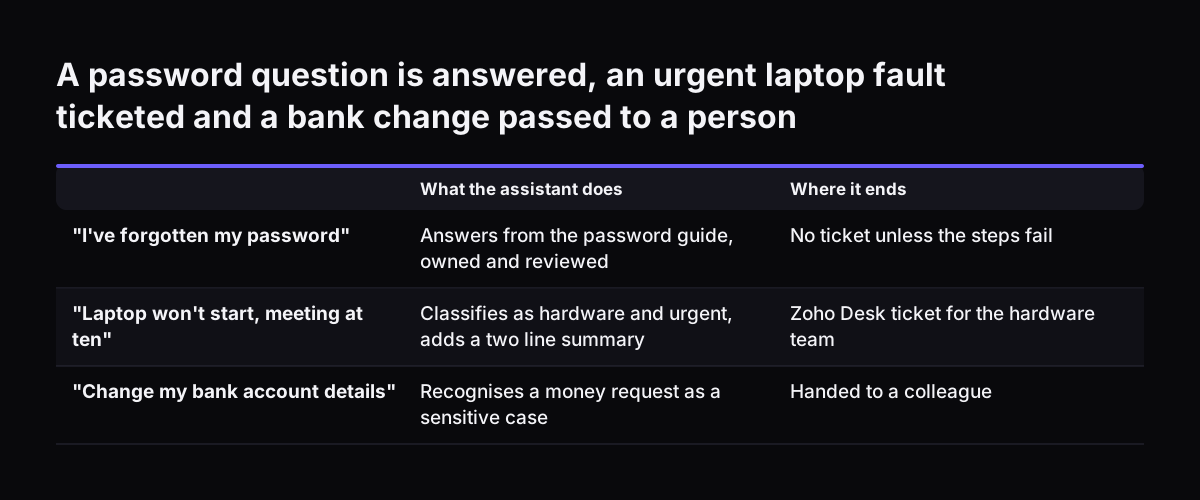
  • "I've forgotten my password." The assistant answers from the internal password guide, which has an owner and a current review date. No ticket is needed unless the steps fail.
  • "My laptop won't start and I have a client meeting at ten." The assistant classifies it as hardware and urgent. It creates a ticket in Zoho Desk for the hardware team, with a two-line summary.
  • "Can you change the bank account my salary goes to?" This touches money and personal data. The assistant does not try to answer. It hands the case to a colleague and tells the requester who will pick it up.
  • A request at 9pm about a shared drive. Nobody is on shift. The assistant logs the ticket and tells the requester when the team will see it.

Model choice follows the steps. A small, fast model such as Claude Haiku 5.5 handles the classification. Anthropic launched it for high-volume, cost-sensitive work. Drafting answers can use Claude Sonnet 5.5, which Anthropic describes as the best combination of speed and intelligence. If you are unsure, Anthropic's own advice is to start with Claude Opus 5.5 for most workloads.

A password question is answered, an urgent laptop fault ticketed and a bank change passed to a person. What the assistant does / Where it ends. "I've forgotten my password": Answers from the password guide, owned and reviewed / No ticket unless the s

Checklist table: knowledge, routing and escalation decisions

The table below sets out the three decisions side by side. For each, it shows what you decide, what your company prepares, who owns it on your side, and how it is checked before go-live.

DecisionWhat you decideWhat you prepareOwner on your sideHow it is checked
KnowledgeWhich documents the assistant may answer fromA deduplicated document list with owners and review datesEach policy owner, coordinated by the service desk leadTest questions answered against the source page; gaps logged
RoutingCategories, urgency and the team for eachThe category list as your team uses it, and a definition of urgentService desk leadReal past requests routed and compared with where a person sent them
EscalationWhich cases always go to a person, and what happens out of hoursA written list of sensitive topics and the fallback for eachService desk lead with HR, finance and securityEach sensitive topic tested; the handoff and the fallback both triggered
Accounts and accessWhere the assistant runs and what it may changeYour Anthropic or AWS account, keys and a usage budgetIT administratorPermissions reviewed; budget limit confirmed

If a row has no owner, the assistant is not ready to go live. That is the quickest check you can run on your own preparation.

The two-week setup: stages, people and timing

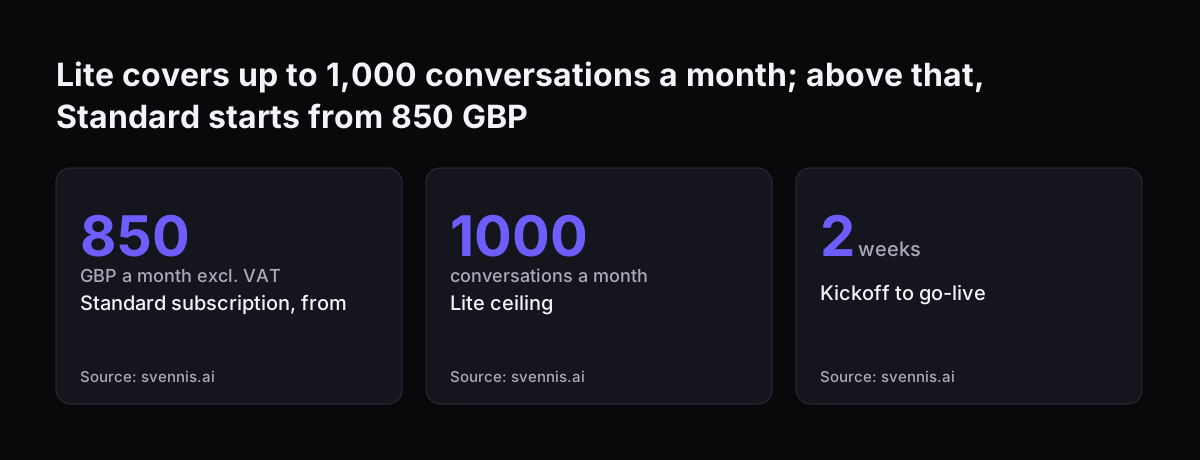
The AI service desk assistant takes two weeks from kickoff to go-live, as stated on our service page. That timing assumes the preparation in the checklist table is done or under way. The document owners, the category list and the escalation list are what usually set the pace.

Published plans for helpdesk chatbots follow a similar rhythm. One two-week plan from Level Up Coding puts use cases, conversation flows and platform setup in week one. Week two builds the knowledge base and tests it, and the last step connects the chatbot to channels such as Teams. Servia's six steps add the discipline around it: identify repetitive questions, improve documentation, start with low-risk use cases, create escalation rules, monitor conversations and expand gradually.

People involved on your side:

  • A service desk lead who owns the categories, the escalation list and sign-off.
  • Document owners who confirm their guides are current.
  • An IT administrator who sets up the account and keys.
  • A small group of colleagues who test the assistant before everyone else uses it.

On our side, we build the connections, set up the routing and escalation rules, and test them with you. After go-live we run the assistant for you month by month. The subscription has no minimum term and can be stopped in any month. A second channel or a second language is priced separately, so start with one.

What goes wrong with AI helpdesk assistants, and how each part is checked

Most failures in an AI helpdesk assistant trace back to one of the three decisions, not to the model. The common ones are predictable, which means you can test for them:

  • Stale knowledge: an answer that was right last year. The check is the review date on each source.
  • Wrong category: a request filed with the wrong team. The check is routing real past requests before go-live.
  • Handoff into nowhere: an escalation with nobody on shift. The check is triggering the fallback on purpose.
  • Integration down: Deskhero notes that systems relying on CRM or account data need a safe fallback when those integrations are unavailable.
  • Language quality: quality varies across languages and domains, so test with the terms your staff actually use.

At Svennis, we run a set of the client's real past requests through the routing rules before go-live and compare each result with where a colleague actually sent it. The mismatches show which categories need a clearer rule, and we fix those before anyone relies on the assistant.

After go-live, measure outcomes, not volume. Servia suggests tracking response time, resolution time, ticket volume, escalation rate, satisfaction and recurring issues. Deskhero warns that a high automation rate can still hide poor answers, so read the numbers together. Our post on measuring an AI assistant by outcomes sets out which figures to watch.

What setting up an AI helpdesk assistant means for a UK company

For a UK company, the practical questions are where the data goes, who holds the account and how the bill arrives. On our service, the assistant runs on your company's own Anthropic or AWS account, with your keys, not ours. On the API, Anthropic does not use the content to train its models, under its commercial terms.

Billing comes in two currencies. Claude seats are billed directly by Anthropic in pounds. An agent's model usage is billed by Amazon Web Services in US dollars, on use, and is not capped unless you set a budget. Model usage is not included in our price. Set a budget in the account on day one, so a busy month does not surprise your finance team.

Data protection belongs in the escalation list as well as the contract. For a UK company, the assistant must comply with the UK GDPR and the Data Protection Act 2018, like any other system that handles staff data. Telling people they are talking to a chatbot is good practice. A line at the start of each conversation in Teams or Zoho Desk does it. Under the UK GDPR, your staff privacy notice should also explain how the assistant uses their data.

Supplier paperwork has limits too. Deskhero notes that independent audit reports are useful evidence. They do not replace a review of scope, contracts and actual controls. Ask your data protection lead to read the escalation list, because it decides which personal data the assistant never handles alone.

Lite covers up to 1,000 conversations a month; above that, Standard starts from 850 GBP: Standard subscription, from 850 GBP a month excl. VAT, Lite ceiling 1000 conversations a month, Kickoff to go-live 2 weeks
Source: svennis.ai

Next steps for your AI helpdesk assistant

The next step is to fill in the checklist table for your own service desk. You can do most of it in an afternoon with your service desk lead. Work through it in this order:

  1. Choose the channel your staff already use for requests: Zoho Desk or Microsoft Teams.
  2. List the documents your team answers from, and name an owner for each.
  3. Write down your ticket categories and the team that owns each one.
  4. Write the escalation list: personal data, complaints, money and security as a minimum, plus anything specific to your business.
  5. Decide what happens out of hours and when a handoff fails.
  6. Ask your IT administrator to prepare the account, keys and a usage budget.
  7. Ask your data protection lead to check whether you need a data protection impact assessment, to confirm where the data is processed, and to update your staff privacy notice.

With those seven answers, the two-week setup has what it needs. Svennis builds and runs this as a monthly service; the AI service desk assistant service page sets out the scope and the published prices. If your first priority is a different process, our overview of AI by business task shows where else an assistant fits.

Sources

  1. Svennis AI: AI service desk assistant on Claude
  2. Anthropic: Models overview
  3. Anthropic: Newsroom
  4. Servia: AI Customer Support for SaaS
  5. Thunai: How to Build a Powerful Helpdesk Knowledge Base
  6. Deskhero: AI Chatbot for Support
  7. eesel AI: Zendesk AI agent escalations
  8. eesel AI: Salesforce AI escalation
  9. eesel AI: AI service desk tools
  10. DRUID AI: A Roadmap to Improved IT Helpdesk Experience via Conversational AI
  11. LinkedIn: AI Chatbot Integration in Helpdesk Systems
  12. Level Up Coding: Automate Your Enterprise Helpdesk with AI Chatbot
Free, 30 minutes

Pick a time. Bring the process this article made you think of.

You leave with a clear yes or no on putting Claude on it, and the step that fits from our published prices. You speak to someone who builds the agents, not a salesperson.

Prefer to call? +44 7588 772736 · Not ready to talk? See it on your business first.

30 minutes · video call · free
  1. 1Time
  2. 2Details
  3. 3Booked