Svennis AI
9 min read

Training staff to work with an AI assistant in their everyday tools

Staff learn an AI assistant fastest on their own work, in their own tools. This guide covers AI literacy, how to ask, when to escalate and how to correct the assistant.

Abstract cover with interlocking paths that merge, split and rejoin, suggesting people and an assistant sharing work

Training staff to work with an AI assistant inside their daily tools

Training staff to work with an AI assistant goes fastest inside the tools they already use, on their real work. Staff need to learn three things: what the assistant handles, when it hands over to a person, and how to correct it. A separate classroom session rarely teaches all three, because none of them are visible until real cases arrive.

An AI assistant is software built on a large language model, such as Claude, that reads requests written in plain language and answers them. When you connect it to your systems, it can also look up or prepare records. The Claude Help Center describes connectors as a way to connect Claude to "the tools and data sources your team already uses".

That connection changes what training means. Staff are not learning a new application. They are learning to share their existing work, in their help desk, CRM or inbox, with a colleague that is fast, tireless and sometimes wrong.

This guide covers four skills in order: AI literacy, asking well, escalating at the right moment and giving feedback that improves the assistant. It then walks through a worked example of a support team in Zoho Desk, a checklist table, the UK rules that apply and the next steps for a first pilot team.
AI literacy for staff: what the assistant can and cannot do

AI literacy is the working knowledge a person needs to use an AI assistant safely. It covers what the assistant does well, where it fails and how to check its output. Staff do not need to understand how a model is built. They need a short, accurate picture of its limits.

The assistant's knowledge stops at a date

Every model has a knowledge cutoff, the date after which it knows nothing unless your systems tell it. Anthropic's models overview lists a reliable knowledge cutoff of June 2026 for Claude Opus 5.5, Claude Sonnet 5.5 and Claude Fable 5.1. For Claude Haiku 4.5, the cutoff is February 2025. Staff should expect current facts, such as prices or stock levels, to come from your connected records, not from the model.

The assistant can sound sure and still be wrong

A language model can produce confident references that do not exist. The ICO gives a concrete case. It warns that requests drafted with AI "might make references to ICO decision notices or case law that doesn't exist." Staff should treat any citation, figure or policy quote as a claim to check.

The assistant only sees what it is connected to

All current Claude models support tool use, according to Anthropic. Tool use is how the assistant calls another system, for example to read a ticket or a customer record. If a system is not connected, the assistant cannot see it, and staff should not assume it has.

Why training in the real workflow beats a separate classroom session

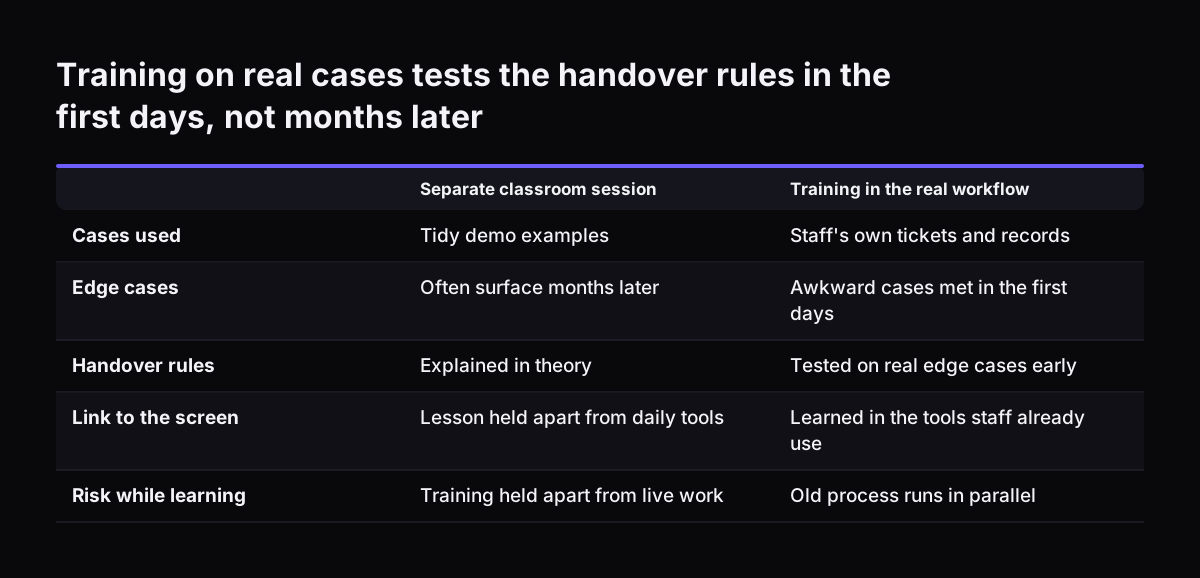
Training inside the real workflow works because staff meet the assistant's actual behaviour on their own cases. A classroom demo uses tidy examples. Live work brings the awkward ticket, the half-filled record and the customer who changes their mind halfway through.

Workflow training has three practical advantages:

  • Staff ask questions about the cases they really handle, so the answers stick.
  • The handover rules get tested on real edge cases in the first days, not months later.
  • There is no gap between what staff learned and the screen in front of them.

Running the old process alongside the new one reduces the risk while staff learn. The ICO advises that if you are replacing traditional decision-making systems with AI, you "should consider running both concurrently for a period of time." For staff training, that means people keep their usual method for a while and compare it with the assistant's output on the same cases. They learn where the assistant is reliable by watching it, not by being told.

A short briefing still has a place. Use it to explain the boundaries and who owns the assistant. Then move the learning to the desk, with a team lead nearby for the first live cases.

Training on real cases tests the handover rules in the first days, not months later. Separate classroom session / Training in the real workflow. Cases used: Tidy demo examples / Staff's own tickets and records; Edge cases: Often surface months later

How to ask an AI assistant: four habits for a clear request

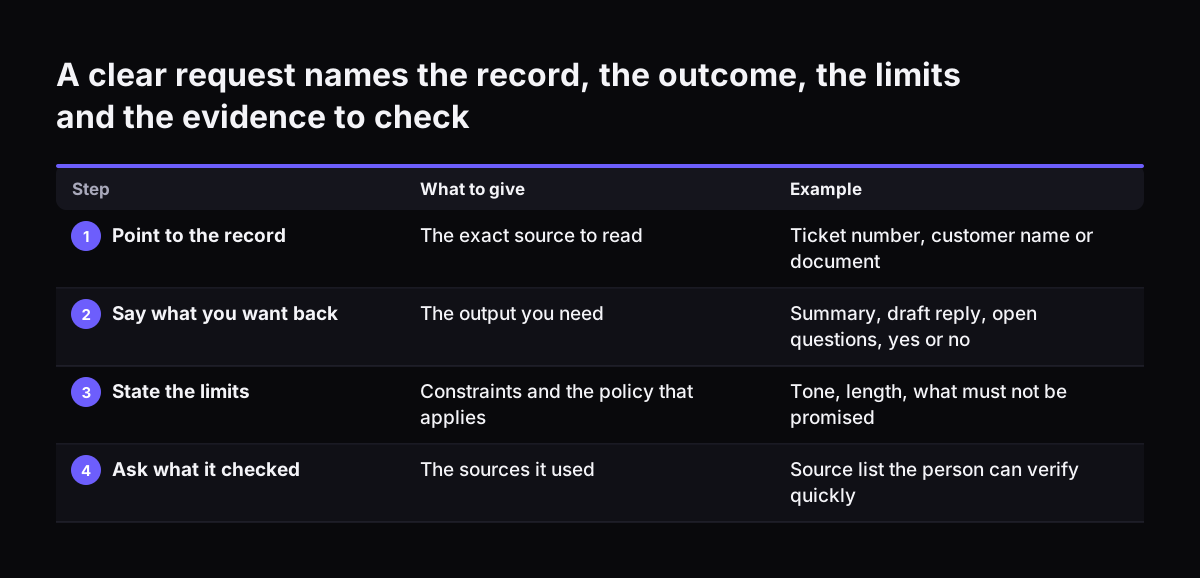
Staff get better answers from an AI assistant when every request names the record, the outcome, the limits and the evidence. Vague requests produce vague answers. These four habits are worth teaching on the first day, with examples from your own work.

The four habits for a clear request are:

  1. Point to the record. Give the ticket number, customer name or document, so the assistant reads the right source.
  2. Say what you want back. A summary, a draft reply, a list of open questions or a yes or no.
  3. State the limits. Tone, length, what must not be promised, and which policy applies.
  4. Ask what it checked. Request the sources it used, so the person can verify them quickly.

A weak request looks like this: "Reply to this customer." A strong one names everything the assistant needs:

Summarise ticket 4182 in three lines. Draft a reply that explains our returns policy, in a friendly tone, under 120 words. Do not offer a refund. List the knowledge base article you used.

The second request takes a few more seconds to write. It saves the minutes spent rewriting a draft that missed the point. It also makes the assistant's mistakes easier to spot, because the person knows exactly what was asked.

A clear request names the record, the outcome, the limits and the evidence to check. What to give / Example. 1. Point to the record: The exact source to read / Ticket number, customer name or document; 2. Say what you want back: The output you need /

When the assistant hands over to a person: writing the escalation rules

Escalation, or handover, is the point where the assistant stops and passes a case to a named person. Staff must know these rules as well as the assistant does. Otherwise people either trust the assistant past its limits or redo work it handled correctly.

Most teams need handover rules for these situations:

  • The answer depends on data the assistant is not connected to.
  • The case involves a decision about money, such as a refund, credit or price exception.
  • The case is a complaint, a legal threat or an HR matter.
  • The records conflict, or the assistant says it is unsure.
  • The customer or colleague asks for a person.
  • The request involves health or other sensitive personal data.

Each rule needs an owner. "Hand over to a person" is not enough. Name the role, such as the team lead or the finance contact, and the place the case goes, such as a queue or an assignee.

At Svennis we write the handover rules once, in plain sentences, and use that same list in the assistant's instructions and in the staff briefing. When a rule changes, both change on the same day, so staff never learn one boundary while the assistant follows another.

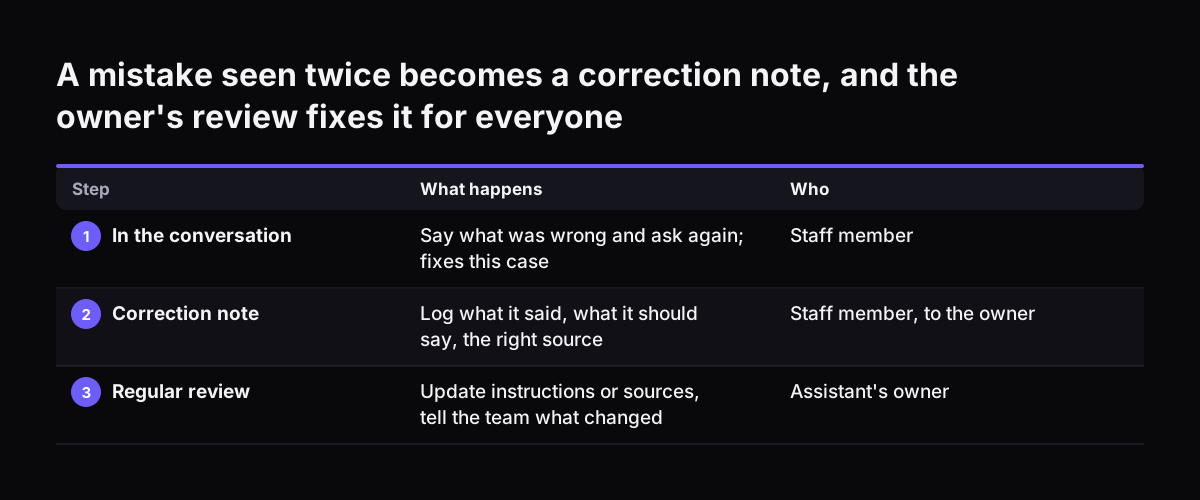
Correcting the assistant: feedback that improves it over time

Feedback improves an AI assistant only when corrections reach the person who maintains its instructions and knowledge. Fixing a bad draft in the moment helps one customer. Reporting the pattern helps every customer after that.

Teach staff three levels of correction:

  1. In the conversation. Tell the assistant what was wrong and ask again. This fixes the case in front of you.
  2. A correction note. When the same mistake appears twice, log it for the assistant's owner.
  3. A regular review. The owner reads the notes, updates the instructions or source documents, and tells the team what changed.

A useful correction note has three parts: what the assistant said, what it should have said, and where the right answer lives. "The draft quoted the old delivery charge; the current charge is in the pricing article updated last month" is actionable. "The bot was wrong again" is not.

Most errors trace back to the sources, not the model. An outdated knowledge base article or an unclear instruction produces the same wrong answer every time. Fixing the source fixes the answer.

Track whether the corrections work by looking at results, not message counts. Our guide to measuring an AI assistant by outcomes sets out which numbers show real progress.

A mistake seen twice becomes a correction note, and the owner's review fixes it for everyone. What happens / Who. 1. In the conversation: Say what was wrong and ask again; fixes this case / Staff member; 2. Correction note: Log what it said, what it

Worked example: a support team using Claude alongside Zoho Desk

This worked example follows a small support team that handles customer tickets in Zoho Desk and adds Claude as an assistant. The setup uses features described in the Claude Help Center. Training happens on the first live tickets, not before them.

Setup before the first day

The company uses a Team plan, which the Help Center says supports setting up a workspace, adding seats and administering Claude across an organisation. Identity management covers single sign-on, provisioning and directory sync, so staff log in with their usual work account. Agents work either through a connector, where the setup has one, or with Claude in Chrome, which the Help Center describes as working "alongside any page", here the open ticket.

A morning of live tickets

  1. An agent opens a ticket about a late delivery and asks Claude for a three-line summary and a draft reply that cites the delivery policy article.
  2. The agent checks the cited article, edits one sentence and sends the reply.
  3. The next ticket asks for a refund. The handover rule says refunds go to the team lead, so the agent assigns it there without asking Claude to draft an offer.
  4. A third draft quotes an old returns window. The agent corrects it in the conversation, then posts a correction note in the team's Zoho Cliq channel.
  5. At the end of the week, the assistant's owner updates the returns article and confirms the fix in the same channel.

The team lead sits with each agent for the first few tickets. Questions get answered on the case that raised them, which is the whole point of training in the workflow.

Checklist: who does what, and what staff are trained on

A clear split of responsibilities is the core of training staff to work with an AI assistant. The table below gives a starting checklist for a service or back-office team. Adapt the rows to your own handover rules.

TaskAssistant's rolePerson's roleWhat staff are trained on
Summarising a ticket or recordDrafts the summarySkims and confirmsSpotting missing or invented details
Drafting a routine replyDrafts and cites the sourceChecks the source, edits, sendsVerifying citations before sending
Refunds, credits, price exceptionsFlags and hands overDecidesRecognising the handover trigger
Complaints and legal threatsHands over at onceOwns the caseNot asking the assistant to respond
Questions outside connected dataSays it cannot see the dataFinds the answerKnowing which systems are connected
A repeated mistakeNoneLogs a correction noteWriting a three-part note

Print this checklist or pin it next to the help desk. New starters should see it in their first week, alongside the people who own each handover.

What UK rules mean for training staff on an AI assistant

UK data protection law allows staff to use AI assistants, but it shapes what they put in and what they check. The ICO states that data protection law "does not stop you from using AI tools". The condition is that you apply data protection principles and meet the legal requirements when processing personal data. Training should cover both.

Prompts can be records

The ICO's guidance on prompts applies to public authorities. When staff use AI for work, the ICO says the information generated is subject to the Freedom of Information Act, "along with the prompts used". If the AI tool keeps conversations and past prompts, that is recorded information under section 84 of FOIA. The tool must then be searched when a request covers it. If your organisation is a public authority, train staff to write prompts as if they could be disclosed.

Fairness and discrimination

The ICO says any processing of personal data using AI that leads to unjust discrimination between people violates the fairness principle. It adds that obligations under the Equality Act 2010 are separate, and meeting one does not guarantee the other. Senior management should sign off the approach to discrimination risk. The ICO notes this guidance is under review after the Data (Use and Access) Act.

Before rollout, work through our UK GDPR checklist for an AI assistant. For the wider picture, see what UK AI law means for your business.

Next steps: starting staff training with one pilot team

The practical next step is to train one small team on one workflow, then widen. A pilot shows where the handover rules and sources need work before the whole company depends on them.

To start, work through these steps in order:

  1. Pick one workflow with clear, repeated cases, such as routine support tickets or order queries.
  2. Write the handover rules in plain sentences and name an owner for each one.
  3. Name one person who owns the assistant's instructions and reads correction notes.
  4. Hold a short briefing on AI literacy and the four habits for asking.
  5. Run the first live cases with a team lead beside each person, keeping the old process in parallel.
  6. Review correction notes regularly and tell the team what changed.

Once the pilot team works smoothly, copy the same handover list and checklist to the next team. Each new team will add its own rows.

If you are still choosing which task to hand to an assistant first, look up your process on our page of AI by business task. It shows where an assistant fits into common work, so the training you plan matches the job it will do.

Sources

  1. 1. Claude Help Center
  2. 2. Anthropic: Models overview
  3. 3. ICO: Freedom of Information (FOI) and Artificial Intelligence
  4. 4. ICO: What about fairness, bias and discrimination?

Related articles