Skip to content
SVENNISAIWe speak Claude.
Blog · Claude Team

Getting Claude Team ready for unified Claude: an owner's checklist for 1 December

Chat and Cowork become one Claude for Team plans on 1 December 2026. This guide covers the settings, usage, integrations and a one-week rollout an owner needs.

10 min read

Book a 30-minute call · with a Claude Certified Architect from our team.

Article · 10 min read
Two separate flowing paths merging into a single broad stream across an abstract grid

Getting Claude Team ready for unified Claude: what changes on 1 December 2026

Getting Claude Team ready for unified Claude means checking four things before 1 December 2026: cloud code execution, permission settings, usage allowances and connected tools. On that date the new experience turns on by default for Team plans unless an owner keeps it off. Your staff then see one Claude instead of separate Chat and Cowork options.

Unified Claude is the single Claude experience that merges chat and Cowork into one conversation on web, desktop and mobile. Staff no longer decide which product suits a task before they start. In Team admin settings and usage reports it appears as Chat and Cowork unified. Anthropic made it generally available for Claude Team on 12 November.

Unified Claude changes where heavier work runs. When a task needs to run code or work with files, Claude continues the same chat in an Anthropic-managed cloud environment. It then returns the finished work for review. Longer tasks keep running in the cloud even if someone closes the laptop, but tasks that use local files or apps still need Claude Desktop open. For background on Cowork itself, see our guide to Claude Cowork for UK firms.

Two facts shape every decision in this guide. Once an account has the new experience, it cannot switch back to separate Chat and Cowork options. New features are planned only for unified Claude, while the separate experience gets new model launches and nothing else.
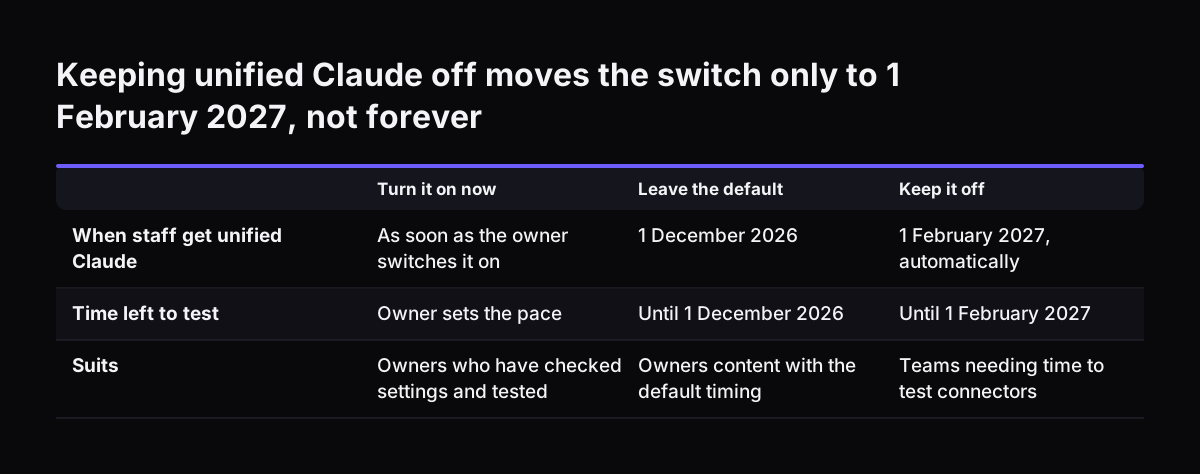
Keeping unified Claude off only delays the switch to 1 February 2027

Keeping unified Claude off buys a Team owner about two months, not a permanent opt-out. An owner can keep the new experience off past 1 December 2026. On 1 February 2027, Anthropic retires the separate chat and Cowork experience, and any users still on it move to unified Claude automatically.

Organisations set up with zero data retention are the one exception. According to Anthropic's help centre article on setting up unified Claude for Team, these organisations keep using chat and Cowork as they do today. Their owners cannot turn the new experience on.

The three options for a Team owner compare as follows.

OptionWhen staff get unified ClaudeCan you go back?Suits
Turn it on nowAs soon as the owner enables itNo, accounts cannot switch backTeams whose settings and integrations are already checked
Leave the default1 December 2026NoTeams that can finish their checks before that date
Keep it off1 February 2027 at the latestNo, the separate experience is retiredTeams that need time to rework integrations that break

Keeping it off has a cost beyond the delay. Staff on the separate experience miss every new feature released in the meantime. Use the extra weeks for testing, not for waiting.

Keeping unified Claude off moves the switch only to 1 February 2027, not forever. Turn it on now / Leave the default / Keep it off. When staff get unified Claude: As soon as the owner switches it on / 1 December 2026 / 1 February 2027, automatically;

Cloud code execution and file creation must be on before unified Claude can run

Unified Claude requires the Cloud code execution and file creation capability to be on for your organisation, because longer tasks run remotely. It does not require Cowork or Cowork in the cloud to be on. Check this capability first, before you touch the unified switch.

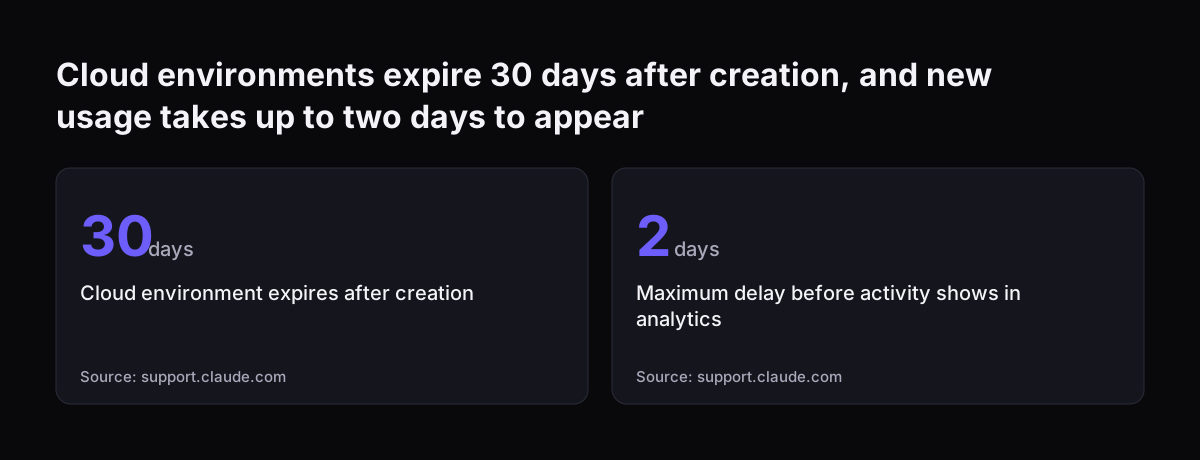
The cloud environment works per chat. Each chat that needs one gets its own virtual machine, managed by Anthropic. After a few minutes idle, the virtual machine stops and its disk is saved as an encrypted snapshot. The environment expires 30 days after it was created.

Deleting a chat also deletes the cloud sessions Claude started in it, including their transcripts. Tell staff this before they tidy up old chats. Work they still need should be downloaded or saved elsewhere first.

Network egress

Allow network egress is the setting that controls which internet destinations code in the cloud environment can reach. It has four positions: off, package managers only, a custom list of domains, or all domains. If code needs to reach an outside service, that service must be within what the setting allows. Decide the position deliberately rather than accepting whatever is set.

Once those settings are right, the owner turns the experience on under Organization settings > Capabilities by enabling Chat and Cowork unified.

Permission settings to review: Auto, Manual, computer use and trusted devices

Unified Claude on Team plans is rolling out with the Auto permission setting as the default. Auto means Claude keeps working without stopping to ask about each step, and automated safety checks run before it takes most actions. Manual means Claude asks before it takes actions, and the user chooses whether to allow each one. Enterprise plans default to Manual.

Decide whether Auto suits your team before 1 December. A team that drafts documents may be comfortable with Auto. A team whose connectors can change records in live systems may prefer Manual at first.

Computer use

Computer use lets Claude operate apps on a computer. On Team plans it is rolling out gradually in beta and works once an owner turns it on. By default Claude asks before permanently deleting files, but that protection does not cover computer use. Keep computer use off until you have agreed who may use it and on which machines.

Trusted devices

Require trusted devices is the setting that makes users verify each new device before it can connect to Claude on their computer remotely. Long tasks now run in the cloud while laptops are closed, so knowing which devices connect matters more. Our post on Claude Team admin settings for the owner walks through the wider settings page.

Seat allowances: heavier tasks use more, and reporting moves to a new line

Unified Claude makes heavy work easier to start, so seats can reach their usage limits sooner. Longer agentic tasks that search the web, run code or create files generally use more of a plan's usage limits than a quick question. Before the switch, staff chose Cowork for such work. Afterwards, the same chat can turn into a long task without anyone choosing.

Reporting changes but billing does not. Usage of members with access appears under Chat and Cowork unified, and moving usage to that line does not change how it is counted or billed. New activity can take up to two days to show up in analytics. Allow for that delay before you judge the first week.

Efficient mode is not available on Team plans. You cannot rely on it to stretch allowances.

Claude Meetings adds another source of usage. Claude Meetings is a beta feature in which Claude joins a Google Meet as a visible participant, takes notes and creates documents during the call. A November report notes that using connected tools during a meeting counts against the person's allowance and may create charges for the organisation. For how seats and usage turn into an annual figure, see what Claude costs and how to start.

Cloud environments expire 30 days after creation, and new usage takes up to two days to appear: Cloud environment expires after creation 30 days, Maximum delay before activity shows in analytics 2 days
Source: support.claude.com

Connected tools, skills and plugins carry over to unified Claude

Connected tools, skills and plugins carry over to unified Claude. Existing Cowork users keep their chats, projects, artifacts, connectors and skills, and everything is where they left it. What Cowork could do becomes available from any conversation, with the same context, skills and connectors.

Three terms matter here. A connector is the link that lets Claude work inside another app, such as Google Drive, Gmail, Microsoft 365 or Slack, while it carries out a task. Skills are instructions that teach Claude how a user likes a task done, which it follows whenever the task comes up. Plugins are add-ons that bundle skills and connectors for a user's role.

Carrying over is not the same as working the same way. A connector that someone used only in chat may now be called during a longer cloud task, under Auto permissions. At Svennis, we list every connector, skill and plugin in a client workspace before the switch and test each one in a single account with unified Claude on, so the owner finds the breakages before staff do.

If your team relies on Microsoft 365, our post on connecting Claude in Microsoft 365 and Teams covers the systems behind it. For plugin choices, see the Claude plugins directory for a small team.

Integrations and habits that tend to break after the switch to unified Claude

Some features and habits do not survive the switch to unified Claude. Anthropic's help centre lists current limitations, and other limits follow from the settings above. The ones to test are these:

  • Add from GitHub is not supported. Anyone who pulls files from GitHub into Claude needs another route.
  • Branching a conversation from an earlier point is not available.
  • Incognito chats still work, but Claude cannot create files or run code in them.
  • Local files and apps still need Claude Desktop open. Cloud tasks continue without it; local ones do not.
  • Network egress set to off or a narrow list blocks code that needs an outside destination.
  • Zero data retention organisations cannot use unified Claude at all.

Claude Meetings needs separate attention. According to the November report, it is on by default on Team plans and off by default on Enterprise. It is a Google Meet workflow, not a general bot for Zoom or Microsoft Teams. Owners cannot set Auto-join, the user setting that has Claude join meetings automatically, on a member's behalf.

Claude Meetings was also unstable at launch. At a 17 November check, Anthropic's incident page said Team customers could not add Claude to new calls and Auto-join remained paused. Check its status before you tell staff it is available.

A worked example: preparing a twelve-person Claude Team workspace

Take a twelve-person firm on Claude Team with one owner. Finance uses a Microsoft 365 connector for spreadsheets. Sales uses a project and a quoting skill. One operations manager adds files from GitHub. Nobody has looked at the admin settings since the plan was bought.

The owner works through the settings in this order:

  1. Open Organization settings > Capabilities and confirm Cloud code execution and file creation is on.
  2. Set Allow network egress to package managers only, then add a custom list if a tested task needs another domain.
  3. Switch the default permission to Manual for the first week, because the Microsoft 365 connector can edit live files.
  4. Leave computer use off and turn on Require trusted devices.
  5. Turn on Chat and Cowork unified for the owner's own account only, if the settings allow, and run the finance and sales tasks end to end.

The test shows two problems. The operations manager's GitHub routine fails, because Add from GitHub is not supported. A sales colleague who drafts quotes in incognito chats cannot get a file out. The owner agrees a new GitHub route with the operations manager. Sales moves quoting into normal chats inside the project.

The owner then enables unified Claude for everyone before 1 December. The firm controls the date instead of the default doing it.

The owner's checklist for unified Claude on Claude Team

The owner's checklist below covers every setting and test named in this guide. Work down it before you enable unified Claude, or before 1 December 2026 if you leave the default.

ItemWhere to checkWhat good looks like
Cloud code execution and file creationOrganization settings > CapabilitiesOn
Allow network egressAdmin settings for the cloud environmentA deliberate choice, tested against real tasks
Default permissionPermission settingsAuto or Manual, chosen for your riskiest connector
Computer useCapabilitiesOff until someone owns the decision
Require trusted devicesAdmin settingsOn if staff use several devices
Connectors, skills, pluginsA written list per teamEach one tested with unified Claude on
GitHub, branching, incognito habitsAsk each teamReplacement routes agreed
Claude MeetingsCapabilities, plus Anthropic's status pageOn or off by decision, not by default
Usage reportingAnalytics, Chat and Cowork unified lineChecked after two days, not on day one

Keep the completed list with your AI policy records. When something changes later, you will know what was tested and why each setting was chosen.

A one-week internal rollout of unified Claude, with a short staff note

A one-week rollout gives a Team owner a controlled switch to unified Claude without disrupting work. Run it in a normal working week, well before 1 December 2026.

  • Monday: complete the settings checks and send the staff note below.
  • Tuesday: turn on unified Claude for the owner and one person per team; run each team's main tasks.
  • Wednesday: fix what failed, such as egress domains, GitHub routes or incognito habits.
  • Thursday: enable unified Claude for everyone.
  • Friday: collect questions, and plan to read usage analytics the following week, once the two-day delay has passed.

Staff need a short note, not a training manual. Adapt this one:

From Thursday, Claude will no longer show separate Chat and Cowork options. You start every task in one conversation, and Claude moves longer work to the cloud by itself. Your projects, connectors and skills stay where they are. Three things change: you cannot add files from GitHub, you cannot branch a conversation, and incognito chats cannot create files.

Deleting a chat also deletes its cloud work, so save anything you need first. Long tasks use more of your allowance than quick questions. Questions go to [owner's name].

What the switch to unified Claude means for a UK company

For a UK company, the switch to unified Claude falls in the run-up to Christmas, and the hard deadline in early February. If you plan to keep it off, schedule the testing before the break. Otherwise the February retirement arrives while half the team is catching up.

Data handling deserves a fresh look in your records. Heavier tasks now run in an Anthropic-managed cloud environment by default, not only when someone chose Cowork. Each environment is saved as an encrypted snapshot when idle and expires 30 days after creation. Deleting a chat deletes its cloud sessions and transcripts. Record these points wherever you describe how staff use Claude.

Claude Meetings raises its own questions. The meeting page keeps a live transcript, summary, action items and screen descriptions, but not audio, and Anthropic's guide does not state a retention period. If external guests are blocked, Claude stays out of calls with an outside person invited and leaves if one joins. Settle that setting before client calls take place.

Many UK firms run meetings in Microsoft Teams. Claude Meetings works with Google Meet only, so those firms gain nothing from it yet.

Next steps for getting Claude Team ready for unified Claude

Getting Claude Team ready for unified Claude comes down to a few concrete actions this month. Do them in this order:

  1. Open Organization settings > Capabilities and confirm cloud code execution and file creation is on.
  2. List every connector, skill and plugin your teams use, with an owner for each.
  3. Choose Auto or Manual, and decide on computer use, trusted devices and Claude Meetings.
  4. Test unified Claude in one account per team, then run the one-week rollout.
  5. Read the Chat and Cowork unified usage line once two days have passed.

If you would rather have the workspace prepared with you, Svennis works in four steps: a Workshop, a pilot, the department Activation, then monthly operations. For a whole team on Claude, Pilot Claude B sets up Claude Team in 30 days, including the connections to your own systems. For each connection we build a connector, an MCP server, a plugin or a skill, show you the options with their cost, and you choose.

Sources

  1. Anthropic: Claude Cowork and chat are now one Claude
  2. Claude Help Center: Claude Cowork and chat are one Claude
  3. Claude Help Center: Set up and manage the new unified Claude experience for your Team organization
  4. GrowthForgeAI Signal: Claude Meetings setup, Team access paused, Enterprise restored
Free, 30 minutes

Pick a time. Bring the process this article made you think of.

You leave with a clear yes or no on putting Claude on it, and the step that fits from our published prices. You speak to someone who builds the agents, not a salesperson.

Prefer to call? +44 7588 772736 · Not ready to talk? See it on your business first.

30 minutes · video call · free
  1. 1Time
  2. 2Details
  3. 3Booked