Skip to content
SVENNISAIWe speak Claude.
Blog · Claude memory

Claude memory at work: what to switch on, what to leave off and how to protect client data

A practical guide for Claude Team owners. It covers chat search, memory in Projects and Cowork, what admins can and cannot control, and the data rules to settle before staff rely on memory.

9 min read

Book a 30-minute call · with a Claude Certified Architect from our team.

Article · 9 min read
Abstract layered shapes separating into distinct compartments, suggesting memory kept apart by project

Claude memory at work: switch it on per member, and keep clients in Projects

For Claude memory at work, here is what to switch on. Turn memory on for the organisation, let each member switch it on once they know the rules, and keep every client inside its own Project. Leave the sensitive-topics option off. Use incognito chat for one-off confidential questions. Agree your data rules before staff rely on what Claude remembers.

Claude memory is a structured set of facts and preferences that Claude derives from your conversations and carries into later chats. It is not a transcript of what you said. In the current version, Claude saves memory as individual topics while you chat. It no longer writes a summary after each conversation ends.

The default depends on the plan. Memory is on by default for Free, Pro and Max. On Team and Enterprise, the owner decides whether memory is available, and it stays off for each member until that member turns it on. That difference matters if staff have used Claude on personal plans before. Their habits come from a setting where memory was always on.

The rest of this guide covers how chat search and memory differ and how memory behaves in Projects, Cowork and Claude Code. It then sets out what an owner controls, a decision table, a worked example and the rules to agree first.
Chat search and memory are two different Claude features

Chat search and memory both reuse your past work, but in different ways. Chat search looks through earlier conversations when you ask it to. Memory carries forward what Claude has judged worth keeping, without being asked.

How chat search works

Chat search is available on the paid plans: Pro, Max, Team and Enterprise. It runs on the web, in Claude Desktop and in the Claude mobile apps. It uses retrieval-augmented generation (RAG), which means Claude fetches relevant passages from past chats and reads them before it answers. Each search appears as a tool call in the conversation, so you can see when Claude has looked something up.

One exception matters for larger firms. On an Enterprise plan with customer-managed encryption keys, past chats cannot be searched, because the conversation content is encrypted.

How memory works

Memory is built from topics that Claude saves as you talk. Those topics then shape new conversations. The older memory design updated its synthesis every 24 hours. The current one updates during the chat itself.

The practical difference is simple. Chat search finds what someone said. Memory decides what Claude keeps. For a team owner, memory is the feature that needs rules, because nobody asks for it each time.

How Claude memory behaves inside Projects, and where it crosses over

Each Claude Project has its own memory. A Project is a shared workspace for one piece of work, such as one client or one internal process. Claude uses a Project's memory alongside the memory from chats outside any Project. It does not use memory from other Projects. That rule comes from Anthropic's help centre article on chat search and memory.

The separation between Projects and general chat is not complete. Client A's Project does not use what Claude learned in Client B's Project. However, anything a member says in a general chat, outside a Project, can surface in every Project that member opens. New memory saved in a Project can also be referenced in chats outside Projects. To keep a client's Project fully separate, turn off Use account memory on that Project's page.

Two behaviours catch people out:

  • Deleting a chat does not delete the memories that chat created.
  • Reset memory permanently deletes all memories, including Project memories, and cannot be undone.

The working rule follows from this. Do all client work inside that client's Project, and keep general chats for internal topics that every Project may safely see. If your team has not set up Projects yet, our guide to Claude Projects and skills for a small team covers the structure.

Claude memory in Cowork and Claude Code follows different rules

Cowork and Claude Code handle memory differently from chat. Your team needs to know which rule applies where.

Cowork

Cowork is Anthropic's desktop AI agent for multistep tasks. When Cowork runs in the cloud, it shares memory with Chat. Cowork sessions that run locally on your computer do not use memory at all. A cloud Cowork task on client files can therefore add to the same memory that shapes general chats. Our page on Claude Cowork for UK firms explains the plans and data side in more detail.

Claude Code

The memory feature in the Claude app does not apply to API access or to Claude Code. Claude Code has its own two mechanisms instead. CLAUDE.md files are Markdown files of instructions that Claude reads at the start of every session. Auto memory is a set of notes Claude writes for itself from your corrections and preferences.

Auto memory is on by default in local sessions. It is machine-local, so its files are not shared across machines or cloud environments. Claude treats both mechanisms as context, not enforced configuration. To block an action outright, the documentation points to settings rules or a PreToolUse hook.

Organisations can also distribute a centrally managed CLAUDE.md with MDM, Group Policy or Ansible. Developers cannot exclude that file.

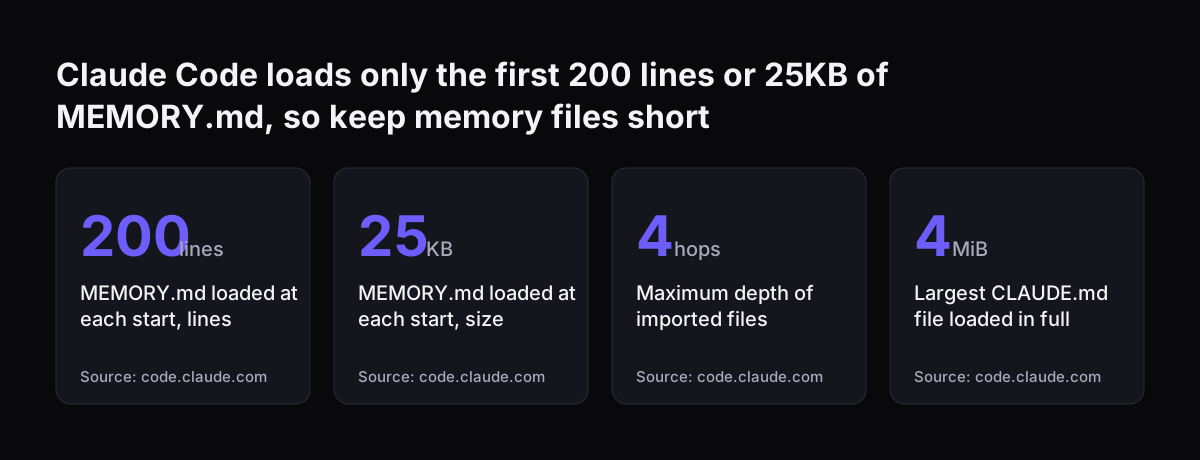
Claude Code loads only the first 200 lines or 25KB of MEMORY.md, so keep memory files short: MEMORY.md loaded at each start, lines 200 lines, MEMORY.md loaded at each start, size 25 KB, Maximum depth of imported files 4 hops, Largest CLAUDE.md file l
Source: code.claude.com

What a Claude Team owner controls, and what the owner cannot see

A Claude Team owner controls whether memory is available to the organisation at all. Once the owner makes it available, each member still has to turn it on. Owners do not switch memory on for people.

The off switch is drastic. When an owner turns memory off for the organisation, all existing memory entries for all users are deleted immediately. On Enterprise, admins can disable memory for the organisation at any time. Treat the organisation setting as a decision you make once, after the rules are agreed, rather than a toggle you test.

The bigger limit is visibility. Owners cannot view or edit a user's individual memories, and individual member edits to memory are not logged. If a member's memory holds a client's figures in the wrong place, the owner has no screen to find it. Only the member can see and correct it in their own settings.

Some further conditions apply:

  • Standard data retention settings apply to memory on Team and Enterprise.
  • The new memory experience is not available to organisations with HIPAA or public-sector agreements.
  • Chat search is unavailable where Enterprise customer-managed encryption keys are in use.

If these controls decide your plan, our comparison of Claude Team and Enterprise sets out the differences.

What Claude memory excludes by default, and what it will happily keep

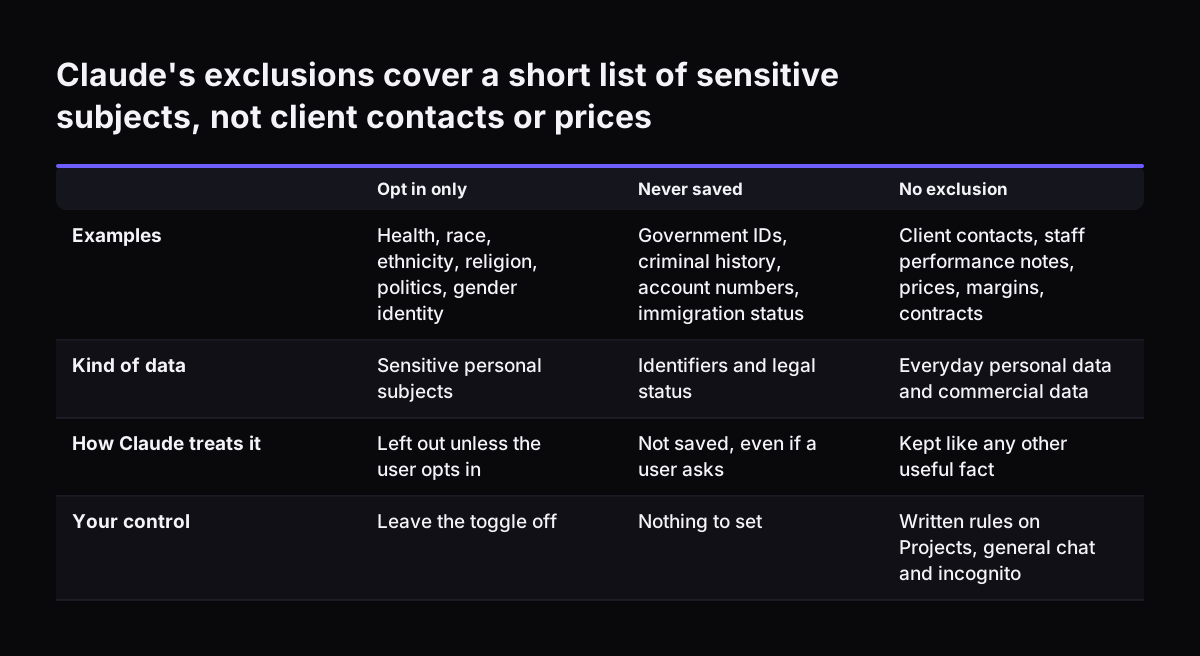
Claude memory leaves some personal subjects out by default. It does not store topics such as health, race, ethnicity, religious beliefs, politics or gender identity unless the user opts in through a toggle. A second list is never saved, even if a user asks: government ID numbers, criminal history, financial account numbers and immigration status. Memory entries are stored with encryption at rest.

These exclusions cover a short list of sensitive subjects. Everyday personal data, such as a client contact's name and email, is not excluded, and nor is business data. Client names, prices, margins, contract terms, staff performance notes and pipeline figures appear on no exclusion list. Claude will treat them like any other useful fact.

For a Team owner, the conclusion is direct. Leave the sensitive-topics opt-in off for everyone, because no business process needs it. Then cover commercial and client data with your own rules, since the product will not do that for you.

One more setting helps here. Pause memory keeps existing memories but stops Claude using them or making new ones. Conversations held while memory is paused are not added to memory. A member can pause memory for a sensitive stretch of work and resume it afterwards, without losing what Claude already knows.

Claude's exclusions cover a short list of sensitive subjects, not client contacts or prices. Opt in only / Never saved / No exclusion. Examples: Health, race, ethnicity, religion, politics, gender identity / Government IDs, criminal history, account

Claude memory settings to switch on and leave off: a decision table

The table below lists each memory-related setting, who controls it and what we recommend for a business team on Claude Team.

SettingWho controls itRecommendationReason
Memory for the organisationOwnerOn, once the rules are agreedTurning it off later deletes every member's memory at once
Memory for each memberMemberOn for staff who know the rulesIt is off for each member until they turn it on
Generate memory from past chats at set-upMemberOff where past chats mix clientsIt builds memory from old conversations in one go
Chat searchMemberOnEach search shows as a visible tool call
Sensitive topics opt-inMemberLeave offNo business process needs it
Incognito chatMemberUse for one-off confidential questionsNot saved to history or memory, not searched
Pause memoryMemberUse for a sensitive stretch of workKeeps existing memory and adds nothing new
Reset memoryMemberOnly on leaving or after a mistakePermanent, includes Project memories
One Project per clientOwner and membersAlways, for client workEach Project's memory stays separate from the others

Incognito chat is available to all Claude users. Note that incognito conversations are still retained for at least 30 days for safety purposes, so "incognito" does not mean "never stored".

Worked example: Claude memory for a ten-person agency with three clients

Take a ten-person agency on Claude Team with three retainer clients. Here is how memory fits into a normal week.

  1. The owner agrees the rules first. The team signs off a one-page note on what goes where. Only then does the owner make memory available to the organisation.
  2. The owner creates three Projects, one per client, and adds the account team to each.
  3. An account manager turns memory on. She declines the offer to generate memory from her past chats, because those chats mixed all three clients.
  4. She sets house style in a general chat. British spelling, short sentences, no jargon. That memory now helps in every Project, which is exactly the intent.
  5. Client work stays in the client's Project. Contact history she looks up in Zoho CRM goes into that client's Project only. Claude learns the client's reporting preferences there and nowhere else.
  6. A one-off question goes to incognito. When she needs a second opinion on a pricing dispute, she opens an incognito chat. Nothing reaches memory or chat search.
  7. On Friday she opens Settings > Memory. She reads the topics and deletes anything client-specific that ended up outside its Project.

The Friday check carries the most weight, because the owner cannot do it for her. At Svennis we create the client Projects before anyone switches memory on. We then ask each member to review Settings > Memory after their first week, since that is when stray client details show up.

Keeping client and shared data out of Claude memory: the rules to agree first

Client data stays out of the wrong memory only if the team follows a few written rules. The product gives each member the tools. It gives the owner no way to check. Settle these points before staff rely on memory:

  • What general chat is for. Internal topics only: house style, roles, your own processes. No client names.
  • Where client work happens. Inside that client's Project, every time, including drafts and quick questions.
  • When to use incognito. One-off confidential questions that should leave no trace in memory or search.
  • Which Cowork mode suits client files. Cloud Cowork shares memory with Chat. Local Cowork sessions do not use memory.
  • How often members review memory. Deleting a chat does not remove what it taught Claude, so set a regular check in Settings > Memory.
  • What happens when someone leaves. Decide whether the member resets memory, and note that Reset also clears Project memories.
  • Retention and encryption. Confirm your retention settings, because they apply to memory. Enterprise firms with customer-managed keys should expect chat search to be unavailable.

Keep the note to one page so people actually read it. Revisit it whenever Anthropic changes how memory works, as it did when memory moved from a daily summary to topics saved during the chat.

What Claude memory means for a UK company on Claude Team

For a UK company, memory is a data protection question before it is a productivity one. Your existing duties still apply. You need to know what Claude stores, how long it is kept, who can see it and who can delete it. Answer those for memory in the same records where you already describe chat history.

The pack of facts you need is short:

  • Team and Enterprise plans have no model training on your content by default.
  • A custom retention period that covers chats also applies to memory, but not to Project memory, which stays until the Project is deleted.
  • Deleting a chat does not delete the memories it created.
  • Memory entries are encrypted at rest.
  • Owners cannot view individual memories on screen. Memory entries are included in the organisation's data export, so include memory when you search for a subject access request.
  • Incognito chats are kept for at least 30 days for safety purposes.

Plan size and cost frame the decision too. Claude Team covers teams of 2 to 150. A standard seat costs $20 per seat per month billed annually, or $25 billed monthly, on Anthropic's pricing page. Prices are in US dollars, so the sterling cost moves with the exchange rate. Our guide to what Claude costs and how to start puts these figures in context.

Firms that need customer-managed encryption keys should note the trade-off. Those keys come with Enterprise, and with them chat search is switched off.

Next steps for a Claude Team owner setting up memory

A Claude Team owner can have memory set up safely within a week. Take these steps in order:

  1. Read Anthropic's help centre article on chat search and memory, which is the reference for every setting above.
  2. Write the one-page rules note: general chat, Projects, incognito, Cowork mode, reviews and leavers.
  3. Create one Project per client or process before anyone turns memory on.
  4. Make memory available to the organisation, and ask a small group to switch it on first.
  5. After a week, have that group review Settings > Memory and report what they found in the wrong place.
  6. Adjust the rules, then open memory to the rest of the team.

If you would rather have help, Claude Team Adoption sets your team up on Claude, memory and Projects included. A wider rollout runs through Pilot Claude B, described on our Claude Team pilot page.

Sources

  1. Use Claude's chat search and memory to build on previous context, Claude Help Center
  2. Bringing memory to teams, Claude by Anthropic
  3. Plans and pricing, Claude by Anthropic
  4. How Claude remembers your project, Claude Code Docs
  5. Claude Memory: What It Stores and How to Delete It, LumiChats
Free, 30 minutes

Pick a time. Bring the process this article made you think of.

You leave with a clear yes or no on putting Claude on it, and the step that fits from our published prices. You speak to someone who builds the agents, not a salesperson.

Prefer to call? +44 7588 772736 · Not ready to talk? See it on your business first.

30 minutes · video call · free
  1. 1Time
  2. 2Details
  3. 3Booked