SVENNISAI
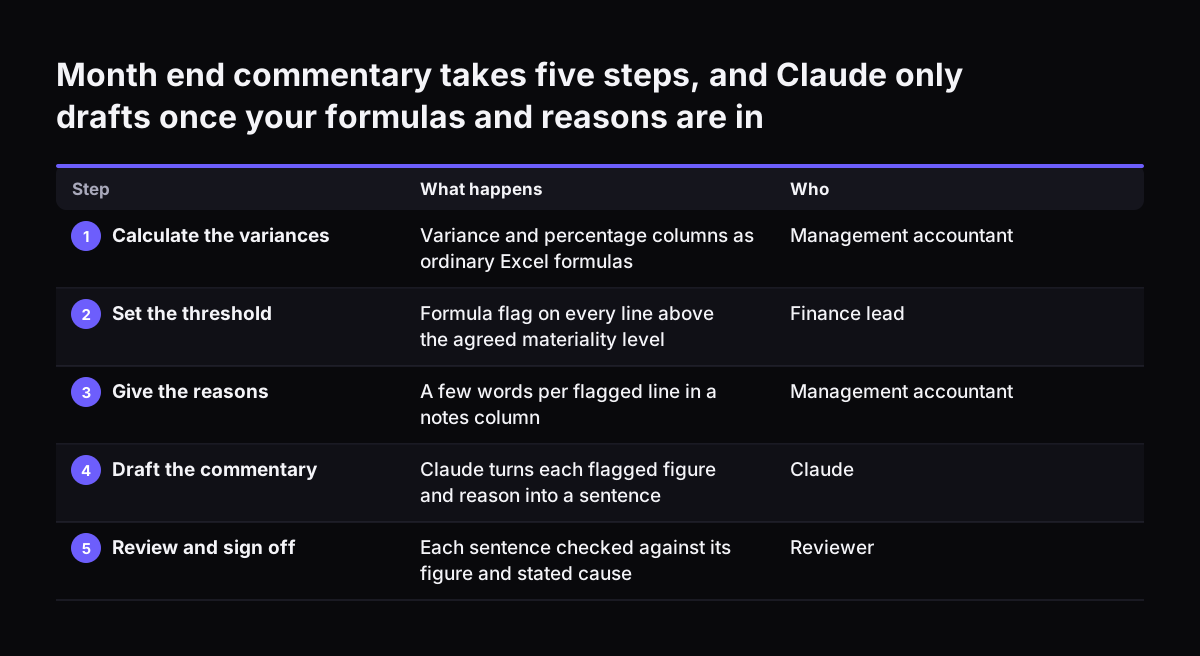
Claude for Excel saves a UK finance team the most time on the writing and explaining around the numbers. That means variance commentary, notes on reconciliation breaks and plain-English walkthroughs of a model. The numbers themselves should still come from Excel's own formulas. Before you rely on it, name a reviewer, set a sign-off rule and list the data that stays out.
Claude for Excel is Claude, Anthropic's AI assistant, working inside Excel itself rather than in a separate chat window. It is one part of Claude for Microsoft 365, which also works inside PowerPoint, Word and Outlook. When Claude changes your workbook, the edited cells are highlighted, so you can see exactly what it touched.
Two other features matter for finance work. First, context carries across the four apps in one conversation, so commentary drafted in Excel can move into a Word report or a PowerPoint board pack. Second, a process that works can be saved as a skill, which is a stored workflow the whole team can run the same way in all four apps.
If Claude is new to you, start with our plain guide to what Claude is. This guide stays with the spreadsheet. For finance work outside Excel, such as policy questions and contract triage, see our post on what Claude takes over in the finance team.