Skip to content
SVENNISAIWe speak Claude.
Blog · Claude for PowerPoint

Claude for PowerPoint: decks in your company template, set up and checked

Claude for PowerPoint builds slides inside your own template. This guide covers the setup, the slide master, a reusable skill and the review that stops decks drifting off-brand.

9 min read

Book a 30-minute call · with a Claude Certified Architect from our team.

Article · 9 min read
Abstract cover with stacked rectangular layers aligning into one grid, suggesting slides falling into a template

Claude for PowerPoint builds decks in your company template

Claude for PowerPoint: decks in your company template are what the add-in produces when you set it up well. It works inside PowerPoint and builds slides from the template you already have open. Anthropic's product page says it will "build slides in your template", edit the content you select, and generate native charts and diagrams. The output stays on-brand when you prepare the template, write down your rules and check every deck before a client sees it.

Claude for PowerPoint is the add-in that puts Claude inside PowerPoint, so you can give it instructions while your own file and template stay open. It belongs to Claude for Microsoft 365, which also works inside Excel, Word and Outlook. Within one conversation, context carries from one of those apps to the next.

This guide is for a director or sales lead who wants decks without the reformatting afterwards. It covers four things:

  • what you need before you start
  • how to prepare the slide master
  • how to turn your deck rules into a reusable skill
  • how to review a deck before it leaves the building

One worked example runs through the middle of the guide. A checklist table follows it.
What you need before you start: a paid Claude plan and the add-in

Claude for PowerPoint requires a paid Claude plan. Anthropic states that Claude for Excel, PowerPoint and Word are generally available on all paid Claude plans. Claude for Outlook is still in beta on those plans. You sign in to the add-in with a Claude account or connect through your existing cloud provider. Anthropic lists Amazon Bedrock, Gemini Enterprise Agent Platform and Microsoft Foundry as available routes. For a company, the practical choice is usually between individual Pro accounts and a shared Team plan. The Claude pricing page lists three relevant options: - Pro costs $17 per month with an annual subscription, or $20 billed monthly. - The Team plan is for teams of 2 to 150, with standard seats at $20 per seat per month billed annually, or $25 billed monthly. - On Team and Enterprise, Anthropic does not train models on your content by default. A shared plan matters for this subject. Skills you build for your template can then be used by the whole team, not just by the person who wrote them. If you are still weighing the two plans, our post on choosing between Claude Pro and Claude Team sets out the differences. Every plan has usage limits that reset on a rolling five-hour window, and paid plans add weekly limits. Long decks with many revisions use more of that allowance than a single chat does. Plan for it if several people build decks on the same day.

Prepare the slide master so Claude has the right layouts to choose from

The slide master is the part of a PowerPoint template that stores its layouts, fonts, colours and formatting rules. Claude for PowerPoint works from it. SlideSpeak's guide to the add-in says that when it generates or edits slides, it "uses your existing layouts, fonts, colors, and formatting rules". A messy master therefore produces messy decks, even when Claude follows it faithfully. Before anyone writes a prompt, look at the master as a stranger would. Many company templates collect layouts over the years. Some are duplicates, some are one-off designs for an old event, and some carry names that say nothing about their purpose. Claude has to choose between them, and so does every colleague. At Svennis, we tidy the slide master before anyone writes a prompt. We delete layouts nobody uses and rename the rest by purpose, such as "Agenda" or "Chart with one takeaway", so the right layout is easy to pick and easy to name in a skill. Three checks are worth making on the master itself: - Each layout has a clear name that describes its job. - Brand fonts and colours sit in the master, not in manual formatting on individual slides. - Your logo, footer and confidentiality line live on the master, so every new slide inherits them. Save the cleaned file as the one company template. Then tell the team which file it is.

Save your deck rules as a skill the whole team can trigger

A skill is a saved, repeatable workflow that teaches Claude how you do a particular job. Anthropic's product page puts it plainly: "When a process is right, save it as a skill. The team can use it the same way in all four apps." In the PowerPoint add-in, you trigger a skill with a slash command, according to SlideSpeak's guide. A deck skill turns your house style from tribal knowledge into written instructions. Without one, every person types their own prompt. Each prompt is phrased differently, so each deck comes out slightly different. A shared skill gives everyone the same starting rules. A good deck skill states rules you can check afterwards. For example: - which layout to use for the title, agenda, section breaks and charts - the maximum number of bullet points per slide - the tone of headlines, for instance a full sentence that states the finding - where figures may come from, and that any slide with a number must name its source - what the closing slide must contain, such as next steps and a named owner Do not rely on Claude remembering your preferences from earlier chats. The Claude release notes state that memory is off by default for Team and Enterprise organisations. Rules that matter belong in the skill, where every user gets them every time. Supporting material can help too. If your brand guidelines or approved product descriptions sit in documents, our guide to building a company knowledge base Claude can use shows how to keep that material in one place.

Worked example: a client review deck built from meeting notes

Here is how a sales lead might build a quarterly client review deck with Claude for PowerPoint. Every step uses a feature that Anthropic or SlideSpeak describe.
  1. Open the template. Start a new file from the cleaned company template, so the slide master is in place before Claude touches anything.
  2. Add the source material. Drop your meeting notes, saved as a PDF or Word document, into the Claude sidebar. Anthropic says Claude reads a dropped file alongside the open one.
  3. Trigger the skill. Run your deck skill with its slash command. Then ask for a ten-slide client review covering results, open issues and proposed next steps, using only the notes provided.
  4. Edit by selection. If one slide is too dense, select it and ask Claude to split it into two using the "Chart with one takeaway" layout. The product page says Claude edits what you have selected.
  5. Add a chart. Ask for the quarterly volumes in the notes as a native chart. A native chart can be edited later like any other PowerPoint chart.
  6. Carry it across apps. If the volumes sit in an Excel file, open it in the same conversation. Anthropic says context carries from Excel to PowerPoint.
The result is a draft in your template, not a finished deck. The next step is the review, described in the checklist further down this guide. When the draft needs little rework, update the skill with what you learned. That way the next person starts from a better set of rules.

Why Claude output drifts off-template, and how to stop it

Off-template drift is when a deck stops matching your slide master and brand rules. It shows up as odd fonts, unfamiliar layouts or slides that look nothing like the rest. In practice, it has three common causes.

Building the deck outside PowerPoint

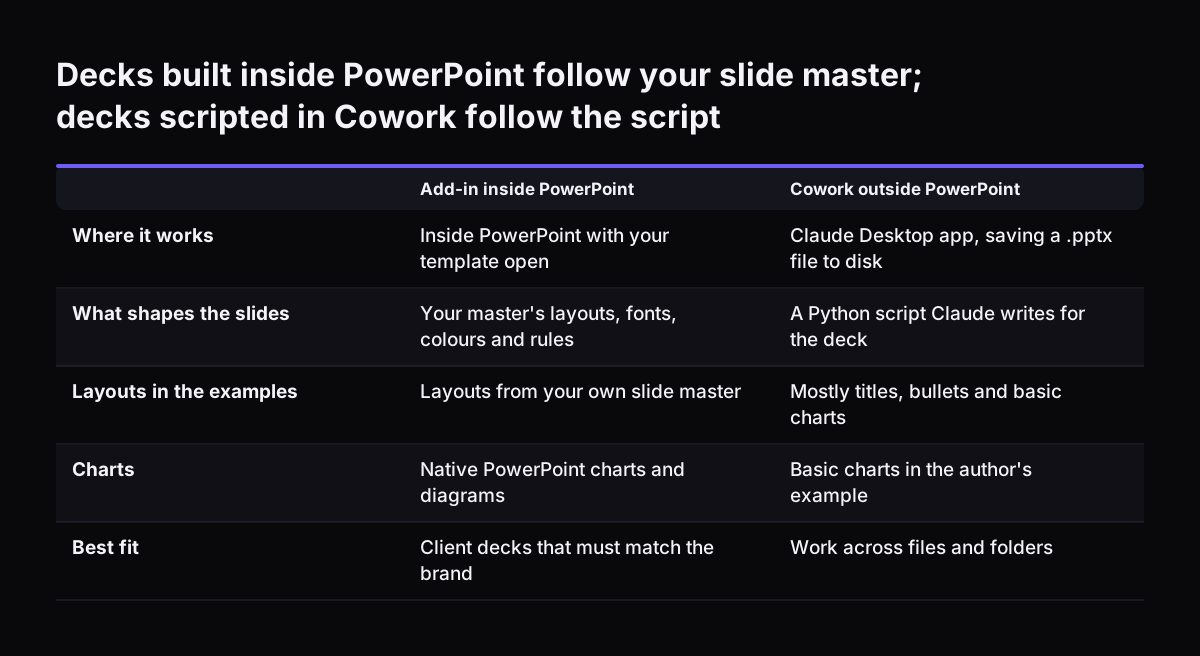
Claude can also create presentation files outside PowerPoint. In SlideSpeak's example, Claude Cowork, a desktop agent in the Claude Desktop app, wrote a Python script using python-pptx and saved a .pptx file to disk. The author found the layout variety limited, mostly titles, bullets and basic charts, with no custom graphics generated. Cowork has its place for files and folders, and our guide to Claude Cowork for UK firms explains where it fits. For decks that must follow your company template, build them in the PowerPoint add-in, which works from your slide master.

Everyone prompting differently

Ten people writing ten prompts produce ten styles. The fix is the shared skill described above, triggered by slash command, so every deck starts from the same rules.

Numbers without a source

Drift is not only visual. The 2Slides guide warns that without source material, "Claude will confidently generate plausible-looking percentages, market sizes, and quotes." A slide can be perfectly on-brand and still be wrong. Always give Claude the source documents, and tell it in the skill to use nothing else.
Decks built inside PowerPoint follow your slide master; decks scripted in Cowork follow the script. Add-in inside PowerPoint / Cowork outside PowerPoint. Where it works: Inside PowerPoint with your template open / Claude Desktop app, saving a .pptx f

Review checklist before a client sees a Claude-built deck

Review every deck Claude builds before it reaches a client, however good the draft looks. Brand drift is quick to spot. A wrong figure is not, and it costs more. The table below sets out what to check, what to look for and who should do it.
CheckWhat to look forWho checks
LayoutsEvery slide uses a named layout from the master, with no stray designsDeck owner
Fonts and coloursBrand fonts and colours throughout, with no manual overridesDeck owner
FiguresEvery number traces back to a source document you suppliedPerson who owns the data
Quotes and namesNo quotes or client names that are missing from the notesAccount lead
ChartsNative charts with correct values and axis labels you can editDeck owner
CommitmentsPrices, dates and promises match what the company has agreedSales lead or director
Closing slideNext steps with named owners, as the skill requiresAccount lead
Two people should share the review when the deck carries figures or commitments. The deck owner checks the look. Someone who knows the numbers checks the substance. Note the problems you find. When the same fault turns up twice, add a rule to the skill rather than fixing it by hand every time.

What Claude for PowerPoint means for a UK company

For a UK company, the main decisions concern the plan, the data you put into decks and who signs off. They are management choices more than technical ones.

Plan and data settings

Client decks often contain commercial or personal information. On the Team and Enterprise plans, Anthropic's pricing page states that it does not train models on your content by default. The release notes state that memory is off by default for Team and Enterprise organisations. Both settings point a company towards a business plan rather than personal accounts. Our page on how Claude runs in your company, from account to data to UK law covers the wider questions to settle first.

Pricing in dollars

The Claude pricing page lists its prices in US dollars. Budget with that in mind, and confirm the final cost in your account before you commit.

Who signs off

Decide who may send a Claude-built deck to a client without a second reviewer. Most firms will want a named approver for decks that carry prices or contract terms. Write that rule down next to the skill, so it does not depend on habit. These points apply whether you have five staff or fifty. A smaller firm simply has fewer people to agree them with.

Next steps: pilot one deck type, then roll it out to the team

Start with one deck type that your team builds often, such as the client review or the new business proposal. Then follow these steps:
  1. Clean the slide master and save one company template.
  2. Write a deck skill with checkable rules, and test it on three real sets of notes.
  3. Run the review checklist on each draft and record what you had to fix.
  4. Update the skill, then share it with the rest of the team.
Measure the result in your own terms: the time from notes to a client-ready deck, and how many fixes the review still finds. When both fall, add the next deck type. If you already pay for Claude seats that are not yet doing this kind of work, Claude Relaunch puts paid seats to work on processes like this one. For a fuller start, Svennis works in four steps: the Workshop, then Pilot Claude A (an AI agent on Claude for one process) or Pilot Claude B (Claude Team for the whole team), the department Activation, and then monthly operations. Costs and the route in are set out in our guide to what Claude for business costs and how to start.

Sources

  1. Claude for Microsoft 365 | Claude by Anthropic
  2. Plans & pricing | Claude by Anthropic
  3. Release notes | Claude Help Center
  4. How to Create Presentations with Claude Cowork (2026 Guide) | SlideSpeak
  5. How to Use Claude to Make Presentations: Complete 2026 Guide | 2Slides Blog
Free, 30 minutes

Pick a time. Bring the process this article made you think of.

You leave with a clear yes or no on putting Claude on it, and the step that fits from our published prices. You speak to someone who builds the agents, not a salesperson.

Prefer to call? +44 7588 772736 · Not ready to talk? See it on your business first.

30 minutes · video call · free
  1. 1Time
  2. 2Details
  3. 3Booked