
Svennis AI
10 min read

A company knowledge base Claude can use, and how to build one from your documents

A knowledge base Claude can answer from depends on your documents more than the AI. This guide covers what to include, how to structure it, who owns it and how to test it.

Abstract cover showing scattered fragments settling into ordered, layered blocks connected by thin lines

Building a company knowledge base Claude can use starts with the documents

A company knowledge base Claude can use is a set of current documents that Claude reads to answer your staff's questions. Each document has a named owner and clear access rules. Most companies need to fix their documents before they connect anything. That means removing duplicates, splitting long files by topic, dating every page and deciding who may see what.

Your documents matter more than the model because Claude knows nothing about your company from training. Claude Opus 5.5 has a reliable knowledge cutoff of June 2026, according to Anthropic's models overview. It has never seen your staff handbook or your returns policy. Every answer about your business comes from what you give it.

So the quality of those answers follows the quality of the source. If two versions of your leave policy sit side by side, Claude may quote either. If a price list has no date, nobody can tell whether the answer is still true. The UK Government's AI Playbook states plainly that AI systems "are also not guaranteed to be accurate".

This guide covers four things in order. It covers which documents to include, what form they should take, how to keep them current, and how to test answers before your team relies on them.
Claude Projects and RAG are where a company knowledge base lives

A Claude Project is a self-contained workspace with its own chat history and its own knowledge base. You upload documents, text or other files to the project. You then write project instructions that shape how Claude answers, according to the Claude Help Center article on projects. For most small and mid-sized companies, a project is the simplest home for an internal knowledge base.

Projects rely on RAG for larger collections. RAG, or retrieval augmented generation, means Claude searches the knowledge for the passages relevant to a question and reads those, rather than holding every document in view at once. When project knowledge approaches the context limit, Claude switches to RAG mode and expands capacity by up to 10 times. This enhanced project knowledge is only available on paid plans: Pro, Max, Team or Enterprise.

The context window is the amount of text a model can consider at once. Claude Opus 5.5 and Claude Sonnet 5 each have a 1M-token window, while Claude Haiku 4.5 has 200K tokens. A larger window helps, but it does not fix a contradictory document.

Some knowledge should not be uploaded as a file at all. Figures that change daily, such as ticket status or stock levels, are better read from the live system. Anthropic's MCP connector links Claude to remote MCP servers from the Messages API, as the Claude features overview describes. MCP, the Model Context Protocol, is the standard way to give Claude access to another system. If your documents already sit in SharePoint, see our guide to connecting Claude to Microsoft 365 and Teams.

Which documents to include in the knowledge base, and which to keep out

Include only documents that are approved, current and meant for the people who will ask the questions. Everything else makes answers less reliable or exposes information to the wrong people. The table below sets out the decision for the document types most companies hold.

Document typeInclude?Condition
Approved policies and proceduresYesNamed owner, approval date and review date at the top
Product and service descriptionsYesLatest version only, older versions removed
Help articles and FAQsYesChecked against the policy each one summarises
Drafts, old versions, meeting notesNoThey contradict the approved text
HR case files, personal data, individual contractsNoRisk of data leakage to anyone with access
Live figures: prices, stock, ticket statusConnect, do not uploadRead from the source system so the figure stays current

Help articles are a common source for these FAQs. If your support team writes articles in Zoho Desk, check each one against the policy behind it before you copy it across.

Data leakage is the risk behind the fifth row. The UK Government's AI Knowledge Hub defines data leakage as a model's responses revealing confidential information such as personal data. Your company AI policy on what staff may put into Claude should list the categories that never enter a shared knowledge base.

Document form: one topic per file, a plain title and a date

Claude answers best from documents that each cover one topic and say plainly what they are. With RAG, Claude reads passages rather than whole files. A passage that says "as described above" loses its meaning once it is pulled out alone. Write so that each section of a document stands on its own.

A document ready for a knowledge base usually has these features:

  • A title that names the subject, such as "Expense claims policy", not "Policy v3 final".
  • A header block with the owner, the approval date, the review date and who the document applies to.
  • Rules written as statements: "Claims over the limit need director approval", not a story about how the rule came about.
  • Figures in tables with their units and the date they apply from.
  • Short sections with descriptive headings.

All current Claude models accept text and image input. Claude can therefore read a scanned page. A typed document is still easier for you to check, correct and replace than a scan. Convert scans of important policies to text before you upload them.

At Svennis we start every knowledge base project with a document audit rather than a connector. We list each file with its owner and last review date, then merge or retire the duplicates before anything is uploaded.

Ownership and review dates keep knowledge base answers current

A knowledge base stays current only when every document has one person responsible for it. That owner approves changes, replaces the old file in the project and removes superseded versions. Without an owner, stale documents stay in place, and Claude keeps quoting them with the same confidence as the new ones.

Give each document a review date in its header and hold owners to it. When a policy changes, the owner uploads the new version and deletes the old one on the same day. Leaving both in the project is the most common way a correct knowledge base turns wrong.

Keep editing rights narrow. Anthropic's guidance for deploying Claude Code recommends that "one central team configures MCP servers" so that everyone benefits from a single configuration. The same principle suits a knowledge base: a small group maintains it and everyone else reads from it.

Wherever your documents are stored, the source files remain the master copy. That might be Zoho WorkDrive, a Zoho Learn manual or a shared drive. The Claude project holds a copy, so update the source first and the project second, and never the other way round.

Finally, link ownership to testing. Every document change is a reason to re-run the questions that depend on that document. The testing section below explains how to set those questions up.

Permissions: who can see the knowledge base and who can change it

Anyone who can open a Claude Project can see its knowledge, so plan one project per audience. On Team and Enterprise plans, projects can be shared with other members of your organisation at two levels. "Can view" members see the project's contents, knowledge and instructions and can chat in it, but cannot edit it. "Can edit" members can change instructions and knowledge, add or remove members and update member settings.

This means an all-staff handbook project and a management project on pay bands must be separate. Putting both sets of documents into one project and hoping Claude keeps them apart is not access control.

Owners hold the organisation-wide switches. They can turn off project sharing for the whole organisation, or on Enterprise for specific roles. Existing shares stay in place when sharing is turned off, so audit current shares rather than assume the switch removed them. If an Owner or Primary Owner disables public projects, organisation-wide sharing is disabled at creation and afterwards.

Claude for Enterprise also adds role-based permissions, domain capture and compliance API access, according to Anthropic's enterprise deployment overview. Role-based permissions let you manage groups of staff as a unit rather than person by person. For a company with several departments, that is often the deciding reason to choose Enterprise over Team.

Worked example: a staff handbook project in Claude Team

A staff handbook project on a Claude Team plan shows the whole process in one place. Suppose an office manager wants staff to ask Claude about leave, expenses and IT requests instead of emailing her. She follows these steps.

  1. She audits the handbook folder, keeps the approved version of each policy and deletes drafts.
  2. She adds a header block to each policy with its owner, approval date and review date.
  3. She creates a project named "Staff handbook" and uploads the approved policies to its knowledge base.
  4. She writes project instructions, shown below.
  5. She shares the project with all staff as "Can view" and gives the HR lead "Can edit".
  6. She runs a test set of real staff questions before announcing the project.

Her project instructions read:

Answer only from the documents in this project. Name the document you used in every answer. If the documents do not answer the question, say so and tell the person to contact the document's owner. Do not guess at figures or dates.

These instructions make gaps visible. A reply that names its source can be checked in seconds. A reply that says "not covered, ask the HR lead" shows exactly which document is missing.

A new version of projects is rolling out in beta, starting with Claude Code, with Team and Enterprise to follow. Existing projects keep working as they do today, so the setup above remains valid.

Testing knowledge base answers before your team relies on them

Test a knowledge base with real questions and known answers before anyone relies on it. Collect the questions staff actually ask from inboxes, tickets and chat. For each question, write down the correct answer and the document it comes from. This list becomes your test set.

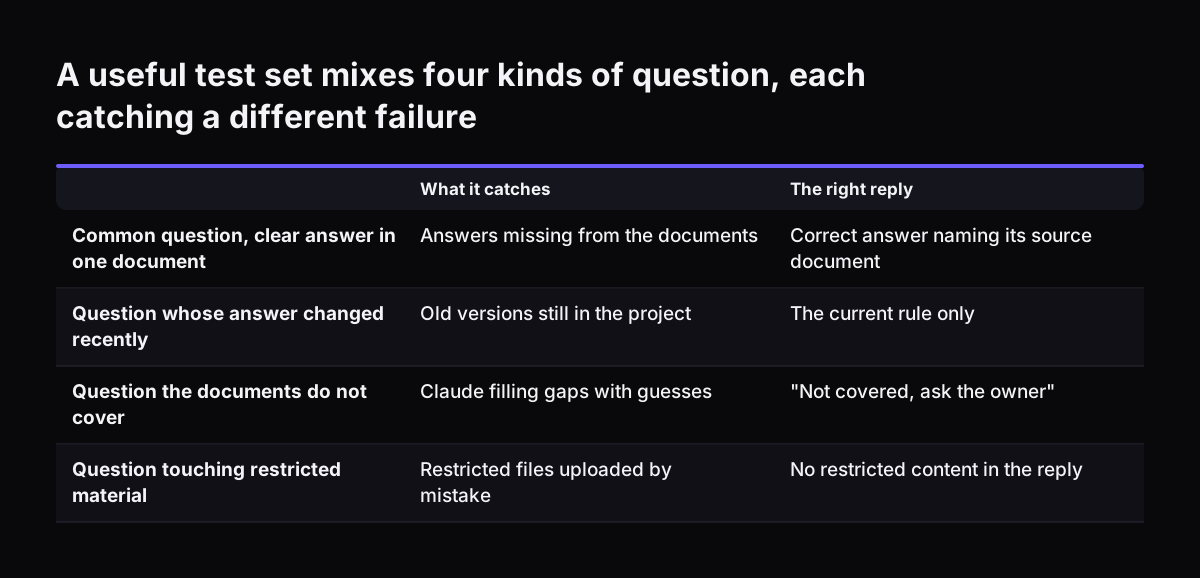
A useful test set covers four kinds of question:

  • Common questions with a clear answer in one document.
  • Questions whose answer changed recently, to catch old versions still in the project.
  • Questions the documents do not cover, where the right reply is "not covered, ask the owner".
  • Questions that touch restricted material, to confirm that material is absent.

Run every question and mark each reply as right, wrong or incomplete. The failures you are hunting are hallucinations. The UK Government's AI Knowledge Hub defines a hallucination as a response that "appears to be truthful but is actually false". When an answer is wrong, fix the document before you touch the instructions. Most wrong answers trace back to a missing, outdated or ambiguous source.

Re-run the relevant questions after every document change. Test on the model your staff will use. Anthropic suggests Claude Opus 5.5 as the starting point for most workloads.

Some answers should never go straight to action. The UK Government's AI Playbook says humans should validate any high-risk decisions influenced by AI. Decisions about pay, dismissal or a customer's legal position belong in that category.

A useful test set mixes four kinds of question, each catching a different failure. What it catches / The right reply. Common question, clear answer in one document: Answers missing from the documents / Correct answer naming its source document; Quest

Hidden instructions in documents are a knowledge base risk to plan for

A knowledge base that reads documents can also read instructions hidden inside them. The UK Government's AI Knowledge Hub page on security and risks states that "RAG tools are susceptible to indirect prompt injection". Prompt injection is the use of prompts that make a generative AI model behave in unexpected ways. The indirect form arrives inside content the model reads, rather than from the person typing.

For an internal knowledge base, the defence is mostly about sources. Upload only documents written or approved by people you know. Do not feed customer emails, supplier attachments or pages copied from the web into a staff knowledge base without review. Any of these could carry text written to steer Claude.

Restricted editing reduces the risk further. If only document owners hold "Can edit", fewer people can add content that has not been checked. Your test set helps here too: an answer that suddenly changes tone or recommends an odd action is worth tracing back to its source.

The same page lists data poisoning, data leakage and hallucination alongside prompt injection. A careful document audit, narrow permissions and a standing test set address all four at once.

What a Claude knowledge base means for a company in the UK

UK companies have a clear public benchmark for AI answers in the government's own guidance. The AI Playbook for the UK Government updates the Generative AI Framework for HMG, first published in January 2024. It sets 10 core principles for AI use in the public sector. It is written for government, but its practical points suit any business.

Two of those points apply directly to a knowledge base. Humans should validate high-risk decisions influenced by AI. Automated responses to the public should be labelled as automated, for example "this response has been written by an automated AI chatbot". If you later open your knowledge base to customers, add that label.

The liability question is not theoretical. The AI Knowledge Hub notes that a court in Canada found an organisation financially responsible for bad advice given by the hallucinating chatbot on its site. A customer-facing answer drawn from an outdated document is your answer, not Claude's.

Personal data raises the second UK consideration. Keep HR files and customer records out of shared projects. For the wider data protection checks, see our checklist on whether Claude is GDPR compliant for European firms.

Next steps: audit the documents, build one project, then test it

Start small and in this order. A single well-built project teaches you more than a company-wide rollout.

  1. Pick one audience and one subject, such as the staff handbook or IT help.
  2. Audit the documents for that subject: list each file, its owner and its last review date.
  3. Remove duplicates and drafts, and add header blocks to what remains.
  4. Create one Claude project, upload the approved files and write instructions that require a named source.
  5. Build a test set from real questions and run it before announcing the project.
  6. Share the project as "Can view" and keep "Can edit" with the owners.

Budget before you scale. Paid plans are needed for RAG on larger collections. Our breakdown of what Claude costs a ten person company per year covers seats and usage. If staff will ask questions in chat tools, our guide to Claude in Slack for internal support shows how answers and tickets fit together.

When the first project passes its tests, repeat the process for the next subject. For how this fits a wider approach, see our page on AI for knowledge management.

Sources

  1. 1. Claude Help Center: What are projects?
  2. 2. Anthropic: Models overview
  3. 3. Anthropic: Features overview, Claude Platform Docs
  4. 4. Anthropic: Enterprise deployment overview, Claude Code Docs
  5. 5. AI Knowledge Hub (UK Government): Security and risks
  6. 6. GOV.UK: Artificial Intelligence Playbook for the UK Government

Related articles