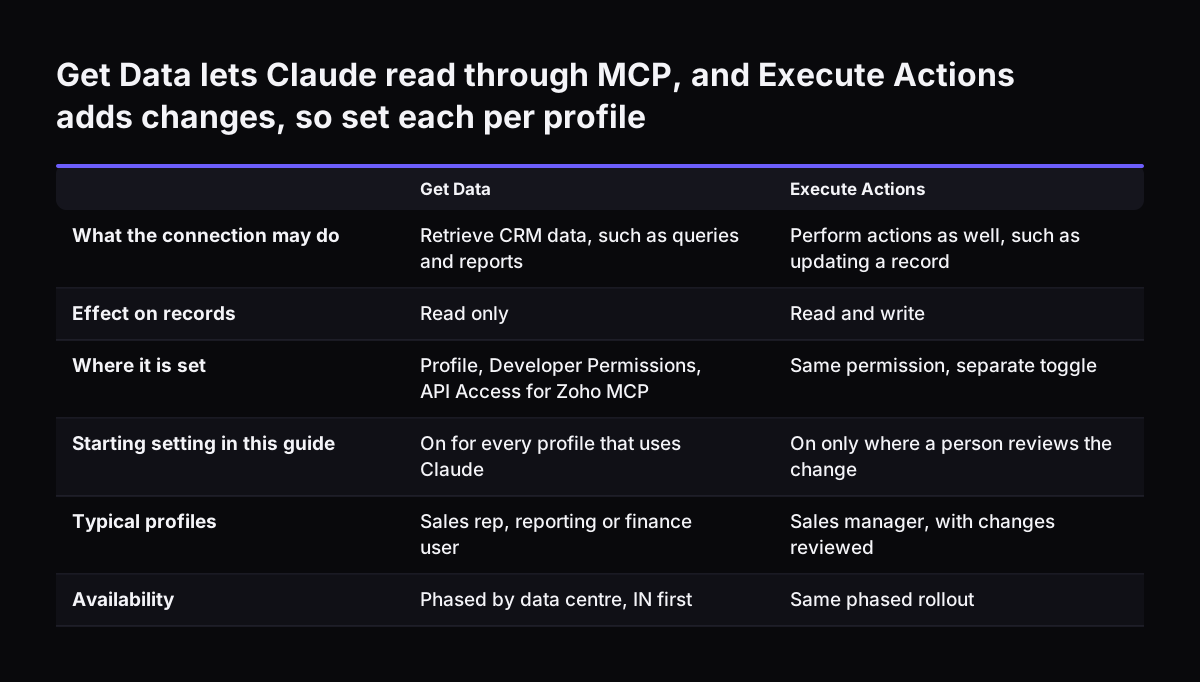
Zoho permissions for what Claude sees are the settings in Zoho CRM that limit which records and actions an AI assistant can reach. Claude connected through Zoho's MCP servers works as the user who signed in. It reads and changes only what that user may. So you set the user's permissions before go-live, not after.
The Model Context Protocol (MCP) is an open source standard for connecting AI tools to other software. Zoho states that its CRM MCP servers give AI agents authenticated, real-time access to Zoho CRM. Zoho also states that every action inherits the authenticating user's permissions, with a full audit trail. The authenticating user is the person whose Zoho login approved the connection.
That design works in your favour and against you. If the user is a sales rep with a narrow profile, Claude stays narrow. If the user is an administrator, Claude can reach everything an administrator can. The AI adds no gap of its own. It copies the gaps you already have and lets someone find them by asking a question in plain language.
The practical consequence is simple. Every weakness in your profiles, field settings and sharing becomes easier to reach once Claude is connected. A record a rep could open but never thought to look for is now one sentence away. Reviewing permissions is therefore the first task of an AI project in Zoho, not a tidy-up for later.