
Svennis AI
9 min read

Cleaning CRM data before adding Claude to your Zoho system

Claude reads your CRM as it is. This guide shows how to find the duplicates, empty fields and stale records that would mislead it, and how to fix them before any AI project starts.

Abstract cover of scattered overlapping shapes settling into clean, evenly spaced rows

Cleaning CRM data before adding Claude: what to fix first

Cleaning CRM data before adding Claude means fixing three problems before you connect anything. The first is duplicate records. The second is inconsistent or empty fields. The third is records with no active owner. Claude routes, summarises and answers from what your CRM holds, so wrong records produce wrong answers, delivered faster and with more confidence.

CRM data cleaning is the work of finding and correcting records that are duplicated, incomplete, inconsistent or out of date. The aim is simple. Each customer, deal and case should appear once, carry the right values and have a named person responsible for it.

The guide is written for owners and managers running Zoho CRM who plan to put Claude on top of it. The examples are Zoho-flavoured, but the checks apply to any CRM. You will find the following:

  • why record quality limits what Claude can do;
  • how to spot each of the three problems;
  • a checklist table you can work through;
  • a worked example on a sales pipeline;
  • how to use Claude itself for the clean-up, safely.

The work is unglamorous. It is also the cheapest part of any AI project to get right, and the most expensive to skip.
Why Claude is only as good as the CRM records it reads

Claude has no knowledge of your customers beyond the records you give it. When you connect Claude to your CRM, it reads whatever is there, including the duplicates, blanks and outdated entries. A stronger model does not change that. Claude Opus 5.5 or Claude Fable 5.1 will reason more deeply over bad data, but the data is still bad.

Weflow, a RevOps software company, states the limit plainly in its guide to Claude prompts for RevOps teams. Claude cannot invent missing CRM data. It cannot infer company-specific logic you never provided. It cannot guarantee correct arithmetic on complex multi-step calculations either. Every gap in your records becomes a gap or a guess in Claude's output.

The way you connect Claude raises the stakes. The same Weflow guide notes that with API access and MCP, Claude can query live CRM records instead of working from exported snapshots. MCP, the Model Context Protocol, is the protocol Claude uses to reach external services and tools. A live connection means your clean-up has to happen in the CRM itself, not in a one-off spreadsheet export.

All current Claude models support tool use, according to Anthropic's models overview. Any of them can read your CRM through a connector. Whichever you choose, record quality sets the ceiling on what Claude delivers.

Duplicate records split customer history and confuse routing

A duplicate record is a second entry for a customer, contact or company that already exists in your CRM. Duplicates usually come from web forms, imports and staff creating a new contact rather than searching first. They look harmless in a list view. For Claude they cause three specific failures.

  • Half the history. Claude summarises the record it finds, which may hold only some of the emails, calls and deals.
  • Wrong routing. Two records can have two different owners, so a request may go to whichever owner the matched record names.
  • Double counting. A deal attached to each copy can appear twice in a pipeline summary.

Routing suffers most. If you plan to use Claude for internal support routing in Slack or for email triage, every duplicate requester is a fork in the road. Claude has to pick one branch, and nothing guarantees it picks the right one.

How to fix duplicate records

Decide your matching rule before you merge anything. Email address is the usual key for contacts. Company registration number or website domain works for accounts. Agree which copy survives a merge, normally the one with the most activity or the most recent update. Then merge so that notes, activities and deals move across, rather than deleting the weaker copy.

Inconsistent and empty fields leave Claude guessing

Inconsistent fields hold the same meaning in different forms. A country field might contain "UK", "United Kingdom" and "GB". An industry field might mix "Manufacturing" with "manufacturer". People read past this, but Claude treats each spelling as a separate value. A question such as "how many UK accounts do we have" then returns a number that is quietly wrong.

Empty fields are worse, because Claude cannot fill them honestly. A deal with no close date cannot appear in a monthly forecast. An account with no industry cannot be grouped by sector. Where a field matters for an answer, decide whether it becomes mandatory or whether Claude should report it as missing.

Picklists and written definitions

A picklist is a field that only accepts values from a fixed list. Converting free-text fields that drive reports or routing into picklists stops new inconsistency at the source.

Write down what each value means, too. Weflow's guide gives example forecast categories. "Commit" means the rep will stand behind the number. "Best Case" means plausible but missing one approval step. Without written definitions, Claude cannot tell the two apart. The same guide notes that Claude Projects stores company context once and keeps stage definitions consistent across recurring work. Clean values and written meanings matter most for the figures covered in which Zoho CRM numbers Claude should report.

Orphaned ownership and stale records send work to the wrong person

An orphaned record is a customer, deal or case whose owner is a deactivated user or nobody at all. Orphaned records build up when staff leave and their records are never reassigned. A stale record is one with no activity for longer than a period you define, such as a deal still marked open months after the last contact.

Both problems mislead Claude in predictable ways. Ask Claude who handles an account, and it may name someone who left last year. Ask for a summary of open deals, and stale ones count as live pipeline. If Zoho Desk tickets link to those accounts, a support assistant can escalate a case to an owner who will never see it.

How to fix ownership and staleness

  • List every record owned by an inactive user and reassign it to a named, active person.
  • Agree a staleness threshold for each module, for example for open deals and open cases.
  • Close, archive or revive each stale record, and give each decision a reason.
  • Add a leaver step to your offboarding process: records are reassigned before the user is deactivated.

The last step matters most. A one-off clean-up decays within months if leavers keep creating new orphans.

A pre-connection checklist for CRM data quality

The checklist below sets out each data problem, what Claude does with it, how to find it and how to fix it. Work through it module by module, starting with the records Claude will read first. For a sales assistant that means accounts, contacts and deals. For a service assistant it means accounts, contacts and cases.

ProblemWhat Claude does with itHow to find itFix
Duplicate contacts or accountsSummarises part of the history, routes to the wrong ownerGroup records by email address or domainMerge on an agreed rule, keep all activity
Inconsistent valuesCounts one meaning as severalExport a field and list its distinct valuesStandardise, then convert to a picklist
Empty key fieldsLeaves records out of answers, or guessesFilter for blanks in fields used by reportsFill, make mandatory, or flag as missing
Orphaned ownershipNames people who have leftFilter by owner against your active user listReassign, add a leaver step
Stale recordsTreats dead deals and cases as liveFilter by last activity dateClose, archive or revive
Undocumented definitionsApplies its own reading of stages and categoriesAsk two managers to define each stageWrite definitions down and give them to Claude

At Svennis we run these checks on a copy of the client's Zoho data and agree every merge and reassignment with the record owners before any connector is switched on. Owners know which "duplicate" is really two people at one firm, and that knowledge rarely sits in the data.

Worked example: cleaning a sales pipeline before a Claude summary

Imagine a small distributor that wants Claude to write a weekly pipeline summary for the sales manager. The CRM holds accounts, contacts and deals. Each deal carries a stage, a close date, an owner and a forecast category with the values Commit and Best Case.

Before connecting Claude, the manager works through the checklist in four steps.

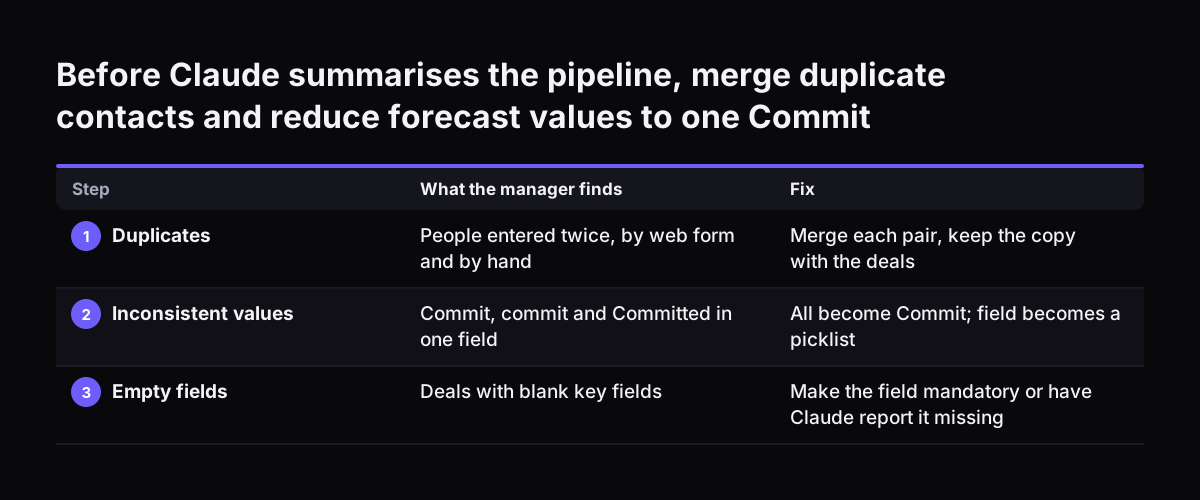
  1. Duplicates. Grouping contacts by email shows several people entered twice, once by a web form and once by hand. The manager merges each pair, keeping the copy with the deals attached.
  2. Inconsistent values. Listing distinct forecast values reveals "Commit", "commit" and "Committed". All three become Commit, and the field becomes a picklist.
  3. Empty fields. Some open deals have no close date. Each owner adds one or closes the deal as lost.
  4. Ownership and staleness. Deals owned by a former sales rep are reassigned. Open deals with no activity past the agreed threshold are reviewed one by one.

Finally, the manager writes the two forecast definitions into the instructions Claude receives. Commit means the rep will stand behind the number. Best Case means plausible but missing one approval step.

The result is a summary Claude can produce without guessing. Each deal appears once, the totals add up and every named owner still works there. Weflow's guide estimates that an automated week-over-week pipeline comparison usually saves one to two hours of spreadsheet work before a leadership review. That saving only holds when the comparison runs on clean records.

Before Claude summarises the pipeline, merge duplicate contacts and reduce forecast values to one Commit. What the manager finds / Fix. 1. Duplicates: People entered twice, by web form and by hand / Merge each pair, keep the copy with the deals; 2. I

Using Claude to help with the clean-up, with a human approving each change

Claude can speed up CRM data cleaning, but a person should approve every change. Claude can classify messy values, suggest likely duplicate pairs and draft the rules that stop new errors. The decision to merge, reassign or delete stays with someone who knows the customers.

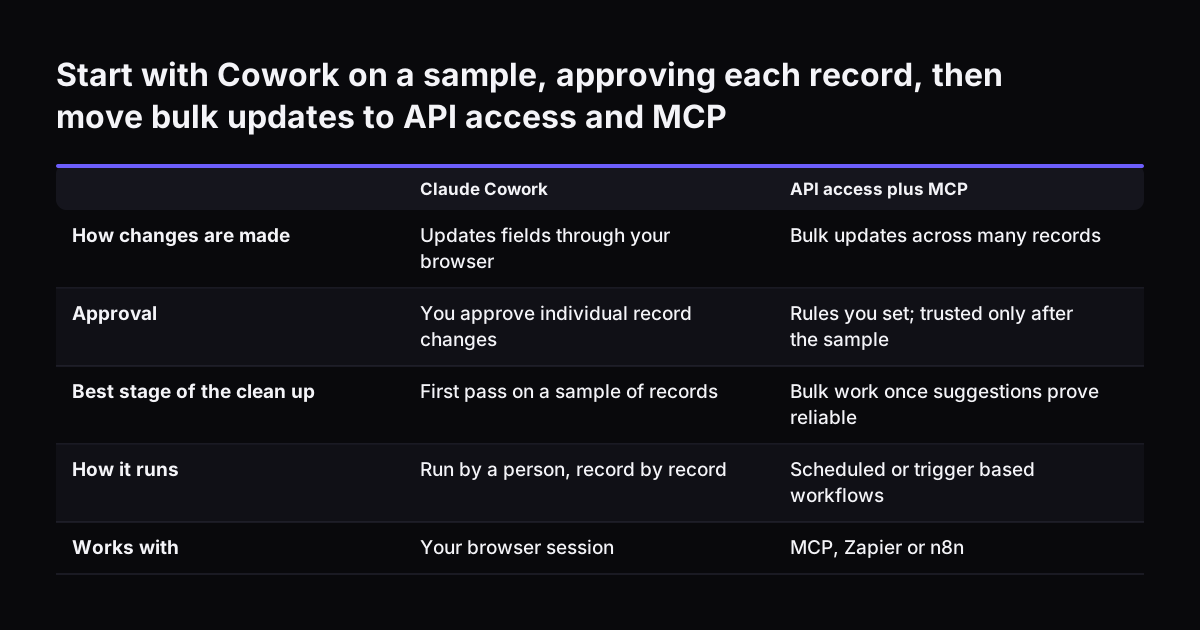
Weflow's guide describes two working patterns. Claude Cowork can update fields through your browser, with your approval on individual record changes. API access plus MCP suits bulk updates. Start with Cowork for a sample of records, and move to bulk only once you trust the suggestions. Our guide on how to use Claude Cowork for your business covers the setup.

Rules, tests and cost

Claude writes the logic, such as a validation rule, but it does not deploy it. Weflow is explicit that an admin or developer still needs to test and publish it. It also advises testing generated logic in a sandbox, never in production first.

For large classification jobs, Anthropic's Claude Cookbook notes that the Message Batches API processes large volumes of requests asynchronously at a 50% cost reduction. On model choice, Anthropic suggests starting with Claude Opus 5.5 if you are unsure. It describes Claude Sonnet 5.5 as the best combination of speed and intelligence and Claude Haiku 4.5 as its fastest model.

Start with Cowork on a sample, approving each record, then move bulk updates to API access and MCP. Claude Cowork / API access plus MCP. How changes are made: Updates fields through your browser / Bulk updates across many records; Approval: You appro

What CRM data cleaning means for a UK or European company

For a UK or European company, CRM data cleaning is also a personal data exercise. Your contact records hold names, email addresses and phone numbers. Every step that copies, exports or sends those records to Claude needs to fit your data protection position. Settle that position before the clean-up, not after.

Three practical points follow from the sources in this guide.

  • Test prompts on placeholders. Weflow recommends replacing names, emails, phone numbers and company identifiers with placeholders while you test prompt structure manually.
  • Prefer cleaning in place. Fixing records inside the CRM avoids scattering spreadsheet exports of customer data across laptops.
  • Standardise across languages. All current Claude models handle several languages, but a firm trading in the UK, Germany, Romania or Italy may hold the same picklist value in different languages. Claude will count each one separately until you standardise.

Deleting stale personal records you no longer need is part of good housekeeping too. Agree what you keep and for how long before you archive or remove anything. The GDPR checklist for European firms using Claude sets out what to check on the Claude side. Our page on data security and UK data residency explains where data is processed.

Next steps: audit the records, fix them, then connect Claude to Zoho CRM

Start small and in order. Data cleaning before an AI project goes best when one module is finished before the next begins. A sensible sequence looks like this.

  1. Pick the first use case. Decide what Claude will do first, such as a pipeline summary or case routing, and list the modules and fields it needs.
  2. Run the checklist on those fields. Use the table above for duplicates, values, blanks, owners, staleness and definitions.
  3. Agree fixes with record owners. Merge, reassign and close only with the people who know the customers.
  4. Prevent new errors. Add picklists, mandatory fields and a leaver step to offboarding.
  5. Write your definitions down. Stages, forecast categories and statuses, in plain sentences Claude can follow.
  6. Connect Claude. Anthropic's documentation on remote MCP servers says you need the right authentication credentials and should follow each server's own connection instructions.

When the records are ready, follow connecting Claude to Zoho CRM with MCP, step by step to set up the connection. Check the first outputs against records you know well. Wrong answers at that stage usually point back to a record the clean-up missed.

Sources

  1. 1. Weflow: Claude prompts RevOps teams run to automate forecasting and CRM hygiene
  2. 2. Anthropic: Models overview
  3. 3. Anthropic: Claude Cookbook
  4. 4. Anthropic: Remote MCP servers

Related articles