
Skip to content
SVENNISAIWe speak Claude.
Blog · Claude

Meeting notes into CRM tasks with Claude, without losing the follow-ups

A practical guide to turning a sales meeting transcript into a summary, follow-up tasks and contact updates in Zoho CRM, with the record owner approving every change.

9 min read

Book a 30-minute call · with a Claude Certified Architect from our team.

Article · 9 min read
Abstract flowing lines converging into ordered blocks, suggesting conversation turning into structured tasks

Meeting notes into CRM tasks with Claude: the short answer

To turn meeting notes into CRM tasks with Claude, you connect Claude to your meeting tool and to your CRM. You give it a fixed instruction for pulling out each follow-up with an owner and a due date. Then the record owner approves every proposed task before Claude writes it to the CRM.

A CRM follow-up task is a single action attached to a contact or deal, such as "send the revised quote". It has one named owner and a due date. The goal of this workflow is that every promise made in a sales or account meeting becomes one of those tasks. Nothing else should reach the pipeline: no invented owners, no duplicates, no vague reminders.

This guide is written for sales and account teams that use Zoho CRM. The same pattern works with other CRMs that Claude can reach. The guide covers the parts you need and a worked example from one sales call. It then covers the review step, a checklist for catching bad tasks, plan and model choices, and what a UK company should check first.

The review step matters most. Claude is good at reading a transcript. It is less reliable when a sentence is ambiguous about who will do what. A CRM full of wrong tasks is worse than one with gaps.
The building blocks: transcript, connector and MCP server

Three technical pieces carry a meeting from the call to the CRM. Each one has a plain meaning, and knowing them makes the setup decisions easier.

  • Transcript. A transcript is the word-for-word record of the meeting, produced by your meeting or recording tool. Claude works from the transcript alone. A decision the recording did not capture will not appear in anything built from it.
  • Connector. A connector lets Claude access your apps and services, retrieve your data and take actions inside them, according to Anthropic's help article on connectors.
  • MCP server. The Model Context Protocol (MCP) is an open standard interface that lets AI agents work with business software. An MCP server is the endpoint that exposes one system's tools, actions and data to Claude in that standard form.

For the CRM side, Zoho offers its own product. Zoho MCP lets you create MCP servers that expose tools, actions and contextual data from Zoho apps to AI agents. Zoho lists CRM, Mail, Calendar, Desk, Cliq, Projects and WorkDrive among the supported apps. Zoho MCP is model-agnostic, so it works with any agent that speaks the protocol, Claude included.

A fourth piece is optional but useful. A skill is a saved set of instructions and workflow that Claude loads when a task calls for it. Anthropic published Agent Skills as a standard in December 2025, and its newsroom says more than 70 agent platforms have integrated it since.

Getting the meeting transcript to Claude through a connector

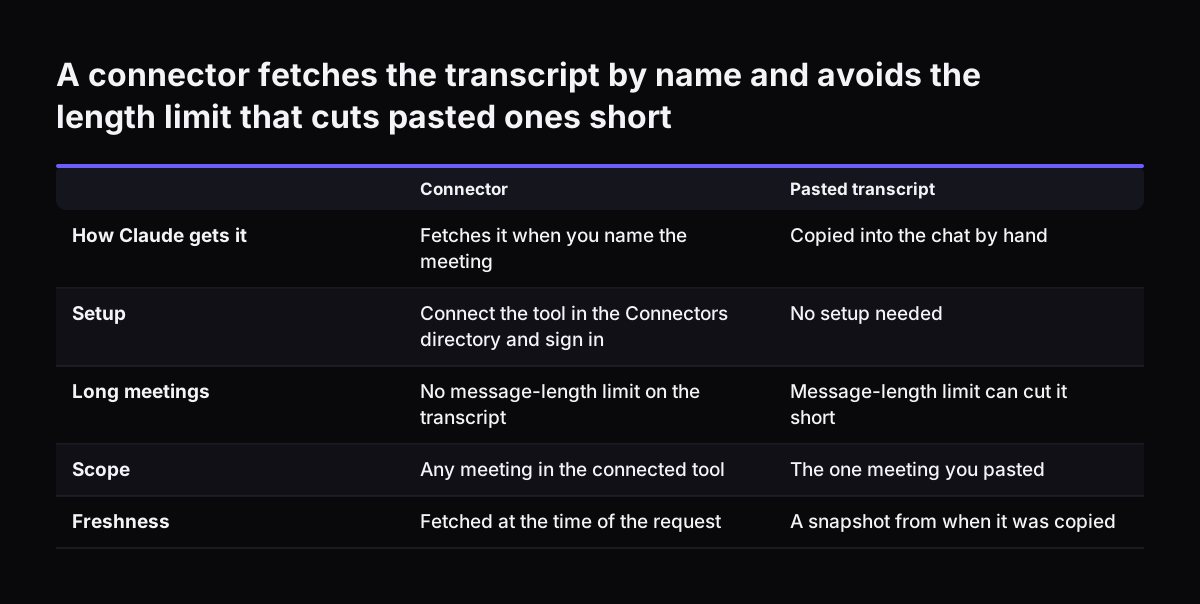
The cleanest way to give Claude a meeting transcript is to connect your meeting tool, so Claude fetches the transcript itself. You then only name the meeting in your request. Anthropic's help article says web connectors are available for all users on Claude, Cowork, Claude Desktop and Claude Mobile. Where a tool has no ready-made connector, a custom connector can reach the tool's MCP server.

Fetching the transcript through a connector beats pasting it. A pasted transcript covers one meeting only. It depends on someone remembering to paste it. And it is out of date the moment the next call happens.

Length is rarely the problem on the model side. All current Claude models have a 1M token context window, according to Anthropic's models overview. That comfortably holds a long sales call.

Access follows the person who asks. Claude inherits each person's permissions from the connected service. If a colleague cannot open a recording in the meeting tool, the connector cannot reach it from Claude either.

Claude can only use the apps you have connected, so connect the meeting tool before you ask. If your team records calls in more than one tool, pick the one where sales calls actually live and start there.

A connector fetches the transcript by name and avoids the length limit that cuts pasted ones short. Connector / Pasted transcript. How Claude gets it: Fetches it when you name the meeting / Copied into the chat by hand; Setup: Connect the tool in the

Connecting Claude to Zoho CRM with limited write access

Claude needs write access to Zoho CRM to create tasks, and that access should be as narrow as the job allows. Two layers of permission protect you. Claude inherits each person's permissions from the connected service, so it cannot reach a record the user cannot open in Zoho CRM. Zoho MCP adds the same rule from its side: agents operate under user-level permissions, with OAuth for identity.

On Claude Team and Enterprise plans, Owners can limit which actions a connected service can take across the organisation. Anthropic's example is allowing reads while blocking writes, and individual users cannot override the setting. Restricting actions in Claude never grants more access than the source system permits. It only narrows it.

The setup itself is covered in our step-by-step guide to connecting Claude to Zoho CRM with MCP, so this post does not repeat it. Three points from the help article affect this workflow directly:

  • An Owner must enable the connector for the organisation, and each person still authenticates individually.
  • A custom connector reaches your MCP server from Anthropic's cloud, so the server must be reachable over the public internet.
  • On Team and Enterprise plans, connectors work only in private projects, and chats with synced content cannot be shared.

Before Claude writes anything, check the state of your CRM data. Duplicate contacts and stale deals make task matching unreliable. Our guide to cleaning CRM data before adding Claude covers what to fix first.

The extraction instruction: owner, task, due date and record

The extraction instruction is the fixed text that tells Claude how to turn a transcript into tasks. Writing it once, as a skill or in a project's instructions, keeps the output the same from call to call. A good instruction asks for four things per follow-up: the owner, the task, the due date and the CRM record it belongs to.

The most important line covers missing owners. Tell Claude to write "Unassigned" when nobody was named, rather than leaving it to infer a name. In a CRM, a plausible but wrong owner is the worst outcome, because the task looks finished and nobody chases it.

An instruction for a sales team might read:

Read the transcript of the named meeting. List every commitment made by our side as a proposed task: owner, task in one sentence, due date, and the Zoho CRM contact or deal it relates to. If no owner was stated, write "Unassigned". If no date was stated, write "No date" and do not guess.

Before proposing a task, search the record for open tasks with the same purpose and flag any match as a possible duplicate. Do not create anything until I approve the list.

The instruction also asks Claude to propose contact updates separately, such as a new job title or phone number mentioned in the call. Keeping updates apart from tasks lets the reviewer approve them one by one.

Worked example: one sales call becomes three Zoho CRM tasks

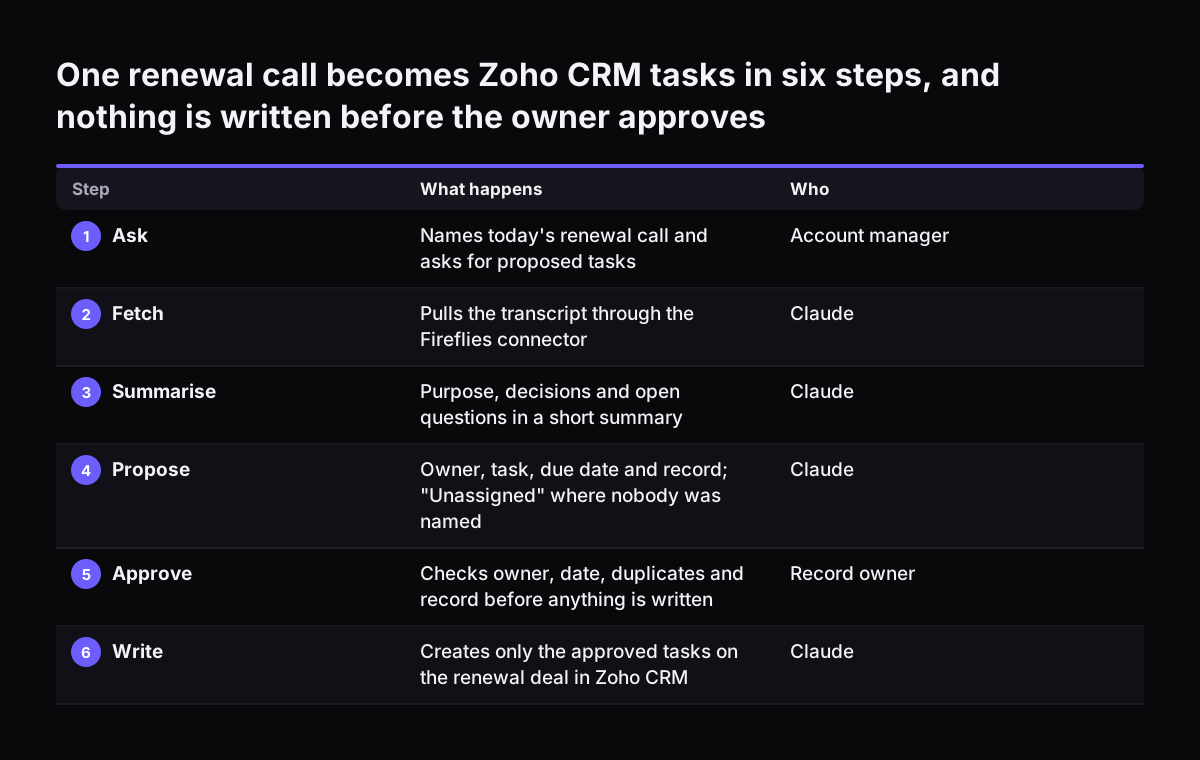
Take a renewal call recorded in Fireflies between your account manager and a client's operations lead. Fireflies and Zoho CRM are both connected to Claude, and the extraction instruction is saved in a private project. The account manager types: "Process today's renewal call with the operations lead and propose tasks."

Claude fetches the transcript through the Fireflies connector. It returns a short summary with the purpose, the decisions and the open questions. Then it lists the proposed tasks:

  1. Owner: account manager. Send the revised renewal quote with the extra seats discussed. Due: Friday, as promised in the call. Record: the renewal deal.
  2. Owner: Unassigned. Arrange a technical call about the integration question. No date. Record: the client account.
  3. Owner: account manager. Follow up on the budget decision. Due: the date the client named. Record: the renewal deal. Flag: an open task "Chase budget approval" already exists on this deal.

Claude also proposes one contact update: the operations lead mentioned a new direct phone number.

The account manager owns the deal, so she reviews the list. She approves task one. She assigns task two to the solutions engineer and sets a date. She rejects task three, because the existing task covers it, and she approves the phone number change.

Claude then creates two tasks and one update in Zoho CRM. Nothing reached the pipeline that she had not seen.

One renewal call becomes Zoho CRM tasks in six steps, and nothing is written before the owner approves. What happens / Who. 1. Ask: Names today's renewal call and asks for proposed tasks / Account manager; 2. Fetch: Pulls the transcript through the F

The review step: the record owner approves every change

The review step is the point where a person checks Claude's proposed tasks and updates before any of them is written to the CRM. The person who reviews should be the owner of the record, because the owner knows what was promised and what is already in hand. A manager reviewing on someone else's behalf misses context the owner has.

The review stops three kinds of error. Claude may misread who committed to what when phrasing is ambiguous. It may propose a task that already exists. It may treat a passing remark as a commitment. Each of these is quick for the record owner to spot and slow to clean up once it sits in the pipeline.

At Svennis, we keep Claude's write actions narrow at first and route the proposed list to the record owner before anything is created. The fault we see most often is the same meeting processed twice by two colleagues, so we have Claude search for open tasks on the record before it proposes any new one.

Approval does not need a separate tool. In the simplest setup, the owner replies in the same Claude conversation with the numbers to approve, change or reject. Claude acts only on that reply. As the team gains confidence, you can restrict which task types need approval, but keep the review on anything that changes a deal or a contact.

Review checklist for catching wrong and duplicate tasks

A short checklist keeps the review fast and consistent across the team. The table lists what the record owner checks, what goes wrong when the check is skipped, and how the extraction instruction helps.

CheckWhat goes wrong if skippedHow the instruction helps
Owner is a real, named personA plausible but wrong owner, so nobody chases the task"Unassigned" is required when no owner was stated
Due date was actually saidAn invented date that misleads pipeline reviews"No date" is required instead of a guess
Task is not already openDuplicate tasks and double contact with the clientClaude searches open tasks on the record and flags matches
Task sits on the right recordA follow-up hidden on the wrong deal or contactEach task names its contact or deal
It was a commitment, not a remarkBusywork tasks that bury the real follow-upsOnly commitments made by your side are listed
The decision was captured in the recordingA missing task for something agreed off the callThe owner adds it by hand during review

The last row is a reminder that the transcript sets the limit. If a decision was made in a corridor or after the recording stopped, no instruction will find it.

Which Claude plan and model this workflow needs

The workflow runs on any Claude plan that allows the connectors you need, but a sales team is best served by Claude Team. Web connectors are available for all users, and custom connectors over remote MCP are available on Free, Pro, Max, Ultra, Team and Enterprise plans. Free users are limited to one custom connector, which is not enough for a meeting tool and a CRM together.

Claude Team adds the controls this guide relies on. An Owner enables connectors for the organisation and can restrict which actions each connected service may take. For what the seats cost, see our guide to what Claude costs a business and how to start. If you prefer working from a desktop workspace, our explainer on Claude Cowork for UK firms covers where it fits.

On models, reading a transcript and pulling out tasks is extraction work. Anthropic describes Claude Haiku 5.5 as built for high-volume, latency-sensitive tasks such as classification, extraction and routing. Claude Sonnet 5.5 is described as the best combination of speed and intelligence. If you are unsure, Anthropic's own advice is to start with Claude Opus 5.5 for most workloads. All current models have a 1M token context window, which comfortably holds a long meeting transcript.

What a UK company should check before switching it on

A UK company should check where each connected service processes data before meeting transcripts start flowing to Claude and the CRM. Anthropic's help article states that connected services process data on their own infrastructure. Settings that control where Claude's inference runs do not change where third-party services operate.

In practice, that means three checks, one per system in the chain:

  • The meeting tool. Each vendor publishes its own terms. Check its UK GDPR position, where it is established and where it stores recordings and transcripts.
  • Claude. Confirm the plan and its settings with your administrator, including which connectors are enabled and which actions are allowed.
  • The CRM. Zoho MCP applies user-level permissions and OAuth, so Claude can only do what the signed-in user may do.

Two further checks cover all three systems. You need a data processing agreement with each vendor. You also need a lawful transfer route for any vendor based outside the UK, such as the International Data Transfer Agreement (IDTA) or the UK Addendum.

Sales meetings often contain personal details about client staff. Agree internally which meetings may be processed this way. Before you start, update your privacy information so the people on the call know the recording is transcribed, processed by Claude and used to update your CRM. The permission model helps here too. A colleague who cannot open a meeting in the recording tool, or a record in Zoho CRM, cannot reach it through Claude either.

Next steps for putting this workflow live

Start small and measure. A sensible first run covers one sales team, one meeting tool and one CRM, for a few weeks. Use these steps:

  1. Connect the meeting tool where your sales calls are recorded, and confirm Claude can fetch a transcript by name.
  2. Connect Zoho CRM with narrow write access, following our Zoho CRM over MCP setup guide.
  3. Save the extraction instruction as a skill or in a private project, including the "Unassigned" and duplicate-search rules.
  4. Have each record owner review every proposed list for the first weeks, using the checklist above.
  5. Track rejected tasks and their reasons, and tighten the instruction where the same error repeats.

When one team runs this reliably, decide whether to extend it. For each connection, Svennis builds a connector, an MCP server, a plugin or a skill, shows you the options with their cost, and you choose. The work follows four steps: the Workshop, a pilot, the department Activation, then monthly operations. For a single process like this one, the Pilot Claude A agent on one process is the most direct route to a working system.

Sources

  1. Zoho MCP
  2. Claude Help Center: Use connectors to extend Claude's capabilities
  3. Anthropic: Models overview
  4. Anthropic Newsroom (Agent Skills)
Free, 30 minutes

Pick a time. Bring the process this article made you think of.

You leave with a clear yes or no on putting Claude on it, and the step that fits from our published prices. You speak to someone who builds the agents, not a salesperson.

Prefer to call? +44 7588 772736 · Not ready to talk? See it on your business first.

30 minutes · video call · free
  1. 1Time
  2. 2Details
  3. 3Booked