Skip to content
SVENNISAIWe speak Claude.
Blog · Claude

Answering tenders and supplier questionnaires with Claude from an approved answer library

Claude can draft tender and supplier questionnaire answers quickly, but only from approved answers and live CRM data, with gaps marked for an owner and a named person signing off before you submit.

10 min read

Book a 30-minute call · with a Claude Certified Architect from our team.

Article · 10 min read
Abstract cover with stacked blocks feeding into a single line that passes through a checkpoint gate

Claude drafts tender answers well only from an approved answer library

Answering tenders and supplier questionnaires with Claude saves real time when three things are in place. Claude drafts from an approved answer library. It reads live customer data from your CRM. A named person signs off every commitment before submission. Without those three, you get fluent text that nobody has checked.

An approved answer library is a set of answers, policies and evidence that the responsible owner has checked and approved for reuse in bids. It holds your agreed wording on quality, security, insurance, delivery and service levels. Each item has one owner who is accountable for it.

In this setup, Claude, Anthropic's AI assistant, does the matching and the first draft. People decide what the company promises. The rest of this guide covers the library, the Claude project that holds it, the CRM connection, a worked example, how gaps reach their owners, the security settings, and what it means for a UK company bidding today.

Unchecked AI drafts turn bid assumptions into compliance risks

An unchecked draft is risky because a tender answer is a commitment, not a piece of marketing copy. A bid practitioner writing on LinkedIn on tender clarifications puts it plainly: "an assumption made during bid preparation can become a compliance issue later."

Most bids are not lost on capability. One post on the same page says most SMEs lose public sector tenders "because of administrative and compliance mistakes hidden inside 200-page bid packs." Another lists the usual causes: a missing certificate, an unanswered mandatory question or a late submission. Even strong proposals fail when that happens.

A general AI model makes these risks worse if you let it guess. Asked about your insurance cover or your response times, it will produce a plausible answer whether or not it is true. The fix is to stop Claude guessing at all. It drafts only from approved material and marks everything else as a gap.

Some bid work should stay with people entirely. Win strategy, pricing and the decision to bid at all are judgement calls. Our post on when AI is the wrong answer for your business systems covers how to draw that line.

What goes in the approved answer library, and who owns each answer

The answer library holds only material an owner has approved for reuse. Old proposals do not belong in it as they stand. They contain customer-specific promises, outdated figures and wording written for a different buyer.

A practical library usually contains these kinds of items:

  • Standard answers on company profile, quality management, information security, environmental policy and health and safety.
  • Current policies and the certificates that support them, each with its expiry date.
  • Case evidence that the customer has agreed you may reuse.
  • Agreed interpretations from past clarification questions, with the date and the bid they came from.
  • A short list of commitments that only named people may make, such as prices, service levels and delivery dates.

Every item needs an owner and a review date. At Svennis we set the library up so each approved answer carries its owner's name and a reference that Claude quotes in the draft, so a reviewer can trace every sentence back to its source. Where we see it go wrong is when a team loads past bids instead of approved answers, because Claude then repeats commitments nobody has re-checked.

If your policies already sit in Zoho WorkDrive, keep the approved versions in one clearly named folder. The library then has a single source that the owners maintain.

A Claude project holds the answer library and the drafting rules

A Claude project is the natural home for bid work. According to the Claude Help Center page on projects, projects are "self-contained workspaces with their own chat histories and knowledge bases." Project knowledge is the knowledge base of uploaded documents, text and files that Claude uses as context for every chat in that project.

You upload the approved answer library as project knowledge. You then write project instructions that set the rules for every draft. A short version might read:

Draft answers only from project knowledge and from the CRM connection. Quote the library reference for every answer. If no approved answer exists, write GAP, state what is missing and suggest the owner. Never state a price, service level or delivery date unless it appears in an approved answer.

Large libraries are handled on paid plans. Enhanced project knowledge with RAG is available on Pro, Max, Ultra, Team and Enterprise. When project knowledge approaches the context limit, RAG mode expands capacity by up to 10x.

On Team and Enterprise plans you can share a project with colleagues. "Can edit" members can change instructions and knowledge and manage members. "Can view" members can see the contents and chat, but cannot edit. Give the bid manager and library owners Can edit, and give contributors Can view. A new version of projects is in beta, starting with Claude Code, and existing instructions and files move across with it.

Live CRM data gives Claude the customer facts each bid needs

Customer-specific answers should come from your CRM, read at the moment Claude drafts. Account history, contract dates, contacts and the products a customer already uses change between bids. A copy pasted into a project last quarter is already out of date.

For a company on Zoho CRM, that means connecting Claude to the CRM directly. For each connection, Svennis builds one of four things: a connector, an MCP server, a plugin or a skill. An MCP server is a small service that lets Claude call a program's functions through the Model Context Protocol. We show you the options with their cost, and you choose.

The connection should give Claude only what bid drafting needs. In most cases that means reading accounts, contacts, deals and past orders. Writing back to the CRM is rarely needed for a questionnaire, and leaving it out keeps the risk small.

The split of sources then becomes simple. Standard wording comes from the approved library in the project. Customer facts come live from the CRM. Anything that comes from neither is a gap for a person to fill.

Worked example: drafting one supplier questionnaire with Claude

A worked example makes the setup concrete. Here a bid manager at a UK services company receives a supplier questionnaire as an Excel file from a prospective customer. The team uses Claude Team, a project called "Tenders: approved answers" and a read-only connection to Zoho CRM.

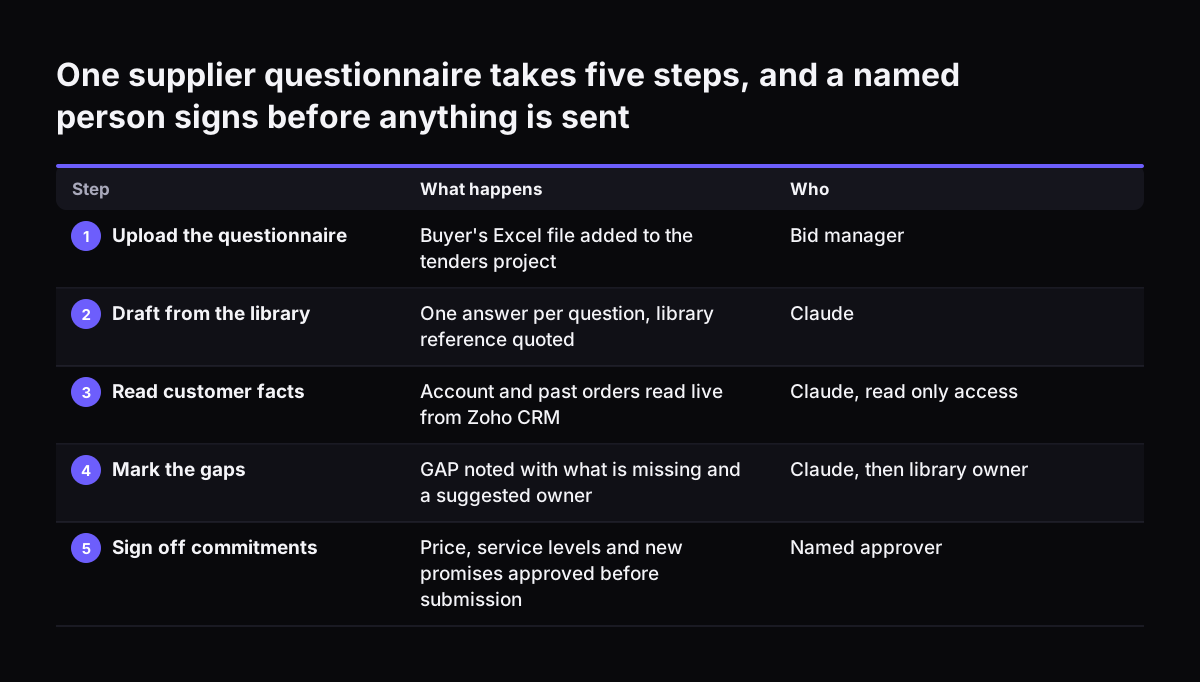
  1. The bid manager opens the project and uploads the buyer's questionnaire. Uploads are limited to 30MB per file.
  2. She asks Claude to draft an answer for every question from project knowledge, quoting the library reference each time.
  3. For questions about the existing relationship, Claude reads the account and past orders through the CRM connection.
  4. Where no approved answer exists, Claude writes GAP, says what is missing and names the likely owner from the library.
  5. Claude creates a new .xlsx file with five columns: question, draft answer, source, status and owner. The Claude Help Center page on file creation confirms Claude can create Excel, Word, PowerPoint and PDF files, downloaded or saved to Google Drive.
  6. Each owner fills their gaps. The named sign-off person reviews every commitment, then the bid manager submits.

The source column does most of the work at review. A reviewer filters for anything without a library reference or a CRM record and checks those lines first. File creation uses more of your plan's usage limit than a normal chat, so a long questionnaire costs more than a quick question.

One supplier questionnaire takes five steps, and a named person signs before anything is sent. What happens / Who. 1. Upload the questionnaire: Buyer's Excel file added to the tenders project / Bid manager; 2. Draft from the library: One answer per q

Gaps, assumptions and clarifications go to a named owner

A gap is any question Claude cannot answer from approved material or the CRM. Gaps are useful, not a failure. They show exactly where your library is thin, and each one lands with a person rather than being guessed.

Clarifications need the same discipline. The LinkedIn posts on tender clarifications give three rules that fit this setup well:

  • Record the exact question asked and the client's response.
  • Document the agreed assumption or interpretation, and use the same interpretation consistently across the bid.
  • Do not "quietly turn an uncertain requirement into an undocumented guess."

A clarification answer also has to travel. The same source says it "needs to flow back into the compliance matrix, technical response, commercial assumptions and any other affected part of the tender." Claude helps here because it can search the whole draft for every answer the clarification affects and list them for the owner.

A responsibility matrix keeps this honest. A responsibility matrix gives every key requirement, deliverable, assumption and commercial input clear accountability, rather than just listing names against sections. Once a clarification is settled, add the agreed interpretation to the library so the next bid starts from it.

Which tender questions Claude drafts, and who signs them off

Claude's role depends on the type of question. Standard questions are mostly drafting. Commitments are always a human decision. The table sets out the split a bid team can adopt as its working rule.

Question typeWhat Claude doesWho signs off
Standard question with an approved answerDrafts from the library and quotes the referenceBid manager checks fit
Customer-specific factReads it live from the CRM and cites the recordAccount owner
No approved answer existsMarks GAP, says what is missing, suggests an ownerLibrary owner writes and approves the answer
Unclear requirementFlags it as a possible clarification questionBid manager decides whether to ask the buyer
New commitment: price, service level, delivery dateLeaves it blank unless approved wording existsNamed person with authority to commit

Write the names into the project instructions, not just the roles. Claude can then put the right owner on every gap, and nobody has to work out who should answer.

File limits and security settings for bid documents in Claude

Bid documents are often confidential, so the security settings matter before the first upload. When Claude executes code or creates files, it works in an isolated, sandboxed container. Sandbox environments are never shared between users.

Network access is the setting to check first. On Team and Enterprise plans, network access is disabled by default, and owners can enable it in organisation settings. The "All domains" option gives Claude full internet access, and the help page calls it "the riskiest option." The reason is prompt injection, where hidden instructions in a document try to steer the model. If network access is on, Claude could in theory be tricked into sending data to external servers.

A buyer's bid pack is exactly the kind of outside document that could carry such instructions. Anthropic has added a prompt injection classifier that stops execution when it detects manipulation. Even so, keep network access off for bid work unless you need it.

MCP connections are a separate route. If MCP integrations are enabled, network communication stays possible through those connections whatever the network setting. That is another reason to give the CRM connection read-only access to the records bids need, and nothing more.

Large files have their own rule. Uploads and downloads are capped at 30MB per file, but Claude can process PDFs above 30MB through its computing environment without loading them into the context window.

Buyers now compare supplier answers with AI, so consistency counts

The buyer side is using AI too. Workday's AI-enabled questionnaire comparison, part of its 2026R1 feature release, lets procurement teams evaluate supplier responses to the questions in an RFx questionnaire. RFx is the umbrella term for requests for information, proposals and quotations.

The process in Workday is straightforward. The evaluator opens the Evaluation tab of an event, selects suppliers and clicks Continue to Evaluation. They then click Generate for each question. The AI identifies differences between supplier responses, and the evaluator scores each supplier.

The Workday output carries the label "This content was generated by AI. Review content before use."

For a supplier, the lesson is consistency. When a tool sets your answers side by side with competitors', vague wording and contradictions between sections become easy to see. An approved library helps because the same question gets the same approved answer every time, and an agreed interpretation is applied across the whole bid.

If you buy as well as sell, the same thinking applies in reverse. Our post on comparing supplier quotes with Claude in purchasing covers that side.

What answering tenders with Claude means for a UK company

For a UK company, the main change is that bid rules are moving while teams adopt AI. One post in the LinkedIn source notes that the Procurement Act 2023 is changing how SMEs bid for contracts. Keep the library's compliance answers under a named owner who follows those changes, and review them when buyers' bid packs change.

A clear approval record helps in public sector work. If a buyer queries an answer after award, you can show who approved the wording and when. The source column in the worked example gives you that trail for every line.

Cost is the other practical question. Projects draw from your plan's usage like any other use of Claude. Our page on Claude pricing in the UK, in GBP sets out the plans, including Claude Team, which you need for shared projects.

Measure the change once it runs. One post in the source suggests tracking win rate, average technical evaluation score, bid preparation cost and common rejection reasons after every tender. A win/loss analysis after each result shows whether faster drafting is also producing better bids. Complex bids take weeks and sometimes months, so give it several tenders before you judge.

Next steps for a bid team starting with Claude

The quickest way to start is with one recurring questionnaire, not a full public tender. Supplier onboarding and security questionnaires repeat often and use the same answers again and again.

  1. Choose one questionnaire type your team answers regularly.
  2. Collect the current approved answers for it, and name an owner and review date for each.
  3. Create a Claude project, upload the library as project knowledge and write the drafting rules into the instructions.
  4. Decide how Claude should read customer data from your CRM, and keep that access read-only.
  5. Run one live questionnaire end to end, with gaps marked and a named sign-off before submission.
  6. Add every newly approved answer and agreed interpretation to the library afterwards.

If you want help, Svennis works in four steps: a Workshop, then Pilot Claude A (an AI agent on Claude for one process, such as questionnaire drafting) or Pilot Claude B (Claude Team for the whole team), then the department Activation, then monthly operations. Our guide to what Claude costs a business and how to start explains the first decisions. If your team already pays for seats that sit unused, Claude Relaunch puts paid Claude seats to work.

Sources

  1. Claude Help Center: Create and edit files with Claude
  2. Claude Help Center: What are projects?
  3. Workday: Compare Supplier Questionnaire Responses with AI
  4. LinkedIn: Managing Uncertainty in Tender Clarifications
Free, 30 minutes

Pick a time. Bring the process this article made you think of.

You leave with a clear yes or no on putting Claude on it, and the step that fits from our published prices. You speak to someone who builds the agents, not a salesperson.

Prefer to call? +44 7588 772736 · Not ready to talk? See it on your business first.

30 minutes · video call · free
  1. 1Time
  2. 2Details
  3. 3Booked