
Svennis AI
10 min read

Calling Claude from Zoho Deluge functions: a step-by-step design guide

A practical guide to calling Claude from Zoho Deluge functions. It covers one parent function, API keys, model choice, reply formats, a worked CRM example and the failures to plan for.

Abstract flow of small blocks passing through a single gate and returning as ordered, labelled shapes

Calling Claude from Zoho Deluge functions: the short answer

Calling Claude from Zoho Deluge functions means a Deluge script sends a request to Anthropic's Messages API. It then waits for Claude's reply and writes the result back into a Zoho record. You need a Claude API key, a model choice, a prompt built from record fields and a plan for when the call fails. Each call should return one small answer that the script can check.

Deluge is Zoho's own scripting language. Zoho expands the name as Data Enriched Language for the Universal Grid Environment. According to the Zoho Deluge help pages, over forty Zoho products support it. An action in one of those products, such as a new record, can trigger a Deluge script.

Deluge can also make API calls to external services, not only to Zoho products. That ability to call external services is what makes a Claude call possible.

The Messages API is the Anthropic endpoint that takes a prompt and returns Claude's reply. In Deluge, the HTTP request to it goes through the invokeurl task.

This guide covers the decisions around the call. Those decisions are which automations deserve one, how to structure the function, which model to pick, what the reply must look like and how to handle errors and timeouts. The guide does not reproduce request syntax. Copy that from Zoho's invokeurl reference and Anthropic's API reference on the day you build, because those pages are the authoritative source.
Which Zoho automations should call Claude, and which should not

A Zoho automation should call Claude when its input is free text that a fixed rule cannot read reliably. Typical cases include the following:

  • routing a ticket from its description
  • pulling named values out of an email
  • drafting a reply for a person to check

Each of these turns unstructured words into a decision or a draft. The guide to email triage and drafting with Claude shows the same split in a mailbox.

An automation should not call Claude when Deluge can do the job exactly. Totals, dates, status changes, field copies and record lookups belong in plain Deluge. A model adds cost and delay to work that a script gets right every time. It also adds the chance of a wrong answer.

Ask three questions before you add a Claude call to any automation:

  • Would a person have to read the text to make this decision?
  • Can a wrong answer be caught before it reaches a customer or the accounts?
  • Will the automation still work, more slowly, if Claude does not answer?

If any answer is no, keep the step in Deluge or route it to a person. A Claude call earns its place only where it saves reading time and a mistake stays visible.

One parent Deluge function for every Claude call

A parent function is a single Deluge custom function that makes every Claude call in your Zoho account. Other functions, called child functions, pass it a prompt and receive the reply. Zoho's documentation on the call function task describes this pattern. The task invokes a custom function from within another function. Zoho's own examples use it to centralise Lead creation in Zoho CRM and email sending in Zoho People.

The parent function keeps the API key, the model name, the error handling and the logging in one place. When you change model, you edit one function instead of twenty workflows.

Naming and parameters

In Zoho CRM, a function is called as <category>.<function_name>, for example ai.askClaude. In Zoho Creator, a function outside the default namespace is written <namespace>.<function_name>. The name must be complete, including that grouping.

The number and data types of the parameters you pass must match the arguments in the function definition. An argument is the variable declared in the definition. A parameter is the value you supply when you call the function. If the two do not match, Zoho will not save the script. That catches many mistakes before anything runs.

Where the pattern does not work

Zoho states that call function is not supported in Zoho Sheet, Zoho Connect and Zoho Cliq. Automations in those products need their own request, or a route through another Zoho product that does support the task.

Authenticating Claude calls: the API key and who holds it

Every Claude call from Deluge is authenticated with a Claude API key sent with the request. Your administrator manages these keys from the Claude Console. Whoever holds a key can send data to Claude and spend money on your account. Treat it as you would a banking password.

At Svennis we create a separate API key for each client system and keep it in the parent function alone. Revoking access then takes one change instead of a search through every workflow.

Three further rules keep the key under control:

  • Only the people who maintain the parent function can open it.
  • Child functions never contain the key, only the prompt and the model name.
  • A key that leaves the company with a former employee or supplier is revoked and replaced the same day.

The account behind the key matters for more than billing. Anthropic's models overview notes that organisation settings can make a request fail even when the model supports the feature. Its example is an administrator disabling web search. If your Deluge call relies on a server tool, check those settings before you blame the script.

Choosing the Claude model for each Deluge call

Choose the model for each Claude call by the work that call does, not one model for everything. Anthropic's current pricing per million tokens is set out below. A token is the unit of text Claude reads and writes, and billing is counted in tokens.

  • Claude Haiku 5.5: from $0.10 input and from $0.50 output.
  • Claude Sonnet 5.5: $2 input and $10 output.
  • Claude Opus 5.5: $4 input and $20 output.
  • Claude Fable 5.1: $10 input and $50 output.

Claude Haiku 5.5 suits most automated calls from Deluge. Anthropic positions it for high-volume, latency-sensitive tasks such as classification, extraction and routing. Its 7 October 2026 announcement describes it as designed for high-volume, cost-sensitive work. Ticket routing and field extraction fit that description.

Claude Opus 5.5 is Anthropic's recommended starting point when you are unsure. Anthropic says it performs at the level of Claude Fable 5.1 on most work and costs 40% less to run than Claude Opus 5. Use it for drafts a customer will read and for judgement across a long document.

Claude Fable 5.1 is for demanding reasoning and long-horizon agentic work. Anthropic also suggests it when your tests on Opus 5.5 at higher effort still fall short. A Deluge workflow rarely needs it.

All current models accept text and images, work in several languages and have a 1M token context window. Size alone is therefore rarely the reason to pick a bigger model. Pick it for the quality of judgement the call needs.

Decision table: automation, model, reply and fallback

The table below matches common Zoho automations to a model, to the reply each Claude call must send back and to what the workflow does when the call fails. Fill in your own rows the same way before you build anything.

AutomationModelReply Claude sends backIf the call fails
Routing a new ticket in Zoho DeskClaude Haiku 5.5One team name from a fixed list, plus a one-line reasonTicket stays in the default queue
Classifying a new CRM leadClaude Haiku 5.5One enquiry type from a fixed listType set to "Needs review"
Extracting order details from an emailClaude Haiku 5.5Named values, such as order number and date, or empty where absentFields left blank, task created for a person
Drafting a customer replyClaude Opus 5.5Draft text under a stated length, never sent automaticallyNo draft, agent writes the reply
Reviewing a long contract against a checklistClaude Opus 5.5, Fable 5.1 only if tests fall shortChecklist items marked found or missing, with clause referencesReview task assigned to a person
Invoice totals, VAT, due datesNonePlain Deluge does this exactlyNot applicable

Every row with a model ends in something a person can see. A failed Claude call delays the work but does not stop it.

What each Claude call must send back to Zoho

Each Claude call must send back a reply that a Deluge script can check before it writes anything. In practice, that reply takes one of three fixed forms:

  • one label from a list you supply
  • a set of named values
  • a draft text with a stated maximum length

Ask Claude to return JSON with named keys and nothing else. JSON is a plain text format of keys and values that Deluge can read into a map.

Validate the reply in Deluge before you use it. Check that the label is one of the allowed values and that every required key is present. Check that the text fits the target field. If any check fails, treat the reply exactly as you would a failed call.

Cap the length of every reply. The Models API reports each model's max_input_tokens and max_tokens, and current models allow up to 128K output tokens. A routing label needs a few words. Set the limit in your request far below the model's maximum, so a confused reply cannot run long and cost money.

Store the reply and a prompt version alongside the record, or in a log. When someone asks why a ticket went to the wrong team, you can then show the input, the prompt and the answer. Without that record, nobody can tell a bad prompt from bad data.

Worked example: classifying a new Zoho CRM lead with Claude

This worked example classifies each new web enquiry in Zoho CRM before a salesperson sees it. It uses the parent function from earlier, named ai.askClaude, which takes two string arguments: the prompt and the model name.

  1. A workflow rule on the Leads module runs when a lead is created. It calls a child function, leads.classifyEnquiry, and passes the lead's record ID.
  2. The child function reads the enquiry text from the lead. It builds a prompt such as: "Classify this enquiry as exactly one of Sales, Support, Partnership or Spam. Reply as JSON with the keys category and reason. Return nothing else." The enquiry text follows.
  3. The child function calls ai.askClaude with the prompt and the model name Claude Haiku 5.5. Both values are strings, matching the argument types, so Zoho saves the script.
  4. The parent function sends the request with the API key, then returns either Claude's reply or an error marker.
  5. The child function checks that category is one of the four allowed values. If it is, the function writes it to an Enquiry Type field, and your existing assignment rules take over.
  6. If the check fails or an error marker comes back, the child function sets Enquiry Type to "Needs review". The lead keeps its default owner.

A short enquiry uses a tiny share of a million tokens. At Haiku 5.5 rates from $0.10 input and $0.50 output per million, the cost per lead is very small. Test the function on a handful of test leads, including an empty one and a spam one, before you switch the workflow on.

Error and timeout cases to plan for in Deluge Claude calls

A Deluge Claude call can fail in four distinct ways, and each needs its own handling in the parent function.

The request is rejected

Anthropic returns an error instead of a reply. For example, a model that does not accept turning thinking off answers a request that tries it with a 400 error. Claude Fable 5.1 and Claude Opus 5.5 use adaptive thinking that is always on. Log the status and the message. Do not retry the same request unchanged, because it will fail again.

No reply arrives in time

A slow or missing reply must never block the record. Check the current execution limits for the Zoho product you are building in. Save the record first and set an AI status field to "Pending". Then let a scheduled function retry pending records later.

A reply arrives but is unusable

The reply may be malformed, off-list or too long. The validation step treats this case as a failure and applies the same fallback, such as "Needs review".

The model reaches retirement

Every model has a retirement date. Anthropic states these earliest retirement dates:

  • Claude Fable 5.1: not sooner than 1 September 2027.
  • Claude Opus 5.5: not sooner than 22 September 2027.
  • Claude Sonnet 5.5: not sooner than 28 September 2027.
  • Claude Haiku 5.5: not sooner than 7 October 2027.

Keep the model name in the parent function only, so a change of model is one edit and one round of tests.

Deluge calls, MCP connections and Agent Skills: where each fits

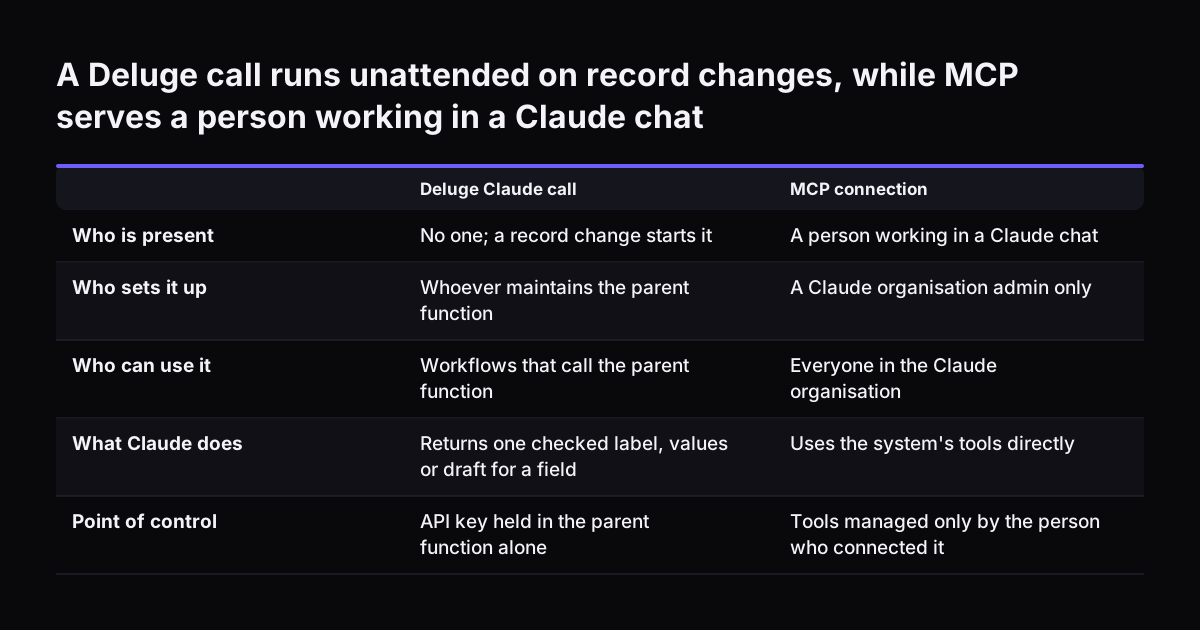
A Deluge Claude call suits automation that runs with no person present: a record changes, Claude answers and a field updates. Two other ways of working with Claude and Zoho serve different needs.

An MCP connection serves people working in a Claude chat. MCP, the Model Context Protocol, lets Claude use a system's tools directly. Zoho's guide to connecting Zoho Assist MCP to Claude sets out the governance rules. Only a Claude organisation admin can set it up, and the connection is then accessible to everyone in the organisation.

Only the person who connected an MCP connection can manage its tools. For CRM work, the setup guide for connecting Claude to Zoho CRM with MCP covers that route.

Agent Skills are organised folders of instructions, scripts and resources that extend what Claude can do. They work with the Messages API through the code execution tool. Before you add one to a Deluge call, note three points from Anthropic's skills guide:

  • Skills run in a container with no network access, so a Skill cannot call Zoho back.
  • Skills are not covered by zero data retention arrangements.
  • A request that omits the version or uses "latest" changes behaviour as soon as anyone uploads a new version, so pin the version.

For a routing or extraction call, a clear prompt in the parent function is usually enough.

A Deluge call runs unattended on record changes, while MCP serves a person working in a Claude chat. Deluge Claude call / MCP connection. Who is present: No one; a record change starts it / A person working in a Claude chat; Who sets it up: Whoever m

What calling Claude from Deluge means for UK and European businesses

For a business in the UK, Germany, Romania or Italy, calling Claude from Deluge raises three practical points before the first workflow goes live.

Cost is quoted in US dollars. Anthropic prices every model per million tokens in dollars, so your monthly bill in sterling or euros moves with the exchange rate. Budget with a margin, and measure real token use on test records before you commit to a forecast.

Language is rarely a barrier. All current Claude models have multilingual capabilities, so one routing prompt can handle enquiries in English, German, Romanian or Italian. Keep the allowed labels in one fixed language, so Deluge validation stays simple. The guide to multilingual customer replies in Zoho Desk covers drafting replies in the customer's language.

Data leaves Zoho with every call. Decide which fields a prompt may contain, and agree that list with whoever handles data protection in your company. Send the enquiry text, not the whole record. If you add Agent Skills, remember they fall outside zero data retention arrangements. The post on Zoho permissions for what Claude sees shows how to set those limits before go-live.

Next steps for your first Claude call from a Deluge function

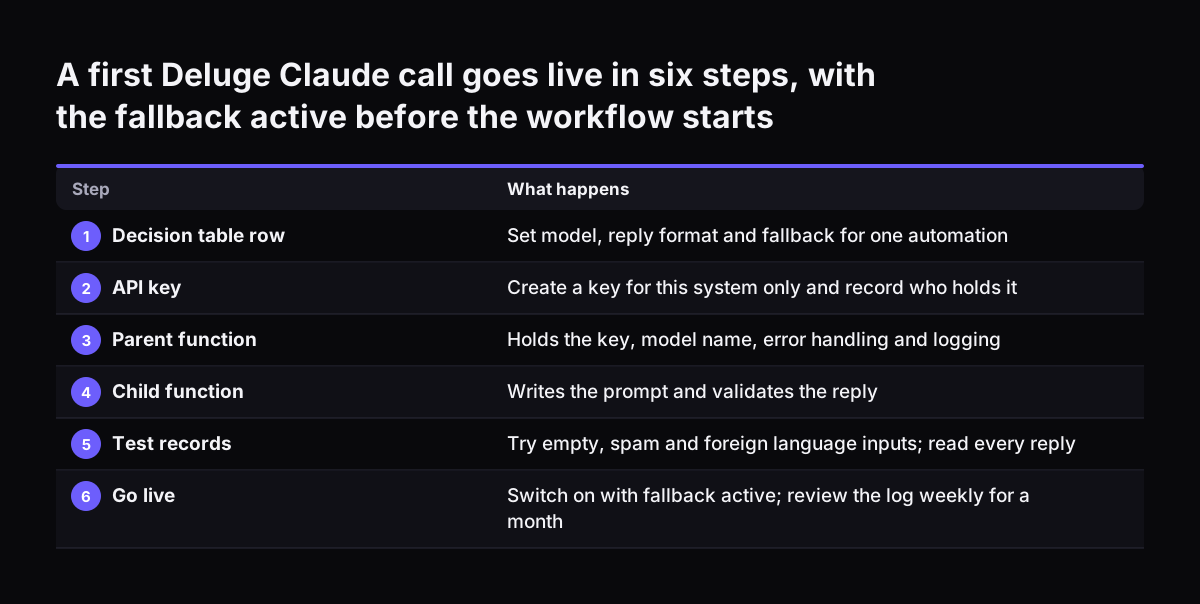
Start with one automation where a wrong answer is cheap and visible. Lead classification and ticket routing both fit. Then work through these steps in order:

  1. Write that automation's row in the decision table: model, reply format and fallback.
  2. Create a Claude API key for this system only, and record who holds it.
  3. Build the parent function with the key, the model name, the error handling and the logging.
  4. Build one child function that writes the prompt and validates the reply.
  5. Run it on test records, including empty, spam and foreign-language inputs, and read every reply.
  6. Switch the workflow on with the fallback active, then review the log weekly for the first month.

Add a second automation only when the first has run cleanly. The parent function will already exist, so each new call is mostly prompt and validation work.

To see where this pattern leads in a live system, read the account of a Teams service desk built on Claude and Zoho Desk. It shows routing and fallback working together in production.

A first Deluge Claude call goes live in six steps, with the fallback active before the workflow starts. What happens. 1. Decision table row: Set model, reply format and fallback for one automation; 2. API key: Create a key for this system only and re

Sources

  1. 1. Anthropic Newsroom
  2. 2. Models overview, Claude Platform Docs
  3. 3. Using Agent Skills with the API, Claude Platform Docs
  4. 4. Call function, Zoho Deluge Help
  5. 5. Introduction to Deluge, Zoho Deluge Help
  6. 6. Connect Zoho Assist MCP to Claude

Related articles