
Skip to content
SVENNISAIWe speak Claude.
Blog · Claude

Claude vs Gemini for business: plans, workspace fit and data terms compared

A business comparison of Claude and Gemini: what each plan costs as listed, which one fits the suite you already run, how each treats your data, and when to run both.

10 min read

Book a 30-minute call · with a Claude Certified Architect from our team.

Article · 10 min read
A fitted alcove shelf of box files beside a freestanding bookcase on castors holding matching files

Claude vs Gemini for business: the answer starts with your suite

Claude vs Gemini for a business comes down first to the suite your team already uses. If you run Google Workspace on Business Standard or above, Gemini is already included in Docs, Sheets, Slides, Drive, Meet and Chat. If you run Microsoft 365, or need an assistant that works across several business systems, look at Claude. Claude is bought as its own subscription and does not ask you to change suite.

Both business offers keep your content out of model training by default. Google states that Workspace does not use customer data to train models without the customer's permission or instruction. Anthropic states that its Team and Enterprise plans have no model training on your content by default.

The differences that matter sit elsewhere. They are in how each is priced and where each one works. They are also in the admin settings you get, and in the parts of each product that fall outside the standard terms. This guide covers those points in order, with one worked example and a comparison table. It does not rank the models on benchmarks. A benchmark score tells you little about whether a tool fits your files, your inbox and your customer records.
Gemini in Google Workspace and Claude Team are sold in different ways

Gemini in Google Workspace is Google's AI built into the Workspace apps and included in the Business Standard, Business Plus and Enterprise plans. You do not buy it separately on those plans. On Business Starter, Google's UK pricing page marks Gemini in Docs, Sheets, Slides, Drive, Meet and Chat as not supported.

Claude Team is Anthropic's business plan for teams of 2 to 150 people, bought per seat. A seat is one named user's licence. Claude Team sits alongside whatever email, file and calendar suite you already run.

What each one draws on

Gemini works through Workspace Intelligence. Google describes this as the mechanism behind its context-aware AI features, drawing content from Gmail, Drive, Calendar and Google Chat. In practice Gemini is strongest on material that already lives in Google's apps.

Claude works on what you give it or connect it to. Anthropic's models overview says all current Claude models accept text and image input, support tool use and have a 1M-token context window. A context window is the amount of text the model can hold in view at once. Tool use is what lets Claude reach into other systems once someone has connected them.

Claude Code, Anthropic's coding tool, is included in all paid plans and shares the plan's usage limits. If you want a plain introduction first, read what Claude is and how UK businesses use it.

Listed prices for Claude plans and Google Workspace, excluding tax

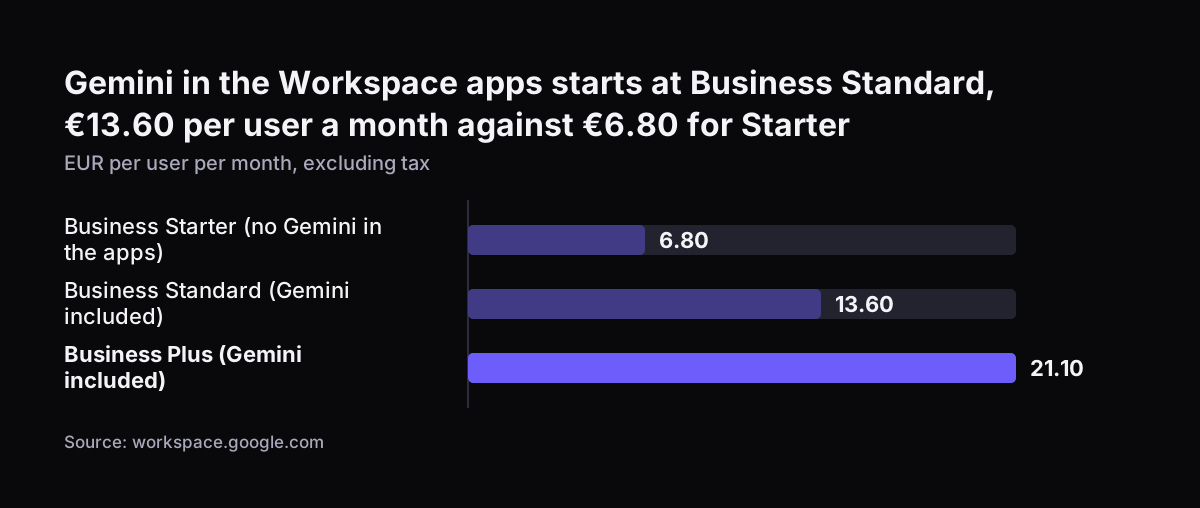
Google's UK pricing page lists Workspace prices per user per month, excluding tax. On the day we read it, the page showed the prices in euros: Business Starter at €6.80, Business Standard at €13.60 and Business Plus at €21.10. The Starter, Standard and Plus plans cap at 300 users. Enterprise plans have no minimum or maximum user count. A one-year commitment saves 16% compared with monthly billing.

Google also runs an introductory offer for new Workspace customers. It covers the first 20 users added, for 12 months, and standard pricing then applies to everyone. When we last checked, the page also offered new customers up to 50% off their first three months, for a limited time.

Anthropic's pricing page lists Claude in US dollars:

  • Team standard seat: $20 per seat per month billed annually, or $25 billed monthly.
  • Team premium seat: $100 per seat per month billed annually, or $125 billed monthly, with 5x the usage of a standard seat.
  • Enterprise: US$20 per seat per month billed annually, 20 seat minimum, plus usage that scales with model and task.
  • Pro, an individual plan: $17 per month with the annual discount, or $20 billed monthly.

Claude Team seats have usage limits that reset on a rolling five-hour window, with weekly limits on top. Confirm the figure in your billing currency before you buy, and add VAT where it applies.

Gemini in the Workspace apps starts at Business Standard, €13.60 per user a month against €6.80 for Starter: Business Starter (no Gemini in the apps) 6.80, Business Standard (Gemini included) 13.60, Business Plus (Gemini included) 21.10 (EUR per user
Source: workspace.google.com

Claude Team, Claude Enterprise and Gemini in Workspace side by side

The table below compares the three business options on the points most UK buyers ask about. Prices are as listed on each vendor's page, before tax.

PointClaude TeamClaude EnterpriseGemini in Google Workspace
Listed price$20 per seat/month annual, $25 monthlyUS$20 per seat/month annual, plus usageIncluded in Business Standard (€13.60) and Plus (€21.10) per user/month
Team size2 to 150 people20 seat minimumUp to 300 users on Business plans; no limit on Enterprise
Suite requiredNoneNoneGoogle Workspace, Business Standard or above
Training on your contentNot by defaultNot by defaultNot without your permission or instruction
Where it worksClaude itself, plus systems you connectClaude itself, plus systems you connectDocs, Sheets, Slides, Drive, Meet, Chat
Best fitMixed or Microsoft shops, cross-system workLarger firms with usage-based budgetsFirms already on Google Workspace

The suite row usually decides the matter. A firm on Google Workspace Standard already pays for Gemini. A firm on another suite would have to buy Workspace to get Gemini inside the apps, while Claude needs nothing extra. For the choice between Anthropic's two business plans, see how to choose between Claude Team and Enterprise.

Data and training terms on the Claude and Gemini business plans

Neither vendor trains its models on business content by default, but the detail differs. Google's Workspace privacy hub for generative AI treats user prompts as customer data under its Cloud Data Processing Addendum. That puts prompts under the same contract terms as your email and files.

Gemini also respects your existing sharing permissions. If a user cannot open a document or email, Gemini will not retrieve it for them. The cross-app knowledge base is off by default for files shared with outside collaborators or created outside your domain. Google lists SOC 1/2/3, ISO 9001 and ISO/IEC 27001, 27701, 27017, 27018 and 42001 certifications for Gemini.

The Gemini exceptions to check

Two Gemini products need a separate check. Google's privacy hub says Gemini in Chrome does not yet carry ISO, SOC or FedRAMP coverage. The same page says Gemini Notebook does not yet carry ISO, SOC or FedRAMP coverage either. Gemini Notebook is not yet integrated with Workspace data loss prevention, and your file sharing and data region settings do not apply to it.

The Claude point to check

Anthropic's training default applies to Team and Enterprise. Individual plans such as Pro, Max and Ultra are opt-out instead. If staff use personal Pro accounts for work, their content sits under different terms from your business plan. For where your data sits once Claude is connected to your systems, see our data security page.

Retention periods and admin controls for Gemini and Claude

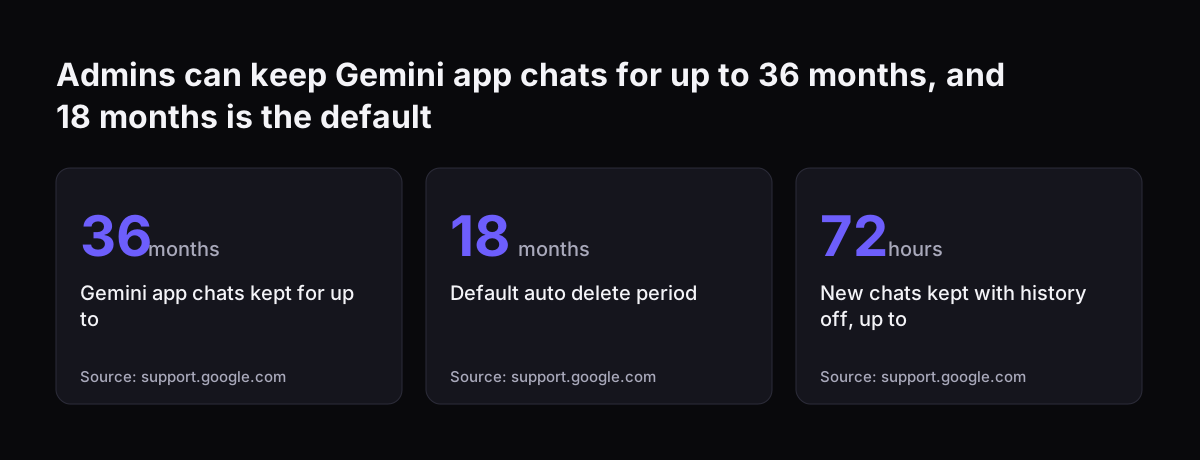
Google publishes detailed retention settings for Gemini that a Workspace admin can change. Prompts and responses in Gemini in Workspace apps are kept from 90 days to indefinitely, as admins decide. Conversations in the Gemini app can be kept for up to 36 months.

The Gemini app retention settings break down as follows:

  • Auto-delete options: 3, 18 or 36 months, with 18 months as the default.
  • With conversation history off: new chats are kept on the user's account for up to 72 hours.
  • Feedback data: kept for up to 18 months.
  • Gemini Notebook: prompts and responses are not kept after the session ends.

Google also confirms that its personalised intelligence feature is not available on Workspace Business, Enterprise or Education accounts. That feature links personal Google accounts to other Google services.

For Claude, the main admin decision is the plan itself. The plan sets seat types, usage and how you are billed. Anthropic's documentation also notes that organisation settings override model features. For example, an administrator can disable web search, and requests that use it will then fail. Write down which settings you need before choosing between Team and Enterprise.

Admins can keep Gemini app chats for up to 36 months, and 18 months is the default: Gemini app chats kept for up to 36 months, Default auto delete period 18 months, New chats kept with history off, up to 72 hours
Source: support.google.com

Worked example: a 12-person firm on Google Workspace Business Starter

Take a 12-person firm on Google Workspace Business Starter. It wants an AI assistant for drafting, meeting notes and summarising documents. It has three listed options.

Option one: move everyone to Business Standard

Business Standard lists at €13.60 per user per month against €6.80 for Starter. The extra €6.80 per user comes to €81.60 a month for 12 people, before tax. The firm gets Gemini in Docs, Sheets, Slides, Drive, Meet and Chat. Pooled storage rises from 30 GB to 2 TB per user, and Audio Overviews rise from 3 to 20 per day.

Option two: stay on Starter and add Claude Team

Twelve standard Claude Team seats list at $240 a month billed annually, or $300 billed monthly. The firm keeps its Workspace bill and adds an assistant that can also reach systems outside Google once they are connected.

Option three: Standard for all, Claude for a few

The firm upgrades to Business Standard for everyone and adds Claude Team seats only for the people whose work crosses several systems. Team needs at least two seats.

The choice depends on where the work happens. If most of the work is in Docs and Meet, option one is the cheapest fit. If the work runs through the CRM, accounts or long contracts held elsewhere, option two or three earns its cost.

Which fits a Google Workspace shop and which fits a Microsoft shop

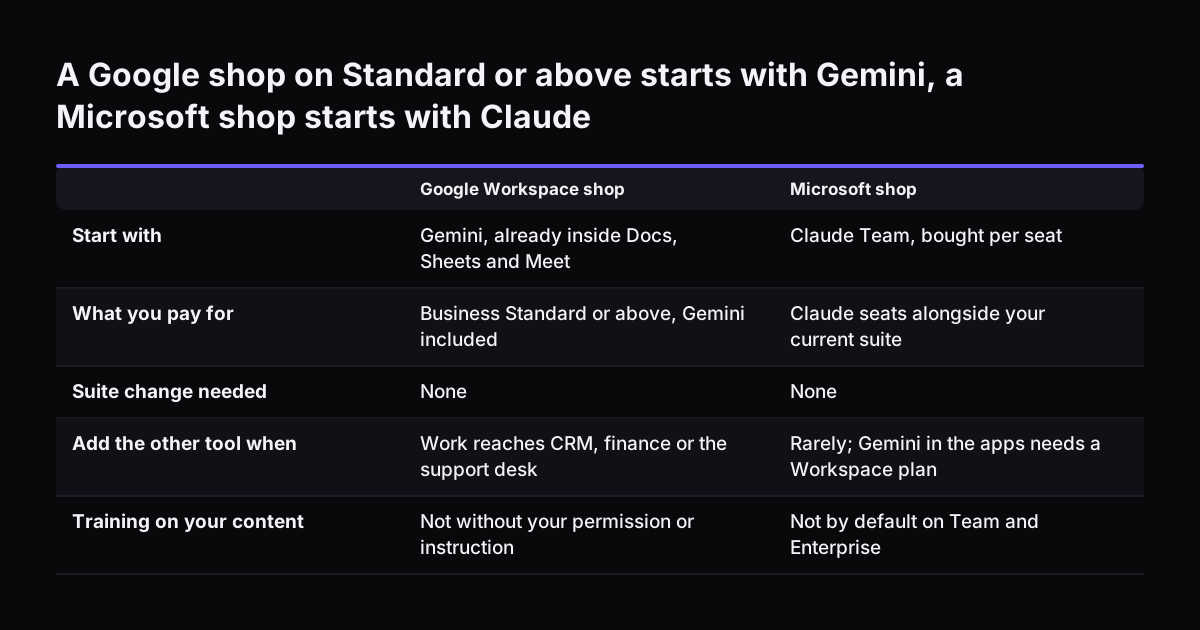
A Google Workspace shop on Business Standard or above should start with Gemini. Gemini is already paid for and already inside the apps your team uses. Add Claude when the work reaches beyond Google's apps. Typical cases are customer records, finance or a support desk.

A Microsoft shop has a different calculation. Gemini inside Docs, Sheets and Meet needs a Workspace plan. A firm on Microsoft 365 would be paying for a second suite to use it. Claude does not depend on a suite, which is why it is usually the more natural fit for a Microsoft business. If you are also weighing OpenAI's assistant, our Claude vs ChatGPT comparison for business covers that choice.

At Svennis we map which suite holds a client's email, files and calendar before we compare any assistant. That map often settles the choice before price comes up.

The systems behind the suite matter as much as the suite itself. To connect Claude to a CRM such as Zoho CRM, we build one of four things for each connection. It can be a connector, an MCP server, a plugin or a skill. We show you the options with their cost, and you choose.

A Google shop on Standard or above starts with Gemini, a Microsoft shop starts with Claude. Google Workspace shop / Microsoft shop. Start with: Gemini, already inside Docs, Sheets and Meet / Claude Team, bought per seat; What you pay for: Business St

When running both Claude and Gemini makes sense

Running both Claude and Gemini makes sense when your firm is on Google Workspace Standard or above and some people do work that spans several systems. Everyone keeps Gemini inside Docs and Meet. A smaller group gets Claude Team seats for work that pulls from the CRM, finance or support systems.

Running both adds a few duties. Set them before anyone starts:

  • Decide which tool handles which kind of data, and write it into your AI policy.
  • Keep work on the business plans, not on personal Gemini or Claude accounts.
  • Check Gemini Notebook and Gemini in Chrome separately, because Google's certification coverage for them differs from the rest of Gemini.
  • Watch Claude's five-hour and weekly usage limits for heavy users, and move them to premium seats if they keep hitting them.

Developers are a common second case. Claude Code is included in every paid Claude plan. A Google shop can therefore give its developers Claude seats without changing anything for the rest of the firm.

Running both makes less sense for a small firm on Business Starter with one main use. In that case, pick the one that matches where the work happens, as the worked example shows.

What the Claude and Gemini comparison means for a UK company

A UK company should read both vendors' prices as net figures and add VAT where it applies. Google's UK page states that its prices exclude tax. When we read it, the page listed euros, so check the currency on your own invoice. Anthropic lists Claude in US dollars, so confirm the amount in your billing currency at checkout.

Anthropic's 14-day refund window in the UK and EEA applies under its consumer terms. It covers individual plans such as Pro, not a business buying Team seats. A Team plan can be cancelled at any time and stays active until the end of the billing period. If you want a low-commitment test, start on monthly billing with a few seats.

Data region settings matter if your organisation has set one in Workspace. Google states that those settings do not apply to Gemini Notebook, so keep sensitive material out of that product. Google also says it signs the EU Code of Practice for general-purpose AI models. This is a voluntary EU code for companies that build general-purpose AI models. It places no duties on a UK firm that uses Gemini, whether or not it trades in the EU.

For either tool, record which data staff may put in and which systems it may reach. Do this before rollout, not after. Both vendors give you contract terms for business data. Your own decisions about what goes in remain your responsibility.

Next steps: check your suite, your data and your first process

You can settle the Claude vs Gemini question for your firm in a week with these checks:

  1. Check your Workspace plan. If you are on Business Standard or above, you already have Gemini in the apps.
  2. List the systems outside your suite that people work in daily, such as CRM, accounts and helpdesk.
  3. Find any staff using personal AI accounts for work, and move that work onto a business plan.
  4. Price the options from the vendors' own pages, add VAT, and compare against the worked example above.
  5. Pick one process that crosses systems, and test Claude on it with two or three Team seats on monthly billing. You can then cancel at the end of the month if it does not fit.

If Claude is the fit, Svennis works in four steps. First comes a Workshop. Next is a pilot: Pilot Claude A puts an AI agent on Claude for one process, and Pilot Claude B rolls out Claude Team to the whole team. Then comes the department Activation, followed by monthly operations. Our guide to what Claude costs and how to start sets out the prices and the first step.

Sources

  1. Google Workspace Help: generative AI privacy hub
  2. Google Workspace UK pricing
  3. Claude plans and pricing
  4. Anthropic models overview
Free, 30 minutes

Pick a time. Bring the process this article made you think of.

You leave with a clear yes or no on putting Claude on it, and the step that fits from our published prices. You speak to someone who builds the agents, not a salesperson.

Prefer to call? +44 7588 772736 · Not ready to talk? See it on your business first.

30 minutes · video call · free
  1. 1Time
  2. 2Details
  3. 3Booked