
Svennis AI
9 min read

Claude Team vs Enterprise: how to choose the right plan for your business

Enterprise adds audit logs, SCIM, retention controls and compliance APIs to Team, needs at least 20 seats, and bills usage at API rates. Here is how to decide.

Abstract cover of two nested layered rings, the outer ring gathering flowing lines into a controlled channel

Claude Team vs Enterprise: the short answer

In the Claude Team vs Enterprise choice, pick Enterprise if at least 20 people will use Claude and you need central control. That control means audit logs, SCIM user provisioning, custom data retention and a Compliance API. Pick Team if you are smaller, or if you do not need those controls yet.

Claude Enterprise is Anthropic's organisation plan. It includes everything in the Team plan and adds admin, compliance and security controls. You pay a seat fee for access, and Anthropic bills usage separately at API rates. That definition comes from Anthropic's own help page on the Enterprise plan.

The everyday experience of a single user overlaps between the two plans, because Enterprise is built on top of Team. The difference shows up elsewhere. It shows up in who can see what happened, how accounts are created and removed, and how the bill grows with use. The difference matters most once Claude is connected to real business systems, such as your CRM, your service desk or Microsoft Teams.

The rest of this post covers what Enterprise adds and how its billing works. It then looks at what connecting real tools changes, and which plan suits which kind of company.
What Enterprise adds to Team: audit logs, SCIM, retention and compliance APIs

Anthropic describes Enterprise as "everything in the Team plan" plus a set of administrative features. Those features exist for the people who run IT, security and compliance, not for the person typing a prompt.

The additions Anthropic lists on the Enterprise help page are:

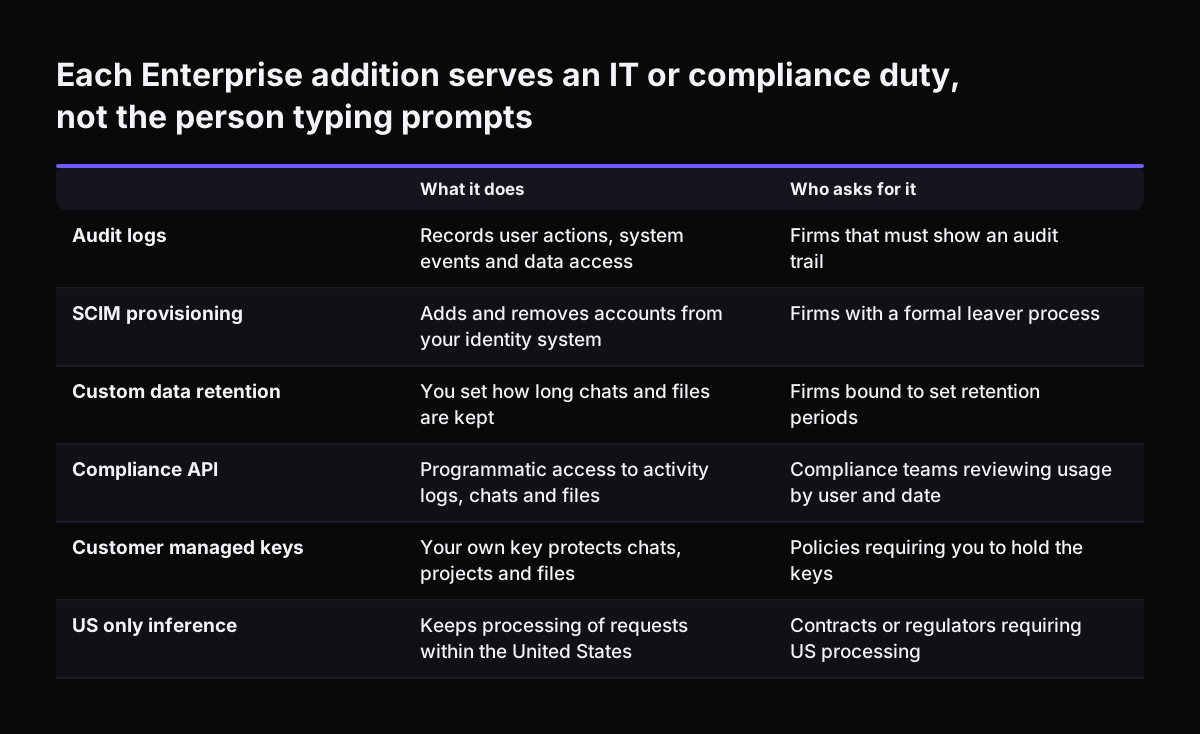
  • Audit logs, which capture key information about user actions, system events and data access.
  • SCIM, which provisions and removes user accounts automatically from your identity system.
  • Custom data retention controls, so you decide how long chats and files are kept.
  • A Compliance API, which gives programmatic access to usage data, including activity logs, chat histories and file content, filtered by user and time range.
  • An Analytics API, which returns aggregated engagement and adoption metrics for the organisation.

Each of these answers a question an auditor or data protection officer will eventually ask. Who read this customer record through Claude? When did a leaver lose access? How long do we keep conversation history?

On Team, you answer those questions by hand, if you can answer them at all. On Enterprise, you answer them from logs and APIs.

If none of those questions applies to you today, the Enterprise features are insurance you do not yet need. If one of them already appears in a contract, a tender or an internal policy, the choice is largely made.

Each Enterprise addition serves an IT or compliance duty, not the person typing prompts. What it does / Who asks for it. Audit logs: Records user actions, system events and data access / Firms that must show an audit trail; SCIM provisioning: Adds an

Enterprise billing: a seat fee for access, usage at API rates

Enterprise billing separates access from usage. According to Anthropic, "the seat fee covers access only, and all usage is billed separately at API rates." The seat fee gets a person in the door. Every task that person runs is then metered on top.

Enterprise uses a single seat type, priced per user per month and billed annually. That one seat covers Claude on web, desktop and mobile, plus Claude Code and Cowork. If your staff will use Cowork for file and desktop tasks, our guide to setting up Claude Cowork for your business shows what that looks like day to day.

Usage-based Enterprise plans have no per-seat usage limits and no included token allowance. That cuts both ways. A heavy user is never cut off mid-task, but nothing caps the bill by default either. Anthropic's answer is spend limits. Admins can set them at the organisation level and for individual users.

The practical consequence is simple. On Enterprise, your cost depends on how people use Claude, which model they use and how long the tasks run. You budget for seats and for consumption separately. A company with 25 light users and one person running long automated jobs can find that one person drives most of the usage bill.

Model choice drives Enterprise usage costs

Because Enterprise usage is billed at API rates, the model a task runs on sets its price. Anthropic's models overview lists API prices per million tokens. A token is a small chunk of text, roughly part of a word.

ModelInput, USD per million tokensOutput, USD per million tokensContext window
Claude Fable 5.110501M tokens
Claude Opus 5.54201M tokens
Claude Sonnet 52101M tokens
Claude Haiku 4.515200K tokens

The spread is wide. Output on Claude Fable 5.1 costs ten times as much per token as output on Claude Haiku 4.5. Anthropic recommends starting with Claude Opus 5.5 for most workloads if you are unsure. It keeps Claude Fable 5.1 for demanding reasoning and long-horizon agentic work. Anthropic also says Opus 5.5 performs at the level of Fable 5.1 on most work and costs 40% less to run than Opus 5.

For many routine business tasks, a smaller model is enough. We cover that trade-off in Claude Sonnet 5 as the everyday business model. On Enterprise, matching the model to the task is a budget decision as well as a quality decision.

Enterprise seat minimums and buying routes: 20 self-serve, 50 sales-assisted

Claude Enterprise has a minimum size. The self-serve route, which you buy online without talking to sales, needs at least 20 seats. The sales-assisted route, which adds advanced options and dedicated support, needs at least 50 seats.

Those minimums make the decision easy for small firms. If fewer than 20 people will use Claude, Enterprise self-serve is not available to you. Team is the plan to plan around. If you have 20 to 49 users, self-serve Enterprise is open to you. At 50 or more you can choose between the two routes.

Enterprise is also available through the AWS Marketplace. That can suit a company that already buys software through its AWS account and wants one supplier invoice.

Two payment details from Anthropic's help page are worth knowing before you commit:

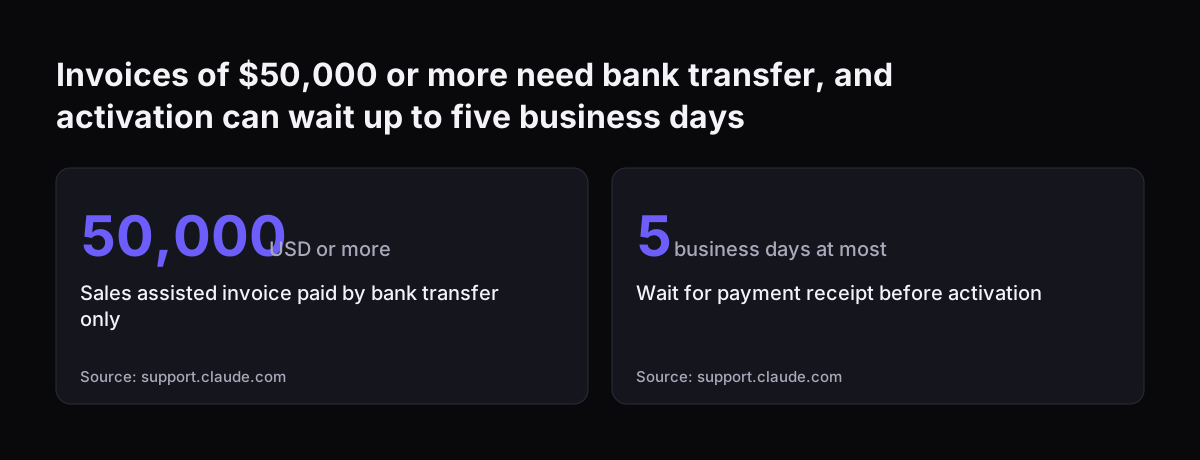
  • For sales-assisted invoices of $50,000 or more, only bank transfer (ACH or wire) is accepted.
  • If you pay by ACH, the plan is not activated until Anthropic receives the payment, which can take up to five business days.

Build those five business days into your rollout plan. A launch date set for the day you sign can slip for reasons that have nothing to do with the technology.

Invoices of $50,000 or more need bank transfer, and activation can wait up to five business days: Sales assisted invoice paid by bank transfer only 50,000 USD or more, Wait for payment receipt before activation 5 business days at most
Source: support.claude.com

Encryption keys, US-only inference and HIPAA: Enterprise controls only some firms need

Enterprise includes three security options that most small and mid-sized firms will never switch on. A few organisations cannot operate without them.

Customer-managed encryption keys

Enterprise lets you provision an encryption key in your own cloud provider. Anthropic then uses that key to protect your team's chats, projects and files in Claude. Your organisation controls the key. This matters if your security policy says you must hold the keys to any system that stores sensitive data.

US-only inference

Enterprise can keep your organisation's inference within the United States. Inference is the step where the model processes your request. This option is relevant if your contracts or regulators point you towards US processing. It does not answer every data residency question, so check what your own obligations require. Our overview of AI law in the UK and what applies to your business is a starting point.

HIPAA-ready configuration

Eligible organisations can enable a HIPAA-ready configuration and accept a BAA from organisation settings. HIPAA is the US health data law, and a BAA is the agreement it requires with suppliers. This is for firms that handle US health information.

If none of these three options applies to you, none of them should push you towards Enterprise.

Connecting Claude to Zoho and Microsoft Teams: what the plan decides

Connecting Claude to your business systems changes the plan decision more than any feature list does. Once Claude can read and write records, the questions shift. It is no longer only what a user asked. It is also what data Claude touched, and on whose behalf.

Anthropic's Enterprise page lists connectors to Google Drive, Gmail, Google Calendar, GitHub, Microsoft 365 and Slack. For systems outside that list, such as Zoho CRM or Zoho Desk, the usual route is a remote MCP server. MCP is the protocol Claude uses to call external tools. Anthropic's documentation on remote MCP servers is clear on two points. You need the right authentication credentials, and each server's connection instructions come from the company that runs it.

That is where Enterprise earns its keep. Audit logs capture data access, and the Compliance API lets you pull activity by user and time range. When a service desk assistant in Teams is creating tickets, you want that trail. Our write-up of a Teams service desk running on Zoho Desk shows the kind of setup we mean. For the Microsoft side, see connecting Claude in Microsoft 365 and Teams to the systems behind it.

At Svennis, we set per-user spend limits and confirm what the audit logs record before we connect Claude to a live CRM or service desk. We do it first because a long automated task on metered usage shows up on the invoice, and nobody wants to find it there.

Which Claude plan fits which kind of company

The right Claude plan follows from three facts about your company: how many people use it, what you must be able to prove, and whether Claude writes into your systems. The table below maps common profiles to a starting plan, based on the rules on Anthropic's Enterprise help page.

Company profilePlan to start withWhy
Fewer than 20 users, no audit requirementTeamSelf-serve Enterprise needs at least 20 seats
20 to 49 users who need audit logs or SCIMEnterprise, self-serveAdds the admin controls without a sales process
50 or more users who want advanced optionsEnterprise, sales-assistedAnthropic offers dedicated support on this route
Policy requires your own encryption keysEnterpriseCustomer-managed keys are an Enterprise feature
Claude writes to CRM or service desk records for many usersEnterprise, if you have 20 or more seatsAudit logs and the Compliance API show who touched what

A small firm on Team can still connect Claude to its tools. It will rely more on the logs inside those tools, and less on logs from Claude itself. If that describes you, our guide to Claude for small business inside the tools you already use covers where to start.

Seat-based Enterprise customers must switch billing at renewal

Some organisations already run Claude Enterprise on an older seat-based model. Those organisations have to change billing at their next contract renewal. The older models used Standard and Premium seats, or Chat and Chat + Claude Code seats. Anthropic states that such organisations "will not be able to continue with this billing model past your next contract renewal."

After renewal, the arrangement described earlier applies. You get one seat type priced per user per month, and usage is billed at API rates. For some teams that lowers cost. For heavy users it can raise it, because there is no included token allowance.

If you are in this position, start before the renewal date. Pull your current usage by user, and find out which models your people actually use. Then decide the spend limits you will set on day one. The Analytics API and the Compliance API give you the data for that review, so the new bill does not arrive as a surprise.

Next steps: four checks to settle Claude Team vs Enterprise

You can settle the Claude Team vs Enterprise question in an afternoon with four checks. Work through them in order, because an early answer can end the exercise.

  1. Count real users. Count the people who will use Claude every week. Fewer than 20 means Team. At 50 or more, sales-assisted Enterprise becomes an option.
  2. List what you must prove. Check your contracts, tenders and policies for audit trails, retention periods, leaver processes or key ownership. Any firm requirement points to Enterprise.
  3. Map the connections. Write down which systems Claude will read from and write to, and who owns the credentials for each connection.
  4. Estimate usage by model. Estimate which tasks need a large model and which can run on a smaller one. Then set spend limits per user before launch.

Whichever plan you choose, the setup inside it matters as much as the plan itself. Shared instructions and reusable workflows keep results consistent across the team. Our guide to Claude Projects and Skills for a small team covers that next step.

Sources

  1. 1. What is the Enterprise plan? Claude Help Center
  2. 2. Models overview, Claude Platform Docs
  3. 3. Anthropic Newsroom
  4. 4. Remote MCP servers, Claude Platform Docs

Related articles