Skip to content
SVENNISAIWe speak Claude.
Blog · Claude Enterprise

Audit logs and the Compliance API for Claude in a business deployment

Claude's audit log export covers 180 days of events without chat content. The Compliance API adds content, sessions and a continuous feed. This guide shows how to use both before go-live.

10 min read

Book a 30-minute call · with a Claude Certified Architect from our team.

Article · 10 min read
Abstract layered bands flowing into a single ordered stream, suggesting records gathered into an audit trail

Audit logs and the Compliance API for Claude: what each one records

Audit logs and the Compliance API for Claude give an Enterprise organisation two different records. The audit log export is a file of account events from the past 180 days, without chat titles or content. The Compliance API is a continuous programmatic feed that adds chats, files, projects, and Claude Code and Cowork sessions.

An audit log is a time-stamped list of actions in your Claude organisation, such as settings changes and data exports, with the user and the item each action affected. You download it as a file when you need it. It tells you what happened, not what was said.

The Compliance API is programmatic access to Claude usage data. According to Anthropic's Enterprise plan page, it covers activity logs, chat histories and file content, with filtering by user and time range. A security, archiving or eDiscovery tool calls it on a schedule and keeps its own copy.

Both belong to the Enterprise plan. Unbound Security's documentation states that the Compliance API is not available on Team plans. If you are still choosing a plan, the guide to what Claude costs and how to start covers that decision. This post covers what the two records hold, where they stop, and how to connect them to your governance before an assistant or agent goes live.
The Claude audit log export: who runs it and how far back it goes

The Claude audit log export goes back 180 days and only Owners can run it. Anthropic's help article on accessing audit logs states that audit logs are available for Enterprise organisations only.

The steps are short:

  1. An Organization Owner or Primary Owner opens Organization settings > Data and Privacy.
  2. They click the "Export logs" button.
  3. Anthropic aggregates all audit logs for the organisation from the past 180 days.
  4. The Owner who asked for the export receives an email with a download link.
  5. The link stays active for 24 hours.

Expect a wait. The help article warns that there may be a delay between triggering the export and receiving the email while the logs are aggregated. Plan the export as a task, not a quick lookup during an incident.

One setting blocks the button entirely. If your Enterprise organisation uses customer-managed encryption keys, you cannot export with "Export logs". A customer-managed encryption key is a key held in your own cloud provider that Anthropic uses to protect your chats, projects and files. Organisations with that set-up need the Compliance API for their audit events.

The 180-day limit matters for retention. If your records policy asks you to keep access records for longer, the export alone will not meet it. You either export on a fixed cycle and store each file yourself, or you pull the events continuously through the Compliance API into a system that keeps them as long as you need.

What the Claude audit log contains, and what it leaves out

The Claude audit log records events and identifiers, not conversations. Each row has nine columns. These include entity_info, the item the event affected, and user_agent, which identifies the program used to carry out the event. A client_platform column shows iOS or Android when the event came from a mobile app.

Anthropic adds event types over time, and the help article dates them. Two examples show the kind of event you get:

  • org_sso_connection_deleted, added on 10 September 2024, records that a single sign-on connection was removed.
  • org_data_export_started, listed with the date 15 July 2025, records an organisation data export and whether Anthropic started it.

The second example answers a question auditors ask: did anyone outside our company take a copy of our data? The initiated_by_anthropic field gives a yes or no.

The audit log leaves out what people wrote. The titles and content of chats and projects are not exported; only their unique identifiers are. So the log can show that a given chat existed and when it changed. It cannot show what the chat said. Chat inputs and outputs are a separate route: Primary Owners can export them through data exports.

For a records or eDiscovery process, that split is the key point. The audit log is evidence of activity. Content needs either a data export or the Compliance API.

What the Claude Compliance API adds: content, sessions and a continuous feed

The Claude Compliance API adds the content and the continuity that the audit log export lacks. Anthropic's help article confirms that audit log events are available through it, so you lose nothing by moving to the API.

On top of those events, the API exposes more. Unbound Security's Compliance API integration documentation describes programmatic access to an organisation's retained chats, files, projects and users. Capsule Security's documentation lists endpoints such as /v1/compliance/apps/sessions/local and /v1/compliance/apps/sessions/remote. These return Claude Code and Cowork sessions and their messages. Cowork is Claude's desktop mode for working across files and tasks; the Claude Cowork explainer covers it in more detail.

Activity events are the other half. Kingy AI's report describes them as user logins, admin actions and configuration changes, from both Claude Enterprise and the Claude Platform.

Coverage differs by account type:

  • Claude Enterprise organisations can reach content and activity.
  • A standalone Claude Console organisation can reach the Activity Feed only, according to Unbound.
  • Team plans have no Compliance API at all.

A commenter on Anthropic's Claude for Business LinkedIn post adds that Platform customers receive activity events but not prompts or responses. So content-level checks cover Enterprise only. If your agents run on the API rather than in claude.ai, check this point before you rely on content monitoring.

Compliance Access Keys: who creates them and what they can read

A Compliance Access Key is the credential a tool uses to call the Compliance API, and it reads a great deal. Unbound's documentation states that one key can read every chat, file, project and session transcript in every linked organisation. That includes content the primary owner has not seen.

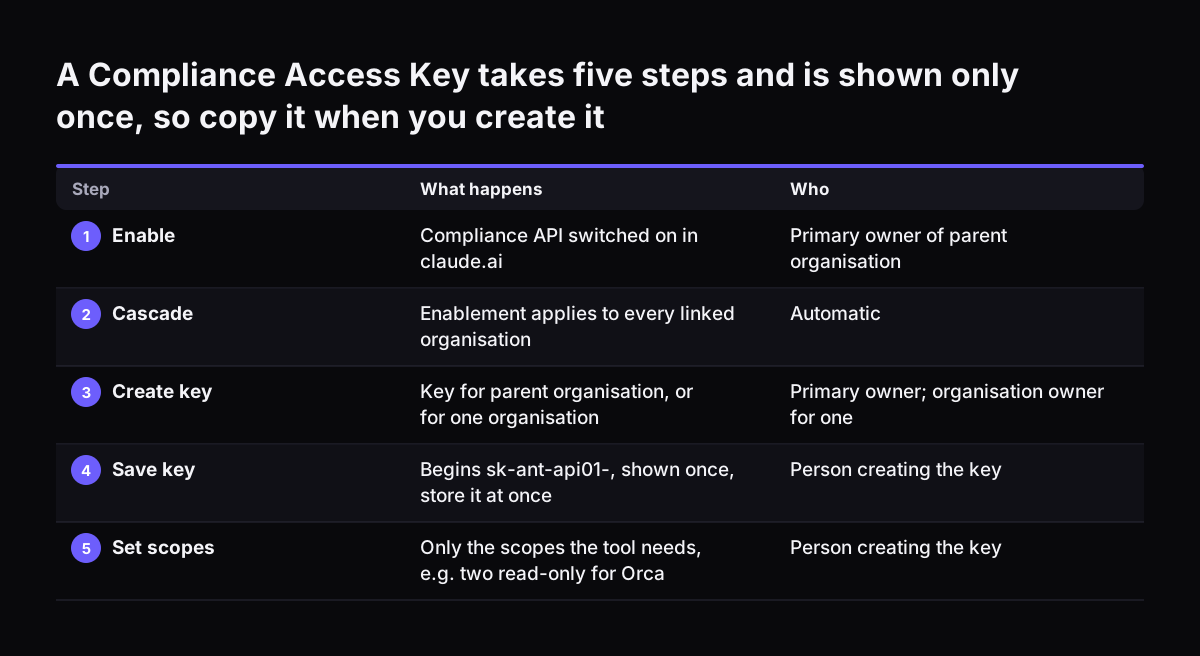
Capsule Security's documentation describes the set-up. The parent organisation's primary owner first enables the Compliance API in claude.ai. Enablement cascades to every linked organisation. Only the primary owner can create a key that covers the parent organisation.

An organisation owner can create a key for a single organisation. The key begins with sk-ant-api01- and is shown only once.

Scopes decide what a key can read, and they are fixed at creation. To change them, you create a new key and delete the old one. Capsule lists three read scopes:

  • read:compliance_activities for the Activity Feed.
  • read:compliance_user_data for users, chats, messages, and Cowork and Claude Code sessions.
  • read:compliance_org_data for organisations, roles and groups.

Two operational facts follow. Deleting a key takes effect on the next request, with no grace period. And a key of the wrong type fails with a 401 "x-api-key header is required" error, even when the header was sent. A standard Claude API key starts with a different prefix and lives in Claude Console; the post on a Claude API key for a company covers that one. All /v1/compliance/* endpoints share a limit of 600 requests per minute per parent organisation.

A Compliance Access Key takes five steps and is shown only once, so copy it when you create it. What happens / Who. 1. Enable: Compliance API switched on in claude.ai / Primary owner of parent organisation; 2. Cascade: Enablement applies to every lin

Gaps in the Claude record that neither source covers

Claude's governance record has gaps you need to know before you rely on it. Most come from timing and from where an item was created.

Recording starts when you switch the Compliance API on, not before. Unbound's documentation states that while the API is off, no new activity is recorded. Activity from that period cannot be recovered later. Capsule adds that skills created before enablement have no creation event. They stay invisible until someone replaces or recreates them.

Some items sit outside the API altogether, according to Capsule:

  • Agent Skills created in a Claude Console workspace, the ones used with the API rather than in claude.ai.
  • Anthropic's Default Workspace, which is absent from the workspace listing for keys not bound to one workspace.
  • A skills inventory, because there is no skills endpoint; it has to be rebuilt from Activity Feed events.

Capsule also warns that Anthropic offers no read-only scope for skills. A key that can list a workspace's skills can also delete them and run inference on your account. Keep that key separate from your compliance key.

Each integration adds its own limits. Unbound, for example, imports at most the last 15 days of activity and syncs once an hour, so it is not a live feed. Kingy AI quotes Tech Times on the general point: buyers should verify which Claude surfaces are covered before assuming every interaction reaches their monitoring stack.

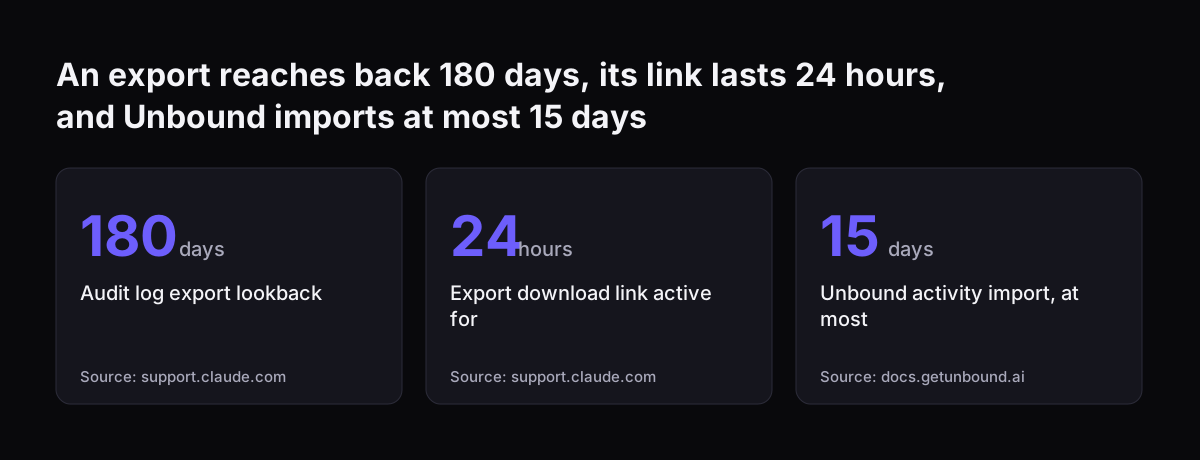
An export reaches back 180 days, its link lasts 24 hours, and Unbound imports at most 15 days: Audit log export lookback 180 days, Export download link active for 24 hours, Unbound activity import, at most 15 days
Source: support.claude.com, docs.getunbound.ai

Connecting the Claude Compliance API to security, archiving and eDiscovery tools

The Claude Compliance API connects to existing security and compliance products, so you rarely build the receiving end yourself. Anthropic's Claude for Business LinkedIn post states that it connects to more than 100 products, covering DLP, SIEM, identity, eDiscovery and AI security. Named integrations include Microsoft Purview, CrowdStrike, Splunk, Okta, Palo Alto Networks, Netskope, Zscaler and Datadog.

The integrations do not all read the same data. Pick by the question you need answered:

  • Posture and settings. Orca Security uses a read-only key and never touches chat or file content. It ingests settings such as SSO enforcement, IP allowlist, data retention and content redaction, plus chat metadata only.
  • Security monitoring. Trend Micro brings Claude Code and Cowork transcripts into TrendAI Vision One, including prompts, responses and tool calls tied to verified users. Security teams can flag tool calls outside expected boundaries.
  • Records and archiving. Kingy AI reports that Smarsh Capture for Claude Enterprise is designed to capture text, files, generated artifacts, deleted messages and archived conversations.
  • Identity. SailPoint's connector manages Claude users, groups, group members and roles in SailPoint Identity Security Cloud.

A metadata-only tool is easier to approve with your data protection officer. A content-capturing tool is what an eDiscovery or records process needs. Many organisations will want one of each, each on a key with only the scopes it requires.

Claude audit records compared: export, data export and Compliance API

Claude offers three routes to its records, and each answers different governance questions. The table compares them on the facts in Anthropic's help centre and the integration documentation cited above.

QuestionAudit log exportChat data exportCompliance API
Who can use itOwners and Primary OwnersPrimary OwnersA tool holding a Compliance Access Key
Chat and project contentNo, identifiers onlyChat inputs and outputsChats, files and projects
Claude Code and Cowork sessionsNot statedNot statedSessions and their messages
How far backPast 180 days per exportNot statedFrom the day it was enabled
DeliveryEmailed link, active 24 hoursExport fileContinuous, pulled by your tool
Works with customer-managed keysNoNot statedAudit events available

Read the table by need. For an occasional access review, the audit log export is enough. For a legal hold or a subject access search, you need content, so a data export or the Compliance API. For ongoing monitoring of an agent in production, only the Compliance API gives a continuous record.

A worked example: governing a Claude service desk agent before go-live

A Claude service desk agent shows how the pieces fit in practice. Take a professional services firm on Claude Enterprise, above the self-serve minimum of 20 seats. It plans an agent that answers staff IT questions and creates tickets in Zoho Desk. For the Zoho Desk link itself, the build options are a connector, an MCP server, a plugin or a skill, each with its own cost, and the firm chooses.

Before the agent handles live tickets, the firm works through this sequence:

  1. The primary owner enables the Compliance API in claude.ai, because recording is not retroactive.
  2. The admin checks that SSO is enforced. Orca notes that without enforcement, members can sign in outside the identity provider.
  3. The admin reviews content redaction. Orca notes that with redaction off, prompts are stored with sensitive data intact.
  4. The primary owner creates one key with read:compliance_org_data and read:compliance_user_data for the archive tool. The key goes straight into a password vault, since it is shown once.
  5. An Owner runs the first audit log export and files it, then repeats on a cycle shorter than 180 days.
  6. The records owner tests a search: find one agent session and its messages through the archive tool.

At Svennis we switch the Compliance API on and name the key holder during set-up, before an agent touches live work, because a pilot with no record is a pilot nobody can audit afterwards.

Claude audit logs for UK companies: tie the record to your existing obligations

For a UK company, Claude's audit log and Compliance API are evidence for duties you already have, not a new regime. Your data retention schedule, your access reviews and your process for subject access requests all need to name Claude as a system that holds personal data and business records.

Three checks are specific to Claude:

  • Retention. The audit log export covers 180 days. If your schedule asks for longer, store each export or feed the Compliance API into a system with your own retention rules.
  • Access to content. One Compliance Access Key reads every chat in every linked organisation. Record who holds it and why, as you would for any administrator credential.
  • Cross-border work. Kingy AI reports that Tenable's integration can help audit Claude interactions against acceptable-use policies and regulations such as the EU AI Act. That matters if you also operate in the EU.

The practical benefit is that Claude activity can sit in the security tools your IT team already watches. Anthropic's Claude for Business post makes that point directly. Where your account is held, how data is handled and which UK rules apply are covered in how Claude runs in your company.

Next steps before your Claude assistant or agent goes into production

The next step is to decide which records your business needs, then switch them on before the first live task. A short order of work:

  1. Confirm you are on Claude Enterprise. Audit logs and the Compliance API are not on Team.
  2. Write down the questions your auditors, legal team and security team will ask. Use the comparison table above to map each to a source.
  3. Enable the Compliance API and run a first audit log export. Store the export where your retention rules apply.
  4. Choose receiving tools by need: metadata-only for posture, content capture for records and eDiscovery.
  5. Create one key per tool, with only the scopes it needs, and keep a register of key holders.
  6. List what stays outside the record, such as Console workspace skills, and decide how you cover it.

If you want an agent built with this governance in place from day one, Pilot Claude A puts one AI agent on Claude live for one process. It follows the Workshop, where these decisions are made with your team.

Sources

  1. What is the Enterprise plan? | Claude Help Center
  2. Access audit logs | Claude Help Center
  3. Claude Enterprise Compliance API | Capsule Security
  4. Claude Compliance API | Trend Micro
  5. Secure Claude Enterprise | Orca Security
  6. Anthropic's Compliance API pulls enterprise AI into the control room | Kingy AI
  7. Claude Compliance API connects to 100+ security and compliance products | Claude for Business on LinkedIn
  8. Anthropic Compliance API | Unbound Security
Free, 30 minutes

Pick a time. Bring the process this article made you think of.

You leave with a clear yes or no on putting Claude on it, and the step that fits from our published prices. You speak to someone who builds the agents, not a salesperson.

Prefer to call? +44 7588 772736 · Not ready to talk? See it on your business first.

30 minutes · video call · free
  1. 1Time
  2. 2Details
  3. 3Booked