Skip to content
SVENNISAIWe speak Claude.
Blog · Claude Team

Claude Max, Ultra or a Team premium seat: which one a business should choose

Max and Ultra are personal Claude subscriptions. For staff, a Team premium seat gives comparable usage with central admin, billing and business data terms. This guide shows how to choose.

10 min read

Book a 30-minute call · with a Claude Certified Architect from our team.

Article · 10 min read
Abstract cover with two separate circles drawn into one larger shared frame, suggesting personal accounts joining a team

Claude Max, Ultra or a Team premium seat: a Team seat usually wins for a company

The choice between Claude Max, Ultra or a Team premium seat comes down to who owns the account. For a company, a Team premium seat is usually the right answer. Max and Ultra are subscriptions a person buys for their own account. A Team premium seat gives one heavy user comparable usage inside a company account that you administer, pay for centrally and keep under business data terms.

A Team premium seat is a seat on the Claude Team plan that gives its holder five times the usage of a standard seat. You can mix standard and premium seats in one Team. So you pay the higher rate only for the one or two people who need it.

The prices on Anthropic's Claude pricing page make the comparison close:

  • Max: $100 per month.
  • Ultra: $200 per month.
  • Team premium seat: $100 per seat per month billed annually, or $125 billed monthly.
  • Team standard seat: $20 per seat per month billed annually, or $25 billed monthly.

Because the money is similar, the decision rests on control. A Team account gives you an organisation to manage. A personal Max or Ultra subscription does not. If you need audit logs, SCIM or custom data retention, the answer moves on to Enterprise, which later sections cover.
Pro, Max and Ultra are personal plans; Claude Team is a company account

Claude Pro, Max and Ultra are subscriptions tied to one person's own account. Pro is the entry paid plan, at $17 per month with an annual subscription or $20 billed monthly. Max and Ultra are the higher usage tiers above it. Max is a personal plan whose core features are higher output limits, priority access during peak hours and early access to advanced features, as Cloud Security Lab's review of the Team plan describes it.

Claude Team is a different kind of product. It is an organisational product, not an upgraded personal plan. It creates a separate Claude organisation with shared workspaces and central management. Anthropic sells it for teams of 2 to 150 people.

Older screenshots showing a five-seat minimum for Team describe a previous offer. Today two people are enough to start one.

Both Team seat types include Claude Code and Cowork. Cowork is Claude's agent for knowledge work in the desktop app. It runs on your computer with access to local files and MCP integrations. If Cowork is new to you, the plain explanation of Claude Cowork for UK firms covers what it does and which plans include it.

The practical point is simple. If a member of staff pays for Max on their own card, the company has no organisation to run. It has no admin role, no shared workspace and no central bill. With Team, those come built in.

Claude usage limits: the five-hour window and the weekly cap

Claude usage limits work on two clocks: a rolling five-hour session window and a weekly cap. The pricing page says most accounts have a limit that resets on a rolling five-hour session. Paid plans add weekly limits on top. Usage here means everything Claude does for you: each question, each document it reads, each draft it writes.

Claude Code is included in all paid plans. It shares the same usage limits as the rest of the plan. A person who chats in the browser and runs Claude Code in the same afternoon draws on one allowance, not two.

On Team, three rules matter for a company with heavy users:

  • Each seat's allowance belongs to that member. Unused allowance cannot pass to a colleague.
  • Standard and premium seats both have weekly limits as well as session allowances.
  • The multiples, such as "five times Standard", describe relative session usage. They are not a fixed token budget.

The first rule cuts both ways. One heavy user never eats into a colleague's allowance. A light user's spare capacity also cannot rescue a heavy one. That is why a premium seat goes to a named person, not to the team as a pool.

When a Team member exhausts their seat allowance, the company can buy usage credits in advance. Those credits support continued use at API rates. Owners can set spending limits for the organisation and for each person, according to Kollab's guide to Team seats and limits.

What the Claude Ultra plan changes, and what stays the same

The Ultra plan removes the five-hour limit, but only for verified accounts, and it keeps a weekly cap. The pricing page states that Ultra gives 10 times the weekly usage of Pro, with no five-hour limit for verified accounts. Ultra costs $200 per month.

Max works differently. Max gives five times the usage of Pro, every five hours and every week. So a Max subscriber still meets the session window. An Ultra subscriber on a verified account does not, but still meets the weekly ceiling.

Three points follow for a business reader:

  • Weekly limits remain. Ultra raises the weekly ceiling. It does not abolish it.
  • Verification matters. The relief from the five-hour window applies to verified accounts. Check on the pricing page what verification involves before you count on it.
  • The API credit is larger. Max includes a monthly API credit of $100 for building on the Claude Platform. Ultra includes $200.

None of this changes who owns the account. Ultra is still a subscription on one person's account. It gives a power user more room, but it adds no admin console, no central billing and no business data terms for the company.

The API credit also has a narrow use. The credit pays for apps and agents you run yourself on the Claude Platform. It does not pay for interactive Claude Code or for extra usage inside the Claude apps.

A Team premium seat compared with Max for one heavy user

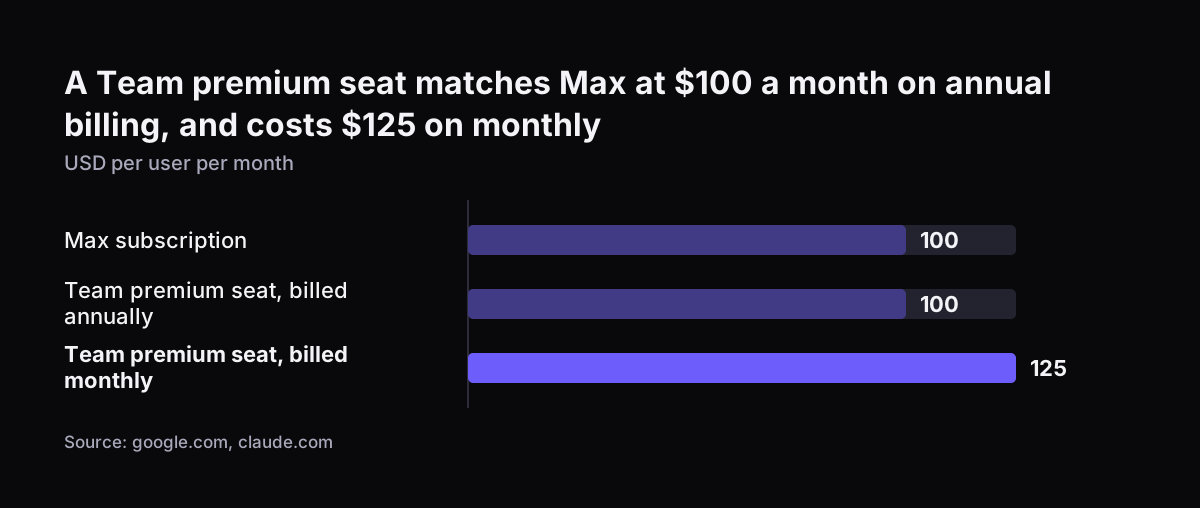
For one heavy user, a Team premium seat and Max cost about the same, and the premium seat gives more session room on paper. A premium seat costs $100 per month billed annually, or $125 billed monthly. Max costs $100 per month.

On usage, Kollab sets out the multiples against Pro. A standard Team seat gives 1.25 times the Pro session allowance. A premium seat gives 6.25 times, which is five times a standard seat. Max gives five times Pro. Remember that these multiples describe relative session usage, not a fixed budget.

Both options include Claude Code. Both have weekly limits. The differences lie elsewhere:

  • Who pays. The premium seat sits on the company's Team invoice. Max sits on the individual's subscription.
  • Overflow. On Team you can buy usage credits and cap spending per person. On Max there is no company-level control.
  • Collaboration. The premium seat holder works in the same shared workspaces and Projects as colleagues on standard seats.
  • API credits. Both Max and Team include monthly API credits for your own apps and agents, according to the Claude release notes.

Team API credits come with conditions. They are claimed into one Console organisation. The claim opens after seven days on an eligible plan. Unused credits do not roll over.

Claude subscriptions and the Claude API Console are separate products. Paying for Team does not automatically cover API key and token fees beyond those credits.

A Team premium seat matches Max at $100 a month on annual billing, and costs $125 on monthly: Max subscription 100, Team premium seat, billed annually 100, Team premium seat, billed monthly 125 (USD per user per month)
Source: google.com, claude.com

Why company data belongs on a Team or Enterprise account

Company data belongs on a Team or Enterprise account because the business controls the account, and Anthropic does not train on its content by default. The pricing page states that Team and Enterprise have no model training on your content by default. That commitment is written for the business plans.

Team also gives the company access to its own records. The Primary Owner of a Team organisation can request user data through data export. That includes conversations, uploaded files and usage patterns. When someone leaves, the work they did in Claude stays with the business.

Two setup rules shape the move from personal accounts:

  • The person who creates the Team organisation must use a business email. Gmail, Yahoo or Hotmail addresses cannot create it.
  • Content moved from a personal account into the organisation cannot be moved back to the personal account.

The second rule needs care. At Svennis we ask each heavy user to sort their personal chats and Projects before the move. Only the work that belongs to the company goes across. Personal material is deleted or kept out, because the transfer is one way.

Staff also need a clear rule on what they may put into Claude at all. The plain guide to what Claude is for UK businesses sets out the basics for people meeting it for the first time.

When Claude Enterprise is the right plan instead of Team

Claude Enterprise is the right plan when you need identity and compliance controls that Team lacks, or more than 150 seats. Team stops at 150 people. Enterprise has a minimum of 20 seats and costs $20 per seat per month, billed annually. Usage comes on top at API rates. The pricing page says usage cost scales with model and task.

The controls that sit in Enterprise and not in Team are:

  • Granular role-based access control.
  • SCIM, which provisions and removes users from your identity provider automatically.
  • Audit logs.
  • The Compliance API.
  • Custom data retention.
  • IP allowlisting.

Enterprise admins can also organise users into groups, manually or through SCIM. Each group gets a custom role that defines which Claude capabilities its members can use. HIPAA configuration on Enterprise became self-serve in July 2026.

Buying is easier than it was. Since February 2026 any organisation can buy an Enterprise plan directly on the website, without a sales conversation.

The billing model changes the heavy-user question. On Team, usage is included in the seat up to its limit. On Enterprise, every hour of heavy use is billed at API rates. Enterprise is a choice for governance, not a cheaper way to give one person more usage. The existing comparison of what Claude costs and how to start covers plan costs in more depth.

Worked example: an eight-person firm with two heavy users

Take an eight-person firm where two people use Claude all day and six use it a few times a day. The two heavy users write proposals and run Claude Code. The six others draft emails and summarise documents. All figures come from claude.com/pricing, in US dollars, per month, before tax.

OptionSeats or subscriptionsMonthly costCompany admin and data terms
Team, billed annually6 standard at $20, 2 premium at $100$320Yes, one organisation
Team, billed monthly6 standard at $25, 2 premium at $125$400Yes, one organisation
Personal plans, Pro annual6 Pro at $17, 2 Max at $100$302No, eight separate accounts
Personal plans, Pro monthly6 Pro at $20, 2 Max at $100$320No, eight separate accounts

The annual Team option costs the same as the monthly personal mix. It costs $18 more than the annual personal mix. For that difference the firm gets one bill and one admin console. It also gets business data terms and the ability to export its own records.

Pro on annual terms is $200 paid up front per person. Annual Team seats are also billed up front in a single payment. So compare cash flow as well as the monthly figure.

If one heavy user later needs more, the firm has two routes on Team. It can buy usage credits with a spending limit for that person. Or it can move a lighter user down from premium to standard.

Decision table: Max, Ultra, Team premium seat or Enterprise

The table below sets the four options side by side for a company deciding how to equip its heavy users. Prices are from claude.com/pricing, in US dollars, before tax.

CriterionMaxUltraTeam premium seatEnterprise
Account ownerThe individualThe individualThe companyThe company
Price$100 per month$200 per month$100 annual, $125 monthly$20 per seat annual, plus usage
Usage5 times Pro10 times Pro weekly5 times a standard seatBilled at API rates
Five-hour limitAppliesNone for verified accountsSession allowance appliesCheck with Anthropic
Weekly limitAppliesAppliesAppliesCheck with Anthropic
No training on content by defaultNo, the pricing page lists model training as opt-outNo, the pricing page lists model training as opt-outYesYes
SCIM, audit logs, custom retentionNoNoNoYes
Minimum1 person1 person2 seats20 seats

Read the table in this order. If the account must belong to the company, rule out Max and Ultra. If you need SCIM, audit logs or more than 150 seats, choose Enterprise. Otherwise choose Team, with premium seats only for the people who reach their limits.

Max or Ultra still fits one case. That is a sole trader or freelancer who is the whole business. There, personal and company accounts are the same thing.

What the choice of Claude plan means for a UK company

For a UK company, the main practical points are currency, tax and payment timing. The pricing page lists plans in US dollars. Published Claude prices exclude applicable taxes, as Procurement VMS's summary of Team and Enterprise pricing notes. Your finance team should budget the dollar figure, the exchange rate and tax on top.

Annual Team seats are billed up front in one payment. A firm that wants to test with a small group first may prefer monthly billing for the first months. It can then switch to annual once seat numbers settle. Monthly billing costs more per seat, so this is a trade between flexibility and price.

The business email rule matters for small UK firms. Some still run on personal webmail addresses. The Team organisation creator needs an address on your own domain.

Many UK companies run on Microsoft 365. Claude's Microsoft 365 connector, with write tools enabled, can draft and send email, manage calendar events and update files in OneDrive and SharePoint. Teams itself stays read-only. The guide to connecting Claude in Microsoft 365 and Teams walks through that setup.

If your customer records sit in Zoho CRM, the plan choice also decides where those records flow. Keep that flow inside a Team or Enterprise organisation, not inside a personal account.

Next steps: moving heavy users onto Team premium seats

The next step is to list who uses Claude today and on which account. Most companies find a mix of free accounts, personal Pro and one or two Max subscriptions paid on expenses.

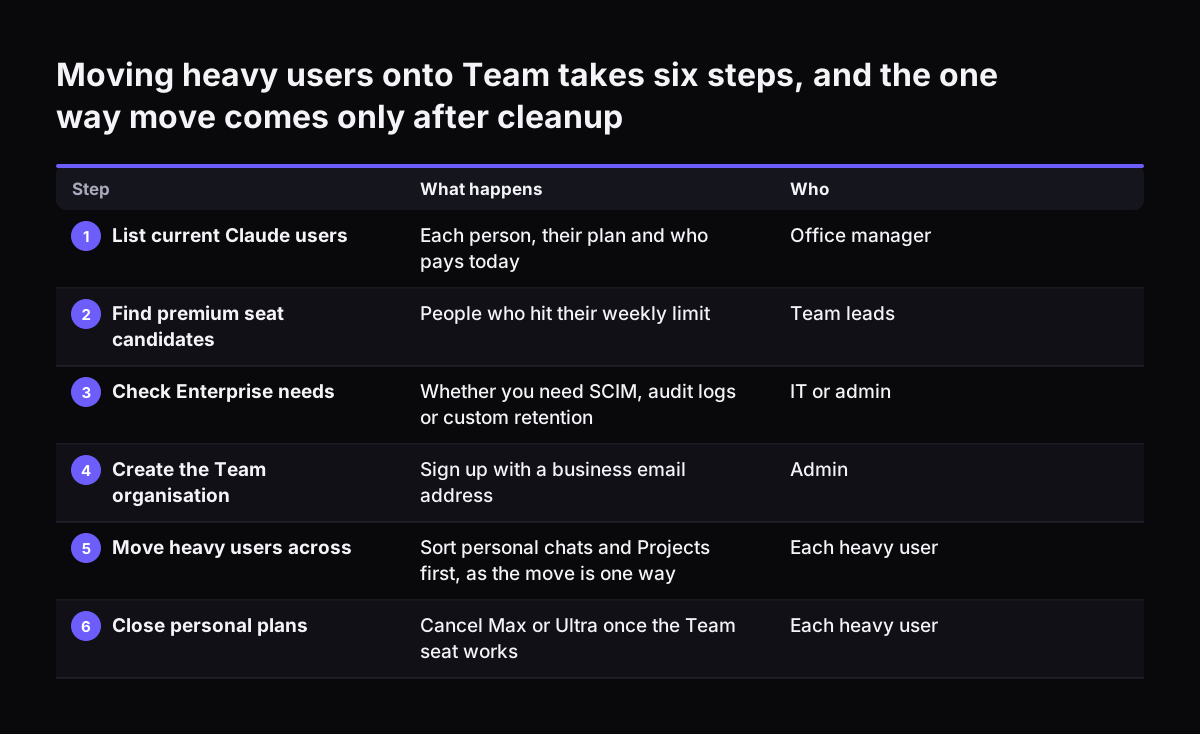
  1. List every person using Claude for work, their current plan and who pays.
  2. Mark the people who hit their limits each week. They are your premium seat candidates.
  3. Check whether you need SCIM, audit logs or custom retention. If yes, look at Enterprise first.
  4. Create the Team organisation with a business email address.
  5. Before you move anyone, tell staff in writing that the Primary Owner can export their Claude conversations and files, and when the company would do so. Add this to your staff privacy notice.
  6. Ask heavy users to sort personal chats and Projects before moving them across, since the move is one way.
  7. Set a spending limit per person before you buy any usage credits.
  8. Cancel the personal Max or Ultra subscriptions once the work has moved.

Svennis works in four steps: the Workshop, a pilot, the department Activation and monthly operations. The pilot is either Pilot Claude A, an AI agent on Claude for one process, or Pilot Claude B, Claude Team for the whole team.

If you want help with steps four to eight, the page on setting up Claude Team in 30 days describes Pilot Claude B. If your Team account already exists and staff need to use it well, getting your team working on Claude in two weeks covers the adoption side.

Moving heavy users onto Team takes six steps, and the one way move comes only after cleanup. What happens / Who. 1. List current Claude users: Each person, their plan and who pays today / Office manager; 2. Find premium seat candidates: People who hi

Sources

  1. Claude Plans and pricing (Anthropic)
  2. Claude Help Center release notes (Anthropic)
  3. Claude Team Plan Review (Cloud Security Lab)
  4. Claude Team Plan: Pricing, Seats, Limits and Claude Code (Kollab)
  5. Claude Team and Enterprise Pricing 2026 (Procurement VMS)
Free, 30 minutes

Pick a time. Bring the process this article made you think of.

You leave with a clear yes or no on putting Claude on it, and the step that fits from our published prices. You speak to someone who builds the agents, not a salesperson.

Prefer to call? +44 7588 772736 · Not ready to talk? See it on your business first.

30 minutes · video call · free
  1. 1Time
  2. 2Details
  3. 3Booked