Skip to content
SVENNISAIWe speak Claude.
Blog · Claude Team

Claude usage limits and extra credits for a team: how to plan around them

On Claude Team, usage limits apply per seat, in five-hour sessions and weekly caps. This guide shows how to stretch them, when to buy usage credits and what cap to set.

10 min read

Book a 30-minute call · with a Claude Certified Architect from our team.

Article · 10 min read
Abstract bars filling at different rates inside a row of separate containers, with a few overflowing into one shared channel

Claude usage limits and extra credits for a team: the short answer

Claude usage limits and extra credits for a team work per seat. Each member on a Claude Team plan has a five-hour session limit and a weekly limit. When a member hits one, that member pauses until it resets. Usage credits, which an Owner buys in advance and caps, let that member keep working at standard API rates.

A usage limit is the amount of Claude work a seat can do within a set period before Claude stops answering. Anthropic's pricing page puts it plainly: most accounts have a limit that resets on a rolling five-hour session window, and paid plans add weekly limits on top. Paid plans do not give unlimited use.

This guide is for the manager whose staff keep hitting those limits. It covers four things:

  • how session and weekly limits behave on Standard and Premium seats
  • the working habits that make a seat's allowance last longer
  • how an Owner switches on usage credits, and what cap to set
  • how to tell when repeated limit hits mean a workflow belongs in an API-based system

If you have not picked a plan yet, start with our comparison of Claude Pro and Claude Team for a company. This post assumes you are already on Team.
Session and weekly limits on Claude Team apply to each seat separately

On a Claude Team plan, every seat has its own usage pool. One heavy user does not drain anyone else's allowance. That also means a spare allowance on a quiet colleague's seat cannot help a busy one.

Each seat runs against two limits at once:

  • The five-hour session limit. This rolling window starts when the member begins working and resets five hours later.
  • The weekly limit. This second ceiling stops a member who works through session after session from using far more than the plan intends.

All Claude surfaces draw from the same pool. Anthropic's pricing page states that Claude Code is included in all paid plans and shares the same usage limits as the rest of the plan. A member who spends the morning in Claude Code, then uses Claude Cowork in the afternoon, is spending one allowance, not two.

Each member can check their own position. In Claude, go to Settings > Usage. The help centre describes progress bars for the current session and for weekly limits. The session bar shows how much of the five-hour limit is gone and how long remains. The weekly view shows when the weekly limit resets, for all models and for Fable if the plan includes it.

Ask your heaviest users to screenshot that page when they hit a limit. Those screenshots make the rest of this guide much easier to apply.

Standard and Premium seats: how much usage each one carries

A Premium seat carries several times the usage of a Standard seat and costs five times as much. Claude Team lets you mix the two. You can give Premium to a few power users and keep everyone else on Standard.

The table compares both seat types with an individual Pro plan, which third-party guides use as the reference point.

Plan or seatPrice per month (annual / monthly billing)Session allowance compared with ProWeekly caps
Pro (individual)$17 / $20BaselineWeekly limit on top of sessions
Team Standard seat$20 / $251.25 times ProOne weekly cap
Team Premium seat$100 / $1256.25 times ProTwo: one for all models, one for Sonnet only

The prices come from Anthropic's pricing page. The multipliers and weekly caps come from a third-party guide to Team plan limits, not from Anthropic. Anthropic does not publish fixed multipliers of this kind, so treat them as a guide. The real numbers for your team are in each member's Settings > Usage view.

The Team plan covers teams of 2 to 150, according to the pricing page. If you are weighing a larger rollout, our guide to Claude Team versus Enterprise covers that decision.

What uses up a Claude seat's allowance fastest

A Claude seat's allowance is not counted in messages. The help centre says the number of messages you can send varies with your plan. It then lists the factors that make each message cost more or less.

These are the factors Anthropic names in its usage limit guidance:

  • message length
  • file attachment size
  • current conversation length
  • tool usage, such as Research and web search
  • model choice
  • effort level
  • artifacts
  • multi-step tasks

Conversation length catches most teams out. Each new message in a long conversation carries the earlier conversation with it. A member who keeps one chat open all week for every task spends far more than one who starts fresh chats.

Attachments are the second common drain. A large PDF dropped into a new chat every morning counts in full every time. Tools add to the cost too. Research and web search do useful work, but they do it with your allowance.

Claude Code users have one further drain. Anthropic recommends disabling MCP servers you are not actively using, because unused ones can add to context consumption. An MCP server is a small program that connects Claude to another system, such as a CRM or a file store.

Working habits that stretch Claude Team limits

The cheapest way to raise a team's effective limit is to change how members use their seats. These habits come straight from Anthropic's own guidance, and each one targets a factor from the list above.

Keep recurring material in a Project

Projects are shared workspaces in Claude that hold instructions and documents for a task. The help centre says content in Projects is cached and counts less against your limits when reused. Put the price list, the style guide or the policy manual in a Project once. Do not attach it to fresh chats.

Caches expire after a period of inactivity. The first message after a long break counts that content in full again. Expect that message on a Monday morning to cost more.

For larger collections, Projects offer a retrieval augmented generation (RAG) mode. Claude then pulls in only the relevant parts of the stored documents.

Start new chats and let memory carry context

Start a new chat for each new task. On paid plans, including Team, members can ask Claude to search previous conversations. They can also rely on memory and Project summaries to carry context forward. That beats pasting yesterday's chat back in.

Match tools and effort to the task

Switch off Research and web search when the answer is in your own documents. Use a lower effort level for routine drafting. Save the heavy settings for work that needs them.

Usage credits: what they are and how an Owner switches them on

Usage credits let members on Team Standard and Premium seats keep working after they reach their included limits. That covers Claude, Cowork and Claude Code. Once a member passes their seat's limit, further usage is billed at standard API pricing rates.

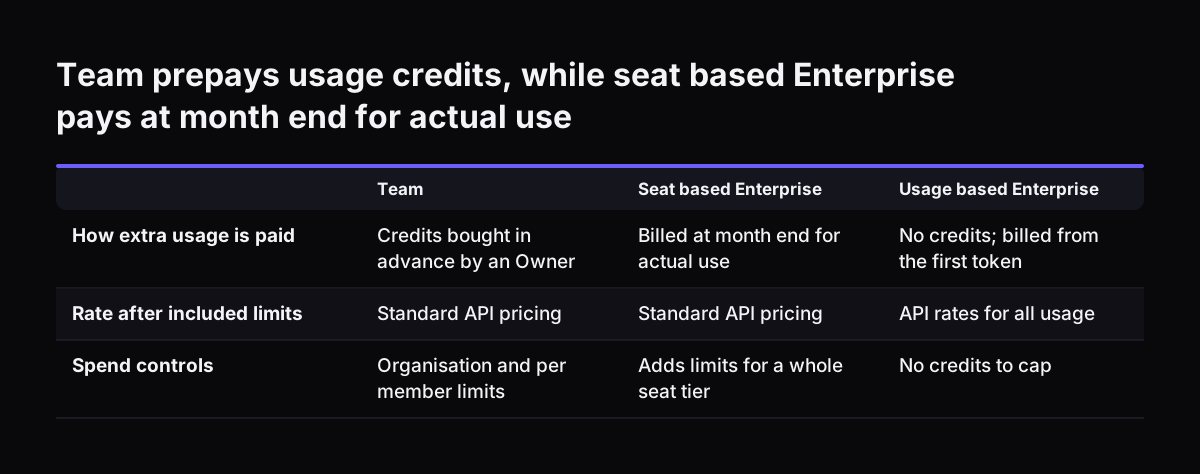
On Team plans, Owners buy usage credits in advance and control them with spend limits. On seat-based Enterprise plans, credits are instead billed at the end of each month for actual use. Usage-based Enterprise plans have no credits at all, because all usage is billed at API rates from the first token.

The help centre article on managing usage credits gives the steps. An Owner or Primary Owner does this:

  1. Go to Organization settings > Usage.
  2. Click Enable under Usage credits.
  3. Buy an opening balance of credits.
  4. Decide whether to turn on auto-reload. If you do, choose Reload when balance reaches and enter the amount to reload.
  5. Set an organisation-wide spend limit and, where needed, limits for individual members.

Do not skip step 5. One software vendor's pricing guide warns that Team usage credits bill at API rates and are not capped by default. Auto-reload without a cap means the balance tops itself up with no ceiling.

Team prepays usage credits, while seat based Enterprise pays at month end for actual use. Team / Seat based Enterprise / Usage based Enterprise. How extra usage is paid: Credits bought in advance by an Owner / Billed at month end for actual use / No

Setting a spend cap for usage credits, with a worked example

Claude Team gives you two levers for usage credits: an organisation-wide spend limit and per-member spend limits. Spend limits for a whole seat tier are only available on seat-based Enterprise plans.

Three rules from the help centre shape how the levers behave:

  • Changes to the organisation's overall spend limit take effect immediately.
  • When a member reaches their own spend limit, their usage credits pause until the end of the month.
  • A member can slightly exceed the limit, because the system checks it before each request and counts the tokens afterwards.

A twelve-person team

Take a team of ten Standard seats and two Premium seats, billed annually. At the pricing page's rates, seats cost 10 × $20 plus 2 × $100, which is $400 a month.

The useful number is the gap between seat types. A Premium seat costs $80 a month more than a Standard one. If a Standard member regularly spends close to $80 a month in credits, a Premium seat costs the same. It also carries far more included usage.

So set each Standard member's spend limit below that $80 gap. Set the organisation cap at a figure you would be happy to see on the bill, such as the price of one Premium seat. To put $100 in context, it buys 50 million input tokens on Claude Sonnet 5.5 at $2 per million, or 25 million on Claude Opus 5.5 at $4 per million. Output tokens cost five times the input rate on both models.

At month end, check who reached their limit. Then decide seat by seat.

Repeated limit hits: a decision table for team leads

Repeated limit hits are a signal, and the right response depends on who hits the limit and on what task. Use this table at your monthly review.

What you seeWhat it usually meansWhat to do
One member hits the five-hour limit on a few busy afternoonsNormal bursts of heavy workCheck habits; allow a small per-member credit limit
The same member hits the weekly limit most weeksThe role needs more than a Standard seatCompare their credit spend with the $80 seat gap; move them to Premium if it is close
Several members hit limits on the same taskA shared, heavy task run separately by each personBuild one Project with the shared documents and instructions
Credit spend keeps climbing for one repeating jobA process is running through chat, one item at a timeMove that job into an API-based system
Headcount approaches 150 seatsYou are nearing the Team plan's ceilingReview Enterprise

The fourth row is the one teams miss. When we at Svennis review a team's limit hits, we first ask which task each hit came from. A repeating job usually explains them, and we move that job before anyone raises the credit cap.

When a Claude workflow belongs in an API-based system instead of a seat

An API-based system is software that calls Claude directly through the Claude Platform and pays per token. Nobody types into a seat. The move makes sense when a job is high volume, follows the same steps every time and needs no human judgement on each item. Sorting every inbound support email into the right queue is the classic case.

An API-based system brings three advantages over seats plus credits:

  • Model choice per step. Anthropic's models overview positions Claude Haiku 5.5 for high-volume tasks such as classification, extraction and routing. Claude Fable 5.1 is reserved for demanding reasoning.
  • Cheaper bulk work. The pricing page says batch processing saves 50% for work that can wait.
  • Credit you already have. According to the help centre, monthly API credits are available on Team plans. A Claude Console organisation linked to a Team plan moves to at least the Build tier, so the full $500 monthly credit fits under its spend limit.

API limits grow with use. Usage tiers are assigned automatically, and you can request higher limits in the Claude Console once you use at least 50% of your current ones.

A typical build is an agent that reads the email, classifies it and creates the ticket in Zoho Desk. That is the scope of a Pilot Claude A agent for one process. Each connection to your systems is built as a connector, an MCP server, a plugin or a skill. The options and their costs are laid out, and you choose.

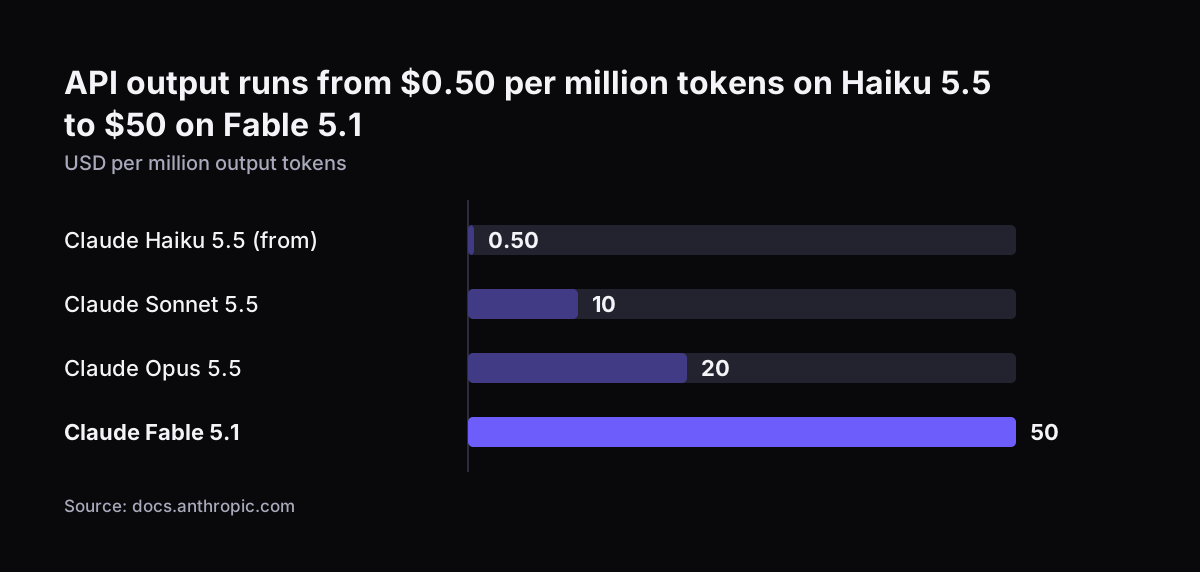
API output runs from $0.50 per million tokens on Haiku 5.5 to $50 on Fable 5.1: Claude Haiku 5.5 (from) 0.50, Claude Sonnet 5.5 10, Claude Opus 5.5 20, Claude Fable 5.1 50 (USD per million output tokens)
Source: docs.anthropic.com

What Claude usage limits mean for a UK company budgeting in dollars

A UK company plans Claude spend in US dollars. Anthropic's pricing page quotes seats, credits and API rates in dollars. Your finance team should therefore budget seat costs and the usage credit cap with room for exchange-rate movement.

Timing matters for UK teams too. In March 2026, Anthropic temporarily reduced effective Claude Code session limits during peak weekday hours. A promotion that same month, reported by TechRadar, defined weekday peak hours as 5am to 11am Pacific time. That is 12pm to 6pm GMT, which covers most of a UK working afternoon.

On 6 May 2026, Anthropic removed that peak-hours reduction for Pro and Max accounts. It also doubled Claude Code's five-hour rate limits for Pro, Max, Team and seat-based Enterprise plans. The lesson for a UK team lead is simple. Limits change during the year, so trust each member's Settings > Usage view over any figure in an old article.

Data handling is the other UK question. The pricing page states that Team plans carry no model training on your content by default. That is one point to record in your data protection assessment, alongside your own policy on what staff may put into Claude.

Next steps for a team lead whose staff hit their Claude limits

Work through these steps over one month, in order:

  1. Ask every member who hits a limit to open Settings > Usage and note which limit it was: session or weekly.
  2. Write down the task they were doing at the time.
  3. Move recurring documents into Projects, and ask staff to start fresh chats and switch off unneeded tools.
  4. Switch on usage credits under Organization settings > Usage. Set an organisation-wide spend limit and per-member limits before you consider auto-reload.
  5. At month end, compare each Standard member's credit spend with the $80 gap to a Premium seat.
  6. List any task that appears again and again in the limit log. Those tasks are candidates for an API-based system.

For total budget figures beyond limits and credits, see our guide to what Claude costs a business and how to start.

If the log points to a team that needs better habits and a cleaner setup, Pilot Claude B sets up Claude Team for the whole team. Svennis works in four steps: the Workshop, then Pilot Claude A or Pilot Claude B, then the department Activation, then monthly operations.

Sources

  1. Plans and pricing, Claude by Anthropic
  2. Manage usage credits for Team and seat-based Enterprise plans, Claude Help Center
  3. Usage limit best practices, Claude Help Center
  4. How can I get higher rate limits on the Claude API?, Claude Help Center
  5. Models overview, Claude Platform Docs
  6. Claude Code Token Limits and How to Manage AI Coding Costs, Faros
  7. Claude Code Pricing 2026: Plans, Limits, and Hidden Costs, Superblocks
  8. Claude has temporarily doubled usage limits for everyone, TechRadar
  9. How Claude Team Plan Usage Limits Really Work in 2026
Free, 30 minutes

Pick a time. Bring the process this article made you think of.

You leave with a clear yes or no on putting Claude on it, and the step that fits from our published prices. You speak to someone who builds the agents, not a salesperson.

Prefer to call? +44 7588 772736 · Not ready to talk? See it on your business first.

30 minutes · video call · free
  1. 1Time
  2. 2Details
  3. 3Booked