Skip to content
SVENNISAIWe speak Claude.
Blog · Claude Code

Claude Code for a small business without developers, and where it stops

Claude Code can build small internal tools for an owner without developers. This guide covers what it builds safely, who should run it, the checks before live data and where it stops.

9 min read

Book a 30-minute call · with a Claude Certified Architect from our team.

Article · 9 min read
Abstract shapes gathered inside a small enclosed square, with lines reaching out towards a wider connected network

Claude Code for a small business without developers: what it can and cannot do

Claude Code for a small business without developers fits small internal tools and scripts. These tools run on one computer, use sample data and get checked by a person. It is a poor fit for production integrations that read or change live records in your CRM, accounting or helpdesk system. For that work, a partner who builds and maintains integrations is often worth pricing up, because the hidden cost of doing it yourself is the time spent on access, testing and upkeep.

The licence is rarely the expensive part. Anthropic's plans and pricing page says Claude Code is included in all paid plans and shares the same usage limits as the rest of your plan. The real cost sits elsewhere: your time, the review before anything goes live, and looking after a tool once people depend on it.

This guide covers six things in order:

  • what Claude Code is
  • what an owner can build safely, with a worked example
  • who should run it
  • the checks before live data
  • where it stops
  • what the choice means for a UK company

The decision table near the end puts the build-or-partner choice on one page.
What Claude Code is, where it runs and which plans include it

Claude Code is Anthropic's AI coding agent. You describe a task in plain English, and it writes code, runs it and tests it for you. It runs on four surfaces: the terminal, extensions for code editors such as VS Code and JetBrains, the Claude desktop app, and the web. The terminal is the text window where you type commands. Claude Code is available for macOS, Linux and Windows.

You can use Claude Code with any of these:

  • a Pro, Max or Ultra plan
  • a Team or Enterprise plan
  • a Claude Console account

On a subscription, Claude Code draws on the same allowance as your chats. Most accounts have a limit that resets on a rolling five-hour window, and paid plans add weekly limits on top. On a Console account, Claude Code consumes API tokens at standard API pricing, so the bill grows with use.

In the terminal, Claude Code runs locally and talks directly to Anthropic's model APIs. It asks for permission before it changes your files or runs commands. On model choice, Anthropic's own advice is to start with Claude Opus 5.5 if you are unsure. For the wider picture of the assistant behind Claude Code, read our plain guide to what Claude is.

Small internal tools and scripts Claude Code can safely build

A safe Claude Code project, for an owner without developers, meets three conditions. The tool runs on one computer. It works on copies or made-up data. A person checks the result before anyone relies on it. Within those limits, Claude Code is genuinely useful.

Typical safe builds for a small business:

  • A script that renames, sorts or merges files in a test folder, such as scanned delivery notes.
  • A simple browser page that checks a quote request or job sheet for missing details.
  • A calculator for a rule you already apply by hand, such as a call-out charge.
  • A one-off tidy-up of a spreadsheet you already hold, saved as a new file.
  • A short written guide explaining what each of these tools does.

These builds share one feature. None of them writes to a system that your customers or your accountant depend on. If a tool goes wrong, you delete the folder and start again.

Claude Code also lets you set house rules for each project. CLAUDE.md is a markdown file in the project's main folder, and Claude Code reads it at the start of every session. You use it to say what the tool is for, which data it may touch and what it must never do. A repository that already has an AGENTS.md file for other coding agents can use that file instead.

A worked example: a quote request checker built from one folder

Picture a five-person installation business. Office staff retype quote requests from email into the CRM. Requests often arrive without a postcode or a phone number. The owner wants a small page that flags missing details before anyone retypes a request.

The build takes five steps:

  1. Install the Claude desktop app. It includes Claude Code, so you need no separate install, and it requires a paid subscription.
  2. Create a folder called quote-checker. Put ten made-up quote requests in it as a plain text file, with no real customer details.
  3. Create a file called CLAUDE.md in that folder with the rules below.
  4. Open the folder in Claude Code and ask: "Read CLAUDE.md, then build the quote checker and test it on the sample file."
  5. Read each change Claude Code proposes before you accept it. Then open the finished file in your browser and try it.

Paste the following text into CLAUDE.md in the quote-checker folder. The file holds plain instructions, not code.

Project: quote checker for a five-person installation business.
Who uses it: office staff, not developers. Keep the screen plain and the words simple.
Data: only the sample file in this folder. Never connect to the CRM,
the accounting system or any mailbox. Never ask for passwords or API keys.
Required fields on a quote request: customer name, site postcode,
job type, preferred date, phone or email.
Output: one HTML file that opens in a browser with nothing to install.
Before finishing: list every file you created and explain each one in plain English.

Change the required fields line to match your own quote form. Change the business description so the screen suits the people who will use it. Keep the data line exactly as written. That line stops a first experiment from reaching live systems.

Who in your business should run Claude Code

The right person to run Claude Code is careful rather than technical. Look for someone who reads instructions, notices odd results and writes down what they did. That might be an operations manager or an office manager rather than the owner. Give them a paid seat, a few protected hours a week and a written list of allowed projects.

The default settings matter before that person starts. Claude Code runs in auto mode by default on Pro, Max and Team plans. Auto mode lets Claude Code work longer while still being designed to catch risky commands. That is convenient. It is also why first projects belong in a folder holding nothing you would mind losing.

Two set-up details matter on office computers:

  • Native installations of Claude Code update automatically in the background. Homebrew and WinGet installations do not.
  • On Windows without Git for Windows, Claude Code uses PowerShell as its shell tool.

Some staff work mostly with documents rather than code, and Cowork may suit them better. Cowork brings Claude Code's agentic capabilities to the Claude desktop app for knowledge work beyond coding. It runs locally on your computer in an isolated virtual machine. Our guide to Claude Cowork for UK firms explains its plans, uses and data handling.

The review before a Claude Code tool touches live data

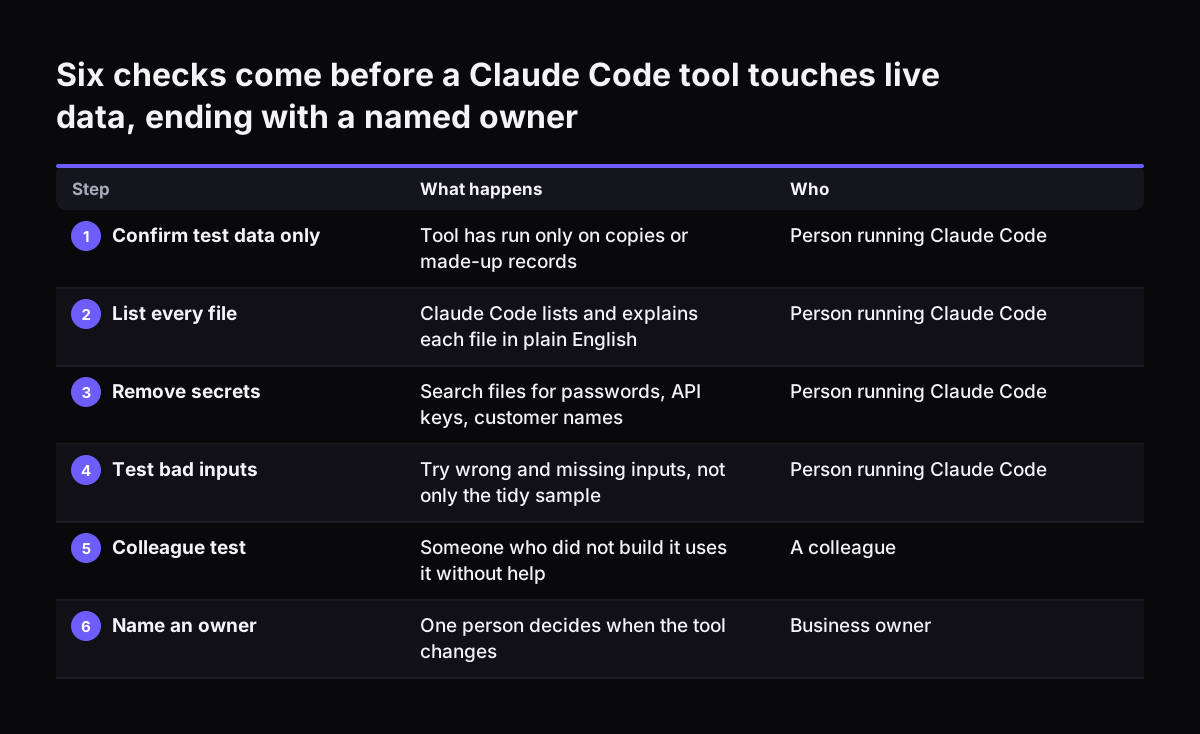
Every tool Claude Code builds needs a review before it touches real customer, staff or financial data. Work through these checks in order:

  1. Confirm the tool has only ever run on copies or made-up records.
  2. Ask Claude Code to list every file it created and explain each one in plain English.
  3. Search those files for passwords, API keys or customer names, and remove any you find.
  4. Test the tool with wrong and missing inputs, not only the tidy sample.
  5. Ask a colleague who did not build the tool to use it without help.
  6. Name one person who owns the tool and decides when it changes.

The colleague test comes from a LaunchLemonade guide to choosing no-code AI tools. The guide suggests asking a non-technical staff member to build something during a trial. If a colleague cannot use the tool unaided, the tool is not ready.

Some businesses later keep their tools in GitHub on a Team or Enterprise plan. For them, Code Review is now generally available. Anthropic says it catches more bugs before they reach production. Treat it as support for a human review, not as a replacement.

Six checks come before a Claude Code tool touches live data, ending with a named owner. What happens / Who. 1. Confirm test data only: Tool has run only on copies or made-up records / Person running Claude Code; 2. List every file: Claude Code lists

Where Claude Code stops: live integrations with CRM, accounting and helpdesk

Claude Code stops being a safe do-it-yourself tool when the job becomes a production integration. A production integration is a link that lets Claude read or change live records every day, for several people. Typical examples are links to Zoho CRM, Zoho Books or Zoho Desk. A mistake there changes a deal value, an invoice or a customer reply, and the error spreads before anyone notices.

Access and permissions

Someone must decide which records Claude may read, which it may change, and under whose login. Those choices need a person who understands authentication and can spot a login that grants too much.

Unattended running

Cloud scheduled tasks run in the cloud, so they keep running when your computer is off. They can also trigger on API calls or GitHub events. That is useful. It also means a faulty rule repeats with nobody watching.

Upkeep

A live integration needs an owner whenever the connected program, your process or the Claude model changes. Without a developer on staff, that owner is you.

Model Context Protocol (MCP) is an open standard for connecting AI tools to external data sources. For each connection, Svennis builds a connector, an MCP server, a plugin or a skill. We show the options with their cost, and the client chooses. At Svennis we keep every new connection read-only at first, and we switch on write access only after the client has watched Claude handle test records correctly. For the wider approach, see how Claude works inside the tools you already use.

Do it yourself or use a partner: a decision table for Claude Code work

The table sorts common Claude Code jobs by who should build them and what to check first.

JobDo it yourself?Who runs itCheck before use
Script that sorts or renames files in a test folderYesOwner or office managerFile list read, run on copies
Checklist or calculator page on made-up dataYesOne careful staff member with a paid seatColleague tests wrong inputs
One-off tidy-up of a spreadsheet you already holdYes, with careStaff member who knows the dataTotals compared with the original
Tool that reads live CRM or helpdesk recordsPartnerPartner builds, your owner approvesRead-only access, agreed scope
Anything that writes to CRM, accounts or helpdeskNoPartner builds and maintainsTest records first, write access last
Scheduled task that runs unattendedNoPartner or a developerLogging and a named person on alert

A partner is worth pricing up when a tool must touch live records, run unattended or serve several people. In those cases, add up the hours you would spend learning authentication, testing writes and fixing faults, and compare that with a quote for a built and maintained integration. A do-it-yourself build stays cheaper when the tool is small, local and easy to throw away.

Whichever route you take, clean your data first. The LaunchLemonade guide advises removing duplicate records and correcting customer details before you connect systems.

What Claude Code means for a UK small business: terms, data and plan choice

For a UK company, the Claude plan you choose decides the contract that covers Claude Code. Anthropic's Claude Code legal and compliance page sets out two sets of terms:

  • The Commercial Terms of Service cover Team, Enterprise and Claude API users.
  • The Consumer Terms of Service cover Free, Pro, Max and Ultra users.

When staff use Claude Code for company work, a Team plan puts that use under commercial terms.

On data, Team and Enterprise plans have no model training on your content by default. Even so, keep personal data about customers and staff out of experiments until you have checked your plan's data controls. The LaunchLemonade checklist treats an unclear data hosting location as a failing sign for security. Apply the same test to any AI tool you adopt.

On cost, the pricing page lists prices in US dollars. Pro costs $17 a month on an annual subscription ($200 billed up front) or $20 billed monthly. Team standard seats cost $20 per seat per month billed annually, or $25 billed monthly, for teams of 2 to 150. Max and Team plans now include monthly API credits for running your own apps and agents. For a UK-specific view of plans and set-up, read how to set up Claude for a UK small business.

Next steps: build one small Claude Code tool, then decide on integrations

The practical route for an owner without developers starts small. Work through these steps in order:

  1. Pick one painful, repetitive task. The LaunchLemonade guide advises fixing one specific process first rather than automating everything at once.
  2. Choose the person who will run Claude Code. Give them a Team seat if the work is for the company.
  3. Build the first tool in a folder of made-up data, with a CLAUDE.md that bans live systems.
  4. Run the review checklist and decide whether to keep, change or delete the tool.
  5. Write down every job that would need live CRM, accounting or helpdesk access. That list becomes your integration brief.

A long integration brief is a sign to bring in help. The Svennis route has four steps:

  • the Workshop
  • a pilot: Pilot Claude A, an AI agent on Claude for one process, or Pilot Claude B, Claude Team for the whole team
  • the department Activation
  • monthly operations

Claude Team adoption for your whole team describes the team route. What Claude costs and how to start covers prices and first steps.

Sources

  1. Plans & pricing, Claude by Anthropic
  2. Claude Code by Anthropic
  3. Overview, Claude Code Docs
  4. Legal and compliance, Claude Code Docs
  5. Models overview, Claude Platform Docs
  6. Release notes, Claude Help Center
  7. How to Choose the Best No-Code AI Tool for Small Businesses, LaunchLemonade
Free, 30 minutes

Pick a time. Bring the process this article made you think of.

You leave with a clear yes or no on putting Claude on it, and the step that fits from our published prices. You speak to someone who builds the agents, not a salesperson.

Prefer to call? +44 7588 772736 · Not ready to talk? See it on your business first.

30 minutes · video call · free
  1. 1Time
  2. 2Details
  3. 3Booked