Skip to content
SVENNISAIWe speak Claude.
Blog · Claude

Claude terms explained in plain English for business teams

One short definition and one business example for each Claude term you meet when scoping an assistant or agent, from models and effort to memory, skills, connectors and Duet.

9 min read

Book a 30-minute call · with a Claude Certified Architect from our team.

Article · 9 min read
Abstract clusters of rounded shapes in five groups, joined by thin flowing lines, one group drifting outward

Claude terms in plain English: five groups that cover what you will meet

Claude terms explained in plain English for business teams fall into five groups. Each group answers one question: which model does the thinking, where your team uses it, what it makes, what it knows about you, and how it works on its own. This guide gives one short definition and one business example for each term, in that order.

The central idea behind most of these terms is the agent. An agent is Claude carrying out a job of several steps, using tools such as a search or a connected app, rather than answering one question and stopping. Scoping a support desk assistant or a sales helper comes down to two questions. How much of the job do you hand to an agent, and what checks sit around it?

Every definition below comes from Anthropic's own help centre, platform docs and pricing page. Where a feature is in beta or limited to certain plans, the post says so. If you want the basics first, read our plain guide to what Claude is.

Models and effort levels: which Claude does the thinking

A model is the engine that reads your request and writes the answer. Claude's current models differ in depth, speed and cost, so the right choice depends on the task.

Anthropic positions its current main models as follows:

  • Claude Opus 5.5: the docs say to start here for most workloads if you are unsure. Anthropic says it costs 40% less to run than Claude Opus 5 on typical workloads.
  • Claude Fable 5.1: for demanding reasoning and long-horizon agentic work, or when Opus 5.5 at higher effort still falls short in your tests.
  • Claude Sonnet 5.5: runs more than 30% faster than Claude Sonnet 5 and costs up to 30% less for most work.
  • Claude Haiku 5.5: for high-volume, quick tasks such as classification, extraction and routing.

Effort is the setting that controls how many tokens Claude spends on a response. It covers the visible text, the tool calls and the thinking behind them. Most models default to high effort, while Opus 5.5 and Haiku 5.5 default to medium. Anthropic reserves the xhigh level for agentic tasks running over 30 minutes.

For a support desk, the split is simple. Ticket routing suits Haiku 5.5 at low effort, while a delicate complaint reply suits Opus 5.5 at a higher level. All current models have a reliable knowledge cutoff of June 2026, so anything newer must come from your systems.

Tokens, usage limits and plans: how Claude use is measured and sold

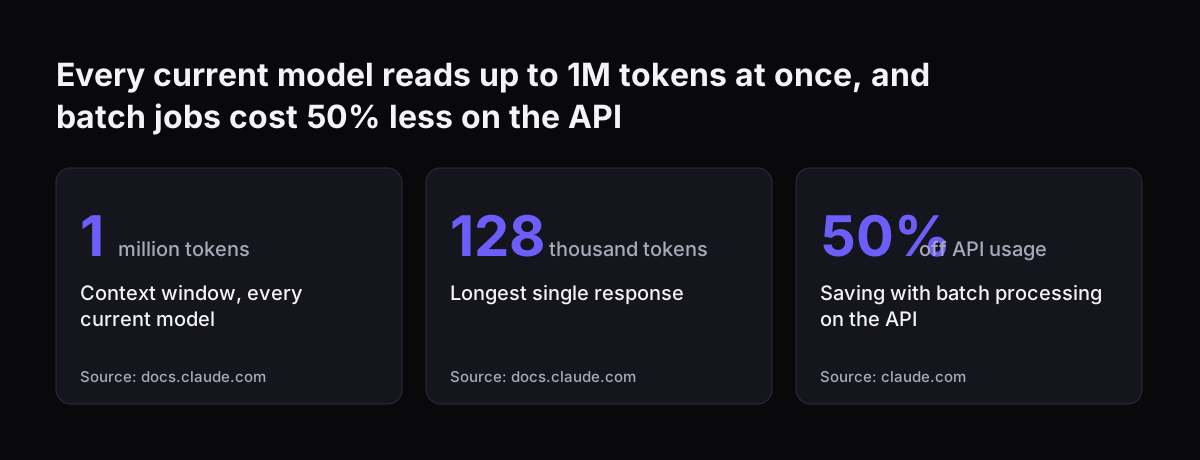
A token is the unit in which Claude measures the text it reads and writes. The context window is how much Claude can hold in view at once: your request, your documents and its own working. Every current model has a 1M token context window and can write up to 128K tokens in one response.

Usage limits cap how much you can use Claude in a period. Most accounts have a limit that resets on a rolling five-hour window, and paid plans add weekly limits. Claude Code, the coding tool, is included in all paid plans and draws on the same limits.

The plans on Anthropic's pricing page fall into three groups:

  • Individual plans: Free, Pro, Max and Ultra. Max gives five times the usage of Pro. Ultra gives ten times the weekly usage of Pro, with no five-hour limit for verified accounts.
  • Claude Team: for teams of 2 to 150. A seat is one named user's licence.
  • Claude Enterprise: a per-seat fee plus usage billed at API rates, with a 20 seat minimum.

Team and Enterprise come with no model training on your content by default. A sales team of twelve sharing customer notes would normally start on Claude Team rather than twelve individual subscriptions. Prices change and differ by market, so our guide to what Claude costs and how to start sets out the current figures.

Every current model reads up to 1M tokens at once, and batch jobs cost 50% less on the API: Context window, every current model 1 million tokens, Longest single response 128 thousand tokens, Saving with batch processing on the API 50% off API usage
Source: docs.claude.com, claude.com

Chat, Cowork and the Office add-ins: where your team uses Claude

Your team can reach Claude in several places, and each one changes what Claude can see. Chat is the conversation window on the web, in Claude Desktop and in the mobile apps. It is where memory and past-chat search live.

Cowork is where Claude takes on tasks for you rather than only discussing them. Cowork sessions run either in the cloud or locally on your computer. Memory is shared between Chat and Cowork in the cloud, but local sessions do not use memory. Our Cowork explainer for UK firms covers plans, uses and data.

Claude Code is the tool developers use to build software with Claude. It matters to a business team because autonomous features such as /goal run there.

The Office add-ins put Claude inside Excel, PowerPoint, Word and Outlook, and skills you enable in your Claude settings work there too. An account manager can draft a reply in Outlook using the team's tone-of-voice skill. If your company runs on Microsoft tools, read about connecting Claude in Microsoft 365 and Teams to the systems behind it.

Artifacts, Docs, Slides and Design: what Claude makes for you

An artifact is anything Claude makes that you would put in front of someone: a design, a deck, a document, a dashboard or a small interactive tool. It opens beside your conversation, and you can edit, revisit and share it. Artifacts are available on every plan from Free to Enterprise.

Artifacts come from templates. Docs export to Word, PDF, Markdown and Google Docs. Slides export to PowerPoint and PDF, or go straight to Google Slides as editable files. Dashboards is in beta on paid plans, and Motion is in beta on Team and Enterprise.

Artifacts need code execution and file creation switched on in Settings > Capabilities. On Enterprise, the Docs, Slides and Design templates turn on by default on 15 October 2026.

Three details matter for a business:

  • A shared artifact that calls Claude counts against each viewer's own plan limits, not the creator's.
  • Artifacts can read from and write to connected apps such as Asana, Google Calendar and Slack.
  • Connector tools that need approval for each action are not available to artifacts.

A sales manager might ask for a quarterly pipeline deck and send it to PowerPoint for the board pack. A support lead might build a small dashboard of ticket volumes per queue.

Memory, chat search and skills: what Claude knows about your business

Memory is what Claude keeps between conversations. Claude saves it as a set of individual topics as you chat, rather than summarising conversations afterwards. On Team and Enterprise, owners decide whether memory is available, and it stays off for each member until that person turns it on.

By default, Claude does not store sensitive topics such as health, religious beliefs or politics. Government ID numbers, criminal history, financial account numbers and immigration status are never saved, even on request. Deleting a chat does not delete the memory entries drawn from it.

Owners cannot view or edit a member's memories. Turning memory off for the organisation deletes everyone's entries at once.

Chat search lets Claude find earlier conversations on paid plans. It uses retrieval-augmented generation (RAG), meaning Claude looks up relevant past chats and reads them before answering.

Skills

Skills give Claude specialised knowledge and workflows, loaded when relevant. Anthropic provides built-in skills for Excel, Word, PowerPoint and PDF work, and you can upload your own as a ZIP file. On Team plans, skills are on by default, and they need code execution enabled.

A shared skill is view-only, and recipients get your updates automatically. A refund-policy skill, for instance, keeps every support agent's drafts consistent. Anthropic names prompt injection and data exfiltration as the main skill risks, so install third-party skills with care.

Connectors and MCP servers: how Claude reaches your CRM and helpdesk

A connector is a link, set up in Claude, that lets Claude read from and act in another program. Anthropic's help centre lists connectors such as Gmail, Google Calendar, Google Drive, Slack, QuickBooks, HubSpot, Docusign and Calendly. Each connector gives Claude tools, the specific actions it can call, such as reading a record.

When the program you need is not on that list, the link has to be built. An MCP server is a small service that presents a program's data and actions to Claude in a standard way. A CRM such as Zoho CRM or a helpdesk such as Zoho Desk reaches Claude through one of these routes.

Svennis connects Claude to each of a company's programs in one of four ways. For each connection we build a connector, an MCP server, a plugin or a skill. We show the options with their cost, and the client chooses.

Two settings shape what any connection can do. First, your admin settings can stop a tool working even when the model supports it; an administrator can, for example, disable web search. Second, decide whether Claude may only read, or may also write.

Prompt injection is the risk to plan for. It means content written by other people, such as emails, containing instructions meant to mislead Claude. A support desk reading customer emails meets that content every day, so a sensible first scope is read-only access.

Sub-agents, /goal and Duet: how Claude works on its own

A sub-agent is a helper that a main agent hands one slice of a job to, such as summarising a document while the main agent plans. Anthropic describes Claude Haiku 5.5 as built for high-volume work like summarisation, sub-agents and browser use.

/goal

/goal is a command in Claude Code that sets a completion condition, and Claude keeps working towards it without a prompt for each step. After every turn, a small model checks the condition and returns one of three verdicts: not yet met, met or impossible. Only one goal can be active per session.

The checker does not read files or run commands itself; it judges only what Claude has shown in the conversation. So a developer on your CRM project would write a condition such as "the test run reports no failures". A goal does not change permissions, so unattended runs need auto mode.

Duet

Claude Duet is a research preview of an assistant that works on its own computer in the cloud and keeps working after you close the app. It is available only in the US, on Pro, Max and Ultra, through a waitlist. It is not yet on Team or Enterprise.

Duet is designed to ask before it sends a message, makes a payment, signs a document or deletes anything. Some actions are off-limits even with approval, such as moving money between accounts. Duet runs on Claude Opus 5.5, and its background work, such as the morning brief, counts towards your usage limits.

Worked example: scoping a support desk assistant with these terms

Take a support team of eight people working tickets in Zoho Desk. They want an assistant that routes each ticket to the right queue and drafts a first reply. Here is how the glossary turns into decisions.

  1. Plan: Claude Team, because the team sits within the 2 to 150 range and content is not used for training by default.
  2. Models and effort: Claude Haiku 5.5 at low effort for routing, and Claude Opus 5.5 for the harder replies.
  3. Settings: code execution switched on, because skills and artifacts both need it.
  4. Skill: the routing rules and reply tone written as a skill and uploaded as a ZIP.
  5. Connection: a connector or an MCP server to the helpdesk, starting with read access.
  6. Memory: the owner decides whether to make it available.
  7. Artifact: a dashboard of tickets per queue for the team lead, while the template is in beta.

Writing the rules down before connecting anything is the step teams most want to skip. When Svennis scopes a support desk assistant, we write the routing rules as a skill first and connect the helpdesk second. The team lead can then read and correct the rules before Claude touches a live ticket.

The same pattern fits a sales team: swap the helpdesk for the CRM, routing rules for qualification rules, and keep access read-only at first.

Scoping checklist: the question each Claude term raises

Each Claude term in this glossary maps to one decision you need to make before a project starts. Use the table below in your first scoping meeting.

TermPlain meaningQuestion to settle
ModelThe engine doing the workWhich steps need depth, and which need speed?
EffortHow many tokens Claude spends per responseWhich tasks can run at low effort?
Usage limitsRolling five-hour and weekly capsWill background work reach the weekly limit?
PlanSeats, limits and data termsTeam, Enterprise or individual plans?
ArtifactA document, deck, design or dashboard Claude makesWhich output do people actually need to receive?
MemoryTopics Claude keeps between chatsWill the owner make it available, and to whom?
SkillWritten know-how Claude loads when relevantWhich rules must be written down first?
Connector or MCP serverA link to another programRead only, or read and write?
/goalA condition Claude keeps working towardsCan Claude's own output show the condition is met?
DuetA US research preview assistantNot on Team yet, so does the plan work without it?

If a row has no clear answer, close that gap before anyone builds anything. The connection and memory rows usually need the most discussion, because they decide what data Claude can see.

What these Claude terms mean for a UK company

For a UK company, three Claude terms carry extra weight: plan, memory and Duet. Each one touches either your data or what you can use today.

The plan decides your data terms. Team and Enterprise come with no model training on your content by default, which most UK firms will want confirmed before staff share customer records.

Memory needs a written decision from the owner. Owners cannot see members' individual memories, and deleting a chat does not remove the memories drawn from it. Your staff AI guidance should say whether memory is on and what belongs in it.

Duet is not available to a UK team yet. It is limited to the US and not on Team or Enterprise plans. Plan your first project around Chat, Cowork, skills and connections, which a UK team on Claude Team can use now.

Many UK firms run on Microsoft tools, where the Office add-ins and skills already work. Large UK organisations are moving too: Anthropic reports that Barclays is expanding its collaboration to integrate AI systems across its global operations.

Next steps: turn the glossary into a scoped first project

The quickest way to use this glossary is to apply it to one real process. Pick the task that costs your team the most time each week, such as ticket routing, deal follow-ups or report drafting.

Then work through these steps:

  1. Answer each row of the scoping checklist above for that one process.
  2. Check your current plan, and whether code execution and memory are switched on.
  3. Write the rules for the process down in plain language, ready to become a skill.
  4. List the programs Claude must reach, and decide read or write for each.

If you want help with the next stage, Svennis works in four steps. A Workshop maps the process. Pilot Claude A puts an AI agent on Claude to work on one process, while Pilot Claude B sets up Claude Team for the whole team. The department Activation follows, then monthly operations. You can see how Pilot Claude B sets up Claude Team in 30 days before you decide.

Sources

  1. Get started with Claude Duet | Claude Help Center
  2. Keep Claude working toward a goal | Claude Code Docs
  3. Use skills in Claude | Claude Help Center
  4. Use Claude's chat search and memory to build on previous context | Claude Help Center
  5. What are artifacts and how do I use them? | Claude Help Center
  6. Plans and pricing | Anthropic
  7. Effort | Claude Platform Docs
  8. Models overview | Claude Platform Docs
  9. Models overview | Anthropic
  10. Newsroom | Anthropic
Free, 30 minutes

Pick a time. Bring the process this article made you think of.

You leave with a clear yes or no on putting Claude on it, and the step that fits from our published prices. You speak to someone who builds the agents, not a salesperson.

Prefer to call? +44 7588 772736 · Not ready to talk? See it on your business first.

30 minutes · video call · free
  1. 1Time
  2. 2Details
  3. 3Booked