Skip to content
SVENNISAIWe speak Claude.
Blog · Claude Research

Research in Claude for a business decision you can defend

Claude's Research feature searches the web and your connected tools and returns a cited report. This guide shows a director how to frame the question, run it and check the sources first.

9 min read

Book a 30-minute call · with a Claude Certified Architect from our team.

Article · 9 min read
Abstract lines branching outwards from a single point and converging again on one checked node

Research in Claude for a business decision: what it does and how to use it

Research in Claude for a business decision works best as a structured first pass. You frame one decision question, switch Research on, let Claude search the web and your connected tools, and check every citation before anyone acts. The output is a cited report, not a verdict. You still own the decision.

Research is a Claude feature in which Claude investigates a question in depth by running several searches that build on each other. According to the Claude Help Center article on Research, Claude "decides what to look into next based on what it finds." Anthropic's launch post describes the same behaviour: Claude "operates agentically", meaning it plans and runs its own sequence of searches rather than answering from one lookup.

Every Research answer comes with citations. Anthropic calls them "easy-to-check citations", and the checking is the part that makes the report usable for a real decision. A citation is a link to the page, email or document behind a statement in the report.

Research matters because a model on its own only knows what it learned in training. Anthropic's models overview gives the current models a reliable knowledge cutoff of June 2026. Anything newer, such as a supplier's latest terms or a price change, has to come from a search. If you are new to the product itself, start with the plain guide to what Claude is and what it does.
Where Claude Research looks for evidence, and the gaps to know about

Claude Research searches two kinds of source: the public web and the tools you have connected to Claude. The Help Center says Claude researches "the web and your connected tools, including Google Workspace (Gmail, Google Calendar, and Google Docs) and any other connectors you've turned on for the chat." A connector is a link that lets Claude read from another program.

The gaps matter as much as the coverage. Two of them fail silently, so a director can believe the internal evidence was checked when it was not. The table sets out each source and its limits.

SourceDoes Research use it?What to watch
Public webYesWeb search must be turned on, or Research will not run
Gmail, Google Calendar, Google DocsYes, once connectedOn Team and Enterprise, an admin must enable Google Workspace domain-wide first
Other connectors turned on for the chatYesClaude uses their tools automatically, without asking for approval each time
Local MCP servers set up in Claude DesktopNoResearch cannot use their tools
Research started in Claude MobileWeb onlyConnectors are skipped with no error or warning

If your team has a connector to Zoho CRM turned on for the chat, Research can draw on it in the same way as on Gmail. On Claude Enterprise, administrators can also switch on Google Docs cataloging. Cataloging builds an index of the organisation's documents, so Claude can find relevant files without you naming them.

Plan, admin settings and models needed before the first Research run

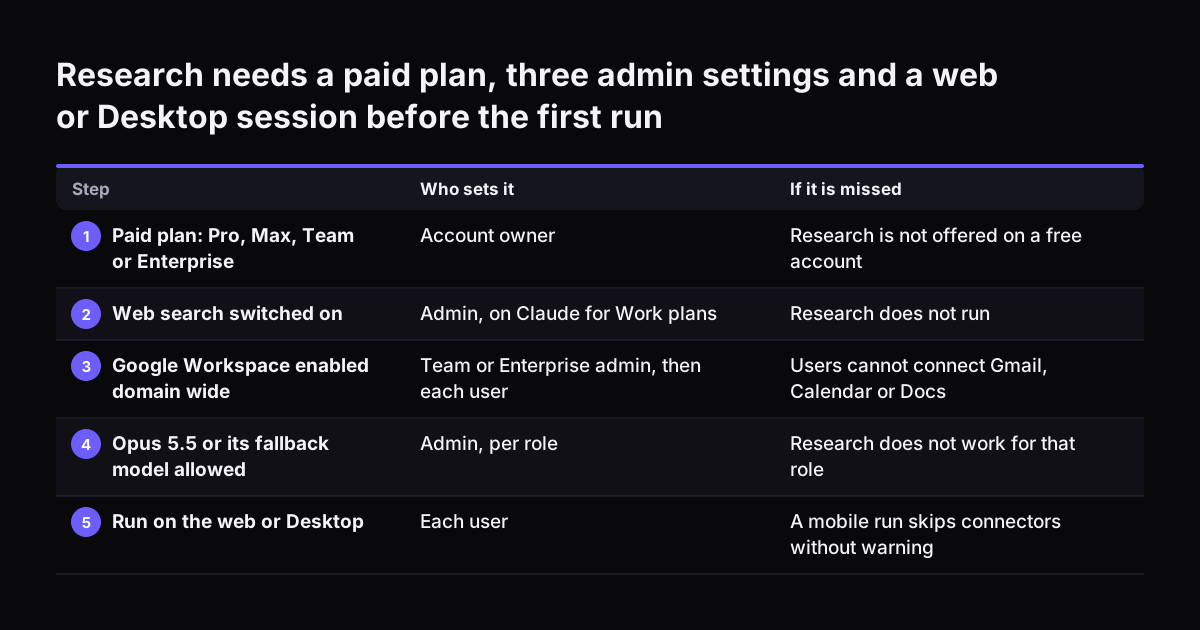
Claude Research needs a paid plan and three settings in place before it works. The Help Center lists Research for Pro, Max, Team and Enterprise users on Claude on the web, Claude Desktop and Claude Mobile. A director on a free account will not see it.

These are the settings to confirm with whoever administers your Claude organisation:

  • Web search on. Research does not function without it, and on Claude for Work plans an administrator must enable web search for the organisation in settings.
  • Google Workspace enabled domain-wide. On Team and Enterprise, the admin does this before each person connects their own account in profile settings.
  • The right models allowed for your role. Research runs on Claude Opus 5.5 and falls back to an earlier Opus model when needed. If an admin has turned off both models for your role, Research will not work.

The model point surprises people. Research uses those models "no matter which model you've selected for your chat", according to the Help Center. Picking a smaller model in the chat does not make a Research run cheaper or lighter. If your admin has restricted the larger models to save usage, the people who need Research should sit in a role that still allows them.

A quick test confirms the setup. Open a new chat on the web, switch Research on, and ask a small question that needs both a web page and one of your own Google Docs. If the citations include both, the settings are right.

Research needs a paid plan, three admin settings and a web or Desktop session before the first run. Who sets it / If it is missed. 1. Paid plan: Pro, Max, Team or Enterprise: Account owner / Research is not offered on a free account; 2. Web search sw

Framing the decision question before you switch Research on

A Research report is only as useful as the question it answers. Claude decides what to investigate next based on what it finds, so a loose question produces a broad survey. A decision needs a narrow answer: which option, against which criteria, by when.

Write a short decision brief before you open the chat. It should cover five things:

  1. The decision in one sentence, with the options named.
  2. The criteria that will decide it, in order of weight.
  3. The deadline, and the date after which evidence counts as current.
  4. The sources Claude should use, such as named Google Docs or email threads.
  5. What is out of scope, so Claude does not spend searches on it.

At Svennis we ask the client team to write the decision and its deadline in one sentence before anyone switches Research on. When that sentence is missing, the report reliably answers a wider question than the one on the table, and the team ends up reading for what it already knew.

Ask for the shape of the output as well. A table of options against criteria, each cell with its citation, is easier to check than flowing prose. Ask Claude to mark any statement it could not support with a source. Ask it to list open questions separately rather than filling them with guesses.

Worked example: a supplier decision run through Claude Research

Take an operations director at a UK distributor on Claude Team. The decision is whether to renew the current packaging supplier or move to a named alternative before the contract renewal date. The worked example below uses the real settings from Anthropic's pages.

Setting up the chat

The admin has already enabled web search and Google Workspace domain-wide. The director has connected Gmail, Calendar and Docs in profile settings. They open a new chat on Claude on the web, not on their phone, because Research started in Claude Mobile skips connectors without warning. They switch Research on and leave on only the connectors the question needs.

The brief they paste in

Decision: renew with our current packaging supplier or move to the alternative we were quoted, before our renewal date. Criteria, in order: delivery reliability, total cost per year, contract exit terms, sustainability claims we can verify. Use the contract summary in our Google Docs and my Gmail threads with both suppliers. Use only public sources dated in the last twelve months.

Give a table of options against criteria with a citation in every cell. List anything you could not support as an open question.

What comes back

Claude runs several searches in sequence. It reads the director's email threads and contract summary, then searches the web for public information on both suppliers. The result is a report with citations to the pages, emails and documents it used. The director now has a draft comparison in one place. They do not yet have a decision, because nothing has been checked.

Checking the citations in a Research report before anyone acts

Checking a Research report means opening the sources behind the statements the decision turns on. Anthropic built Research to give "easy-to-check citations", but the checking is still a human job. A report can cite a real page and still misread it, or cite an old page as if it were current.

Use this checklist on every Research report that will feed a decision:

CheckHow to do itWhat it catches
Figures match their sourceOpen every citation attached to a number and find the number on the pageMisread or rounded figures
Sources are currentCompare each source's date with the cut-off date in your briefOld prices, terms or policies
Primary beats secondaryPrefer the supplier's or regulator's own page over a summary of itErrors introduced by a third party
Internal sources are the latestCheck the cited email or document is the final version, not a draftDecisions built on superseded terms
Nothing was skippedConfirm the run started on web or Desktop and the right connectors were onSilent gaps from Mobile or local MCP servers
The counter-case existsAsk Claude in a follow-up for the strongest evidence against its leading optionA one-sided report
A second reader signs offHave a colleague verify the three facts the decision depends onBlind spots of the person who ran it

Keep the checked report with the decision record. When someone later asks why you chose the alternative supplier, you can show the sources, the dates and who verified them.

Treating a Research report as a hypothesis with kill gates

A Research report is a set of hypotheses to test, not a finding to act on. Claude builds each search on what the earlier ones found. An early misreading can therefore shape the rest of the report. Treat every claim as something to confirm before it carries weight in the decision.

A useful device for this is the kill gate. A kill gate is a condition, written before you read the report, that drops an option the moment it fails. The next option is then picked up instead.

Applied to the supplier example, a director would write two or three kill gates before reading the report. These might include:

  • The alternative supplier's exit terms cannot be confirmed in writing.
  • The delivery reliability claim rests on a single marketing page.
  • The total cost per year depends on a figure no one can trace to a quote.

If a gate fails, the option stops there, however good the rest of the report looks. Writing the gates first keeps a fluent report from carrying a weak option through. Contracts and legal terms deserve their own review route, and the guide to Claude for contract review, research and sign-off covers who signs off what.

Research usage limits and what each Claude plan costs

Claude Research shares the same usage limits as ordinary conversations, but it uses them up faster. The Help Center says research sessions "can use up your limits faster" because of the many searches each run makes. A director who runs several deep reports in a morning can hit the limit before lunch.

The Claude pricing page explains how limits work: every plan has limits that reset on a rolling five-hour session window, and paid plans add weekly limits on top. The plan prices, as listed there, are:

PlanBilled annuallyBilled monthlyUsage
Pro$17 per month$20 per monthIndividual plan
MaxFrom $100 per month5x or 20x more usage than Pro
Team, standard seat$20 per seat per month$25 per seat per monthMore usage than Pro, teams of 2 to 150
Team, premium seat$100 per seat per month$125 per seat per month5x more usage than standard seats

On Claude Team you can mix seat types. The people who run Research every week, often finance or operations leads, are the obvious candidates for premium seats. Everyone else can stay on standard seats. For a full picture of seats, usage and setup costs, see the guide to what Claude for business costs and how to start.

What Claude Research means for a UK company

For a UK company, Claude Research raises three practical questions: availability, data and the currency of sources. Each has a short answer you can check yourself.

Availability

Anthropic's launch post introduced Research as an early beta for Max, Team and Enterprise plans in the United States, Japan and Brazil. The current Help Center article lists Research for Pro, Max, Team and Enterprise users without naming countries. Confirm it in your own account before you plan a process around it.

Data

The Claude pricing page states that Team and Enterprise plans have no model training on your content by default. That matters because Research reads your connected email and documents automatically, without asking for approval each time. Decide which connectors a Research user may turn on, and keep sensitive mailboxes out of scope unless the question needs them.

Sources

Claude searches the open web, so it can surface material written for other markets. A UK decision on supplier contracts, employment or tax needs UK sources. Say so in the brief, and treat any foreign source cited for a UK rule as a failed check. If your team prefers working on files inside a shared desktop workspace, the guide to Claude Cowork for UK firms explains how that fits alongside Research.

Next steps for using Claude Research on your next decision

The next step is to run one real decision through Research, with the checks in place, before you roll it out to a team. Pick a decision due in the next month with two clear options.

  1. Ask your Claude admin to confirm web search is on, Google Workspace is enabled domain-wide and your role allows the models Research needs.
  2. Write the decision brief: the decision, criteria, deadline, sources and exclusions.
  3. Write two or three kill gates before you read any output.
  4. Run Research on the web or Desktop with only the needed connectors on.
  5. Work through the citation checklist, then have a second person verify the key facts.
  6. File the checked report with the decision record.

Some companies already pay for Claude seats that nobody uses this way. Claude Relaunch puts paid Claude seats to work on processes like this one. Svennis works in four steps. The first is a Workshop. Next comes Pilot Claude A, an AI agent on one process, or Pilot Claude B, Claude Team for the whole team. Then comes the department Activation, followed by monthly operations.

Research may need data from your own systems. For each connection, we build a connector, an MCP server, a plugin or a skill. We show you the options with their cost, and you choose.

Sources

  1. Claude Help Center: Use research on Claude
  2. Anthropic: Claude takes research to new places
  3. Anthropic: Plans & pricing
  4. Anthropic: Models overview
Free, 30 minutes

Pick a time. Bring the process this article made you think of.

You leave with a clear yes or no on putting Claude on it, and the step that fits from our published prices. You speak to someone who builds the agents, not a salesperson.

Prefer to call? +44 7588 772736 · Not ready to talk? See it on your business first.

30 minutes · video call · free
  1. 1Time
  2. 2Details
  3. 3Booked