Skip to content
SVENNISAIWe speak Claude.
Blog · Claude Cowork

Scheduled tasks in Claude Cowork for a weekly routine you can trust

A step-by-step guide to turning a Monday pipeline or support summary into a scheduled task in Claude Cowork, with the permissions and checks it needs before it runs on its own.

10 min read

Book a 30-minute call · with a Claude Certified Architect from our team.

Article · 10 min read
Abstract cover of repeating circular loops advancing along a straight line in a steady weekly rhythm

Scheduled tasks in Claude Cowork: what they are and what a weekly routine needs

Scheduled tasks in Claude Cowork let you hand a weekly routine, such as a Monday pipeline summary, to Claude on a fixed schedule. You write the job once as a prompt and choose when it runs. Claude then does the work each week. Start it read-only, review every output for the first few weeks, and only then let it run unattended.

A scheduled task is a Cowork task that runs on a schedule or when you start it by hand, rather than each time you type a request. A practitioner comparison of the two Anthropic automation features puts it plainly: Cowork tasks are schedule-or-manual only. Anthropic describes Claude Cowork as the place where you hand Claude real work. It works in the files and tools you choose and completes multi-step tasks from start to finish.

Cowork is built for non-coding knowledge work: research, analysis, document creation and other multi-step tasks. It uses the same agentic approach as Claude Code, and it works with a paid plan. If you are new to the product itself, our explanation of Claude Cowork for UK firms covers plans and uses first.

A weekly routine suits a scheduled task when three things hold:

  • The job reads the same sources every week.
  • The output has a fixed shape, such as a summary or a list of flags.
  • A person can check the result in a few minutes.
Where a Cowork scheduled task runs: the cloud for web services, your desktop for local files

Where a Cowork scheduled task runs depends on what it touches. Anthropic's release notes describe Cowork as running locally in an isolated virtual machine, with access to local files and MCP integrations. MCP, the Model Context Protocol, is the standard way Claude connects to outside systems.

Since then, part of the processing has moved off the desktop. According to MindStudio's write-up of the Cowork cloud update, anything reachable over a public API now runs server-side. Its examples include Gmail and Google Workspace, Slack, Notion, Salesforce, HubSpot and cloud storage. Those tasks run on Anthropic's infrastructure and do not need your desktop to be active.

Some jobs still need the desktop app running:

  • Reading or writing files on your hard drive.
  • Driving desktop applications that are not on the web.
  • Querying on-premises databases or internal APIs.

Anything behind a corporate firewall or VPN is out of reach from Anthropic's cloud without a tunnel or a local component. The same comparison post notes that a Cowork task needing local files or apps will only run locally. There is no separate local or remote switch. For a weekly routine, this decides whether someone must leave a machine on overnight on a Sunday.

Permissions a weekly scheduled task needs: connectors, skills and read-only access first

A weekly scheduled task needs exactly the access its sources require, and no write access at the start. Cowork tasks work with your connectors and the files saved to your Claude account. Cowork's documentation also lists skills and installed plugins as capabilities a scheduled task can use.

Three terms matter here. A connector links Claude to a business system, such as your CRM or mailbox. A skill is a way to teach Claude a repeatable workflow tailored to how you work. A plugin bundles tools, knowledge and workflows into a single install.

Write access is the risk. Anthropic's release notes say that with write tools enabled, the Microsoft 365 connector lets Claude draft, send and organise email, manage calendar events, and create and update files in OneDrive and SharePoint. Teams stays read-only. A weekly summary needs none of those write actions, so leave them off for the task's first weeks.

Some protections are built in. Anthropic states that Claude works only within what you choose, and deleting anything needs your approval. MindStudio's guide to Claude Code routines gives a sensible order for the rest: start with human review before extending to fully autonomous actions.

Your organisation's settings also count. Anthropic's model documentation notes that an administrator can disable a tool such as web search. A request that relies on it will then fail, so check admin settings before the first run.

Worked example: a Monday pipeline summary from Zoho CRM

A Monday pipeline summary is the clearest first scheduled task for a sales team lead. Suppose your deals live in Zoho CRM and Claude reaches it through a connector. The task reads open deals before the team arrives and leaves a draft summary for the sales manager.

Set the task up in this order:

  1. Name: a short label such as monday-pipeline-summary.
  2. Description: one line saying what the task does and who reads the result.
  3. Schedule: every Monday morning, before the weekly sales meeting.
  4. Prompt: the full instructions, as below.

A Reddit user reports that Cowork stores a scheduled task as a SKILL.md file. That user reports the file's header accepts fields including name and description. Treat that as a user report, not documentation, but it explains why the name and description deserve care.

Here is a prompt you can adapt:

Read all open deals in Zoho CRM. List deals that have not been updated in more than 7 days, with owner, stage and value. Summarise movement in the pipeline since last Monday in five bullet points. Do not change any record. Save the summary as a draft for the sales manager. End with a list of every source you read and any source you could not reach.

The seven-day threshold comes from a CRM hygiene example in MindStudio's routines guide. Set yours to match your sales cycle. A support lead can run the same pattern on Zoho Desk, listing tickets that are still open after a week.

Writing a scheduled task prompt that runs without anyone watching

A scheduled task prompt must state everything a colleague would otherwise ask you. Nobody is there to answer a question at seven on a Monday. MindStudio's routines guide makes the point directly: reliability depends on how carefully the task is specified and how robust the error handling is.

Four parts make a prompt dependable:

  • Scope: which system, which records and which date range.
  • Limits: what the task must not do, such as changing records or sending messages.
  • Output: the exact shape, length and destination of the result.
  • Failure report: a closing list of sources read and sources missed.

The failure report matters more than it looks. According to MindStudio's Cowork cloud article, a cloud task pointed at a local resource tends to return an incomplete result rather than a loud error. Without that closing list, a summary built on half the data looks just like a complete one.

Keep standing rules out of the prompt where you can. If several tasks share the same definitions, such as what counts as a stalled deal, put them in a skill. Every task then reads the same rules. A company knowledge base Claude can use serves the same purpose for policies and reference material that change rarely.

Choosing the Claude model and watching usage limits for a recurring task

A recurring task runs on your account's default model unless you change it. MindStudio's Cowork cloud article says cloud tasks default to the model your account is configured to use. In the Reddit thread, one user found every scheduled task running on Opus. Another commenter pointed to the model setting in the task's edit window, opened with the pencil icon.

A weekly summary rarely needs the largest model. Anthropic's models overview suggests starting with Claude Opus 5.5 for most workloads if you are unsure. It positions Claude Haiku 5.5 for high-volume tasks such as classification, extraction and routing. On Anthropic's API price list, Claude Sonnet 5.5 costs $2 per million input tokens against $4 for Claude Opus 5.5. That gives a sense of relative weight, even though a Cowork seat is not billed per token.

Usage limits matter more than price for a seat holder. Anthropic's pricing page says every plan has limits that reset on a rolling five-hour session window, and paid plans add weekly limits on top. Anthropic also states that agentic tasks in Cowork consume more capacity than regular chat. A heavy Monday task can eat into the morning's allowance for the person who owns it.

MindStudio adds that Anthropic has not introduced a separate charge for cloud versus local execution. You are billed on your plan and usage.

Checks to run before trusting a Cowork scheduled task unattended

A Cowork scheduled task earns unattended status by passing the same checks every week, not by working once. We at Svennis run a new scheduled task by hand alongside the person who did the job before, and compare both outputs line by line before the schedule goes live. The gap we find most often is a source the task could not reach, which shows up as a thinner report rather than an error.

The checklist below sets out what to confirm and why:

CheckWhat to confirmWhy it matters
Where it runsEvery source is reachable from the cloud, or the desktop stays onA task needing local files runs only locally
Write accessSend, edit and write tools are off for the taskSome connectors can send email when write tools are on
Admin settingsNo tool the prompt relies on is disabledA disabled tool makes the request fail
Failure reportThe output lists sources read and sources missedAn unreachable source gives a partial result, not an error
ModelThe task runs on the model you choseTasks default to the account's model
UsageThe run leaves room for the owner's own workAgentic tasks use more capacity than chat

Run the task manually for several weeks before you trust the schedule. Change one thing at a time, so you know which change fixed which problem.

Reviewing the weekly result: where to check it and who signs it off

Reviewing the weekly result is a named person's job, written into the routine like any other. MindStudio's Cowork cloud article says you can check whether a scheduled task ran, what it produced and whether it hit errors. You can do that from a different device than the one used to set it up. A sales manager can therefore review the Monday summary on a phone before the meeting.

A short review covers three questions:

  1. Did the task run, and did it report any source it could not reach?
  2. Do two or three figures match what you see in the source system?
  3. Is anything in the summary a judgement that a person should make instead?

For Team and Enterprise plans, Anthropic states that Cowork activity streams to your SIEM through OpenTelemetry. A SIEM is the security log system your IT team uses to monitor activity. That gives IT a record of what each task did without reading every summary.

If the summary feeds a board pack, keep the human sign-off at that step. Our guide to weekly and monthly board reports with Claude covers that longer chain in detail.

Cowork scheduled tasks or Claude Code Routines for a weekly business routine

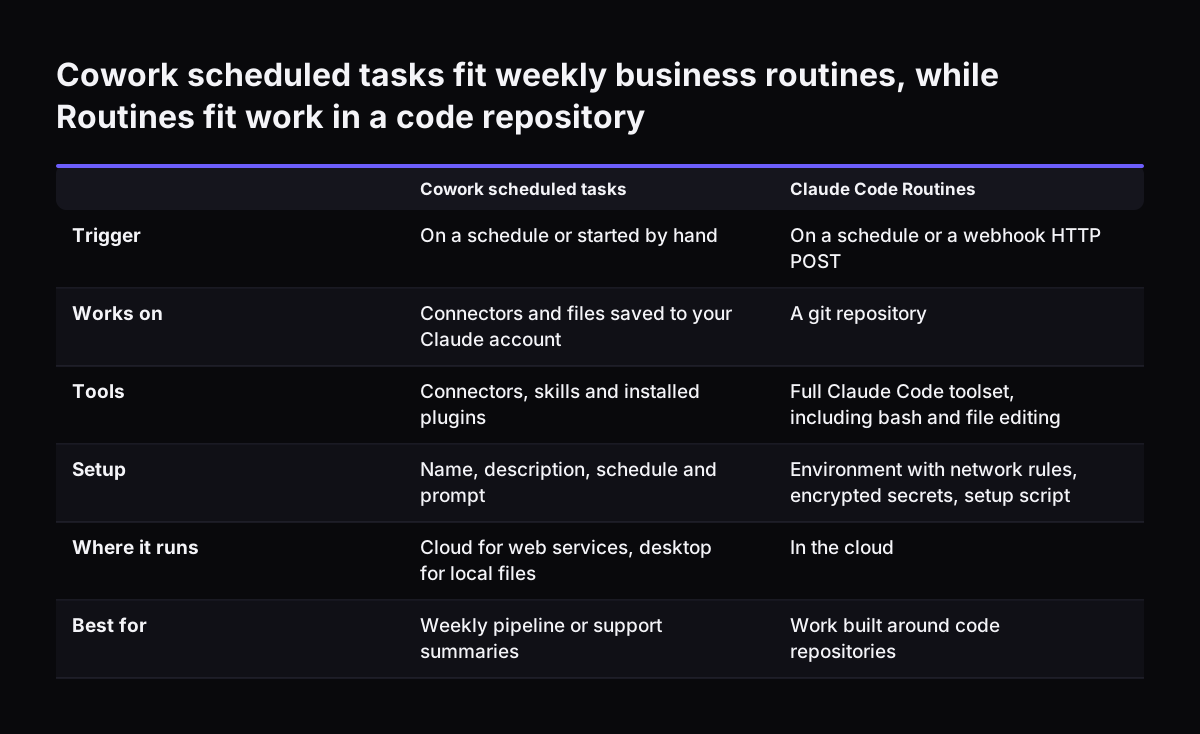
Cowork scheduled tasks suit a weekly business routine. Claude Code Routines suit work built around code repositories. MindStudio defines a Routine as a Claude Code task that runs on a trigger rather than on manual invocation. That trigger can be a schedule or a webhook, which fires when an external system sends an HTTP POST to an endpoint.

The practitioner comparison sets out the practical differences. Routines run against a git repository and offer the full Claude Code toolset, including bash and file editing, scoped to that repository. They also expose a configurable environment with network restrictions, encrypted secrets and a setup script. Cowork tasks have no repository concept and expose none of those settings.

Cowork tasks, by contrast, work with your connectors, the files saved to your Claude account, and your skills and plugins, with no git required. For a team lead summarising a pipeline or a support queue, that is the better fit. The same comparison notes that Routines can combine schedule, webhook and GitHub event triggers on one routine. If your weekly job must start when something happens in another system, rather than at a fixed hour, that is the point to involve a developer.

Cowork scheduled tasks fit weekly business routines, while Routines fit work in a code repository. Cowork scheduled tasks / Claude Code Routines. Trigger: On a schedule or started by hand / On a schedule or a webhook HTTP POST; Works on: Connectors a

What Cowork scheduled tasks mean for a UK company on Claude Team

For a UK company, Cowork scheduled tasks are most practical on the Claude Team plan, which covers teams of 2 to 150. Anthropic's pricing page lists a standard seat at $20 per seat per month billed annually, or $25 billed monthly. Anthropic lists these seat prices in US dollars. Check the currency and any tax shown for your location at sign-up before you budget.

Data handling is the question UK managers ask first. Anthropic's pricing page states that Team and Enterprise plans have no model training on your content by default. The release notes add that memory is off by default for Team and Enterprise organisations. If memory is turned on for the person who owns the task, what Claude reads in a Cowork task can carry into that person's chats. Check the setting at organisation and member level before the first run.

Infrastructure matters too. Many UK firms still run an accounting package or file server on site. MindStudio notes that anything behind a corporate firewall or VPN is unreachable from Anthropic's cloud without a tunnel or a local component. A weekly task that touches such a system needs a desktop left running or a proper connection built first. Our setup guide to Claude Cowork alongside your existing systems covers those connection choices.

Next steps: set up one weekly scheduled task and review it for a month

The next step is to pick one weekly job and run it as a scheduled task for a month, with a person checking each result. Choose a job with fixed sources and a fixed output, such as the Monday pipeline summary or an open-ticket review.

  1. Write the prompt with scope, limits, output and a failure report.
  2. Confirm every source is reachable, and turn off write tools for the task.
  3. Run it manually beside the person who does the job today.
  4. Switch on the schedule only when outputs match for several weeks.
  5. Name the reviewer and the day they check it.

If your team already pays for Claude seats that sit mostly unused, Claude Relaunch puts paid seats to work on routines like this one. For connections your systems do not yet have, Svennis builds a connector, an MCP server, a plugin or a skill. We show you each option with its cost, and you choose.

The wider route runs in four steps: the Workshop, then Pilot Claude A for one process or Pilot Claude B with Claude Team for the whole team, then the department Activation, then monthly operations. Costs are set out in our guide to what Claude costs and how to start.

Sources

  1. Claude Help Center: Release notes
  2. Anthropic: Plans and pricing
  3. Anthropic: Claude Cowork
  4. Anthropic: Models overview
  5. Reddit: Cowork mode, setting the model for scheduled tasks
  6. MindStudio: How to use Claude Code scheduled tasks and Routines
  7. MindStudio: Claude Co-work now runs in the cloud
  8. RayAna Stanek on LinkedIn: Cowork scheduled tasks vs Claude Code Routines
Free, 30 minutes

Pick a time. Bring the process this article made you think of.

You leave with a clear yes or no on putting Claude on it, and the step that fits from our published prices. You speak to someone who builds the agents, not a salesperson.

Prefer to call? +44 7588 772736 · Not ready to talk? See it on your business first.

30 minutes · video call · free
  1. 1Time
  2. 2Details
  3. 3Booked