
Skip to content
SVENNISAIWe speak Claude.
Blog · Claude Team

Claude Pro or Claude Team: which plan your company actually needs

Seat prices for Claude Pro and Claude Team sit close together. The real choice is about shared workspaces, admin control and connecting Claude to your CRM and helpdesk.

9 min read

Book a 30-minute call · with a Claude Certified Architect from our team.

Article · 9 min read
Abstract cover with separate small circles drawing together into one shared, structured grid

Claude Pro or Claude Team: the short answer

Claude Pro or Claude Team: which plan a company needs depends on control, not price. Claude Pro suits one person working alone. Claude Team suits a company of five or more people who need shared workspaces, admin roles and a route to connecting Claude to the CRM and helpdesk. The seat prices sit close together, so price rarely settles the question.

Claude Team is Anthropic's plan for businesses. In the words of the Claude Pilot B service page, it offers "per-person seats, an admin, and the data belongs to the company". Claude Pro is a paid plan for one individual. Each Pro account belongs to the person who opened it.

This guide is part 1 of a 3-part series on Claude Team for the whole team. It covers what each plan is, the problems Claude Team solves, and which companies and roles it fits. Part 2, Rolling out Claude Team to a whole team: the steps that matter, covers the rollout itself. Part 3, Why the company account matters: data, rules and the cost of personal AI accounts, covers data and policy.

If you are new to Claude itself, start with the plain guide to what Claude is and come back here.
What Claude Pro is: a personal plan for one person

Claude Pro is Anthropic's paid plan for an individual user. It costs $20 a month per person, according to Juma's Claude pricing guide and AionX. Juma says Pro gives about five times the usage of the Free plan. That works out at around 45 messages every five hours, depending on message length and Claude's current capacity.

Pro has more than one limit. Superblocks notes that Pro and Max plans carry weekly usage caps on top of the per-session limits. Pro also includes Claude Code, the command-line tool, and Superblocks says that Claude Code usage counts against the same limits as chat.

Pro includes Projects. Juma describes them as a way to organise documents and chats and keep a project's knowledge in one place. On Pro, that place is personal. Your colleague cannot open your Project, and nobody in the company manages it.

Ownership is the real issue for a company. A Pro account has no company admin and no central billing, which Juma lists among the features the Team plan adds. When the employee leaves, the account and its history go with them. AionX also warns that existing Pro accounts cannot be upgraded directly to Team. Projects and conversation history have to be exported and uploaded again by hand.

What Claude Team is: seats, roles and shared projects under one company account

Claude Team is a company account that holds per-person seats, an admin and the company's data in one place. Tactiq's overview of Claude Team lists four things it adds over Pro:

  • shared projects, where all team members can access the same documents, code and context
  • workplace connectors to the tools staff already use
  • admin controls
  • higher usage limits than the Pro plan

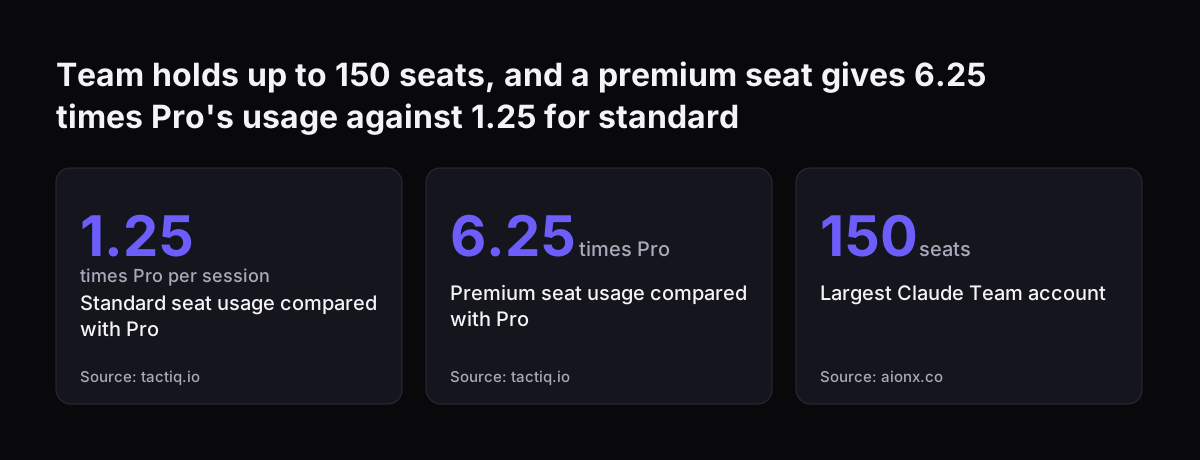
Size has limits at both ends. Juma, Finout and Superblocks put the minimum at five members. Superblocks says Team tops out at 150 seats, and organisations with more than 150 seats need Enterprise.

Team has two seat types. A standard seat suits colleagues who collaborate but do not code. A premium seat adds Claude Code. BrainGrid and Superblocks both state that standard Team seats do not include Claude Code, so developers need premium seats.

Two further points matter for a business. BrainGrid says that on the Team plan your data is excluded from model training. It also says Model Context Protocol (MCP) servers are configured at the team level, which means a connection is set up once for the company rather than by each person. Juma adds central billing and administration to the list.

Team holds up to 150 seats, and a premium seat gives 6.25 times Pro's usage against 1.25 for standard: Standard seat usage compared with Pro 1.25 times Pro per session, Premium seat usage compared with Pro 6.25 times Pro, Largest Claude Team account
Source: tactiq.io, aionx.co

Price per seat for Claude Pro and Claude Team is close, so it rarely decides

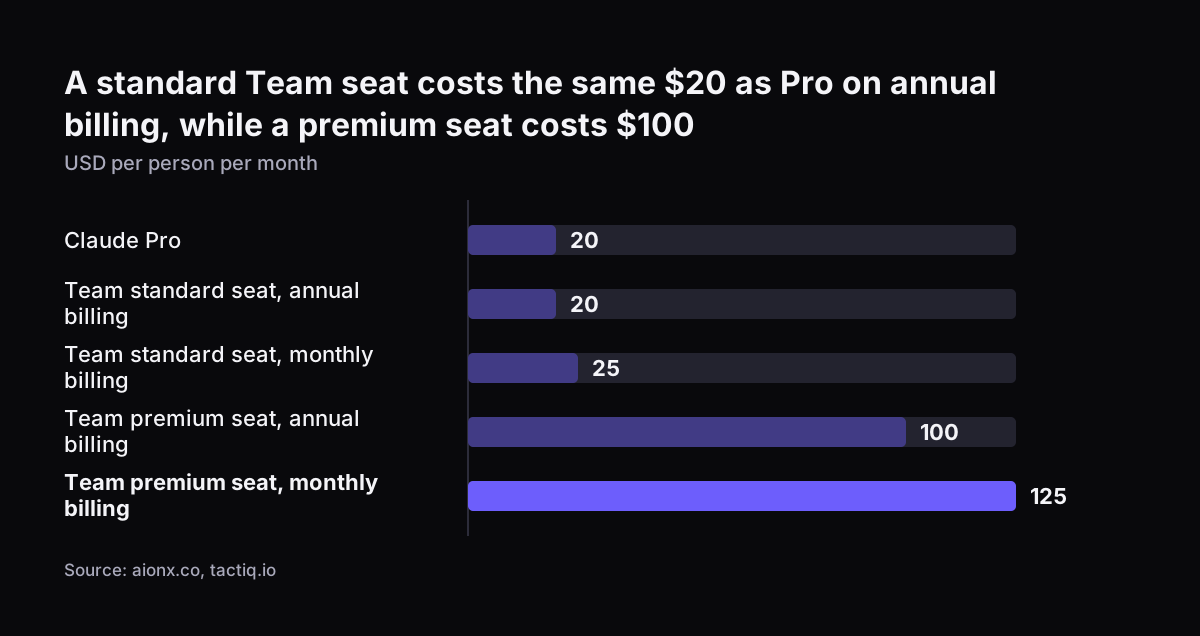
A standard Claude Team seat costs about the same as Claude Pro. Tactiq and AionX list standard seats at $20 a month on annual billing or $25 on monthly billing. Premium seats cost $100 a month on annual billing or $125 monthly. Pro costs $20 a month.

Published figures differ between guides. Finout and Juma list the standard Team seat at $25 on annual billing and $30 monthly. Tactiq notes that pricing varies by region and excludes taxes. Check the figure on Anthropic's own pricing page on the day you buy.

Usage is the other half of the price. Tactiq and AionX say a standard seat gives 1.25 times the usage of Pro per session. A premium seat gives 6.25 times. AionX points out that Anthropic publishes these relative figures but no absolute message counts or token limits.

Team also carries a pooled API credit. AionX describes it as $20 per standard seat plus $100 per premium seat, capped at $500 a month. The credit expires each billing cycle and covers the Claude API but not Claude Code. Superblocks warns that Team usage credits bill at API rates and are not capped by default, so set spend controls early.

The money on a standard seat is therefore nearly a wash. What you buy with Team is ownership, roles and shared context.

A standard Team seat costs the same $20 as Pro on annual billing, while a premium seat costs $100: Claude Pro 20, Team standard seat, annual billing 20, Team standard seat, monthly billing 25, Team premium seat, annual billing 100, Team premium seat,
Source: aionx.co, tactiq.io

Admin control on Claude Team: roles, the Primary Owner and data exports

Admin control on Claude Team comes from roles. Anthropic's help centre article on roles and permissions says that what a person can see and do in a Team or Enterprise account is dictated by their role. There are four standard roles: User, Admin, Owner and Primary Owner. All four can create and modify chats and use projects.

The Primary Owner role needs a decision before anyone is invited. A Team organisation can have only one Primary Owner, and that seat uses one of the plan's licences. The Primary Owner can be a service account that is not tied to an individual user. You can check who holds the role under Settings > Account.

When Svennis sets up Claude Team, we settle who holds the Primary Owner role before the first invitation goes out, and we usually make it a service account so the company account does not leave with one employee. Admin and Owner roles then go to named people with a reason to hold them.

Some controls exist on Team and some only on Enterprise. Requesting data exports and transferring Primary Ownership are available on both, each reserved for a single role. Managing SSO, requesting audit logs, managing data retention and custom roles are Enterprise only, according to the same help centre article. If those matter to your IT team, read the comparison of Claude Team and Enterprise.

Shared projects and connectors: the path from Claude Team to your CRM and helpdesk

Shared projects and connectors turn Claude Team from a chat window into a tool that works with company knowledge. A shared project holds the documents, instructions and history a team needs. Everyone in the team works from the same context instead of pasting it in again.

Native connectors cover the common office tools. AionX lists Google Drive, Gmail, Google Calendar, Microsoft 365, Slack and GitHub. It also notes that Team has no direct integrations with project management tools such as Jira, Asana, Monday.com or Trello.

Most CRMs and helpdesks sit outside that list. A company running Zoho CRM or Zoho Desk needs a further step. On Team, BrainGrid says MCP servers are configured at the team level. An MCP server is a small service that lets Claude read from or act in another program through the Model Context Protocol.

Svennis connects Claude to a company's programs one connection at a time. For each one it builds a connector, an MCP server, a plugin or a skill. It shows the options with their cost, and the client chooses. In the Pilot B service, connections to Microsoft 365, Google Workspace, Zoho and Xero start read-only.

A Pro account cannot share any of this. Each person would have to set up and maintain their own connections. To see how shared context is organised, read the guide to Claude Projects and skills for a small team.

Decision table: Claude Pro, Team standard, Team premium or Enterprise

The table below compares the four options on the points that usually decide the choice. Prices are in US dollars per person per month, as published by the guides cited, and exclude tax.

PointClaude ProTeam standard seatTeam premium seatEnterprise
Price$20$20 annual, $25 monthly$100 annual, $125 monthly$20 per seat plus usage at API rates
Minimum sizeOne personFive membersFive members across seat types20 seats
Usage compared with ProBaseline1.25 times per session6.25 timesBilled on use
Shared projectsNo, personal onlyYesYesYes
Company admin and rolesNoFour standard rolesFour standard rolesStandard plus custom roles
Claude CodeIncludedNot includedIncludedIncluded
SSO management, audit logsNoNoNoYes

Read the table from the bottom up. If you need SSO management, audit logs or custom roles, you are choosing Enterprise. If you need shared work and an admin, you are choosing Team. Then you pick a seat type per person. Pro remains the answer for a single user with no company data at stake.

Worked example: an eight person sales and support team on Zoho

Take a firm of eight people. Four work in sales on Zoho CRM, three answer customers in Zoho Desk, and one operations manager runs the office on Microsoft 365. Nobody writes code.

On Claude Pro, the firm buys eight personal accounts at $20 each, so $160 a month. Each salesperson builds their own Projects. The support team writes three versions of the same tone guide. When someone leaves, their history leaves too, and the firm has no admin view of any of it.

On Claude Team, the firm clears the five-member minimum. It makes the Primary Owner a service account, which uses one licence, so it buys nine standard seats. On annual billing that is 9 × $20, or $180 a month. On monthly billing it is 9 × $25, or $225. The settings look like this:

  • Primary Owner: the service account, checked under Settings > Account
  • Admin: the operations manager
  • User: the seven sales and support staff
  • Shared projects: one for sales proposals, one for support replies with the tone guide
  • Connectors: Microsoft 365 natively, Zoho CRM and Zoho Desk through an MCP server, read-only at first
  • Spend control: a limit on usage credits, because they are not capped by default

The extra cost is $20 a month on annual billing. In return the firm owns the account, shares one context and has a clear way to connect Claude to its CRM and helpdesk.

Who Claude Team does not fit, and what to choose instead

Claude Team is the wrong plan for several kinds of company. Check this list before you commit:

  • A sole trader or a team under five. Team requires five members. Claude Pro is the sensible plan until the team grows.
  • Developers on standard seats. Standard seats do not include Claude Code. Developers need premium seats or a separate plan.
  • Organisations above 150 people. Superblocks says more than 150 seats requires Enterprise.
  • IT teams that need SSO management, audit logs or custom roles. Anthropic's help centre lists these as Enterprise only.
  • Firms that need a HIPAA business associate agreement. AionX advises evaluating Enterprise rather than Team.
  • Data that must stay in the UK. Claude Team stores data in the US. The Pilot B page points this kind of data to Pilot A, an AI agent in your own AWS account in London.

The roles that gain most from Team are the ones that share material daily. Sales staff reuse proposals and price lists. Support staff reuse answers and policies. Managers need one view of who holds a seat. A company where each person works on unrelated, private tasks gains less from shared projects, though it still gains ownership of the account.

What Claude Team means for a UK company: currency, tax and where data sits

A UK company buying Claude Team should plan for three practical points: currency, tax and data location. The guides in this post quote prices in US dollars. Tactiq notes that pricing varies by region and excludes taxes, and Juma says the same about tax. Seat prices exclude VAT. How VAT applies depends on which Anthropic company bills you. A VAT-registered business may account for it under the reverse charge, so check the first invoice with your accountant.

Seats are bought from Anthropic, not from a partner. The Pilot B page states that customers pay Anthropic directly, in pounds. It also states that Svennis does not resell seats and adds nothing to their price.

Data location is the point most UK firms ask about. According to the Pilot B page, on Claude Team and Enterprise Anthropic stores data in the US. It may process that data in the US, Europe, Asia or Australia. For most office work that is acceptable once three things are in place: Anthropic's data processing terms, with the UK transfer safeguard they rely on; your own transfer risk assessment, which UK law now calls the data protection test; and a written rule on what staff may put into Claude. Check that the terms name the UK Addendum, the IDTA (the UK's International Data Transfer Agreement) or a UK Data Privacy Framework certification. For any category of data that must stay in the UK, the same page names Pilot A in your own AWS account in London as the route.

Write that decision down before you buy seats, not after. The guide to how Claude runs in your company, its account, data and UK law sets out the questions to answer. Part 3 of this series returns to the cost of leaving staff on personal AI accounts.

Next steps: check your current accounts, then choose the plan

Start with what you already have. These steps take an afternoon and settle most of the decision:

  1. Count who uses Claude today and on which plan, including personal Pro accounts paid on expenses.
  2. Count the people who would share projects. Five or more points to Team.
  3. List who writes code. They need premium seats or another plan.
  4. Check whether IT needs SSO management, audit logs or custom roles. If yes, look at Enterprise.
  5. Name the CRM and helpdesk you want Claude to reach, and whether a native connector exists.
  6. Mark any data that must stay in the UK.
  7. Decide who holds the Primary Owner role.

If the answers point to Claude Team and you want help with the rollout, Svennis does this work. Claude Pilot B sets up Claude Team for your whole team in 30 days, with roles, spending limits, read-only connectors, three real tasks completed and two Claude ambassadors trained. That page carries the published prices.

Pilot B is one of four steps: the Workshop, then Pilot Claude A or Pilot Claude B, then the department Activation, then monthly operations. If your company already pays for seats that nobody uses well, Claude Relaunch puts paid seats to work. Part 2 of this series covers the rollout steps in detail.

Sources

  1. Svennis AI: Claude Pilot B, Claude Team set up in 30 days
  2. Claude Help Center: Roles and permissions
  3. Finout: Claude Pricing in 2026 for Individuals, Organizations, and Developers
  4. Tactiq: Claude Team, Pricing, Features and Benefits
  5. Juma: Claude Pricing, In-Depth Guide
  6. BrainGrid: Claude Code Pricing 2026, Pro vs Max vs Team
  7. AionX: Claude Pro Team Collaboration, Features and Pricing
  8. Superblocks: Claude Code Pricing 2026, Plans, Limits and Hidden Costs
Free, 30 minutes

Pick a time. Bring the process this article made you think of.

You leave with a clear yes or no on putting Claude on it, and the step that fits from our published prices. You speak to someone who builds the agents, not a salesperson.

Prefer to call? +44 7588 772736 · Not ready to talk? See it on your business first.

30 minutes · video call · free
  1. 1Time
  2. 2Details
  3. 3Booked