
Skip to content
SVENNISAIWe speak Claude.
Blog · Claude

Changing a live Claude assistant safely: test sets, staged rollout and rollback

A small edit to a prompt or connector can quietly break routing. This guide shows how to test, stage and roll back changes to a Claude assistant that already serves users.

10 min read

Book a 30-minute call · with a Claude Certified Architect from our team.

Article · 10 min read
Abstract layered paths branching from one line, with one branch looping back to its starting point

Changing a live Claude assistant safely means testing, staging and keeping a way back

Changing a live Claude assistant safely rests on three habits. First, you test every edit against a fixed set of real questions. Second, you release the edit to a small group before everyone. Third, you keep the previous version ready to switch back to. Prompts, knowledge, connected tools and the model itself all count as edits.

A live Claude assistant is a Claude setup that already answers customers or staff in production. Examples are a service desk inside Microsoft Teams, a support chat on your website, or an agent that sorts incoming email into queues. Once people rely on it, every change carries a risk. The risk is that something which worked yesterday stops working, and nobody notices for a week.

The habits pay off in measured quality. The Government Digital Service (GDS) ran two public pilots of GOV.UK Chat, which now runs on Claude models through Amazon Bedrock. Over the pilots, the team raised answer accuracy from 76% at its earliest benchmark to 90% across all topics. It assessed answers with subject matter experts and automated evaluation tools, according to the GDS blog. That is the pattern this guide follows: measure, change, measure again.

The rest of the guide defines each type of change and shows how to build a test set. It explains versioning and staged rollout, then walks through one worked example. It ends with a checklist table and the points a UK company should weigh.

What counts as a change: prompts, knowledge, tools, the model and settings

Any edit that alters what a Claude assistant sees or can do counts as a change to that assistant. Most teams think only of the prompt. In practice, five layers move independently, and each can break a working assistant on its own.

The five layers of a Claude assistant are:

  • The prompt. The standing instructions that tell Claude its role, its tone and its rules, such as which queue each type of request belongs to.
  • Knowledge. The documents and reference material Claude draws on, for example a price list or a returns policy held in Projects.
  • Tools. The links into your other programs. Each one is a connector, an MCP server, a plugin or a skill. An MCP server is a small program that uses the Model Context Protocol to give Claude access to another system's data and actions.
  • The model. The Claude model version that does the reasoning, such as Claude Sonnet 5 or Claude Haiku 5.5.
  • Settings. Organisation-level switches that sit outside the assistant itself.

Settings are the layer people forget. Anthropic's models documentation notes that your organisation's settings can make a request fail even when the model supports the tool. Its example is an administrator disabling web search. A change made in an admin console for a different reason can therefore break an assistant that nobody touched.

Treat all five layers the same way. Each gets a version, a test run and a way back.

Why small edits quietly break routing and answers

Small edits break Claude assistants quietly because the output still reads well when it is wrong. A misrouted ticket does not throw an error. A slightly wrong answer still sounds confident. The failure shows up later, as a customer chasing a reply or an engineer finding tickets in the wrong queue.

Routing is the most fragile area. Suppose you add one sentence to the prompt about a new request type. Claude now weighs that sentence against every borderline request, not only the new ones. Some tickets that used to land in the right queue drift into the new category. The clear cases still work, so a quick manual check passes.

Tool changes fail in a different way. If someone renames a field or a status in Zoho Desk, a connector that writes to that field can stop working. It can also start writing to the wrong place. The prompt and the model are unchanged, yet the assistant's behaviour is not.

Model changes affect speed as well as quality. GDS reported a trade-off between speed and accuracy. It found that the latest frontier models were more powerful but slower than earlier versions. A newer model can therefore answer better and still feel worse to a user who waits longer.

The UK Government's AI Playbook lists hallucinations and prompt injections among the threats specific to AI. Any change can raise or lower your exposure to both. Only a repeatable test tells you which way it went.

Build a test set from real questions before you edit anything

A test set is a fixed list of real past questions, each paired with the answer or route you expect. You run the current version against it to get a baseline. Then you run every proposed change against the same list and compare. If the score drops, the change does not ship.

Build the test set from your own history, not from questions you invent. Good sources are:

  • Past tickets or chats, with the queue or answer a person confirmed as correct.
  • The awkward cases: vague requests, requests that fit two categories, and requests in other languages.
  • Questions the assistant should refuse or hand to a person.
  • Attempts to trick it. GDS counted 508 jailbreak attempts during its two pilots, and its guardrails blocked all of them.

Score each type of output in the way that suits it. Routing has one right answer per ticket, so you can score it exactly. Free-text answers need judgement, so copy the GDS approach: a subject matter expert reviews a sample, and automated checks cover the rest.

Record response time alongside quality. GDS reported an average of 10.7 seconds per answer. It chose its model by maximising accuracy while keeping latency within acceptable bounds. Decide your own acceptable bound before testing, so a slower but cleverer change does not slip through on enthusiasm.

Keep the test set stable between runs. When you add cases, rerun the current version too, so the baseline stays comparable. Our guide to testing a Claude workflow before go-live covers the first build of such a set in more detail.

Version every prompt, skill and connector so you can roll back in minutes

Rollback is the act of switching a live assistant back to its last known good version. It only works if that version still exists, complete, in one place. Rollback therefore depends on versioning, which means recording every layer of the assistant under a single number each time anything changes.

A version record for a Claude assistant should hold:

  • The full prompt text.
  • The list of knowledge documents, with their own dates or versions.
  • The configuration of each connector, MCP server, plugin and skill.
  • The exact model ID.
  • The test set score and response time for that version.
  • Who approved it, and when.

The working rule is simple: never edit the live version in place. You copy it, change the copy, test the copy, and promote the copy. The old version stays untouched, so going back is a switch, not a rebuild.

At Svennis we give every prompt, skill and connector setting a version number. We do not promote a change until it passes the same set of past questions the current version passed.

Log which version handled each conversation. When a complaint arrives, you can see at once whether it came before or after the change. Without that link, you end up guessing.

Roll out in stages: one group first, then everyone

A staged rollout releases a change to a small, defined group of users first, and widens it only when that group's results hold up. A test set shows how a change behaves on old questions. A staged rollout shows how it behaves on new ones, from real people, before the whole organisation depends on it.

GOV.UK Chat followed this path at national scale. In the app pilot, GDS gave 641 people access, and they asked 2,670 questions in four weeks. GDS plans to release the service to GOV.UK app users first. It will start testing the best way to offer it across the GOV.UK website later in 2026.

A business can stage by any boundary it can switch cleanly. Typical choices are one team, one queue, one office or one channel, such as Teams before email. Pick a group that sees a representative mix of requests, not only the easy ones.

Agree three things before the stage starts:

  1. What you will watch: routing corrections, hand-offs to people, response time and complaints.
  2. How long the stage runs before you decide.
  3. The trigger that sends you straight back to the previous version.

Keep a person in the loop where the stakes are high. The AI Playbook says humans should validate any high-risk decisions influenced by AI. During a stage, that is the cheapest insurance you can buy.

Worked example: changing the routing step of a Teams service desk on Zoho Desk

The worked example is an IT service desk on Claude that runs inside Microsoft Teams and creates tickets in Zoho Desk. Staff describe a problem in Teams. Claude decides which team should handle it and files the ticket in the right Zoho Desk department. The company wants two changes.

One change is a new routing category for access requests. The other is moving the routing step to a faster model.

Step 1: check the new model before testing it

Anthropic's models documentation positions Claude Haiku 5.5 for high-volume, latency-sensitive tasks such as classification, extraction and routing. Before testing, the team queries the Models API. Its response includes max_input_tokens, max_tokens and a capabilities object for every available model. If the assistant uses web search, the team also checks server_tools. That field reports whether the model accepts the web search and code execution tools, though not web fetch.

Step 2: test one change at a time

The team saves the current setup as the baseline version and runs the test set of past tickets. Next, it adds the access-request category to the prompt, keeps the old model, and runs the test set again. Then it moves to Claude Haiku 5.5 with the new prompt and runs it a third time. Separating the two changes shows which one caused any drop.

Step 3: stage and decide

If both runs hold their routing score within the agreed response time, the new version goes live for one office's Teams users only. The previous version stays configured. If misroutes rise past the agreed trigger, the team switches back the same day and studies the failed tickets against the test set.

Checklist for each type of change to a live Claude assistant

The checklist below sets out, for each type of change to a live Claude assistant, what to test, how to stage it and what your way back looks like. Use it as a gate: a change moves forward only when every column for its row is done.

Type of changeWhat to testHow to stage itWay back
Prompt wordingFull test set, with the borderline routing cases checked by nameOne team or queue firstRestore the previous prompt version
Knowledge documentsQuestions the old and new documents answer differentlyOne topic area firstSwap back to the previous document set
Connector or MCP serverEvery read and write it performs, against a test recordRead-only first, then writesRe-enable the previous configuration
Skill or pluginThe tasks that call it, plus tasks that should notNamed users firstDisable it and restore the earlier one
Model versionFull test set plus response timeOne channel firstPoint back to the previous model ID
Organisation settingsAny feature the assistant relies on, such as web searchAnnounce the change, then watch errorsRevert the setting

Two rules apply to every row. Change one layer at a time, so a failure has one suspect. Write down the result of each test run in the version record, because next quarter's change will need this quarter's baseline.

Model updates and retirements are changes you do not choose the timing of

Anthropic retires Claude models on a published schedule. A model swap is therefore a change every live assistant will eventually make, whether or not you plan one. The models documentation lists retirement dates of not sooner than 1 September 2027 for Claude Fable 5.1 and not sooner than 7 October 2027 for Claude Haiku 5.5. Put the date for your model in the calendar and run your test set against its successor well before then.

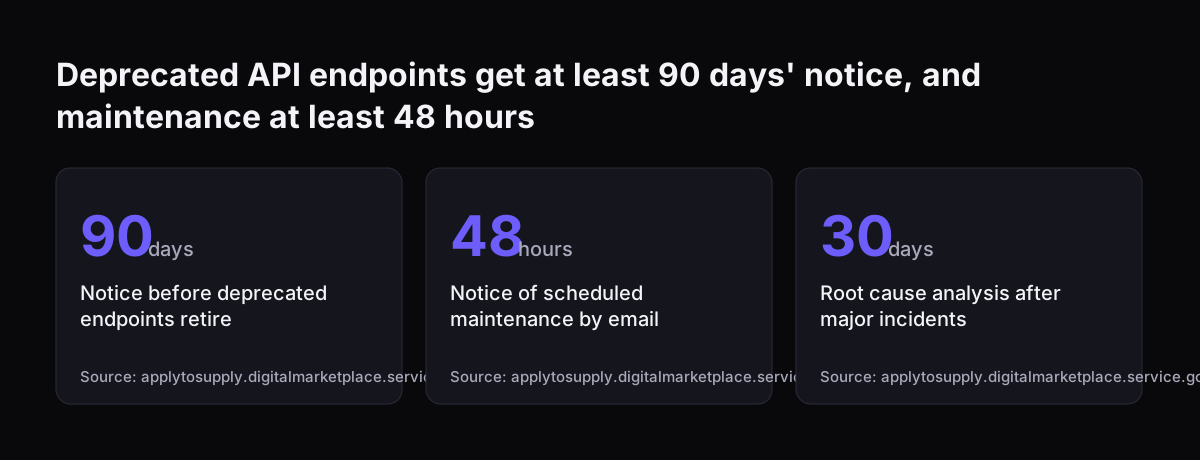
Anthropic's G-Cloud listing on the UK Digital Marketplace sets out separate notice periods for API endpoints and service maintenance. These are not model retirement dates. At the time of writing, the listing gives the following figures, but check the current listing for the ones that apply to your contract:

  • Deprecated API endpoints are retired with at least 90 days' notice.
  • Scheduled maintenance is announced by email at least 48 hours ahead.
  • Root cause analysis follows within 30 days of a significant incident.

Newer models also tempt you to switch early. Anthropic says Claude Opus 5.5 costs 40% less to run than Claude Opus 5 on typical workloads. It says Claude Sonnet 5.5 runs more than 30% faster than Claude Sonnet 5 and costs up to 30% less for most work. Those are good reasons to test a move, not reasons to skip the test.

The documentation suggests starting with Claude Opus 5.5 when unsure. It suggests Claude Fable 5.1 when your evals on Claude Opus 5.5 at higher effort still fall short. Either way, the evals are your test set. Our post on moving from Claude Opus 5 to Opus 5.5 works through one such switch.

Deprecated API endpoints get at least 90 days' notice, and maintenance at least 48 hours: Notice before deprecated endpoints retire 90 days, Notice of scheduled maintenance by email 48 hours, Root cause analysis after major incidents 30 days
Source: applytosupply.digitalmarketplace.service.gov.uk

What changing a live Claude assistant means for a UK company

For a UK company, changing a live Claude assistant is also a data protection matter whenever the assistant handles personal data. The ICO's guidance on AI and data protection covers fairness across the AI lifecycle, from problem formulation to decommissioning. A change sits inside that lifecycle. The accountability chapter includes content on things to consider as part of a data protection impact assessment (DPIA), which is the written risk assessment UK GDPR requires before any processing that is likely to result in a high risk to people.

Two practical points follow. If a change alters what data the assistant reads, for example a new connector into your CRM, revisit the DPIA before you stage it. The ICO also publishes an AI and data protection risk toolkit as a spreadsheet file, which suits a change log well.

Note that the ICO says its AI guidance is under review after changes made by the Data (Use and Access) Act. Check the current version before relying on any detail.

The AI Playbook for the UK Government is written for the public sector, but its governance advice transfers well. It asks for clearly documented review and escalation processes and an AI review board or programme-level board. In a ten-person firm, that board can be two named people who approve each version. The playbook also says automated responses to the public should be clearly identified. That is worth keeping true through every prompt edit.

Next steps for changing your own live Claude assistant safely

The first step toward changing a live Claude assistant safely is to record what is live today, before you change anything. Write down the prompt, the knowledge documents, each connector, MCP server, plugin and skill, and the model ID. Give that record version number one. You now have something to roll back to.

Then work through these steps in order:

  1. Collect past questions with confirmed correct answers or routes, including the awkward ones, and run them as your baseline.
  2. Agree an acceptable response time and a rollback trigger with whoever owns the process.
  3. Choose the group you will stage changes with, such as one team, queue or channel.
  4. Name the person who approves each new version, and log which version handled each conversation.
  5. Put your model's retirement date in the calendar.

If your assistant handles personal data, check whether the planned change affects your DPIA before step three.

If you are still deciding whether to put a Claude assistant into production at all, start with what Claude is and how it works. Our Claude for business guide on costs and getting started explains the four steps Svennis follows. They are the Workshop, Pilot Claude A or Pilot Claude B, the department Activation, and then monthly operations, where versioned changes like the ones in this guide are routine.

Sources

  1. GDS: 5 things we learned testing GOV.UK Chat
  2. Anthropic: Models overview
  3. Anthropic: Newsroom
  4. Digital Marketplace: Anthropic Claude G-Cloud listing
  5. GOV.UK: Artificial Intelligence Playbook for the UK Government
  6. ICO: Guidance on AI and data protection
  7. ICO: AI and data protection risk toolkit
Free, 30 minutes

Pick a time. Bring the process this article made you think of.

You leave with a clear yes or no on putting Claude on it, and the step that fits from our published prices. You speak to someone who builds the agents, not a salesperson.

Prefer to call? +44 7588 772736 · Not ready to talk? See it on your business first.

30 minutes · video call · free
  1. 1Time
  2. 2Details
  3. 3Booked