
Skip to content
SVENNISAIWe speak Claude.
Blog · Claude Relaunch

AI not working? How to relaunch Claude in a company: diagnosis, fixes, second rollout

A stalled Claude rollout is rarely the model's fault. This guide shows how to measure where usage dropped, fix the specific gaps and run a narrower second rollout.

10 min read

Book a 30-minute call · with a Claude Certified Architect from our team.

Article · 10 min read
Abstract lines that fork, stall and then rejoin into one steady path moving forward again

AI not working after a Claude rollout: relaunch with diagnosis, fixes and a narrower second rollout

When AI is not working after a first Claude rollout, the model is rarely the fault. To relaunch Claude in a company, you diagnose where usage dropped off. You then fix the specific gap behind the drop: a missing workflow, integration or owner. Finally, you roll out again to one team at a time and measure the result.

A Claude relaunch is a second, narrower rollout of Claude seats a company has already paid for, built on a measured diagnosis of why the first one stalled. The first rollout usually gave everyone a seat at once. The relaunch picks one team, fixes what blocked it and proves the fix before moving on.

This guide is part 2 of a 3-part series. Part 1, When an AI rollout stalls: what a relaunch is and who needs one, explains the problem and who has it. Part 3, Why a stalled AI rollout costs more than it seems, and how to measure the return, covers the money. This post covers how a relaunch is done, step by step. It sets out the stages, what your company prepares, who is involved, how long each step takes and how each step is checked.

Why a first Claude rollout stalls: a missing workflow, integration or owner

A first Claude rollout usually stalls because of one of three gaps around the model, not the model itself. Each gap shows up differently, so each needs a different fix.

  • Workflow gap: nobody defined which recurring task Claude should do in that team, so staff try it once on a general question and stop.
  • Integration gap: Claude cannot see the systems the team works in. A connector is the link between Claude and a system, such as Microsoft 365, Xero or Zoho CRM. Without one, staff copy and paste, and the time saved disappears.
  • Owner gap: no named person in the team keeps the instructions current, answers questions or notices when use drops.

Any one of these gaps is enough to stop a team using Claude. In many companies all three appear together in one team, while another team uses Claude daily. That uneven pattern is useful, because it tells you the model works and the surroundings do not.

The workflow gap is often a knowledge gap too. If Claude has no access to your price lists, policies or templates, its answers stay generic. Our guide to building a company knowledge base Claude can use covers that part in detail.

Rule out technical faults and admin settings before blaming adoption

A technical fault or an admin setting can look like low adoption, so check for both before you diagnose people and processes. Staff who hit an error twice tend to stop trying and rarely report it.

Admin settings are the first suspect. Anthropic's models overview notes that your organisation's settings can make a request fail even when a tool is supported. Its example is an administrator disabling web search. On Claude Enterprise, administrators can also set up a policy check with Inference hooks. According to the Claude Code error reference, Claude Code does not re-send a denied request to the same model or to a fallback model.

The network is the second suspect. The same reference says Claude Code reports a TLS certificate validation failure on the first attempt, without retrying. A TLS-inspecting proxy, common in corporate networks, is one cause it names. For temporary failures, Claude Code retries up to 10 times before showing an error. For a 529 overload, it names status.claude.com as the place to check service status.

The desktop app is the third. A GitHub issue on the Claude Code repository reports that on Windows the Claude desktop app could fail to reopen. The error shown was "Another program is currently using this file". Some commenters fixed it by stopping leftover processes, others needed a reboot. In October 2026 several reported they no longer saw it.

Weeks one and two: measure Claude usage from the admin console

The diagnosis of a stalled Claude rollout starts with data from the Claude admin console, not with opinions. Svennis runs the measurement over the first two weeks of a four-week Claude Relaunch. The admin console shows three readings that matter most:

  • the number of active seats;
  • who signed in during the last month;
  • which connectors are authorised.

Together these readings show where usage dropped off. A team where few people signed in has a different problem from a team that signs in daily without any connector authorised. The sign-in list names the teams. The connector list shows whether Claude can reach their systems at all.

At Svennis we read the admin console before we interview anyone, because the sign-in list usually points straight to the team where the first rollout lost its owner. The interviews then test that reading rather than start from scratch.

On Claude Enterprise, week one also checks two things. The first is sign-in with the company account. The second is the roles assigned to users. A wrong role or a broken company sign-in can lock a whole team out quietly. A short Workshop, one day with your admin's team, sets the scope and agrees which readings count as success.

Reading the Claude diagnosis: symptoms, likely causes and targeted fixes

Each pattern in the admin console points to a likely cause and a targeted fix. The table below is the checklist Svennis works through after the two measurement weeks. Use it to match what you see in your own console to the fix it needs.

What the admin console showsLikely causeTargeted fix
Seats active, but few people in one team signed in last monthOwner gap, or no clear task for that teamName an owner in the team and define its recurring tasks as skills
Regular sign-ins, but no connector authorised for the team's main systemIntegration gapBuild the connection Claude needs and authorise it for that team
Connector authorised, but sign-ins still fallingWorkflow gap: Claude can see the data but has no defined jobWrite skills for specific tasks and test them on real cases
Sign-ins stop after errors or failed requestsTechnical fault or admin settingCheck admin settings, network proxy and app status before anything else
Enterprise users cannot sign in or lack accessCompany sign-in or roles misconfiguredCorrect sign-in and roles in week one

One team usually shows the clearest pattern. That team becomes the target of the fixes, as the next section explains.

Weeks three and four: fix the gaps with skills, connections and a named owner

The fixes in a Claude Relaunch run as a sprint on one team, the team that uses Claude least. A sprint is two weeks of work on one team, with a clear start and end. Choosing the weakest team is deliberate. If the fixes work there, they will work where adoption is already better.

A sprint produces three things:

  • Skills: 5 to 8 of them, each a set of instructions for one recurring task, with test cases and a named owner.
  • Tests on real cases: every skill runs against real work from that team before anyone relies on it.
  • Training: the team learns to use the skills in its daily work.

Integration gaps get closed in the same fortnight. For each connection, Svennis builds one of four things: a connector, an MCP server (a small program that lets Claude read and act in another system), a plugin or a skill. We show you the options with their cost, and you choose. The work starts from the live system, not from files exported out of it.

The owner gap closes when a colleague takes responsibility. That person gives about an hour a week for the four weeks. The hour covers reviewing skills, answering team questions and keeping the test cases honest.

Worked example: relaunching Claude in a finance team that stopped using it

Take a company on Claude Team whose finance team barely uses Claude, while sales uses it daily. This example shows how the four weeks would run for that finance team.

Weeks one and two: diagnosis

The admin console shows that few finance staff signed in during the last month. No Xero connector is authorised. Sales, by contrast, has Microsoft 365 authorised and signs in often. Finance therefore has an integration gap. Interviews add an owner gap: the person who championed Claude in finance has moved role.

Weeks three and four: fixes

The finance lead names a new owner, who commits an hour a week. Svennis presents the options for connecting Claude to Xero, each with its cost, and finance picks one. The sprint then writes skills for finance's recurring tasks. Examples are drafting replies to supplier queries and commenting on month-end figures. Each skill gets test cases taken from the previous month's real work, and the team is trained on them.

The check

At handover, you read the same admin console again. Two readings must change: finance sign-ins in the last month, and an authorised Xero connector. If both have moved, the fix worked. If sign-ins are still low with the connector in place, the skills do not yet match finance's real tasks.

The second Claude rollout: one team at a time, measured the same way

The second Claude rollout extends the fixes to other teams one at a time, never all at once. Each further team gets its own two-week sprint, priced separately from the Relaunch itself. That keeps the measurement clean. You can see which team changed and why.

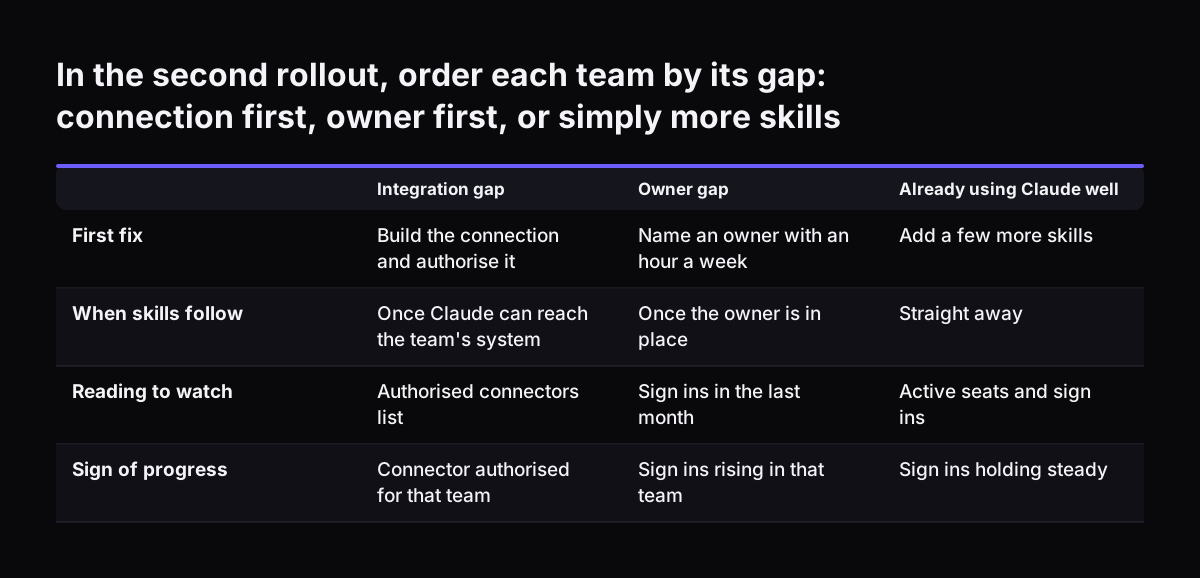
Order the remaining teams by the diagnosis, not by seniority or by who asks loudest. A team with an integration gap needs its connection built before skills make sense. A team with an owner gap needs a named person before anything else. A team already using Claude well may need only a few more skills.

Use the same three admin console readings for every team: active seats, sign-ins in the last month and authorised connectors. Record them before each sprint and at its end. The comparison becomes your evidence that the second rollout works, and part 3 of this series turns it into a return figure.

A relaunch fits companies whose seats are on Claude Team or Claude Enterprise already. If your seats are still being bought, or the first rollout never really started, Claude Team Adoption is the better fit. That service is aimed at teams of under 250 users with seats bought or being bought.

In the second rollout, order each team by its gap: connection first, owner first, or simply more skills. Integration gap / Owner gap / Already using Claude well. First fix: Build the connection and authorise it / Name an owner with an hour a week / A

What can go wrong in a Claude relaunch, and how each step is checked

A Claude relaunch fails in predictable ways, and each one has a check. These are the risks to watch, with the check that catches each:

  • The owner's hour disappears. Check weekly that the owner reviewed the skills. If the hour slips twice, the owner gap is back.
  • Skills tested on invented examples. Check that every test case comes from the team's real work. Invented cases pass easily and fail in use.
  • A connector built but not authorised for the team. Check the authorised connectors list in the admin console, not the build log.
  • Agent costs that run unchecked. An agent's model usage is billed by Amazon Web Services and is not capped unless you set a budget. Set one before go-live.
  • A technical fault mistaken for low adoption. Re-run the checks on admin settings, the network proxy and app status if sign-ins drop suddenly.

The final check is the handover reading. The same three admin console figures, compared with the start of the four weeks, show whether the relaunch did its job. A relaunch without a before-and-after reading is just a second rollout with the same blind spots as the first.

Costs and billing for a UK company relaunching Claude

A UK company relaunching Claude deals with up to three bills, from three parties, in two currencies. Knowing who bills what avoids surprises at handover.

  • Claude seats: billed to you directly by Anthropic, in pounds. You set the number of seats with Anthropic, under its own terms. A relaunch does not change that relationship.
  • Agent usage: if the fixes include an AI agent, its model usage is billed by Amazon Web Services in US dollars. It is charged on use and not capped unless you set a budget.
  • The relaunch work: Svennis prices it in GBP, excluding VAT, with 50% at the start and 50% at handover. Seats are not included, because you already pay Anthropic for them. Sprints for further teams are priced separately.

The dollar bill is the one finance teams most often miss, because the exchange rate moves it month to month. Set the AWS budget in the same week the agent goes live. For a fuller picture of the yearly cost, see what Claude costs a ten person company per year.

Data handling deserves the same attention as billing. New connectors give Claude access to more of your systems. Before you authorise them, check how Claude handles account data and UK law in our guide to how Claude runs in your company.

Next steps: what to prepare before a Claude relaunch

Before you relaunch Claude, gather the inputs the diagnosis needs. Most of them take an afternoon. Prepare these four things:

  1. Admin console access: make sure your admin can read active seats, last-month sign-ins and authorised connectors.
  2. A list of systems per team: note which programs each team works in, so integration gaps are easy to spot.
  3. A candidate owner: pick a colleague who can give an hour a week for four weeks.
  4. Known errors: ask staff which errors or blocked requests made them stop using Claude.

With those in hand, read your own admin console against the diagnosis table in this guide. If one team stands out with low sign-ins or no connector, you have found your starting point.

If you want someone to run the four weeks with you, Svennis does this work. The Claude Relaunch service page sets out the stages and the published prices. You can also book a free 30-minute call there to talk through your admin console readings first.

Sources

  1. Claude Relaunch: paid Claude seats put to work (Svennis AI)
  2. Models overview, Claude Platform Docs (Anthropic)
  3. Error reference, Claude Code Docs
  4. Claude Code Desktop fails to relaunch on Windows, issue #42776 (anthropics/claude-code, GitHub)
Free, 30 minutes

Pick a time. Bring the process this article made you think of.

You leave with a clear yes or no on putting Claude on it, and the step that fits from our published prices. You speak to someone who builds the agents, not a salesperson.

Prefer to call? +44 7588 772736 · Not ready to talk? See it on your business first.

30 minutes · video call · free
  1. 1Time
  2. 2Details
  3. 3Booked