
Skip to content
SVENNISAIWe speak Claude.
Blog · AI ROI

AI ROI: why a stalled AI rollout costs more than it seems, and how to measure the return

A stalled AI rollout keeps costing in seats, usage and manual workarounds. This guide shows how to set a baseline and one outcome, such as correct ticket routing, so the return can be shown.

9 min read

Book a 30-minute call · with a Claude Certified Architect from our team.

Article · 9 min read
Abstract cover showing a stalled line that restarts and climbs past a fixed baseline marker

Why a stalled AI rollout costs more than it seems, and how to measure the return

AI ROI from a stalled rollout cannot be shown, while the costs keep running every month. Seats stay billed, agent usage can run uncapped, and staff fall back on manual workarounds. This post explains why a stalled AI rollout costs more than it seems, and how to measure the return. The method is simple: set a baseline and one measurable outcome before the assistant goes live.

This is part 3 of a three-part series on Claude Relaunch. Part 1, "When an AI rollout stalls: what a relaunch is and who needs one", covered the symptoms. Part 2, "How to relaunch Claude in a company: diagnosis, fixes, second rollout", covered the work itself. This part covers why it matters: what changes for the business, how you measure the result in time, errors and cost, and the risks of leaving things as they are.

The guide is written for owners and managers who already pay for Claude seats. You will see where the hidden costs sit and how to find them in the admin tools. You will also see how to turn one process into a number your finance team will accept.
What a stalled AI rollout is, and how common it is

A stalled AI rollout is a deployment where the seats are bought and the tool is switched on, but few people use it for real work and no process has changed. The licences exist. The results do not. Nobody can say what the money bought.

Stalls are common. A UBS survey of IT leaders in 125 organisations, reported by Techstrong.ai, found that 61% had AI tools implemented in one or more functions. Yet UBS analysts wrote that only 11% of organisations moved their AI projects into production within two years. Most of the rest expected to reach production in 2026 or the second half of 2025.

The gap between a demo and a working process explains much of this. One author on Medium argues that generative AI has lowered the barrier to building a working demo to almost zero. A demo proves that the model can answer. It does not prove that your team uses it, that it reads the right data, or that a process got faster.

A stalled AI rollout is therefore not a technology failure in most cases. It is a missing link between the tool and a measured piece of work. That missing link is what this guide helps you put back.

Four costs that continue while an AI rollout stalls

A stalled AI rollout carries four running costs, and only two of them appear on an invoice. The billed costs are easy to find once you know who sends the bill. The unbilled costs sit in payroll and in rework, where nobody labels them as AI costs.

The table below sets out each cost line, who bills it, and where you can see it.

Cost lineWho bills itWhere you can see it
Claude seatsAnthropic, directly, in poundsAdmin console: active seats and who signed in last month
Agent model usageAmazon Web Services, in US dollars, on useThe AWS bill; not capped unless you set a budget
Staff timeNobody; it sits in payrollHours spent checking or redoing work the assistant was meant to do
Manual workaroundsNobody; it sits in the processReassigned tickets, re-keyed data, copied answers

Seats are the visible line. You set the number of seats with Anthropic, under its own terms, so an unused seat keeps billing until someone reduces the count. The admin console also shows which connectors are authorised. A connector is the link between Claude and a system, Microsoft 365 or Xero for example. Few authorised connectors usually means Claude cannot reach the data your staff need.

The unbilled lines often cost more. When the assistant cannot do the job, people do it by hand and also keep the assistant open. You pay twice for the same task.

Why usage-based billing makes a stalled rollout hard to see

Usage-based billing hides a stall because the cost moves with activity that nobody is watching. According to Anthropic's Claude Enterprise consumption guide, Claude Enterprise is priced per seat on a usage basis, with a consumption pool shared across all users. Some surfaces, particularly Claude Code and Cowork, consume tokens at a significantly higher rate than standard chat.

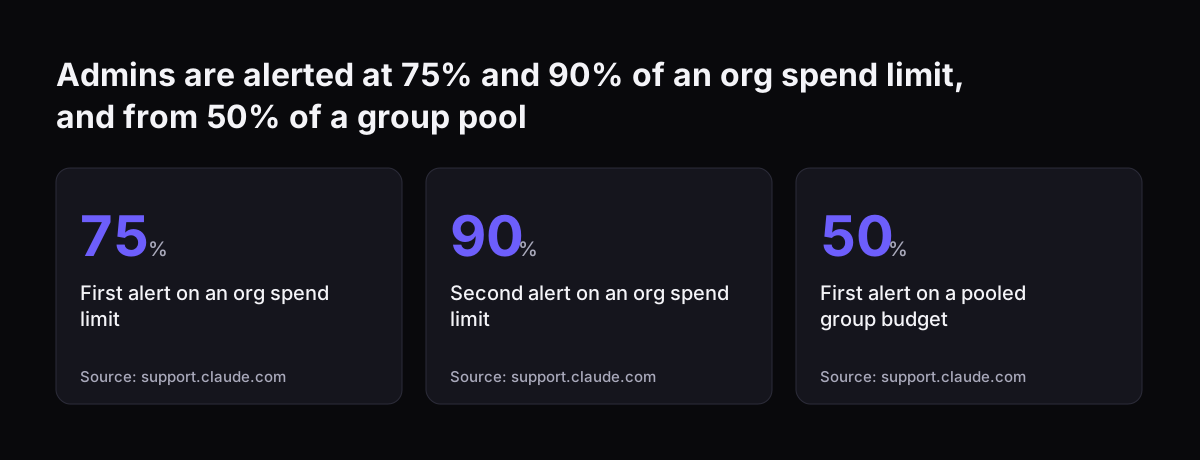
Limits do not apply by default. The guide states that if a member has no individual limit and none of their groups has a limit, their spend is not capped. Admins can set limits at three levels: the organisation, the group and the individual user. Individual limits always override group limits, regardless of which is higher.

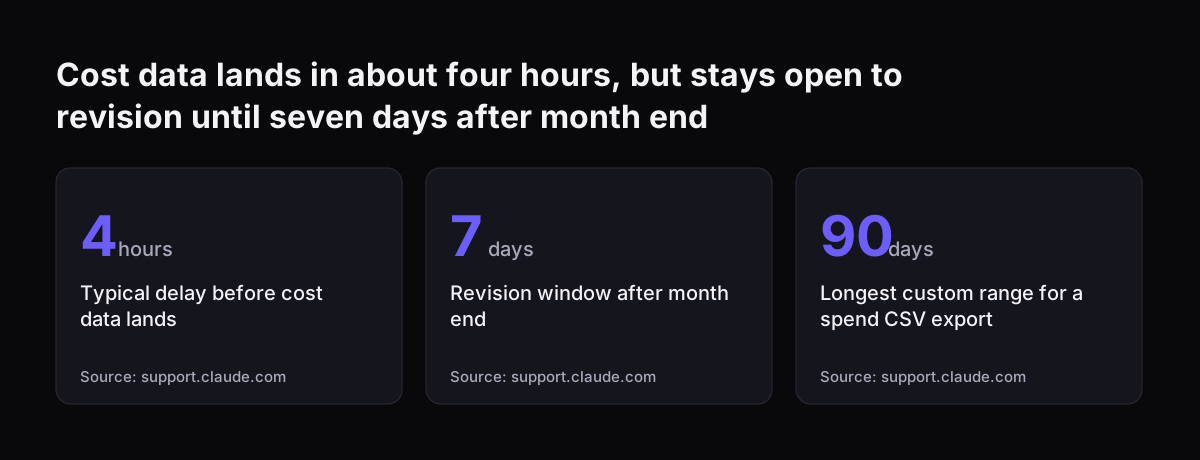
The figures also arrive late. Cost and usage data typically lands within about four hours, occasionally up to 24. Cost data can be revised until seven days after the end of the month it belongs to. A monthly review held on the first working day can therefore read incomplete numbers.

Budget structure adds a further blind spot. The Techstrong.ai article notes that enterprises tend to keep a single IT budget rather than a separate AI budget. AI spend then sits inside a larger line and draws little scrutiny. A stall can run for months before anyone asks what the seats are doing.

Admins are alerted at 75% and 90% of an org spend limit, and from 50% of a group pool: First alert on an org spend limit 75 %, Second alert on an org spend limit 90 %, First alert on a pooled group budget 50 %
Source: support.claude.com

Measuring AI ROI starts with a baseline and one outcome

Measuring the return on an AI project starts with a baseline and one agreed outcome, both fixed before go-live. A baseline is the measured state of a process before the change: how long it takes, how often it goes wrong and what it costs. Without it, any later figure has nothing to be compared with.

Pick one outcome, not five. A good outcome has three properties:

  • It is a number your systems already record, so nobody has to estimate it.
  • It belongs to one process with one owner.
  • It changes within weeks, not quarters.

Correct ticket routing meets all three. Your help desk already records which team a ticket went to and whether it was moved. The service desk lead owns the process. A change shows up in the first month.

Agree the pass mark at the same time as the baseline. The pass mark is the result that counts as success, written down before anyone sees live data. At Svennis we agree the baseline and the pass mark with the process owner before the assistant is switched on, and we write both down. The review afterwards then compares two numbers rather than two opinions.

For more on choosing the first process, see our guide to scoping a first AI project with a process, a baseline and a threshold.

Worked example: first-time-right ticket routing in Zoho Desk

First-time-right routing is the share of tickets that reach the correct team at first assignment and are never reassigned. It is a clean outcome for a service desk running Zoho Desk with Claude in front of it. The steps below show how to set it up so the result can be shown.

  1. Define the rate. First-time-right rate equals tickets not reassigned, divided by all tickets in the period.
  2. Measure the baseline. Read the rate from the ticket history in Zoho Desk for a fixed period before go-live. Note the period length.
  3. Write the routing skill with test cases. Use real past tickets with known correct teams. Give the skill a named owner.
  4. Choose the model on evidence. Anthropic suggests starting with Claude Opus 5.5 if you are unsure. It positions Claude Haiku 5.5 for high-volume tasks such as classification, extraction and routing. Run both on the same test cases.
  5. Cap the spend. Set a budget on the agent's usage, because AWS does not cap it otherwise.
  6. Measure again. After go-live, read the same rate over a period of the same length and compare.

The model choice matters for cost. On Anthropic's models overview, Claude Haiku 5.5 starts from $0.10 per million input tokens. Claude Opus 5.5 costs $4 per million input tokens. If the smaller model passes your test cases, every routed ticket costs a fraction as much.

To connect Claude to Zoho Desk, Svennis builds a connector, an MCP server, a plugin or a skill. We show the options with their cost, and you choose.

Turning time, errors and cost into a return figure

A return figure is the value of time saved and errors avoided, set against what the assistant costs to run. For routing, the errors avoided are the reassignments that no longer happen. The time saved is the handling each of those reassignments used to take.

Anthropic's consumption guide gives a worked figure for the cost side. It describes a call-prep skill costing $0.90 per run against $20 of value, which returns 20x on every use. The same arithmetic works for a routed ticket: cost per run against the value of one avoided reassignment.

Claude Enterprise gives you the usage data to fill in the cost side:

  • The Usage page shows power users, the top 10% by spend.
  • Time at limit shows how often members reach their spend limits, compared with prior months.
  • Smart reports, in beta, break spend down by workstream and output type.
  • The spend report CSV export covers a custom range up to 90 days back.

Close each month only after the revision window. Cost data can change until seven days after month end, so a figure taken earlier may move. Report the routing rate, the cost per ticket and the change against the baseline, in that order. A finance reader can check each number against its source.

Cost data lands in about four hours, but stays open to revision until seven days after month end: Typical delay before cost data lands 4 hours, Revision window after month end 7 days, Longest custom range for a spend CSV export 90 days
Source: support.claude.com

Risks of doing nothing, and the honest limits of measurement

The main risk of doing nothing is that a stalled AI rollout keeps billing while the case for AI gets weaker inside the business. Seats renew. Agent usage without a budget keeps running. Staff who tried the tool and gave up become harder to win back.

Spreading effort thinly does not fix it. Techstrong.ai reports PYMNTS Intelligence figures showing that only half of firms using generative AI for five or more business applications report a positive ROI. Among firms using it for fewer than five applications, the share reporting a positive ROI is 6.3%. Many applications without measurement is not a plan.

Measurement has honest limits too:

  • One outcome captures one process, not every benefit the team gets from Claude.
  • A short measurement period can be distorted by a busy or quiet month.
  • Claude Enterprise surveys are not anonymous: the export includes each respondent's email, which can soften the answers.
  • A good number shows the assistant works; it does not make people use it.

Treat the measured outcome as proof for one process. Then repeat the method for the next process, with its own baseline.

What AI ROI measurement means for a UK company

A UK company paying for Claude deals with two currencies, and the return calculation should show both. Anthropic bills Claude seats directly in pounds. Amazon Web Services bills an agent's model usage in US dollars, on use. A change in the exchange rate moves the agent cost even when usage stays flat.

Budget pressure makes a measured result more valuable. The UBS survey reported by Techstrong.ai found that IT leaders' estimated budget growth fell from 5.6% at the beginning of 2024 to slightly under 4.5%. When the IT line grows more slowly, an AI line that cannot show a return is an easy cut.

Three practical points follow for a UK business:

  • Give AI spend its own line inside the IT budget, split into seats in pounds and usage in dollars.
  • Set the AWS budget and the Claude spend limits before go-live, not after the first bill.
  • Compare suppliers on the same basis; Svennis publishes its prices for the Workshop, Pilot, Activation and Operations in GBP, excluding VAT.

If your team works in a regulated or process-heavy sector, the guide to AI by business task lists processes that already have a clear outcome to measure.

Next steps: set the baseline before the next go-live

The next step is to measure what you already have, then pick one outcome and fix its baseline. You can start this week with the tools you already pay for:

  1. Open the admin console and note active seats, who signed in last month and which connectors are authorised.
  2. Set spend limits in Claude and a budget on the agent's AWS usage.
  3. Choose one process with one owner and one recorded number, such as first-time-right routing.
  4. Read the baseline from your own system and write down the pass mark.
  5. Go live, wait for the revision window, and compare.

If your seats are already bought and use has stalled, Svennis does this as Claude Relaunch for paid Claude seats. It runs four weeks: two weeks of measurement, then two weeks of fixes. It applies to seats on Claude Team or Claude Enterprise. The sprint goes to the team that uses Claude least, with 5 to 8 skills, each with test cases and an owner. A colleague who owns it gives an hour a week for four weeks.

If you are still choosing seats, Claude Team Adoption sets the measurement up from the first day instead.

Sources

  1. Claude Relaunch: paid Claude seats put to work | Svennis AI
  2. Claude Enterprise consumption guide | Claude Help Center
  3. Models overview | Claude Platform Docs
  4. Newsroom | Anthropic
  5. Companies Plan to Cut Back IT Spending in Response to Delays in AI Projects and Unmet ROI | Techstrong.ai
  6. The real reason most AI startups will fail in 2026 | Medium
Free, 30 minutes

Pick a time. Bring the process this article made you think of.

You leave with a clear yes or no on putting Claude on it, and the step that fits from our published prices. You speak to someone who builds the agents, not a salesperson.

Prefer to call? +44 7588 772736 · Not ready to talk? See it on your business first.

30 minutes · video call · free
  1. 1Time
  2. 2Details
  3. 3Booked