
Svennis AI
10 min read

The Claude plugins directory for a small team: which plugins to start with

A small team needs a handful of Claude plugins, not hundreds. Start with those that connect to systems you already use, limit their rights from day one, and package your own processes privately.

Abstract cover showing a few connected nodes chosen from a large grid of scattered shapes, with clear lines between them

What the Claude plugins directory is

The Claude plugins directory for a small team is a shop window with far more stock than you will ever need. The directory on claude.com currently lists 340 plugins, covering browsers, code repositories, design files, databases, chat tools and more. A team of five or fifteen people will use a handful of them. This guide explains what a plugin is, which few to install first, what a plugin can reach once installed, and how to package a plugin for a process of your own.

A few terms first. A plugin is an add-on that gives Claude new tools, skills or connections to other systems. Many listings describe themselves as an MCP server: the connector that lets Claude read from, and act in, another application such as Slack or Jira. A plugin marketplace, in Anthropic's documentation, is a directory or repository containing a file called .claude-plugin/marketplace.json that lists plugins and where to fetch each one.

The public directory is one such catalogue, and you can run your own. Plugins also appear in two different products. Some listings are written for Claude Code, Anthropic's coding agent, and others for Claude Cowork. The GitHub listing, for example, is described as usable from Claude Code, while the Slack listing is described as working from Claude Cowork. Check which product a plugin is built for before you plan around it.
Start from the systems you already run

The quickest way to waste a week is to browse the directory by what looks interesting. The better order is the reverse. List the systems your team works in every day, then look for the plugin that connects Claude to each one. This is the same principle behind putting Claude inside the tools you already use rather than beside them.

If your team talks in Slack, tracks work in Jira and keeps its documentation in Confluence, two plugins cover most of the ground. If you build and ship a website, GitHub and Vercel matter. If your customer records sit in Zoho CRM and your support tickets in Zoho Desk, search the directory for those systems by name. Do not assume a plugin built for a similar tool will do the job.

There is a second reason to keep the list short. Every plugin you add is another route by which Claude reaches data and takes actions. Fewer plugins means fewer routes to watch, fewer credentials to manage and a shorter list to check when something behaves oddly. A small team rarely has a person whose job is to review integrations. The list therefore has to stay short enough for the owner to read in a minute.

What a plugin can and cannot reach

A plugin is not a harmless add-on. The UK Department for Environment, Food and Rural Affairs (Defra), which is evaluating the Claude Code plugin marketplace for its own teams, puts it plainly:

Plugins can speed teams up considerably, but they also expand the trust boundary of the agent.

The trust boundary is the edge of what Claude can see and do on your behalf. Read the listings in the directory with that in mind. Several describe actions, not just reading:

  • The Supabase plugin covers database operations, authentication and storage, and lets Claude run SQL against your backend.
  • The Playwright plugin, an MCP server by Microsoft, lets Claude interact with web pages, take screenshots and fill in forms.
  • The Atlassian plugin lets Claude search and create Jira issues, access Confluence documents and manage sprints.
  • The GitHub plugin lets Claude create issues, manage pull requests, review code and search repositories.
  • The Slack plugin lets Claude surface insights and draft messages inside Slack.

What a plugin cannot do is reach a system it has not been connected to. In practice it acts with the rights of the account you connect it with, so that account sets the real limit. Defra adds a second limit: what a plugin can do with your data depends on the plugin and on your data's classification. Decide what kind of data each plugin may touch before you install it, not after.

Which plugins a small team installs first

The table below takes plugins from the directory and sorts them by the question that matters: when is each worth installing, and what should you watch. The descriptions come from the listings themselves. Two of them, Slack and Security Guidance, are marked as Anthropic verified in the directory.

PluginWhat the listing says it doesInstall first whenWatch
Slack (Anthropic verified)Surface insights, draft messages, engage teams in Slack from Claude CoworkYour team works in Slack every dayWhich channels the connected account can read
AtlassianSearch and create Jira issues, access Confluence docs, manage sprintsWork is tracked in Jira or documented in ConfluenceWhether Claude may create issues or only read them
GitHubCreate issues, manage PRs, review code, search repos from Claude CodeYou maintain code in GitHubWhich repositories the token covers
Security Guidance (Anthropic verified)Warns about command injection, XSS and unsafe code patterns when editing filesAnyone uses Claude Code to change codeLow risk; it warns rather than acts
SupabaseDatabase operations, auth, storage, run SQLYour product runs on SupabaseWrite access to live data; start read-only
PlaywrightInteract with web pages, take screenshots, fill forms, automate testsYou test a website or web appForms submitted on real sites
FigmaAccess design files, extract components, read tokens, translate to codeDesigners and developers share Figma filesWhich files are shared with the account

For most small teams the first two rows are enough to start. If you are weighing up the chat route specifically, our post on Claude in Slack for internal support covers how requests are routed once Claude sits in the channel.

Setting sensible permissions from day one

Permissions are cheapest to get right on the day you install. Once people rely on a plugin, narrowing its rights feels like taking something away. A few rules hold for almost every plugin in the directory.

  1. Connect with a dedicated account. Do not connect a plugin with the owner's own login. A separate account shows up clearly in audit logs and can be switched off without locking anyone out.
  2. Start read-only. Let Claude search and summarise before it creates issues, sends messages or runs SQL.
  3. Give each plugin one named owner. That person decides when its rights widen and removes it when it is no longer used.
  4. Prefer built-in access control where it exists. The Telegram plugin, for instance, manages pairing, allowlists and policy through /telegram:access. Use such controls rather than leaving them open.

At Svennis we connect each new plugin with its own account, limited to the records one process needs, and widen its rights only after the team has watched it work on real requests. The step people skip is the last one: writing down which plugin holds which rights, so the list can be checked later.

If your team works in Claude Cowork, the same rules apply to its connectors. Our Claude Cowork setup guide walks through the workspace side.

Worked example: a plugin for a process of your own

Sooner or later a small team has a process no public plugin covers. Examples include a month-end checklist, a house style for proposals, or a set of instructions for handling a particular kind of customer request. You may already have written these down as skills, as described in our guide to Claude Projects and Skills for a small team. A private plugin marketplace lets you package them once and install them on every machine.

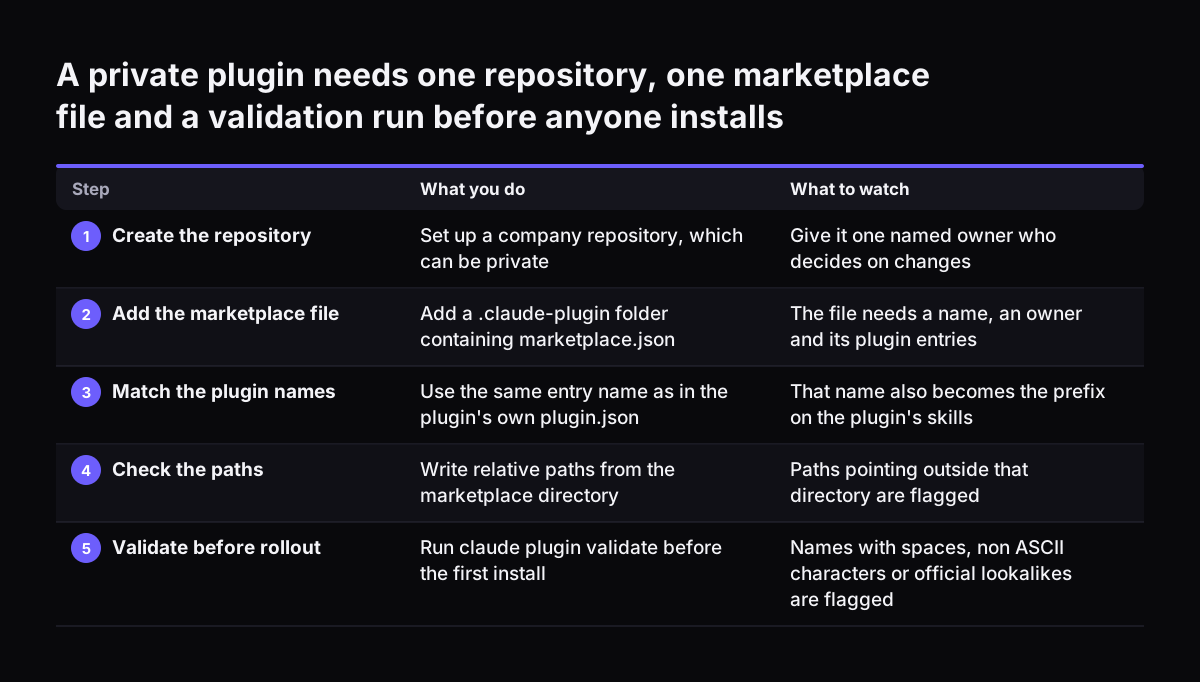
Here is a worked example with illustrative names. Your company creates a repository, which can be private, and adds a folder called .claude-plugin containing marketplace.json. According to Anthropic's documentation, that file needs three things: a name, an owner and a plugins array. Each entry in the array needs a name and a source.

  • Marketplace name: northfield-tools
  • Plugin entry name: month-end-checks
  • Source: ./plugins/month-end-checks, a relative path

The install id is the entry's name, an @, and the marketplace name. Here that is month-end-checks@northfield-tools, which is what colleagues type to install it. Relative paths are written from the marketplace root, which is the directory that contains .claude-plugin/, not from the folder you happen to be working in.

A source does not have to be a local folder. The documentation lists a GitHub repository, a subdirectory of another repository, a git URL on any host, a zip archive over HTTPS, an npm package, or a directory produced by running a command. For a small team, a private GitHub repository is usually the simplest choice.

A private plugin needs one repository, one marketplace file and a validation run before anyone installs. What you do / What to watch. 1. Create the repository: Set up a company repository, which can be private / Give it one named owner who decides on

Validating, rolling out and removing

Anthropic's documentation names the two mistakes behind most failed installs from a new marketplace. The first is a relative path written from the wrong directory. The second is an entry name that differs from the name in the plugin's own plugin.json. In the example, both must read month-end-checks. The name in plugin.json also becomes the prefix on the plugin's skills, so a mismatch shows up in more than one place.

Run claude plugin validate before anyone installs. It reads only files inside the marketplace directory, so a path pointing outside it will show up as a problem. Validation also flags marketplace names with spaces, non-ASCII characters, or a form that imitates an official Anthropic marketplace. Exact official names, such as claude-plugins-official, pass validation, but Claude Code then refuses to add them as reserved. Pick a plain name based on your company.

For roll-out, the documentation says an administrator can require a marketplace on every machine. People who install from a hosted marketplace get a copy of the plugin in their plugin cache. Removal is just as direct: claude plugin marketplace remove removes the marketplace and uninstalls its plugins. That gives the plugin owner a single command to use when a process is retired or a plugin misbehaves.

What this means for a UK company

Installing a plugin that reads customer or staff records is a change to how you process personal data. Under Article 35(1) of the UK GDPR, you must carry out a data protection impact assessment (DPIA) where processing is likely to result in a high risk to people's rights and freedoms. The ICO's own list of processing that needs a DPIA includes innovative technologies, including AI, when combined with any of the criteria from the European guidelines. In most cases a combination of two of those nine criteria indicates the need for a DPIA, although the ICO notes this is not a strict rule.

Two points catch small firms out. The ICO says employees can count as vulnerable data subjects where a power imbalance means they cannot easily object to processing by their employer. That matters if a plugin reads HR or performance data. Decisions about a person's access to a product, service or benefit based to any extent on automated decision-making are also on the ICO list. Note that the ICO says its DPIA guidance is under review following the Data (Use and Access) Act.

If a plugin exposes personal data, the breach rules apply. Where a risk to people is likely, you must notify the ICO as soon as possible and, where feasible, within 72 hours, even without the full picture. The ICO's online form takes about 30 minutes and cannot be saved part-way. Our GDPR checklist for Claude covers the wider checks.

A vetting checklist borrowed from the public sector

Defra's approach is a useful model because it is cautious without being dismissive. Its AI Capability and Enablement team is working out which plugins are safe and how to vet them. Plugins are not yet approved for its delivery work, and staff are told to talk to the team before installing one. A small company can run a lighter version of the same process with one person in that role.

  1. Name the system. Which of your existing systems does this plugin connect to, and is that system on your core list?
  2. Read the listing. Does it only read, or can it create, send, deploy or run queries?
  3. Classify the data. What is the most sensitive data the connected account can see? Does it include personal data?
  4. Check the source. Is the plugin marked Anthropic verified, or published by the vendor of the system it connects to?
  5. Set the account. Create a dedicated account with the narrowest rights that still allow the job.
  6. Screen for a DPIA. Run the ICO screening questions if personal data is involved.
  7. Record it. Log the plugin, its owner, its rights and the date of the next review.

Seven questions take less time than one bad afternoon spent working out what a plugin did with the wrong account. Keep the log where the whole team can see it.

Practical next steps

You do not need to read all 340 listings. You need a short list and a clear rule for adding to it. For the coming week, a sensible order looks like this:

  1. Write down the three to five systems your team uses every day.
  2. Find the matching plugin in the directory for each, and note whether it reads only or also acts.
  3. Install the first one, usually your chat tool or your work tracker, with a dedicated read-only account.
  4. Let the team use it for real requests, then decide with the plugin owner whether to widen its rights.
  5. Pick one internal process that no public plugin covers and package it in a private marketplace, validating it before anyone installs.
  6. Run the DPIA screening for any plugin that touches personal data, and keep the plugin log current.

If your team runs on systems with no ready-made plugin, the work moves from choosing plugins to connecting Claude properly to your own records. Our post on building AI into the systems a small business already runs is the next step. It sets out what to connect first and how to keep control of the data while you do it.

Sources

  1. 1. Claude by Anthropic: Plugins, Claude Marketplace
  2. 2. Anthropic: Create a marketplace, Claude Code Docs
  3. 3. Defra: Claude Code plugin marketplace, AI digital toolkit
  4. 4. ICO: When do we need to do a DPIA?
  5. 5. ICO: UK GDPR data breach reporting

Related articles