
Svennis AI
10 min read

Using Claude like a power user: five working habits and a four week path to a system

Power users give Claude context, reusable skills, connected systems, long tasks and a way to check its work. This guide sets out each habit and a four week path to a working system.

Abstract layered planes stacking into a structured grid, suggesting single prompts growing into an organised system

What using Claude like a power user actually means

Using Claude like a power user means stopping the habit of retyping the same request into a blank chat. Instead, you set Claude up so it already knows your context, repeats your best methods, reaches your systems and checks its own work. Casual use is a series of one-off conversations. Power use is a small, reusable working setup.

The difference shows up quickly inside a team. A user on the r/claude forum put it plainly: their company was pushing coding with tools like Claude Code, and "there are a few people I work with who seem to get more done faster than I can with these tools". The tools were identical. The habits were not.

This guide covers five of those habits. It then gives you a four week path from the chat window to a working system, naming the setting to change at each step. It also marks the point where individual prompting stops scaling and you need something built properly.

Most of the source material comes from Anthropic's own help centre and platform documentation. That includes a page of workflow tips from the Claude Code team at Anthropic. Those tips are written for software work, but most of them carry over to everyday business tasks.
The terms you need first

Six terms come up throughout this post. Here is what each one means in plain language.

  • Project: a workspace with its own standing instructions and reference files, so every conversation inside it starts with the same context.
  • Skill: a reusable, written method for one task, such as how you format a board summary, that Claude can apply whenever it is relevant.
  • Connector: a link that lets Claude read from, or act in, another system you use.
  • MCP server: the component that exposes a system to Claude through the Model Context Protocol, the standard that many connectors are built on.
  • Claude Cowork: in Anthropic's words, a capability that brings Claude Code's agentic capabilities to knowledge work beyond coding. It lets Claude take on complex, multi-step tasks and carry them out on your behalf.
  • Cowork plugin: a package that customises how Claude works for a role, team or company. Each plugin bundles skills, connectors and sub-agents.

You also need to know about the agent loop. Anthropic's computer use documentation defines it as Claude requesting a tool and the application returning the result, over and over, without user input. Long tasks run as agent loops, which is why permissions matter so much later in this guide.

Habit one: give Claude standing context, not repeated prompts

Casual users paste the same background into every chat. Power users write it down once. In a project, that means clear instructions (who you are, who the output is for, what good looks like) plus the files Claude should rely on, such as your price list, tone guide or product sheet.

Claude Code shows where this habit leads. Its hand-maintained instruction files are called CLAUDE.md. A separate auto-memory feature writes what it learns to one directory per repository, kept apart from your user-level CLAUDE.md. Anthropic's team also describes Compounding Engineering. When Claude gets something wrong, the lesson goes back into CLAUDE.md, so each correction improves every future session.

The business version is simple. Whenever you correct Claude twice for the same thing, move the correction into the project instructions. After a few weeks, the instructions hold your team's standards and new colleagues inherit them on day one.

Keep the instructions short and specific. Include what Claude should do when information is missing, for example "ask, do not guess". We cover the setup in detail in our guide to Claude projects and skills for a small team.

Habit two: turn your best methods into reusable skills

A project holds context. A skill holds a method. If you have a way of writing a tender response, reconciling a supplier statement or summarising a sales call that works, write it down as a skill. Claude can then apply it whenever the task comes up, in any project.

In Cowork, skills can travel as part of a plugin, bundled with connectors and sub-agents for a role, team or company. This is how a method stops living in one person's head. A sales team can share one plugin, so every quote summary follows the same structure and uses the same checks.

Be careful where your skills and plugins come from. Anthropic's tips page warns that community plugins, such as the "ralph-wiggum" plugin it names, are not reviewed or sanctioned by Anthropic. A plugin that bundles connectors can act in your systems. Treat it as you would any software installed on a company laptop: someone should read it and approve it before staff use it.

A good first skill is the one you explain most often to new starters. If you can write it as numbered steps with a clear output format, Claude can follow it.

Habit three: connect Claude to your systems, carefully

Casual users copy data out of a CRM or helpdesk and paste it into the chat. Power users connect the system through a connector or MCP server, so Claude reads current records directly. This matters more than it sounds. Anthropic's customer support guide notes that embedding-based retrieval is not sufficient for queries that need real-time information, such as account balances or policy details. Live data needs a live connection.

A connection also brings risk. Two points from Anthropic's documentation deserve attention:

  • The computer use documentation states that Claude may, in some circumstances, follow commands found in content such as webpages or images, even when they conflict with your instructions. This is prompt injection, and any connected content can carry it.
  • The Cowork help centre states that network egress permissions do not apply to the web fetch or web search tools, or to MCPs, including Claude in Chrome. Restricting outbound network access does not restrict what a connected MCP server can do.

The practical rule is to start read-only and connect one system at a time. Only grant write access once you have watched Claude use the connection. For the two most common CRMs, see our guide to connecting Claude to HubSpot or Salesforce via MCP safely.

Habit four: hand long tasks to Cowork, with the right permissions

Some work takes many steps: gather files, compare them, draft, revise and save. Cowork is built for this. It uses the same agentic architecture as Claude Code with no terminal required, and it is available only on paid plans (Pro, Max, Team and Enterprise). Anthropic also states that Cowork is being folded into Claude itself, rolling out gradually to Pro and Max plans first.

The setting that matters most is the permission mode. Cowork has three:

  • Manual: Claude asks before taking actions, such as using your connectors.
  • Auto (Automatically approve): Claude keeps working and reviews each action for safety, for example checking for data exfiltration or prompt injection, and blocks anything it judges unsafe. This extra checking consumes more of your usage limit.
  • Skip (Skip all approvals): Claude does not pause to ask, and nothing checks its actions automatically.

On Team and Enterprise plans, your admin controls whether Automatically approve is available, and it is available by default. Whatever the mode, Claude needs your explicit permission before permanently deleting files. Scheduled tasks run in the cloud, so they work without your computer awake or the desktop app open. Sessions cannot be shared, but artifacts from them can. Our Cowork setup guide walks through each option.

Habit five: build in checking before anything is used

Anthropic's Claude Code team is clear about its priority. Their tips page says the single most impactful tip is verification: giving Claude a way to check its own output. For software, that means tests. For business work, it means a written standard that the output must meet, plus a step where Claude, and then a person, checks against it.

At Svennis we write the check before we write the prompt: we agree what a correct result looks like and how it will be tested, and only then ask Claude to produce anything. Where we see this go wrong at clients, the cause is almost always output that went into a live system because it read well, not because anyone checked it.

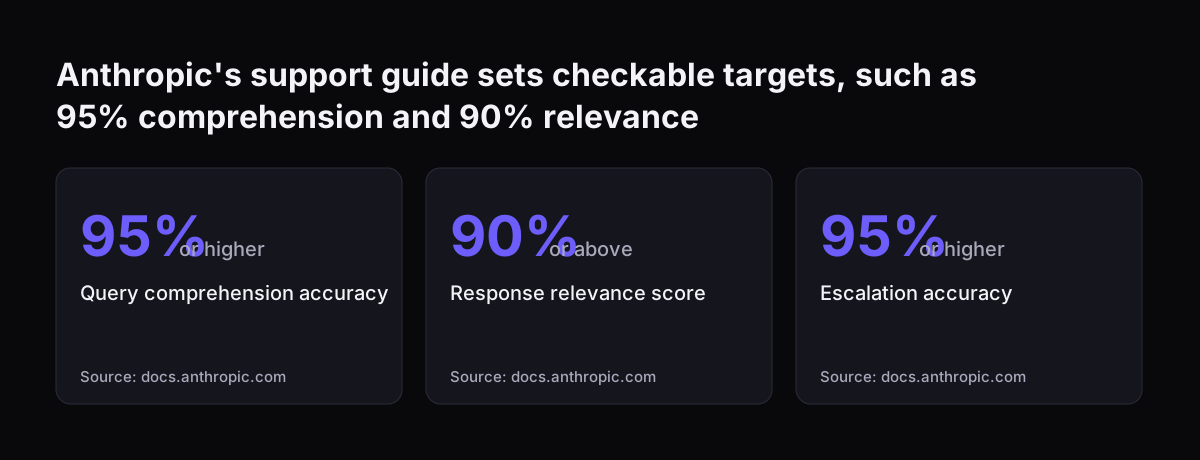
Anthropic's customer support guide shows what a measurable standard looks like. For a support assistant it suggests targets such as:

  • query comprehension accuracy of 95% or higher
  • escalation accuracy of 95% or higher
  • 100% accuracy for introductory company and product information

Your numbers will differ, but the discipline carries over. Decide the bar, test against real examples and record the failures. You can also raise Claude's effort level for work that needs care. The Claude Code levels run from low to max, with auto letting Claude choose per request.

Anthropic's support guide sets checkable targets, such as 95% comprehension and 90% relevance: Query comprehension accuracy 95% or higher, Response relevance score 90% or above, Escalation accuracy 95% or higher
Source: docs.anthropic.com

A worked example: a weekly support summary

Take a service manager whose team logs tickets in Zoho Desk. Every Monday she spends time pulling open tickets, grouping them and writing a summary for the operations meeting. Here is how the five habits turn that into a repeatable task.

  1. Project: she creates a project called "Weekly support summary". Its instructions say who reads the summary, which categories to group by, and to flag any ticket she has marked urgent. She adds last month's best summary as a reference file.
  2. Skill: the grouping and formatting method becomes a skill, so a colleague can produce the same summary when she is on leave.
  3. Connector: once the helpdesk is connected through an MCP server with read-only access, Claude reads current tickets instead of a pasted export.
  4. Cowork: she runs the task in Cowork in Manual mode for the first few weeks and approves each connector call. Once she trusts it, she sets it up as a scheduled task for Monday morning.
  5. Verification: the instructions end with a check. Claude must list the ticket numbers behind every figure, so she can spot-check three before the meeting.

Nothing here writes back to the helpdesk. That is deliberate. Write access comes later, if at all, and only after the read-only version has proved reliable.

A four week path from chat window to working system

You do not need to adopt everything at once. The table below spreads the change over four weeks for one person or a small team. Each week names the setting to change and the sign that it has worked.

WeekWhat you doSetting to changeSign it works
1Move one recurring task out of ad hoc chats into a projectProject instructions and reference filesYou stop pasting background; corrections go into the instructions
2Write your best method for that task as a skill and share itSkill, or a reviewed Cowork plugin for the teamA colleague gets the same result without asking you
3Connect the one system the task depends onConnector or MCP server, read-only; Cowork in Manual modeClaude cites live records you can check
4Run the full task in Cowork and schedule itScheduled task; permission mode chosen deliberately; admin decision on Automatically approveThe task runs on time and passes your written check

Keep the verification step running in every week, not just the last. If a week's sign does not appear, stay on that step. Moving on with a shaky base simply adds more places for errors to hide.

Where individual prompting stops scaling

Personal setups work well for one person and a handful of tasks. They start to strain when several people depend on the output, when the task writes into a system of record, or when volume grows. Anthropic's own team describes this limit. They built multi-agent code review for themselves because code output per engineer increased significantly and reviews became the bottleneck.

The same pattern appears in business work. Once Claude drafts faster than people can check, checking becomes the constraint. The Claude Code tips describe running 3 to 5 sessions in parallel as the biggest productivity unlock, but each extra session is more output for someone to review.

These signs mean you need a proper system rather than better prompts:

  • Output feeds a customer, a ledger or a CRM record without a human reading every item.
  • More than one team relies on the same instructions, and changes need an owner.
  • You need a measured accuracy figure, not a feeling that it is usually right.
  • Staff reach Claude from another tool, such as Teams or Slack, not the Claude app.

At that point the work becomes an integration project, with routing rules, logging and tests. Our write-up of a Teams service desk built on Claude shows what that looks like in production.

What this means for a company in the UK

Connecting Claude to systems that hold personal data brings UK GDPR into play. The Information Commissioner's Office (ICO) states that under Article 35(1), you must carry out a data protection impact assessment (DPIA) where processing is likely to result in a high risk to individuals' rights and freedoms.

AI matters specifically here. The ICO's list requires a DPIA where processing that uses innovative technologies, including AI, is combined with any of the criteria in the European guidelines. It gives artificial intelligence, machine learning and deep learning as examples of innovative technology. It also notes that employees can count as vulnerable data subjects where a power imbalance means they cannot easily object. That is worth remembering if Claude processes staff data. The ICO's advice is direct: if in any doubt, do a DPIA.

Two further points apply. First, the ICO states that its DPIA guidance is under review following changes made by the Data (Use and Access) Act, so check the current version. Second, the ICO's Guidance on AI and data protection, updated on 15 March 2023, adds content on what to consider in a DPIA for AI. For the wider picture, see our overview of AI law in the UK and what applies to your business.

Practical next steps

Start small and make each step measurable. Here is what to do this month.

  1. Pick one task. Choose a recurring task that takes real time each week and whose output a person already reviews.
  2. Write the check first. Before any prompting, write down what a correct result looks like and how you will test three examples.
  3. Build the project and one skill. Move your standing context and method out of chat history and into instructions you can edit.
  4. Connect one system read-only. Use Manual mode in Cowork until you have watched every type of action it takes.
  5. Set your admin controls. On Team or Enterprise plans, decide whether Automatically approve should stay available, since it is on by default. Also decide who approves plugins.
  6. Screen for a DPIA. If the task touches personal data, work through the ICO criteria on when a DPIA is needed and record your decision.

When the task runs reliably for a few weeks, review it against the scaling signs above. If none apply, repeat the four week path with the next task. If several apply, plan the move to a built system. For the next step, our guide to using Claude Cowork alongside your existing systems covers the setup in more depth.

Sources

  1. 1. Claude Code power user tips, Claude Help Center
  2. 2. Get started with Claude Cowork, Claude Help Center
  3. 3. Computer use tool, Claude Platform Docs
  4. 4. Customer support agent, Claude Platform Docs
  5. 5. When do we need to do a DPIA?, ICO
  6. 6. Guidance on AI and data protection, ICO
  7. 7. Are there any well known power users with Claude?, Reddit r/claude

Related articles