Skip to content
SVENNISAIWe speak Claude.
Blog · Claude

Analysing customer feedback with Claude from your helpdesk and CRM data

A guide to analysing customer feedback with Claude: connect your helpdesk and CRM, group feedback into counted themes with quotes, flag urgent issues and check the output.

10 min read

Book a 30-minute call · with a Claude Certified Architect from our team.

Article · 10 min read
Abstract cover with many small scattered shapes drawing together into a few ordered clusters

Analysing customer feedback with Claude: the short answer

Analysing customer feedback with Claude works best when Claude reads the tickets, survey replies and call notes already in your helpdesk and CRM through a connector. It groups them into recurring themes with counts and quotes, and it flags urgent items. A named person checks the output before anyone acts on it.

Customer feedback analysis with Claude is the practice of giving Claude a defined batch of customer comments and a fixed method. Claude returns themes, how often each appears and the evidence behind each theme. The method matters more than the model. Without it, two runs on the same data can give you two different reports.

For a service or product manager, the useful output has four parts:

  • themes, each with a count of the records behind it
  • direct quotes kept as evidence, each tied to its record ID
  • a monthly table of counts that you can chart over time
  • a short list of decisions that a person, not Claude, takes from it

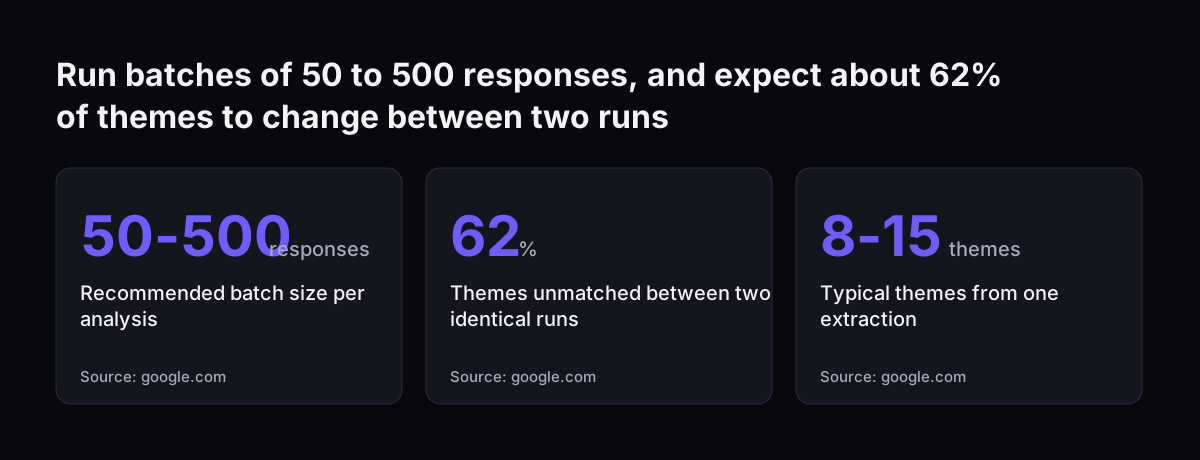
Claude handles feedback well in batches. Enterpret's guide to Claude for feedback analysis puts the sweet spot at roughly 50 to 500 responses. Past about 500 responses per analysis, it says, quality degrades and themes drift. This guide shows how to set up the connection, the method, the check and the monthly routine.
Where your customer feedback already sits: tickets, survey replies and call notes

Most companies already hold their customer feedback in three places, and Claude can read all three. You do not need a new feedback tool to start. You need clean records with a stable ID on each one.

The three sources usually look like this:

  • Support tickets in a helpdesk such as Zoho Desk: the customer's own words, plus status, product and priority fields.
  • Survey replies from a tool such as Zoho Survey: an NPS score from 0 to 10 and an open comment.
  • Call notes and account notes in a CRM such as Zoho CRM: what sales or account managers heard on the phone.

The record ID is the field that matters most. Each quote in the final report should point back to one ticket, one survey reply or one note. That lets a reviewer open the original in seconds. Enterpret lists missing traceability back to individual records as one of Claude's weak points when feedback is simply pasted in.

Tidy fields also help. Duplicate contacts, empty product fields and free-text categories all blur the counts. Our guide to cleaning CRM data before adding Claude covers that preparation step. Screenshots attached to tickets are usable too. All current Claude models accept image input, and Claude can read text inside images, such as an error message in a screenshot.

Connecting Claude to your helpdesk and CRM with a connector

A connector is the link that lets Claude access an app or service, retrieve its data and take actions in it. That is Anthropic's own definition in the Claude Help Center article on connectors. Connectors are available on Claude, Cowork, Claude Desktop and Claude Mobile.

On Team and Enterprise plans, setup has two layers. An Owner or Primary Owner enables the connector for the organisation. Each person then authenticates individually before they can use it. Enabling a connector does not grant anyone access by itself.

Three rules from the Help Center shape how safe the setup is:

  • Claude inherits each person's permissions from the connected service. If an agent cannot see a ticket in the helpdesk, Claude cannot reach it either.
  • Custom connectors that use a shared credential reach whatever that credential can access. A shared admin login therefore opens everything.
  • Owners can restrict which actions a connected service can take, across the whole organisation. Individual users cannot override that restriction.

Custom connectors talk to an MCP server from Anthropic's cloud, not from your laptop. MCP, the Model Context Protocol, is the standard Claude uses to reach another system's data. The server must be reachable over the public internet. Treat its address and keys as secrets. Baserow's own guide warns that its generated MCP URL works as a highly privileged API secret and should never be posted internally or committed to a public repository.

Three ways to bring feedback to Claude, compared

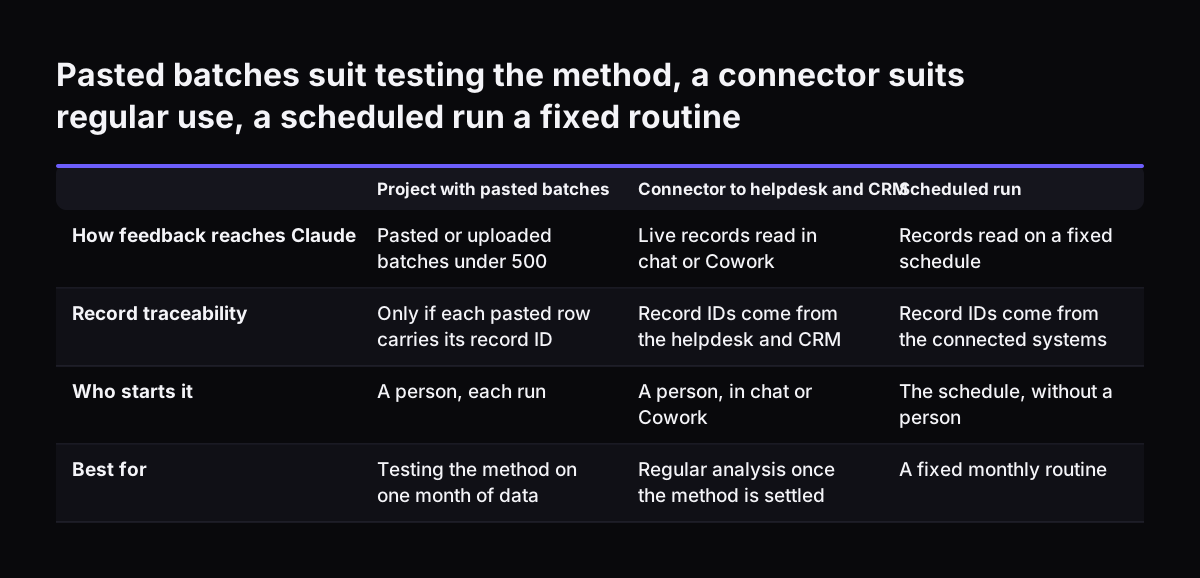
You can bring customer feedback to Claude in three ways, and the right one depends on volume and how often you run the analysis. Many teams start with the first and move to the second once the method is settled. The third suits a fixed monthly routine that runs without someone starting it.

SetupHow feedback reaches ClaudeTraceability to recordsBest for
Claude Project with pasted batchesYou paste or upload a batch of under 500 responses into a Project that already holds your product contextOnly if every row you paste carries its record IDTesting the method on one month of data
Connector to the helpdesk and CRMClaude reads live records in a chat or in Cowork, within each person's permissionsGood: Claude can cite the source record IDs it readA manager who runs the analysis on demand
Agent on the APIAn agent reaches the same systems through the API via the MCP Connector on a scheduleGood, and the output format stays fixed between runsA recurring monthly report for a whole department

The Project route is the pattern Enterpret recommends: load product context once, then run feedback in batches with a structured prompt. Claude Projects keep that context in one place for the team. The connector route removes copying and keeps permissions in the source system. The agent route needs the most setup but gives the most repeatable result.

Whichever you choose, Claude can return the result as a file. The Help Center page on file creation lists Excel, PowerPoint, Word and PDF as formats Claude can create. File creation uses more of your plan's usage limit than a normal chat.

Pasted batches suit testing the method, a connector suits regular use, a scheduled run a fixed routine. Project with pasted batches / Connector to helpdesk and CRM / Scheduled run. How feedback reaches Claude: Pasted or uploaded batches under 500 / L

The analysis method: themes with counts, sentiment and intent, quotes as evidence

A fixed analysis method is what turns Claude's reading of feedback into a report you can compare month to month. Enterpret's framework prompt has three blocks: context, method and output format. Each block answers one question for Claude.

Context

Context tells Claude what your product is, who your customers are and what the feedback source is. Put this in the Project instructions once rather than in every prompt.

Method

The method tells Claude how to sort each record. Sentiment plus intent dual tagging means tagging every response on two axes. Sentiment is positive, negative, neutral or mixed. Intent is feature request, bug report, churn signal, praise or question.

Enterpret reports that Anthropic's own use-case page on feedback analysis recommends this dual approach. For NPS comments, cluster promoters (9 to 10), passives (7 to 8) and detractors (0 to 6) separately. Their reasons differ, and a mixed batch hides that.

Add one instruction that most teams forget: flag uncertainty. Without it, Enterpret notes, Claude defaults to confident grouping even when responses are ambiguous.

Output format

The output format fixes what comes back. A workable format has a theme name, a count, two or three quotes and the record ID of each quote. Baserow's guide adds a useful rule to the prompt: every summary point must reference the exact Feedback ID, and Claude must not generate or assume IDs that do not exist. Finish with a separate list of records Claude could not place.

Worked example: one month of Zoho Desk tickets and NPS replies

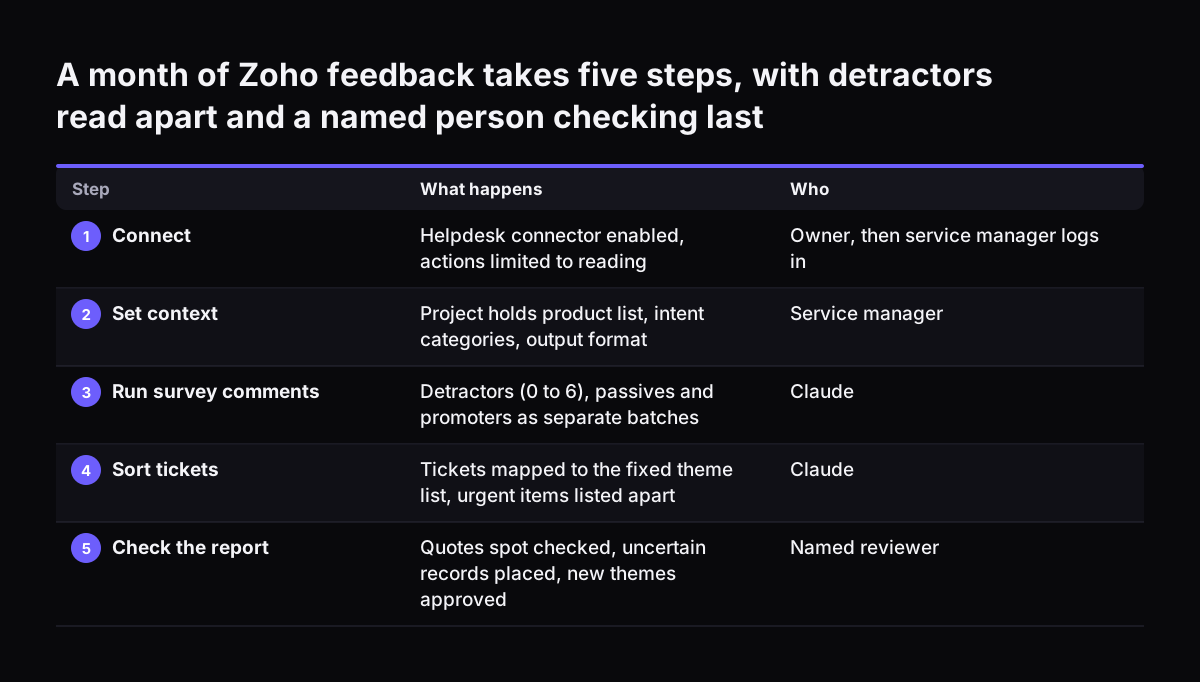
This worked example follows a service manager who reviews last month's feedback from Zoho Desk tickets and Zoho Survey NPS replies on a Claude Team plan. The steps use only settings and limits from the sources in this guide.

  1. Connect. The Owner enables the helpdesk connector and restricts its actions to reading. The service manager authenticates with their own login, so Claude sees only the tickets they can see.
  2. Set context. The manager creates a Claude Project called "Monthly feedback". The instructions hold the product list, the intent categories and the output format.
  3. Run survey comments by segment. Claude reads detractor comments (0 to 6) as one batch, then passives and promoters separately. Enterpret reports that 100 to 300 open survey responses typically yield 8 to 15 themes.
  4. Run tickets for root causes. Claude reads closed tickets in batches of 50 to 100, the size Enterpret suggests for root cause work. Each batch stays well under the 500 response ceiling.
  5. Merge and count. Claude maps each batch onto the agreed theme list and counts records per theme. Unplaced records go on the uncertain list.
  6. Produce the file. Claude creates an Excel workbook with one row per theme, the month's count and the quotes with their ticket or response IDs. The monthly chart is drawn from that count table.

Model choice follows the task. The models overview positions Claude Haiku 5.5 for high-volume classification and extraction, which fits tagging each record. For the synthesis step, Anthropic suggests starting with Claude Opus 5.5 if you are unsure. Every current model has a 1M token context window, but the 500 response batch advice still applies. The limit there is consistency, not space.

A month of Zoho feedback takes five steps, with detractors read apart and a named person checking last. What happens / Who. 1. Connect: Helpdesk connector enabled, actions limited to reading / Owner, then service manager logs in; 2. Set context: Proj

Theme drift between runs, and how a fixed theme list stops it

Taxonomy drift is what happens when the same analysis, run twice on the same data, produces different themes. Sometimes the themes are only renamed. Sometimes they are regrouped. Either way, your monthly chart stops meaning anything, because "Delivery delays" in March and "Shipping problems" in April are counted as different lines.

The problem is measurable. In Enterpret's research, the most consistent of eight frontier models tested, a Claude model, still left about 62% of its themes unmatched between two runs on the same 100 records. Enterpret also notes that Claude keeps no persistent memory of past themes between analyses.

The fix is to stop asking Claude to invent the theme list each time. Write the agreed list down once and make Claude map new records onto it. A Claude Skill is a Markdown file that fixes an analysis method, so Claude loads it the same way every time. Skills follow Agent Skills, the open standard that Anthropic announced in its newsroom it is donating to the Agentic AI Foundation.

At Svennis we write the agreed theme list and its definitions into a skill before the first monthly run, and a new theme joins the list only after the service manager approves it. That one rule keeps the month-on-month counts comparable, and it makes a genuinely new theme stand out instead of hiding among renamed old ones.

Run batches of 50 to 500 responses, and expect about 62% of themes to change between two runs: Recommended batch size per analysis 50-500 responses, Themes unmatched between two identical runs 62 %, Typical themes from one extraction 8-15 themes
Source: google.com

Flagging urgent customer issues without letting Claude act on them

Claude can flag urgent customer issues during the feedback analysis, but the flag should go to a person, not trigger an action. Define "urgent" in the method. Two intent tags from the dual tagging scheme do most of the work: churn signal and bug report. Add your own triggers, such as a named key account or a repeated complaint about the same order.

Keep the urgent list short and separate from the theme report. Each flagged item needs the record ID, the quote and one line on why Claude flagged it. The person on duty then opens the ticket and decides what happens next.

There are good reasons to keep Claude reading rather than writing here:

  • Customer comments are text written by outsiders. The file creation page notes that Claude could theoretically be tricked through prompt injection into sending data to external servers.
  • When MCP integrations are enabled, network communication stays possible through them regardless of the network egress setting.
  • Owners can restrict a connector's actions organisation-wide. Restricting actions never grants more access than the source system allows. It only narrows it.

Anthropic has added a prompt injection classifier that stops execution when it detects manipulation. A read-only connector is still the simpler safeguard. Baserow's guide shows Claude writing tags back to source records. If you want that later, limit it to tagging and keep the review step.

The human check before anyone acts on Claude's feedback report

A named person checks every Claude feedback report before it reaches a meeting or changes a priority. The check takes far less time than reading the feedback, because Claude has already done the sorting. What the reviewer adds is judgement and a test of the evidence.

The review covers four points:

  1. Spot-check quotes. Open a few record IDs per large theme and confirm the quote is real and fits the theme.
  2. Read the uncertain list. Place those records by hand or decide they are noise.
  3. Check the counts against last month. A sudden jump is either news or drift. The reviewer decides which.
  4. Approve or reject new themes. Only approved themes go into the skill.

Once the report is checked, the decisions belong to people. Typical decisions from a monthly feedback report include:

  • raising a recurring bug with the product or engineering owner
  • rewriting a help article that keeps generating the same question
  • calling back detractors who mentioned cancelling
  • adding a training topic for the support team

Record each decision next to the theme it came from. Next month you can see whether the count fell. For the wider picture of AI in service teams, our page on AI customer service for UK SMEs covers agents, costs and examples.

What analysing customer feedback with Claude means for a UK company's data

For a UK company, customer feedback analysis with Claude is mainly a data question, because tickets and call notes contain names, emails and account details. Before you connect anything, decide who may run the analysis and on which records. The connector rules then do much of the enforcement for you.

Three facts from Anthropic's help pages matter here. First, Claude inherits each person's permissions, so a support agent cannot use Claude to read records hidden from them in the helpdesk. Second, settings that control where Claude's inference runs do not change where third-party connected services process data. Your helpdesk and CRM keep their own data location. Third, when Claude creates files, it works in an isolated sandbox, and sandboxes are never shared between users.

On Team and Enterprise plans, network access for code execution is disabled by default. Owners can enable it in organisation settings. The Help Center calls the "All domains" option the riskiest one, so leave it off for feedback work.

Keep personal data out of the final report where you can. Theme counts and short quotes rarely need a customer's name, because the record ID is enough for a reviewer to find them. Our page on where your data sits, layer by layer explains each layer of a Claude setup in more detail.

Next steps: from one manual monthly report to a running process

Start with one month of feedback and one source, and run the analysis by hand before you automate anything. That shows you whether the themes are useful and how long the review takes.

  1. List your feedback sources, the record ID field in each and the person who owns them.
  2. Clean the fields that drive the counts, such as product and category.
  3. Run last month's tickets or NPS comments through a Claude Project, in batches under 500.
  4. Agree the theme list with the service manager and write it into a skill.
  5. Repeat the next month and compare counts. Decide whether a connector or an agent should take over.

If you want help, the work follows four steps. The Workshop maps your systems and the process. For each connection we build a connector, an MCP server, a plugin or a skill, show you the options with their cost, and you choose. Then comes Pilot Claude A, an AI agent on Claude for one process, or Pilot Claude B, Claude Team for the whole team. The department Activation and monthly operations follow.

A monthly feedback agent is a natural fit for Claude Pilot A, an AI agent live in 30 days. If your service desk itself needs Claude, see the AI service desk assistant on Claude. For plans and running costs, read what Claude for business costs and how to start.

Sources

  1. Claude Help Center: Use connectors to extend Claude's capabilities
  2. Claude Help Center: Create and edit files with Claude
  3. Anthropic Newsroom
  4. Anthropic: Models overview
  5. Enterpret: How to Use Claude for Customer Feedback Analysis
  6. Baserow: How to automate product feedback analysis and customer insights using Claude AI
Free, 30 minutes

Pick a time. Bring the process this article made you think of.

You leave with a clear yes or no on putting Claude on it, and the step that fits from our published prices. You speak to someone who builds the agents, not a salesperson.

Prefer to call? +44 7588 772736 · Not ready to talk? See it on your business first.

30 minutes · video call · free
  1. 1Time
  2. 2Details
  3. 3Booked