Skip to content
SVENNISAIWe speak Claude.
Blog · Claude

Credit control with Claude: chasing overdue invoices with a person on every send

A guide for credit controllers: a weekly overdue list from live data, reminder drafts in the right tone for each stage, replies sorted into promise, dispute or query, and a person sending every message.

9 min read

Book a 30-minute call · with a Claude Certified Architect from our team.

Article · 9 min read
Abstract stepped path of rising blocks with a single gate where a line pauses before moving on

Credit control with Claude: Claude drafts from live data, a person sends

Credit control with Claude works best as a drafting system for chasing overdue invoices. Claude reads overdue invoices from your accounting system. It drafts each payment reminder in the tone the customer's history calls for, and it sorts the replies. A person approves and sends every message, and nothing escalates without a human decision.

Credit control is the work of making sure customers pay what they owe on the agreed terms, from the first reminder through to formal recovery. Most of that work is reading: who is late, by how much, and what they said last time. Claude saves time on the reading. The judgement about pressure, relationships and legal steps stays with your credit controller.

This guide covers the setup a credit controller needs. It has four parts:

  • a weekly overdue list built from live accounting data
  • reminder drafts in the right tone for each stage
  • customer replies sorted into promise, dispute or query
  • approval settings that keep a person on every send

If you are new to the assistant itself, start with what Claude is and how businesses use it, then come back here.
The weekly overdue list Claude builds from your accounting system

The weekly overdue list is the starting point for credit control with Claude. Each Monday the credit controller asks Claude to list every unpaid invoice past its due date, grouped by customer. Claude pulls the list from live data through a connector. Nobody has to prepare a spreadsheet on Friday afternoon.

A connector is the link that lets Claude access your apps and services, retrieve your data and take actions within those services. Credit control needs two connectors. One reaches the accounting system where the invoices live. The other reaches the mailbox where reminders go out and replies come in.

The overdue list should carry every field a reminder needs. Ask Claude for these columns:

  • customer name and the accounts contact
  • invoice number, invoice date, due date and amount outstanding
  • days overdue, which decides the reminder stage
  • the last reminder sent, and any reply with its date
  • any recorded dispute or promised payment date

Then ask Claude to flag every customer whose stage has changed since last week. Those customers are the drafts to write first. Customers with an open dispute or a promised date still inside its window should appear on the list, marked "hold". That way nobody chases them by accident.

Connecting Claude to your accounting system and mailbox

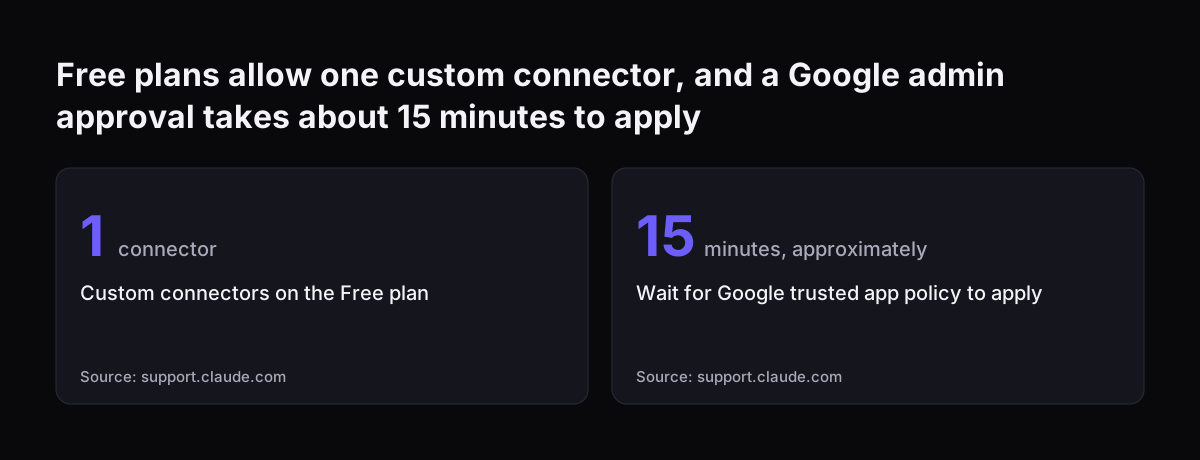
Claude reaches your accounting system through a connector, and the type of connector depends on the system. Some services have a ready connector. For others, a custom connector points Claude at a remote MCP server: a small service that offers your system's records and actions to Claude in a standard way. Custom connectors are available on the Free, Pro, Max, Ultra, Team and Enterprise plans. Free users are limited to one.

A custom connector has one technical condition your IT team must check early. According to the Claude Help Center page on connectors, Claude connects to the MCP server from Anthropic's cloud, not from your own computer. The server must therefore be reachable over the public internet.

When we connect a client's accounting system, we build a connector, an MCP server, a plugin or a skill for that connection. We show the options with their cost, and the client chooses. Our separate guide on connecting Claude to Xero, QuickBooks or Sage covers the accounting side in more depth.

The mailbox side is simpler if you use Gmail. The Gmail connector is available to all users on Claude and Claude Desktop. On Team and Enterprise plans, an Owner or Primary Owner must enable it for the organisation first. Each person then authenticates individually.

Web connectors also work in Claude Cowork, Claude Desktop and Claude Mobile. A credit controller can therefore review drafts away from the desk.

If your invoices first arrive as documents that need reading in, see processing invoices and contracts with Claude in a Zoho workflow.

Free plans allow one custom connector, and a Google admin approval takes about 15 minutes to apply: Custom connectors on the Free plan 1 connector, Wait for Google trusted app policy to apply 15 minutes, approximately
Source: support.claude.com

Approval settings that keep a person in charge of every send

Connector permissions are what keep a person in charge of credit control with Claude. Each tool a connector offers can be set to Always allow, Needs approval or Blocked. On Team and Enterprise plans, an Owner can set these restrictions for the whole organisation. Individual users cannot override them.

For credit control, a sensible split looks like this:

  • Always allow: reading invoices, customer records and email threads
  • Needs approval: sending, replying to and forwarding email
  • Blocked: any action that changes an invoice, a payment or a credit note

The Gmail connector already asks for approval before each send, reply or forward by default. Locking that setting at organisation level means nobody can switch it off in a hurry. At Svennis we set every send action to Needs approval before the first draft is written. We also keep the sixty and ninety day stages out of the drafting instructions entirely, so those always start with a person.

Claude also inherits each person's permissions from the connected service. If a credit controller cannot see a customer's records in the accounting system, Claude cannot reach them either. On Team and Enterprise plans, connectors are only available in private projects, and chats with synced content cannot be shared. Each credit controller therefore works in their own private project. Handovers happen through notes, not shared chats.

Reminder stages from before the due date to formal action

A reminder ladder is a fixed sequence of steps tied to how many days an invoice is overdue. It decides what kind of message goes out and who decides. The stages below are an example ladder; replace the days and actions with the policy your business has approved. We have added Claude's part and the human decision at each stage.

StageWhat happensClaude's partWho decides and sends
Before the due dateFriendly reminderDrafts the emailCredit controller approves the send
7 days overduePolite written follow-up referencing the invoiceDrafts with invoice number and historyCredit controller approves the send
30 days overduePhone callPrepares call notes from the account historyCredit controller makes the call
60 days overdueOwner or a senior person involved; credit terms reviewedSummarises the account and past contactOwner or senior person
90 days overdueFormal action: letter of demand, suspended work or a collections specialistAssembles the file of invoices and correspondenceOwner, with professional advice

Two rules are worth building into your instructions. Send a reminder before the due date rather than after. Apply the ladder the same way for every client, so nobody can claim they were singled out.

Matching reminder tone to each customer's payment history

Tone matching means Claude adjusts the wording of a reminder to the customer, while the stage stays fixed by the ladder. A long-standing customer who usually pays on time gets a lighter seven-day email than a repeat late payer. Both still get a seven-day email. Tone varies; the ladder does not.

Write the tone rules down once, in the project instructions or in a skill. A skill is a packaged set of instructions and workflows Claude can load when a task needs it. Anthropic describes Agent Skills as an open standard that gives AI agents specialised knowledge and workflows. Useful tone rules include:

  • first late payment in a long relationship: assume an oversight, offer a copy of the invoice
  • repeat late payer: state the due date, the days overdue and the next step plainly
  • customer who broke a promised date: quote the promise and its date back to them
  • open dispute on the invoice: no reminder at all, flag it for the account owner

Keep a few house rules alongside the tone rules. Claude must never threaten an action the ladder does not reach yet. It must never mention interest or late-payment compensation unless your adviser has approved the wording. That applies whether the right comes from your own terms or, for UK business customers, from the Late Payment of Commercial Debts (Interest) Act 1998.

Check your own terms with your adviser before Claude drafts any sentence about interest.

Sorting customer replies into promise, dispute or query

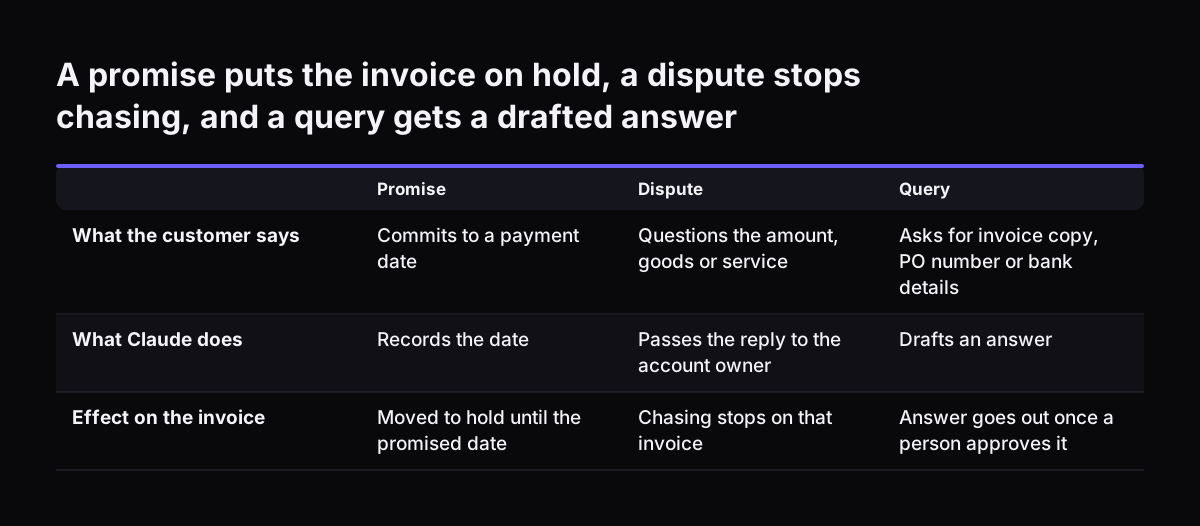
Reply sorting is the second half of credit control with Claude. Claude reads each customer reply through the mailbox connector and places it in one of three groups. Each group triggers a different next step:

  • Promise: the customer commits to a payment date. Claude records the date and moves the invoice to "hold" until then.
  • Dispute: the customer questions the amount, the goods or the service. Chasing stops on that invoice, and the reply goes to the person who owns the account.
  • Query: the customer needs a copy of the invoice, a purchase order number or bank details. Claude drafts an answer for approval.

One limit matters here. The Gmail connector can read attachment metadata but not attachment content. Claude can therefore see that a reply carries a remittance advice, but it cannot read the figures inside. Ask Claude to flag every reply with an attachment so the credit controller opens it. Nobody should assume a payment from a file name.

If you later run reply sorting at volume as an agent through the API, model choice matters. Anthropic's models overview points to Claude Haiku 5.5 for high-volume tasks such as classification, extraction and routing. For drafting reminders, it suggests starting with Claude Opus 5.5 when unsure. Our existing post on AI email triage explains why first-time-right routing matters most.

A promise puts the invoice on hold, a dispute stops chasing, and a query gets a drafted answer. Promise / Dispute / Query. What the customer says: Commits to a payment date / Questions the amount, goods or service / Asks for invoice copy, PO number o

A worked example: one Monday credit control run in Zoho Books and Gmail

This worked example shows one Monday run for a company that invoices from Zoho Books and sends email from Gmail. The credit controller works in a private project called "Credit control". It holds the ladder, the tone rules and the house rules as instructions. Both connectors are authenticated under the controller's own login.

  1. The controller asks: "List all overdue invoices in Zoho Books, grouped by customer, with days overdue, last contact and any hold." Claude reads them through the accounting connector.
  2. Claude flags the customers whose stage changed since last Monday and lists the holds separately.
  3. For each customer now at seven days, Claude drafts a follow-up in Gmail that quotes the invoice number. Each send stops at Needs approval. The controller edits where needed and approves.
  4. For each customer now at thirty days, Claude writes short call notes: the invoices, the last promise and any earlier dispute. The controller makes the calls.
  5. For each customer now at sixty days, Claude writes a one-page account summary for the finance director, who decides on credit terms.
  6. Through the week, Claude sorts incoming replies into promise, dispute or query. The controller updates the notes that feed next Monday's list.

The same pattern works for a company on Zoho Invoice. Only the accounting connector changes. The ladder, the permissions and the human sign-off stay exactly as they are.

What credit control with Claude means for a UK or European company

For a UK or European company, the first question about credit control with Claude is where customer data goes. Anthropic's help pages give three facts to put in front of whoever handles data protection.

  • Data retrieved through connectors is stored on Anthropic's servers with its chat. Deleting the chat deletes that data.
  • Connected services process data on their own infrastructure, which may be outside the United States. Settings that control where Claude's inference runs do not change where those services operate.
  • Anthropic states that it does not train its models on Gmail, Drive or Calendar connector data. On consumer plans (Free, Pro, Max and Ultra) with model training switched on, content copied from those connectors, or Claude responses that include it, may be used for training. Use a Team or Enterprise plan for customer data. Those plans come with Anthropic's data processing terms and are not used for training, which consumer plans do not offer even with training switched off.

The second question is language. Many companies across Britain, Germany, Romania and Italy invoice customers abroad. Anthropic's models overview confirms that all current Claude models are multilingual. Claude can therefore draft a German, Romanian or Italian reminder for the matching customer. Keep one rule: a person who reads that language approves the draft before it goes.

The third question is your own terms. Late-payment interest, suspension of work and the use of a collections agency all depend on your contracts and your local rules. Put the exact wording your adviser has approved into the project instructions. Tell Claude never to go beyond it. For a wider view of plans and setup, see Claude for Small Business set up for UK companies.

Next steps: start with one ledger, one mailbox and one ladder

The practical first step in credit control with Claude is a narrow pilot. Use one accounting system, one credit controller's mailbox and one written ladder. Work through this checklist before the first Monday run:

  1. Write your reminder ladder and tone rules on one page, and have your adviser approve the wording for interest and formal action.
  2. Confirm which plan you are on and who your Owner or Primary Owner is, because only they can enable connectors for a team.
  3. Check with whoever handles data protection that your Claude plan comes with data processing terms covering customer data. Confirm that any transfer outside the UK, or outside the EEA if your company is in the EU, has a valid safeguard in place. Check that your privacy notice names the AI provider, or the category of provider, among the recipients of customer data. It should also explain any transfer outside the UK.
  4. Decide how Claude will reach your accounting system, and check that any MCP server can be reached over the public internet.
  5. Set send, reply and forward to Needs approval, and block every action that changes an invoice or payment.
  6. Run the weekly list and the seven-day drafts for a few weeks before you add reply sorting.

If you want help, our work runs in four steps. It starts with a Workshop to map the process. Pilot Claude A then builds an AI agent on Claude for one process, such as credit control. Pilot Claude B instead rolls out Claude Team for the whole team.

A department Activation follows, then monthly operations. To see how that fits your budget, read what Claude for business costs and how to start.

Sources

  1. Claude Help Center: Use connectors to extend Claude's capabilities
  2. Claude Help Center: Use Google Workspace connectors
  3. Anthropic: Models overview
  4. Anthropic: Newsroom
Free, 30 minutes

Pick a time. Bring the process this article made you think of.

You leave with a clear yes or no on putting Claude on it, and the step that fits from our published prices. You speak to someone who builds the agents, not a salesperson.

Prefer to call? +44 7588 772736 · Not ready to talk? See it on your business first.

30 minutes · video call · free
  1. 1Time
  2. 2Details
  3. 3Booked