Skip to content
SVENNISAIWe speak Claude.
Blog · Claude Code

Claude Code GitHub Actions for integration code: setup and guardrails

A practical guide to Claude Code GitHub Actions for CRM and helpdesk integration code: the setup, a read-only review workflow, the guardrails for client repositories and the running costs.

9 min read

Book a 30-minute call · with a Claude Certified Architect from our team.

Article · 9 min read
Abstract layered lines passing through a narrow gate, suggesting code that is checked before it ships

Claude Code GitHub Actions: what it is and how to run it safely

To use Claude Code GitHub Actions safely on integration code, take four steps. Install the Claude GitHub app only on the repositories you mean. Keep the API key in GitHub Secrets. Start with a read-only review workflow, and let only people with write access trigger anything that changes code. A human still merges every change.

Claude Code GitHub Actions is Anthropic's coding agent, Claude Code, running inside your GitHub workflows. It watches for @claude mentions in issues, pull requests and review comments. It can also run on events you choose, such as a pull request opening or a schedule. When triggered, it reads the code or the issue, then posts feedback or proposes changes in a pull request, as Apidog's walkthrough of the action describes.

The setup below suits teams that ship integration code. That is the scripts and services that move records between a CRM, a helpdesk and the rest of the business. If nobody in your company writes code, start with Claude Code for a small business without developers instead.
Why CRM and helpdesk integration code needs careful review

Integration code writes to live business records, so its mistakes reach customers. A sync between Zoho CRM and Zoho Desk can break quietly. A renamed field, a missed error check or a changed lookup does not crash anything. It assigns the wrong owner, duplicates a contact or sends a ticket to the wrong queue.

Reviewer time is the scarce resource on small delivery teams. An automatic Claude review on each pull request handles the routine checks. These include hard-coded credentials, unhandled API errors and logging of personal data. The engineer's own review can then focus on the business logic: does this change do what the sales or support team asked for?

An automatic review is a second pair of eyes, not a replacement for the first. The security section of Anthropic's documentation requires reviewing suggestions before merge, according to the awesome-claude review workflow guide. Treat every Claude comment as a proposal. Treat every Claude commit as a draft that a person signs off.

Setting up Claude Code GitHub Actions: app, secret and workflow file

Claude Code GitHub Actions needs three things: the Claude GitHub app, an API key stored as a secret, and a workflow file. You can set these up through a quick route or a manual one.

The quick route is the /install-github-app command, run in the Claude Code terminal. It is only available if you use the Anthropic API directly. The manual route works for everyone and gives you more control:

  1. Install the Claude GitHub app on the repository. You need admin rights on that repository.
  2. Add your Anthropic API key as a repository secret named ANTHROPIC_API_KEY.
  3. Add a workflow file at .github/workflows/claude.yml that calls anthropics/claude-code-action.

The app requests read and write permissions on Contents, Issues and Pull requests. Scope the installation to the repositories you intend, not the whole organisation. On a client's GitHub account, ask their administrator to approve each repository by name.

Use the official action rather than a community fork. Older tutorials copy the example workflow from a fork. One such fork, which added subscription login, stated on 8 July 2025 that Anthropic had added the capability natively and the fork was obsolete. If you route requests through Amazon Bedrock or Google Vertex AI, follow the separate documented setup.

Those two routes use OIDC authentication exclusively. OIDC lets the cloud provider trust GitHub's job identity instead of a stored key.

A read-only pull request review workflow to paste in

The workflow below runs a Claude review whenever a pull request opens or receives new commits. It gives Claude read tools only, a turn limit and a job timeout. Save it as .github/workflows/claude.yml on the repository's default branch.

name: Claude review

on:
  pull_request:
    types: [opened, synchronize]

permissions:
  contents: read
  pull-requests: write
  issues: write

jobs:
  review:
    runs-on: ubuntu-latest
    timeout-minutes: 10
    steps:
      - uses: anthropics/claude-code-action@v1
        with:
          anthropic_api_key: ${{ secrets.ANTHROPIC_API_KEY }}
          prompt: |
            Review this pull request. It changes integration code for our CRM and helpdesk.
            Flag hard-coded credentials, API calls without error handling,
            renamed or removed field names, and any logging of customer personal data.
            Do not change any files. Report findings only.
          claude_args: '--max-turns 10 --model opus --allowedTools "Read Grep Glob"'

Four lines are the ones you will adjust:

  • prompt: the instructions. Name the systems the repository touches and the mistakes you care about most.
  • --max-turns: how many back-and-forth steps Claude may take. Ten matches the example in the awesome-claude guide.
  • timeout-minutes: the job's hard stop, which caps Actions minutes on a large diff.
  • --allowedTools: the tools Claude may use. Read, Grep and Glob let it search and read code but not edit it. Bash stays off unless you allow it explicitly.

Replace @v1 with a reviewed, immutable commit SHA before you use the workflow on a client repository. Pinning third-party actions to a SHA rather than a mutable tag is the guide's recommendation.

Two trigger modes: @claude mentions and automatic runs

Claude Code GitHub Actions runs in one of two modes, and the v1 action picks the mode itself. An @claude mention in an issue or pull request comment runs interactively. A workflow that passes a prompt input runs immediately on its event, for example a pull request being opened or synchronised, or a schedule.

The two modes suit different jobs on integration code:

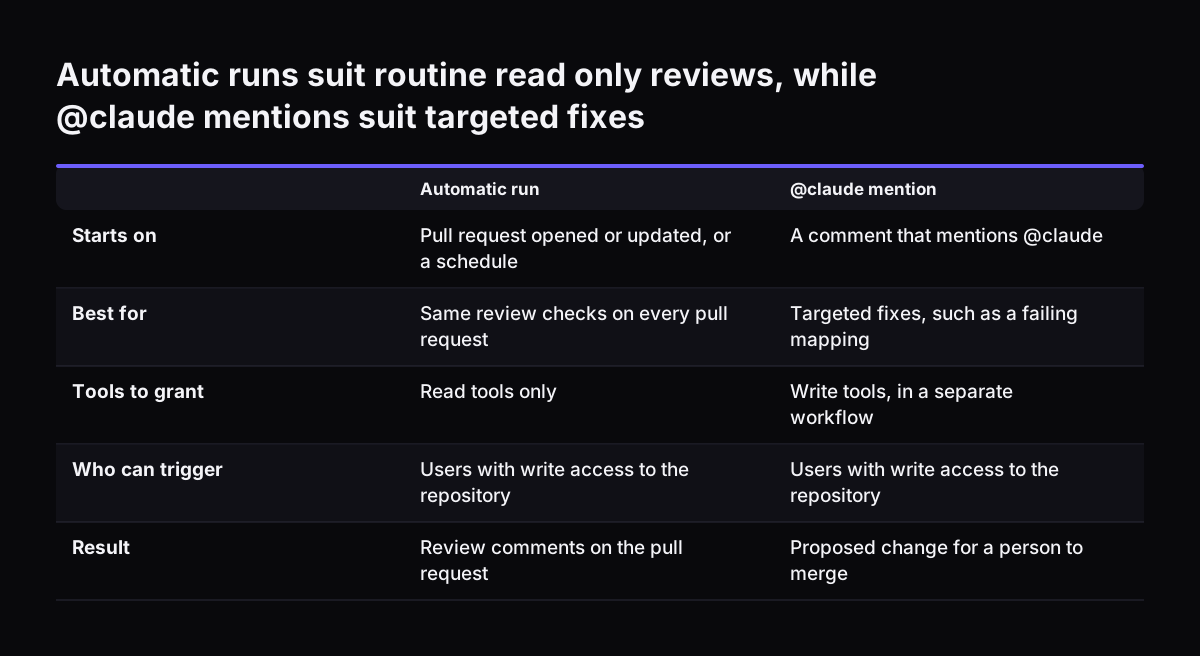
  • Automatic runs fit the read-only review above. Every pull request gets the same checks without anyone asking.
  • @claude mentions fit targeted work. An engineer asks Claude to fix a failing mapping or add error handling, and Claude proposes the change.

The trigger phrase defaults to @claude and can be customised. Customising it helps when a client's team already uses that word in comments for something else.

Configuration changed when the action left beta. GA workflows use prompt for instructions and claude_args for command-line flags such as --max-turns, --model and --append-system-prompt. Beta inputs such as direct_prompt and mode are replaced, so check any tutorial you copy from.

Project rules belong in a CLAUDE.md file in the repository. Claude follows it like a style guide. For integration code, write down the rules a new developer would need. Examples are how you name fields, which API errors must be retried and what must never be logged. Complex tasks may still need prompt adjustments, as Apidog's author found.

Automatic runs suit routine read only reviews, while @claude mentions suit targeted fixes. Automatic run / @claude mention. Starts on: Pull request opened or updated, or a schedule / A comment that mentions @claude; Best for: Same review checks on ev

How Depot uses Claude in a scheduled GitHub Actions job

Depot, a software company that runs GitHub Actions runners, uses Claude in a daily workflow that ends in a draft pull request for a human. Its runners run on isolated EC2 instances, so Depot builds its own machine images. It starts from GitHub's open-source runner image definitions, which it keeps in a git submodule. A patch file, arm64.patch, adapts them because GitHub builds its images for x86_64.

Each pull from upstream brings in dozens of commits that need checking for compatibility. Depot's workflow runs daily and calls Claude with the Opus model when the patch fails to apply. The tools allowed in that run are Read, Edit, Write, Grep, Glob and Bash. Claude also summarises the upstream changes and analyses them for breaking changes, based on a session that holds previous upstream issues. The output comes back as JSON.

The guardrail is in the last step. Depot keeps the pull request in draft until a human engineer has time to review and merge it. Developers verify Claude's output and make any adjustments it needs. Depot's write-up of the runner update workflow shows the full job.

The same shape fits a scheduled job on an integration repository. Claude does the reading and the first draft on a schedule. A wide tool set is acceptable because the output is a draft, not a merge. A person decides what ships.

Guardrails for Claude Code GitHub Actions on client repositories

Several protections for Claude Code GitHub Actions are built into the action, and the rest are choices you make in the workflow. The built-in ones and the recommended settings are these:

  • Only users with write access to the repository can trigger the action.
  • GitHub Apps and bots cannot trigger it.
  • Claude cannot approve pull requests, for security reasons.
  • Claude cannot run Bash commands unless you allow them explicitly.
  • Every commit Claude makes through the action is signed automatically.
  • Keys live in GitHub Secrets, never in the workflow file.
  • Third-party actions are pinned to reviewed commit SHAs.
  • The Claude GitHub app is installed on named repositories only.

Public repositories need one extra rule. Pull request diffs and issue comments there are written by outsiders. Treat them as prompt-injection input, meaning text written to steer the model. Never give an untrusted pull request access to tools that use your secrets.

At Svennis we run two separate workflows on a client repository. One is a read-only review on every pull request. The other can write code, and only an engineer on the project can start it with @claude. The mistake we see most often is a single workflow with write access and Bash switched on for every event.

What data leaves the repository during a Claude run

During a Claude Code GitHub Actions run, the pull request diff and the issue comments go to your chosen model provider. The action itself executes on your own GitHub runner. Only the calls to Claude leave it, and they go to the provider you configure.

That provider can be the Anthropic API directly, Amazon Bedrock or Google Vertex AI. Anthropic's models overview also lists Microsoft Foundry and Claude Platform on AWS as routes to the current models. A client with an existing cloud agreement may prefer to keep traffic inside that account.

Integration repositories carry a specific risk: sample data. Test fixtures, mapping examples and bug reports sometimes contain real customer names, emails or ticket text. Anything in a diff or a comment is sent with the review. Before you switch the action on, replace real records in fixtures with invented ones. Then ask the team to keep personal data out of issue comments.

Organisation settings can also block a run. Anthropic notes that an administrator can disable a server tool, such as web search, and requests that use it will then fail. Check the client's settings before you write a prompt that relies on one. For a plain overview of where Claude runs and who it is for, see what Claude is and how UK businesses use it.

Running costs: tokens, Actions minutes, timeouts and model choice

Claude Code GitHub Actions costs you on two meters: GitHub Actions minutes and Claude API tokens. Timeouts and turn limits control both. The official action defaults to a 30-minute execution timeout. The awesome-claude example sets 10 minutes and 10 turns, a tighter start for reviews.

Model choice sets the token price. The --model flag in claude_args chooses it. Anthropic's models overview lists these prices and uses for the current models:

ModelPrice per million tokens, input / outputAnthropic's stated use
Claude Fable 5.1$10 / $50Demanding reasoning and long-horizon agentic work
Claude Opus 5.5$4 / $20The starting point for most workloads
Claude Sonnet 5.5$2 / $10Over 30% faster than Sonnet 5, up to 30% cheaper for most work
Claude Haiku 5.5from $0.10 / from $0.50High-volume classification, extraction and routing

Anthropic says Claude Opus 5.5 costs 40% less to run than Opus 5 on typical workloads. All four models have a 1M-token context window. A large diff therefore fits in one run, but a large diff also costs more.

A practical split for integration work is to start reviews on Opus 5.5, as Anthropic recommends. Then test whether Sonnet 5.5 catches the same issues on your own pull requests. For what Claude costs a company overall, see Claude for business: costs and how to start.

Next steps for Claude Code GitHub Actions on your integration repositories

Start with one repository and the read-only review, then widen access only when the reviews prove useful. A sensible order:

  1. Pick one integration repository with active pull requests.
  2. Install the Claude GitHub app on that repository only.
  3. Store the API key as a secret and paste in the review workflow, pinned to a commit SHA.
  4. Write a CLAUDE.md with your field naming, error handling and logging rules.
  5. Replace real customer data in fixtures with invented records.
  6. Read the first reviews with the team and tighten the prompt where Claude misses or over-reports.
  7. Add a separate @claude workflow with write tools only when the team trusts the reviews.

If you want help putting Claude to work in your business systems, Svennis works in four steps. These are the Workshop, a pilot, the department Activation and then monthly operations. The pilot is either Pilot Claude A, an AI agent on Claude for one process, or Pilot Claude B, Claude Team for the whole team. For each program Claude must reach, we build a connector, an MCP server, a plugin or a skill.

We show you the options with their cost, and you choose. For the wider picture, read how to put Claude inside the tools you already use.

Sources

  1. Models overview, Claude Platform Docs
  2. Anthropic newsroom
  3. What is Claude Code GitHub Actions?, Apidog
Free, 30 minutes

Pick a time. Bring the process this article made you think of.

You leave with a clear yes or no on putting Claude on it, and the step that fits from our published prices. You speak to someone who builds the agents, not a salesperson.

Prefer to call? +44 7588 772736 · Not ready to talk? See it on your business first.

30 minutes · video call · free
  1. 1Time
  2. 2Details
  3. 3Booked