Skip to content
SVENNISAIWe speak Claude.
Blog · Claude Code

First Claude setup: CLAUDE.md, one skill and /goal for a business team

Start Claude Code with three pieces only: a CLAUDE.md under 200 lines, one skill for a weekly task and a /goal with a measurable end state. Agents and integrations come after.

10 min read

Book a 30-minute call · with a Claude Certified Architect from our team.

Article · 10 min read
Abstract layers stacking into a single path that ends at a marked point, suggesting rules, a routine and a goal

First Claude setup: CLAUDE.md, one skill and /goal, in that order

First Claude setup: CLAUDE.md, one skill and /goal is the whole starter kit, set up in that order. CLAUDE.md is a short file holding your company rules. The skill handles one task your team does every week. The /goal prompt names one measurable end state and a limit. Leave agents and integrations until those three work reliably.

The order matters because each piece does a different job. CLAUDE.md tells Claude who you are and how you work. A skill packages one procedure so nobody types it out again. A goal tells Claude when the work is finished, so it keeps going without you prompting each step.

This guide is for business owners and managers who do not write code. It uses Claude Code, the Claude tool that works on files in a folder on your computer. You can also run it in the desktop app. If you are new to Claude itself, start with our plain guide to what Claude is. Every product fact below comes from Anthropic's own Claude Code documentation.

A new Claude Code session runs Claude Opus 5.5 at medium effort on most plans and providers. New sessions also start in auto mode. In auto mode, a classifier reviews anything risky before it runs. You do not need to change either setting to follow this guide.
CLAUDE.md is the rulebook Claude reads at the start of every session

CLAUDE.md is a markdown file that gives Claude persistent instructions for a project, your personal workflow or your whole organisation. Claude reads it at the start of every session. That matters because each Claude Code session begins with a fresh context window. Without CLAUDE.md, Claude starts every morning knowing nothing about your firm. Keep the file short. Anthropic's memory guide recommends staying under 200 lines per CLAUDE.md file. Its reason is plain: longer files consume more context and reduce adherence. In practice, a first CLAUDE.md for a business team fits on one screen. Write each rule once and make sure no two rules disagree. The documentation warns that if two instructions contradict each other, Claude may pick one arbitrarily. A rule such as "always reply within a day" next to "never reply at weekends" invites exactly that. You do not have to start from a blank page. Running the /init command generates a CLAUDE.md for the folder you are in. It also reads instruction files from tools such as Cursor and Copilot and includes the relevant parts. Treat the generated file as a draft and cut it down. One limit to understand early: CLAUDE.md is context, not enforced configuration. Claude Code delivers its content as a user message after the system prompt. Strict compliance is not guaranteed. A later section covers what to use when a rule must hold every time.

Worked example: a CLAUDE.md for a small UK maintenance firm

A useful first CLAUDE.md covers four things: who you are, how you write, what stays out and where files live. The example below is for a fictional building maintenance firm. Save it as a plain text file named CLAUDE.md in the folder you open in Claude Code.
# Company rules for Claude

# Who we are
- Hartley Facilities Ltd, a building maintenance firm in the UK.
- Write in British English: organisation, licence, colour.

# How we write to clients
- Use the client's first name after the first email.
- Never promise a completion date. Write "we will confirm the date".
- Quote prices only from prices/current.md. Never estimate a price.

# What stays out
- Never copy staff home addresses or bank details into a draft.
- Ask before deleting or moving any file.

# Where things are
- Job notes: jobs/, one file per job, named client-job.md.
- Templates: templates/.
- Drafts for review: drafts/.
The lines you would change are the company name, the writing rules and the folder names. Keep the folder names exact, because the skill in the next example relies on them. Notice what the file leaves out. It has no history of the company, no long tone-of-voice guide and no list of every client. Long reference material belongs in a skill, where it costs almost nothing until Claude needs it. The file also avoids vague wishes such as "be professional". Each line is a rule a reviewer could check in a draft.

One skill for a task your team does every week

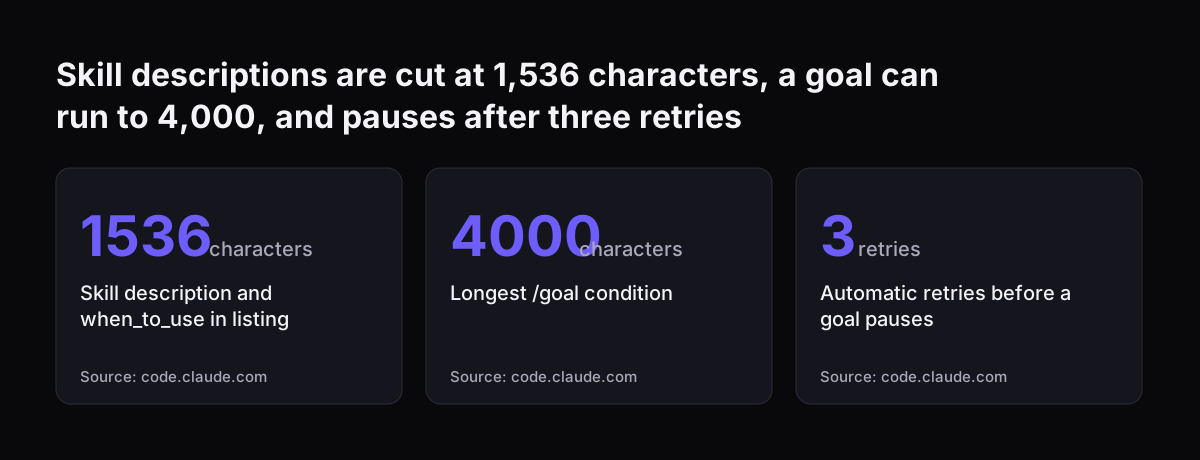
A skill is a procedure or a piece of team knowledge saved as a SKILL.md file. In Claude Code it lives at .claude/skills/<name>/SKILL.md. The file has a short header in YAML, a simple key and value format, that tells Claude when to use it. Below the header sit the instructions Claude follows when the skill runs. Claude uses a skill in two ways. It picks the skill up when the request is relevant, or you call it directly by typing / and the folder name. A skill in a folder called friday-update becomes /friday-update. Skills are cheaper than putting everything into CLAUDE.md. Unlike CLAUDE.md content, a skill's body loads only when the skill is used. Only the description sits in the list Claude scans. That description, together with the optional when_to_use text, is cut off at 1,536 characters in the skill listing. Pick one task, done every week, with a clear finished state. Good candidates are a weekly client update, a Monday summary of open jobs or a Friday check of quotes against the price list. Avoid a task that changes every time. Skills also travel. Claude Code skills follow the Agent Skills open standard. Anthropic says more than 70 agent platforms have integrated it, including ChatGPT, Cursor, GitHub Copilot and VS Code. For a deeper look at skills in the Claude apps, read our guide to Claude Projects and Skills for a small team.

Worked example: a Friday client update skill

The Friday client update skill turns the week's job notes into one draft update per client. Create a folder at .claude/skills/friday-update/ inside your project folder. Then save the text below in it as SKILL.md.
---
description: Drafts the Friday client update from this week's job notes in jobs/.
when_to_use: Use when someone asks for the Friday update or the weekly client note.
---
# Friday client update

1. Read every file in jobs/ that changed since Monday.
2. Group the jobs by client, using the part of the file name before the dash.
3. For each client, write three short lines: done this week, next week, waiting on.
4. Follow the layout in templates/friday-update.md.
5. List any open job with no note this week under "Check with the team".
6. Do not send anything. Save one draft per client in drafts/friday/.
The lines you would change are the description, the three headings in step 3 and the folder names. Keep the description specific. Claude decides whether to use the skill from that one sentence, so "drafts the Friday client update" works better than "helps with clients". Step 6 is deliberate. The skill writes drafts and a person sends them. That keeps a human between Claude and your clients while you learn how good the drafts are. Run the skill by typing /friday-update. Read the drafts, correct the wording, then put any correction that applies every week back into SKILL.md. After a few Fridays the drafts need little editing.

/goal sets one measurable end state that Claude checks after every turn

The /goal command sets a completion condition, and Claude keeps working toward it without you prompting each step. After each turn, a separate small, fast model checks whether the condition holds. If it judges the condition not yet met, Claude starts another turn instead of handing control back to you. The evaluator gives one of three verdicts, each with a short reason: not yet met, met or impossible. It does not run commands or read files on its own. It judges only what Claude has shown in the conversation. Write the condition so that Claude's own output can prove it, for example "print the list of files you covered". A few rules shape how you use it:
  • One goal can be active per session.
  • The condition can be up to 4,000 characters.
  • A goal does not change your permission mode. To let goal turns run unattended, run /goal in auto mode.
  • If Claude makes no tool use for several turns in a row, Claude Code stops the loop, prints a warning and returns control to you.
  • /goal works in the desktop app, in non-interactive mode and through Remote Control.
Cost is rarely the worry. Evaluation tokens are billed on the small fast model and are typically negligible compared to main-turn spend. Four failures clear a goal: an authentication failure, an exhausted credit balance, a context overflow that cannot be resolved and an unavailable model.

Worked example: three /goal prompts, each with an end state and a limit

A good /goal prompt has three parts: a measurable end state, a limit and a request for evidence. The limit tells Claude where to stop. The evidence gives the evaluator something to judge. Here are three goals for the same maintenance firm, typed after /goal in a session.
  1. Friday drafts. "Every client with a job file changed since Monday has a draft in drafts/friday/. Print the list of clients and draft file names. Cover at most 30 clients; if there are more, stop and list the rest."
  2. Price check. "Every price in templates/ matches prices/current.md. Print a table of each price found, its file and whether it matches. Change nothing; only report."
  3. Tidy job notes. "Every file in inbox-notes/ is moved into jobs/ and renamed client-job.md. Print each old and new name. Delete nothing. Leave any file without a client name in place and list it."
Each goal ends in a state a person could check in a minute. Each one also forbids something: sending, editing or deleting. The numbers and folder names are yours to change. Run the third goal only after you trust the first two. It moves files. Checkpoints, Claude Code's undo points, do not restore a file that only a Bash command touched. If a goal asks for something that cannot be done, the evaluator can return "impossible" and the loop ends with its reason.
Skill descriptions are cut at 1,536 characters, a goal can run to 4,000, and pauses after three retries: Skill description and when_to_use in listing 1536 characters, Longest /goal condition 4000 characters, Automatic retries before a goal pauses 3 r
Source: code.claude.com

What CLAUDE.md, skills and /goal cannot enforce, and what can

CLAUDE.md, skills and prompts are non-deterministic instructions. Claude reads them and decides what to do, with no guarantee it will follow them. The documentation is direct about this. Settings rules are enforced by the client regardless of what Claude decides, while CLAUDE.md instructions are not a hard enforcement layer. Deterministic instructions are the ones Claude Code itself must apply. There are three kinds:
  • Deny rules block an action outright. They hold in every permission mode, including auto and bypassPermissions.
  • Hooks run your own script at fixed moments. A PreToolUse hook can block an action whatever Claude decides.
  • Managed settings come from the admin console, MDM or a managed-settings.json file. No personal settings file can override them.
Use the right layer for each rule. "Write in British English" belongs in CLAUDE.md, because a slip costs little. "Never delete files in jobs/" deserves a deny rule, because a slip costs a lot. Watch one trap. A WebFetch deny rule for a domain does nothing about curl to the same domain unless the sandbox is on. The sandbox confines Claude's shell commands on macOS, Linux and WSL2. If a rule really matters, ask whoever sets up your machines to check it holds in practice. Note too that /goal itself is a prompt-based Stop hook. Another model judges the condition, so it is not deterministic either.

Checklist: CLAUDE.md, a skill, /goal or a settings rule for each job

The table compares the four tools a first setup touches. Read across a row to see where each one lives, when it loads and whether it is enforced.
ToolWhere it livesWhen it loadsEnforced every time?Use it for
CLAUDE.mdProject folder, or managed centrallyStart of every sessionNo, it is contextCompany rules, writing style, folder map
Skill.claude/skills/<name>/SKILL.mdDescription always listed, body only when usedNoOne repeatable weekly procedure
/goalTyped in the sessionChecked after every turn, one goal per sessionNo, a model judges itA measurable end state with a limit
Deny rule or hookSettings file or managed settingsEvery time the action is attemptedYesActions that must never happen
Use the table as a decision rule. Ask whether a mistake would be awkward or costly. Awkward mistakes go into CLAUDE.md or the skill. Costly ones go into a deny rule or a hook. Ask a second question about frequency. Rules Claude needs in every session belong in CLAUDE.md. Instructions it needs only for one task belong in a skill, where they load only when used.

What this setup means for a UK company with several staff

A UK company rolling Claude Code out to several staff should decide early which rules sit centrally. Organisations can deploy a centrally managed CLAUDE.md that applies to all users on a machine. Individual users cannot exclude it with the claudeMdExcludes setting. Your IT provider can distribute the file with MDM, Group Policy or similar tools. Auto memory needs the same attention. Auto memory is the set of notes Claude writes itself from your corrections and preferences. It is on by default in local sessions. It is also machine-local, so files are not shared across machines or cloud environments. Two colleagues will build up different memories, so shared rules must live in CLAUDE.md. Skills behave differently across Claude products. Cowork sessions and cloud sessions do not read the skills folder in your home directory. They load the skills enabled for your claude.ai account instead. Claude Code downloads synced skills from claude.ai and never uploads them. If your team also uses Claude Cowork, publish shared skills through the account rather than one person's laptop. Budget seats before you start. Our Claude pricing page for the UK sets out Pro, Max, Team and API in GBP.

Adding agents and integrations after the first three pieces work

Add agents and integrations only once the CLAUDE.md, the skill and one goal produce output you trust. At Svennis we start new client projects with a CLAUDE.md that fits on one screen, one skill and one goal. We connect business systems only after that goal is met reliably, because rule problems are far easier to fix before a live system is involved. Agents add cost as well as reach. In Claude Code, subagents are helper sessions that Claude starts for parts of a task. What they cost is mostly tokens. Every subagent sends its own requests, and they count against the same usage as your main conversation. Integrations come next. Suppose the Friday update should read live jobs from Zoho CRM rather than notes in a folder. For each connection like that, we build a connector, an MCP server, a plugin or a skill. We show you the options with their cost, and you choose. The skill you already wrote carries over. Its steps stay the same; only the source of the job data changes. That is the practical payoff of starting small.

Next steps: set up your first three pieces this week

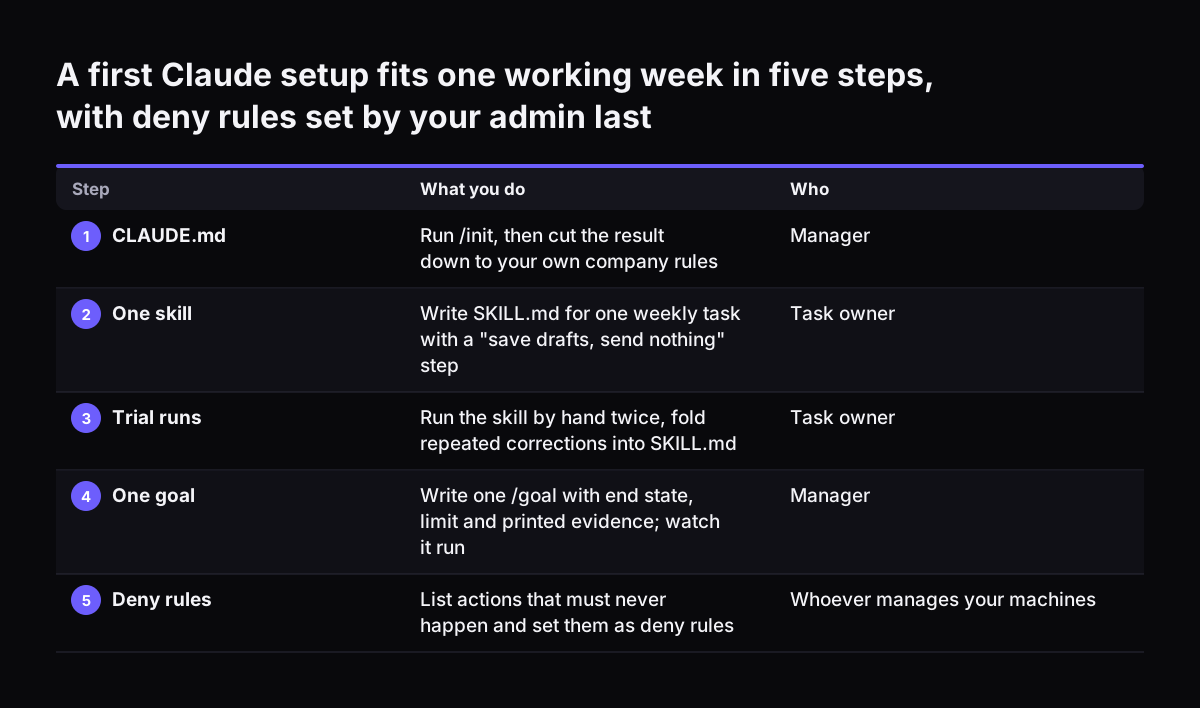
You can set up all three pieces in one working week. A sensible order:
  1. Open your project folder in Claude Code and run /init. Cut the result to your rules, well under 200 lines.
  2. Choose one weekly task. Write its SKILL.md with a one-sentence description and a "save drafts, send nothing" step.
  3. Run the skill by hand twice. Fold every repeated correction back into SKILL.md.
  4. Write one /goal with an end state, a limit and printed evidence. Run it while you watch.
  5. List the actions that must never happen. Ask whoever manages your machines to set them as deny rules.
Keep a short note of what Claude got wrong each time. That note tells you whether to fix CLAUDE.md, the skill or a settings rule. For the wider picture of costs and options, read our guide to Claude for business. If your company already pays for Claude seats that sit unused, Claude Relaunch shows how we put them to work. Our offer runs in four steps: the Workshop, then Pilot Claude A for one process or Pilot Claude B for the whole team, then the department Activation, then monthly operations.
A first Claude setup fits one working week in five steps, with deny rules set by your admin last. What you do / Who. 1. CLAUDE.md: Run /init, then cut the result down to your own company rules / Manager; 2. One skill: Write SKILL.md for one weekly ta

Sources

  1. Best practices for Claude Code - Claude Code Docs
  2. Keep Claude working toward a goal - Claude Code Docs
  3. Extend Claude with skills - Claude Code Docs
  4. How Claude remembers your project - Claude Code Docs
  5. Newsroom, Anthropic
Free, 30 minutes

Pick a time. Bring the process this article made you think of.

You leave with a clear yes or no on putting Claude on it, and the step that fits from our published prices. You speak to someone who builds the agents, not a salesperson.

Prefer to call? +44 7588 772736 · Not ready to talk? See it on your business first.

30 minutes · video call · free
  1. 1Time
  2. 2Details
  3. 3Booked