
Skip to content
SVENNISAIWe speak Claude.
Blog · Claude

Comparing supplier quotes with Claude in purchasing: a buyer's guide

Use Claude to read differently formatted supplier quotes into one comparison sheet. Then see which checks, totals and decisions stay with the buyer before anything reaches accounting or the CRM.

10 min read

Book a 30-minute call · with a Claude Certified Architect from our team.

Article · 10 min read
Abstract cover of several uneven shapes sliding into aligned rows, with one row held back for review

Comparing supplier quotes with Claude: what it does and what the buyer still checks

Comparing supplier quotes with Claude in purchasing follows one pattern. You upload each quote, and Claude reads the PDFs, emails and spreadsheets. It then fills one fixed comparison table with price, unit, terms and delivery for every supplier. The buyer checks the extracted figures, recalculates the totals in the spreadsheet and makes the decision. Nothing goes to accounting or the CRM before that check.

Supplier quote comparison is the assessment of supplier replies against the same purchasing requirements. Those requirements are part number, quantity, unit, price, currency and delivery date. The definition comes from VendorIQ's guide to supplier quote comparison, and this guide uses it throughout.

Claude handles the reading well. All current Claude models accept text and image input and support vision, according to Anthropic's models overview. A scanned or photographed quote can therefore go in alongside a clean spreadsheet. If Claude is new to you, the plain guide to what Claude is covers the basics first.

Claude should not be the final check on its own work. Kommit AI's checklist says it directly: recalculate the amounts in your spreadsheet, and do not treat the AI's arithmetic as the check on itself. The rest of this post shows where that line falls at each step.

Why supplier quotes do not line up: units, extras and payment terms

Supplier quotes rarely line up because each supplier writes them its own way. Quotal, a quoting software company, gives a common case. One supplier prices per piece, another per box of 50, another per pallet of 1,200. In Quotal's example, Supplier C looked dearer until the prices were normalised to a single piece. Per piece, Supplier C was 13% cheaper than Supplier B.

Extras cause the second mismatch. Quotal notes that the cheapest quote is often the most incomplete, because suppliers include different things by default. The items it lists as commonly left out are:

  • delivery and shipping
  • setup or installation fees
  • minimum order charges
  • packaging
  • warranty or support

Its example shows the effect. A quote of $8,500 grows to $10,300 once $800 delivery, $400 setup and a $600 minimum order surcharge are added.

Payment terms are the third mismatch. They sit outside the unit price but change what you pay and when. Quotal cites suppliers that charge 1.5% per month on overdue invoices. A quote that looks cheaper can carry stricter terms. Claude helps by pulling all three of these elements into named columns, so none of them hides in a footnote.

What you need in Claude before you start: file creation, plan settings and connectors

Claude needs only its standard file features for a basic quote comparison. Code execution and file creation are available on the Free, Pro, Max, Ultra, Team and Enterprise plans. They work on the web, in Claude Desktop and in Claude Mobile. Claude can create Excel spreadsheets (.xlsx), which you download or save straight to Google Drive.

Four details from Anthropic's help page on creating files matter for purchasing work:

  • The maximum file size is 30 MB per file, for uploads and downloads.
  • Claude does the work in an isolated, sandboxed container, separate from your systems.
  • On Team and Enterprise plans, network access is off by default, and owners can turn it on in the organisation settings.
  • Creating files uses more of your plan's usage limit than a normal chat.

Connectors come in when you want Claude to read from or write to other systems. A connector lets Claude access an app, retrieve data and take actions there. On Team and Enterprise plans, an Owner enables each connector for the organisation, and each person still authenticates individually. Claude inherits each person's permissions from the connected service.

A buyer who cannot see a record in the source system cannot reach it through Claude either. On those plans, connectors work only in private projects. Web connectors also work in Claude Cowork, Claude Desktop and Claude Mobile.

Build one fixed comparison template before you upload any quote

A fixed comparison template is the most useful thing you can give Claude. It forces every quote into the same columns, so gaps show up as empty cells instead of disappearing. Build it once and reuse it for every purchase.

The columns below come from the sources in this guide. Use them as a starting set:

  • supplier, quote date and quote version
  • quote validity and lead time
  • part number and quantity confirmed
  • unit as quoted, price per quoted unit and price per piece
  • currency and tax treatment
  • freight, setup, minimum order charge, packaging and warranty
  • recurring charges and one-time fees, kept apart
  • payment terms
  • open questions for the supplier

Two rules from Kommit AI's checklist belong at the top of the sheet. Write "Not stated" when an item is absent. Never enter zero unless the supplier has actually said there is no charge. Keep the quote date and version as well, because a revised offer can change a fee or an exclusion.

The instruction you give Claude should match the template. A version that works well reads:

Read the attached quotes. Fill one row per supplier in the template. Copy each figure exactly as quoted, with its unit and currency. Write "Not stated" where the quote is silent. Do not convert currencies and do not calculate totals. List every gap as a question for the supplier.

A worked example: three supplier quotes for 20 M12 sensors

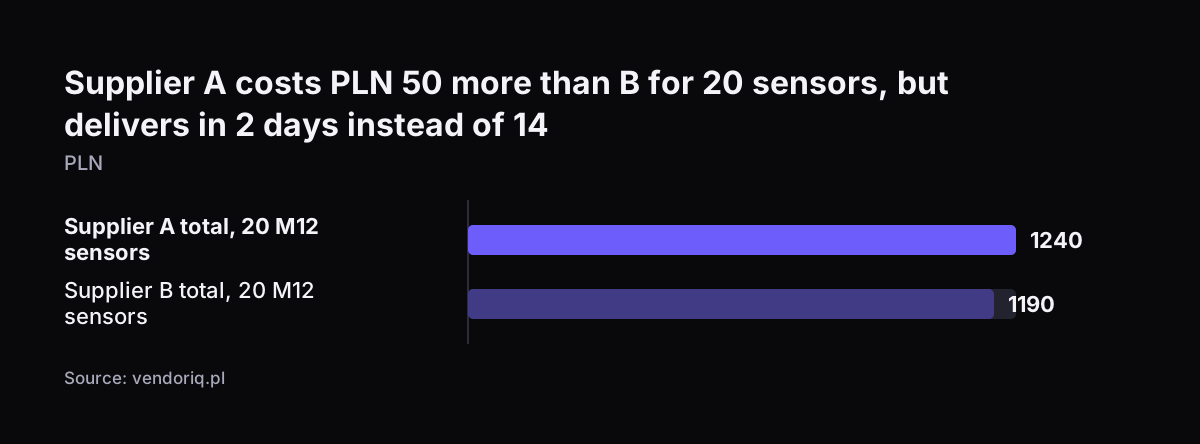
VendorIQ publishes a short illustrative example that is useful for practice. The figures are fictional, net and exclude shipping. A buyer needs 20 M12 sensors and receives three replies.

SupplierQuantity confirmedUnit priceTotalLead time
A20 unitsPLN 62.00PLN 1,2402 days
B20 unitsPLN 59.50PLN 1,19014 days
CMissingPLN 55.00Needs clarification5 days

Claude's job here is to fill these rows and flag what is wrong. Supplier C has the lowest unit price but has not confirmed the quantity. VendorIQ is clear that a low unit price is not enough in that case. Claude should mark C as incomplete and draft one question asking the supplier to confirm 20 units.

Claude should also note that freight is not included. VendorIQ advises checking freight in each reply rather than assuming it is covered.

The buyer makes the call. Quote A meets the assumed deadline and costs PLN 50 more than B. If the sensors are needed within the week, A is the usable quote. Lead time and quote validity decide whether a quote can be used at all.

If time allows, the buyer can wait for C's answer. Choosing between those options depends on knowledge of the production plan, which Claude does not have.

Supplier A costs PLN 50 more than B for 20 sensors, but delivers in 2 days instead of 14: Supplier A total, 20 M12 sensors 1240, Supplier B total, 20 M12 sensors 1190 (PLN)
Source: vendoriq.pl

Normalising units, currencies and payment terms without letting Claude do the sums

Normalising means converting every quote to the same basis before you compare it. For units, that usually means price per piece. Claude can read "box of 50" or "pallet of 1,200" from the quote and fill the pack size in its own column. The spreadsheet formula then divides the price by the pack size. Keep the conversion in a formula, so anyone can see and check it.

Currencies need a rule from finance, not from Claude. VendorIQ's system deliberately does not add different currencies into one total, because a financial comparison needs agreed conversion rules. Do the same. Record each quote in its own currency, and convert in the sheet at a rate your finance team sets.

Payment terms go in their own column. Quotal defines "2/10 net 30" as a 2% discount for paying within 10 days. On a $50,000 quote, that makes the effective price $49,000 if you pay early. Kommit AI adds a caution: keep deposits and payment timing apart from the cost total where they are not an extra charge. Record the discount and decide separately whether your cash position lets you take it.

Two more of Kommit AI's rules keep totals honest:

  • For fixed fees, multiply the recurring charge by the number of charge periods, then add required one-time fees.
  • Add variable costs only when you have their rates and an explicit usage assumption.

A supplier's minimum commitment can also run past your comparison period. Note that in the sheet, because a first-year total does not show the cost of the whole commitment.

Where the buyer checks Claude's work: a step-by-step table

The buyer's checks fall at predictable points in a quote comparison. The table sets out each step, what Claude does and what a person verifies. It draws on the Kommit AI checklist and the VendorIQ guide.

StepClaude's partBuyer's check
Read each quoteExtracts amounts, units, dates and currencyCompares extracted figures with the original, especially from scanned PDFs
Fill the templateOne row per supplier, "Not stated" for gapsNo zero where the supplier has not said "no charge"
Normalise unitsRecords the pack size quotedConfirms the pack size wording, checks the per-piece formula
TotalsNone; leaves the arithmetic to the sheetSpreadsheet formulas calculate, and the buyer reviews them
GapsDrafts clarification questionsSends them; asks for a revised quote if the scope changes
SubstitutesFlags any part that differs from the requestTakes a separate technical and purchasing decision
DecisionSummarises the trade-offsChooses the supplier and signs off

The substitutes row matters most in manufacturing. VendorIQ notes that a substitute does not automatically replace an item on the BOM, the bill of materials listing the parts and quantities required. A supplier's offer of an "equivalent" part is a question for engineering, not a line Claude should accept.

The approval gate before a quote reaches Zoho Books or your CRM

The approval gate is the point where a checked comparison becomes a purchase order or a record in another system. Keep it human. VendorIQ works the same way: the user's selection creates a purchase order draft, and sending it requires approval. Claude can prepare the draft. A named person releases it.

Connector settings let you enforce that gate in Claude itself. On Team and Enterprise plans, Owners can restrict connector actions for the whole organisation, and individual users cannot override the restriction. Restricting actions never grants more access than the source system permits; it only narrows it. Watch custom connectors that use a shared credential, because they reach whatever that credential can access.

In a Zoho setup, the comparison usually ends in Zoho Books as a purchase order or bill. Supplier contact details sit in Zoho CRM, and stock levels in Zoho Inventory. At Svennis we set the accounting connector so that Claude can read but not create purchase orders until the buyer's approval column is filled. When we see this go wrong at clients, the cause is usually a total Claude calculated that nobody recalculated in the sheet.

For each system, the connection can be a connector, an MCP server, a plugin or a skill. Svennis shows you those options with their cost, and you choose which one to build.

Ready-made Claude skills for vendor review and supplier selection

A skill is a packaged set of instructions and workflows that Claude loads for a specific task. Two published skills cover parts of supplier evaluation. Both work better for choosing a supplier than for reading individual quotes.

vendor-review

The vendor-review skill is listed as published by Anthropic, in its knowledge-work-plugins repository. It evaluates a vendor on cost, risk and a final recommendation. When you compare vendors, it produces a side-by-side matrix covering pricing, features, integrations, security, support, contract terms and references. The output ends with Proceed, Negotiate or Pass, followed by negotiation points. Its cost analysis mentions licence fees and exit costs, so it suits service and software vendors better than parts suppliers.

Supplier Selection

The Supplier Selection skill is a Claude Code skill built around three methods. A weighted scoring model balances price against quality across several criteria. Total cost of ownership (TCO) analysis uncovers hidden logistics and risk-related costs. The Analytical Hierarchy Process (AHP) resolves qualitative trade-offs, such as quality against raw cost. The skill also covers supplier pre-qualification and RFQ scoring.

Which model to run

Anthropic positions Claude Haiku 5.5 for high-volume extraction tasks, which fits reading many routine quotes. If you are unsure, Anthropic recommends starting with Claude Opus 5.5 for most workloads.

What comparing supplier quotes with Claude means for a UK purchasing team

A UK purchasing team often receives quotes in pounds from domestic suppliers and in euros from European ones. That makes the currency rule in your template essential. Agree the conversion rate and date with finance before the comparison starts, and record both in the sheet. Claude then copies amounts as quoted, and the sheet converts them.

Tax treatment needs the same discipline. Kommit AI advises putting the same work, period, currency and tax treatment side by side. In practice, that means you record whether each price includes or excludes VAT. A price inclusive of VAT set next to a net price makes the net quote look cheaper than it is.

Data location is the other UK question. Anthropic's connectors page states that connected services process data on their own infrastructure. Settings that control where Claude's inference runs do not change where third-party services operate. If quotes pass through a connected drive or accounting system, check that system's data terms as well as Claude's. The guide to how Claude runs in your company under UK law covers accounts, data and the legal side in more depth.

Supplier quotes are commercial documents. Keep the comparison in a private project, which connectors on Team and Enterprise plans require anyway. Chats with synced content cannot be shared from there.

Next steps: run one live purchase through the comparison template

The fastest way to test this is with one real purchase that already has three or more quotes. A short sequence works well:

  1. Build the template from the column list in this guide, with formulas for per-piece price and totals.
  2. Upload the quotes to a private project and give Claude the fixed instruction.
  3. Check every extracted figure against the original, and send Claude's gap questions to the suppliers.
  4. Make the decision yourself and note the reason in the sheet.
  5. Compare the result and the time spent with your usual method.

VendorIQ notes that a spreadsheet may be enough for a one-off purchase with a few complete quotes. If that describes most of your buying, stop at step five. If quotes arrive every week and the result should feed Zoho Books or your CRM, the process is worth connecting properly.

Svennis works in four steps: a Workshop, then a pilot, then the department Activation, then monthly operations. For a purchasing process, the pilot is usually Pilot Claude A, an AI agent on Claude for one process. Pilot Claude B puts Claude Team in the hands of the whole team instead. Seat and plan costs are on the Claude pricing page for UK plans.

Sources

  1. Claude Help Center: Use connectors to extend Claude's capabilities
  2. Claude Help Center: Create and edit files with Claude
  3. Anthropic: Models overview
  4. Claude Skills Library: vendor-review
  5. Supplier Selection & Evaluation: Claude Code Skill
  6. Quotal: 5 Tips for Comparing Supplier Quotes
  7. Kommit AI: How to compare supplier quotes, checklist and AI prompts
  8. VendorIQ: AI supplier quote comparison
Free, 30 minutes

Pick a time. Bring the process this article made you think of.

You leave with a clear yes or no on putting Claude on it, and the step that fits from our published prices. You speak to someone who builds the agents, not a salesperson.

Prefer to call? +44 7588 772736 · Not ready to talk? See it on your business first.

30 minutes · video call · free
  1. 1Time
  2. 2Details
  3. 3Booked