
Svennis AI
10 min read

Claude with Zoho Inventory for reordering, with a buyer signing off every order

Claude can draft reorder suggestions from Zoho Inventory stock levels, sales history and supplier lead times. This guide covers the setup, the maths and the buyer approval step.

Abstract stacked blocks falling towards a steady threshold line, suggesting stock levels and reorder points

Claude with Zoho Inventory for reordering: Claude drafts, the buyer approves

Claude with Zoho Inventory for reordering works best as a drafting job. Claude reads stock levels, sales velocity and supplier lead times. It then writes suggested purchase orders with the reasons behind them. A named buyer approves, edits or rejects each one before anything reaches a supplier, and Claude never sends an order.

A reorder suggestion is a proposed purchase of one item from one supplier. It carries a quantity, the figures behind it and any warning flags. It is a draft, not a commitment. Zoho Inventory already lets you set a reorder level and a preferred vendor for each item. Once the reorder option is switched on, it can notify you when quantity drops below that level.

That alert is useful but thin. Most stock systems raise an alert at the reorder level rather than placing an order. The alert does not tell you how much to buy. It does not tell you whether demand has shifted, or whether the supplier now takes longer to deliver. Claude can gather those facts and code can compute them, so the buyer starts from a reasoned draft instead of a bare warning.

The split of work stays simple:

  • Zoho Inventory holds the data.
  • Code does the arithmetic.
  • Claude explains the result and flags what looks wrong.
  • The buyer makes the decision and creates the purchase order.
Reorder point, safety stock and lead time, defined

Five terms carry the whole reordering process, and Claude's reorder drafts use all of them:

  • Lead time is the time between placing an order with a supplier and the goods arriving ready to sell.
  • Sales velocity is the number of units sold per period, usually per week, taken from your sales orders.
  • Safety stock is a buffer for the weeks when demand runs higher than average.
  • Reorder point is the stock level at which you place a new order. It is expected demand during the lead time plus safety stock.
  • Service level is the chance of not running out during one replenishment cycle.

A common safety stock formula is z × σ × √L. Here z comes from the service level you choose. σ is the standard deviation of demand per period, and L is the lead time in the same periods. The usual z values are 1.28 for 90%, 1.65 for 95%, 1.96 for 97.5% and 2.33 for 99%.

When supplier lead times swing as well, a fuller version is z × √(L × σ² + d² × σL²). In this version, d is average weekly demand and σL is the standard deviation of lead time.

One more term matters. Censored demand is demand that your records understate because the item was out of stock. Low sales in those weeks reflect a supply gap, not lower interest. A reorder point built on censored weeks comes out too low.

What Zoho Inventory already holds for reorder drafting

Zoho Inventory holds most of the inputs a reorder suggestion needs, spread across items and sales orders. It tracks stock across multiple warehouses and locations, and its API exposes stock quantities per location. A reorder suggestion can therefore name the warehouse that is short, not just the item.

The data sits behind Zoho Inventory's /items and /salesorders endpoints, as Truto's Zoho Inventory integration notes set out. Items give you stock on hand per location, the reorder level, the preferred vendor and the SKU. Sales orders give you the line items and dates from which code works out sales velocity.

Products with variants need care. Zoho Inventory handles variants through Item Groups. Velocity and reorder points therefore belong at the level of each variant's SKU, not the group as a whole. Composite items can need separate handling too, so check how yours are set up before the first run.

Supplier lead time is the input most often missing or stale. If you do not hold it somewhere you trust, agree one place for it, owned by the buyer. Give Claude that source and nothing else. Without a current lead time, every reorder point downstream is a guess.

Connecting Claude to Zoho Inventory with read-only access

Claude should connect to Zoho Inventory with read access only. A reorder draft needs to read items and sales orders. It never needs to create, change or delete a record, so the connection should not allow it.

Zoho Inventory uses OAuth 2.0. With OAuth you authorise a connection with chosen permissions rather than handing over a password. Set those permissions to read before you run a single draft. If you plan to connect through MCP, the Model Context Protocol that lets Claude call tools in other systems, the step-by-step MCP setup guide walks through the same pattern on another Zoho app.

Zoho Inventory enforces organisation-level API rate limits that vary by plan. A reorder run that requests every item one by one during the working day can hit them. Pull the data once on a schedule, for example overnight, and let Claude work from that snapshot.

Purchase order creation is a separate capability. Some integration layers only build it on request, which suits this design. The buyer creates the purchase order in Zoho Inventory from the approved draft. That leaves no write path for Claude to misuse, and every order has a person's name on it.

Let code calculate the reorder point and Claude explain it

Code should calculate every reorder figure, and Claude should read the result. Language models make arithmetic slips when they reason through numbers rather than calculate them. A slip in a standard deviation turns into a wrong order quantity that still looks plausible.

Claude can run code itself through the code execution tool. All current Claude models support tool use. The Models API returns a capabilities object for each model. Its server_tools entry reports whether the model accepts the web search and code execution tools, so check it before you depend on either.

Your organisation's settings can still block a supported tool. Anthropic's documentation gives the example of an administrator disabling web search, which makes requests that use it fail. Confirm with whoever manages your Claude organisation that code execution is allowed.

With the maths handled, Claude does the work it is good at. It compares this run's inputs with the last run's and writes the reasons in plain English. It also spots patterns a formula misses:

  • weeks at zero stock that suggest censored demand;
  • a lead time that changed since the last run;
  • a season the sales history does not cover.

Stockouts usually come from bad inputs rather than bad maths. Those flags therefore carry most of the value in a reorder draft.

Worked example: one item from stock check to draft purchase order

This worked example follows one variant SKU held in two warehouses, from data pull to the buyer's decision. The buyer has chosen a 95% service level, so z is 1.65. Lead time is measured in weeks, the same period as demand.

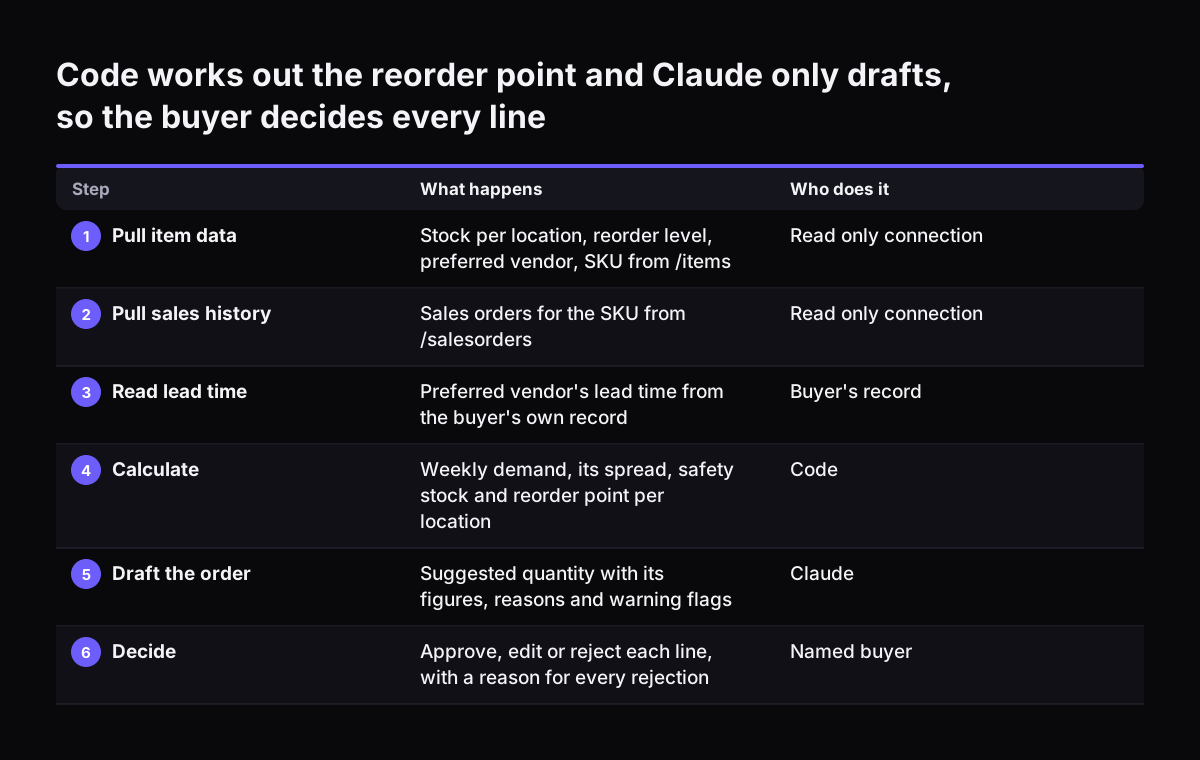
  1. Pull the item from /items: stock on hand per location, the reorder level, the preferred vendor and the SKU.
  2. Pull sales orders from /salesorders for that SKU, covering at least 26 weeks and ideally 12 months.
  3. Read the lead time for the preferred vendor from the buyer's lead time record.
  4. In code, work out average weekly demand d and its standard deviation σ for each location.
  5. Calculate safety stock as 1.65 × σ × √L, and the reorder point as d × L plus safety stock.
  6. Compare the busiest quarter with the quietest. If the busiest is more than about 1.5 times the quietest, flag that a single yearly reorder point will be wrong half the time.
  7. Hand the figures to Claude, which writes the suggestion and its flags.
  8. The buyer approves, edits or rejects it, then creates the purchase order in Zoho Inventory.

Claude's output for one line reads like this:

Suggest reorder of [SKU] for [warehouse] from [preferred vendor]. Stock on hand is below the calculated reorder point. Lead time last confirmed on [date]. Flag: the item was at zero stock for part of the history, so demand may be understated. Flag: the busiest quarter is well above the quietest; consider a separate peak reorder point.

Every figure in that line came from code. Claude chose the words and the flags. The buyer still has to say yes.

Code works out the reorder point and Claude only drafts, so the buyer decides every line. What happens / Who does it. 1. Pull item data: Stock per location, reorder level, preferred vendor, SKU from /items / Read only connection; 2. Pull sales histor

Why the buyer approves every purchase order, and what they check

The buyer approves every purchase order because the most important facts often sit outside the system. One LinkedIn discussion of agents in commerce puts it plainly. A contract exception that only lived in an account rep's memory, never set up as a rule, is invisible to an agent. Supplier minimums agreed by phone or a price rise announced last week fall into the same gap.

Make approval quick so that it actually happens. Send the draft list to where the buyer already works, for example a Teams channel. The guide to connecting Claude to Microsoft 365 and Teams covers that side. Give each line three choices, approve, edit or reject, and ask for a short reason with every rejection.

The buyer can also check spend before committing. If you run Zoho Books, its Registers API returns budget versus actuals for an account register. The period is monthly by default, with quarterly, half-yearly and yearly also allowed. Listing register transactions needs only a read scope, ZohoBooks.accountants.READ. Claude can therefore add a budget line to the draft without write access to your books, the same habit as in Claude with Zoho Books for month-end close.

Rejections are data. Keep the reason with the rejected line and review the pattern each month. Repeated rejections for one supplier usually point to a stale input, not to a fault in the buyer.

Reorder inputs to check before a buyer trusts the draft

Each input to a reorder suggestion has a typical way of going wrong. The buyer should know which one to check first on each line.

InputWhere it comes fromHow it goes wrongWhat to check on the draft
Stock on handZoho Inventory items, per locationStock counted against the wrong warehouseThe location named on the line
Sales velocitySales orders, at least 26 weeksWeeks out of stock understate demandThe censored demand flag
Supplier lead timeThe buyer's lead time recordCopied from an old quoteDate last confirmed with the supplier
Service levelSet by the buyerSame level used for every itemThe z value used on the line
SeasonalityQuarterly sales comparisonOne reorder point for the whole yearThe peak and off-peak flag
Preferred vendorZoho Inventory itemSupplier changed, item not updatedThe vendor named on the line

When Svennis sets up reorder drafting, we keep the Zoho Inventory connection read-only and leave purchase order creation with the buyer. The failure we see most often is a supplier lead time copied once from a quote and never confirmed again.

Recalculate reorder points monthly for fast-moving lines and quarterly for the rest. Ask Claude to list any lead time not confirmed since the last run, at the top of the draft.

Which Claude model to run each reordering step on

Start the drafting step on Claude Opus 5.5, and move high-volume extraction to a smaller model. The Claude models overview recommends Opus 5.5 for most workloads when you are unsure. Anthropic also states that Opus 5.5 costs 40% less to run than Claude Opus 5.

ModelReordering stepListed price per million tokens (input / output)
Claude Opus 5.5Writing the draft list, reasons and flags$4 / $20
Claude Sonnet 5.5Everyday drafting where speed matters more than depth$2 / $10
Claude Haiku 5.5Extracting dates from supplier confirmationsFrom $0.10 / from $0.50

Anthropic positions Haiku 5.5 for high-volume, latency-sensitive tasks such as classification, extraction and routing. That fits reading supplier order confirmations to update the lead time record. Anthropic describes Sonnet 5.5 as running 30% faster than the Sonnet model before it, and costing up to 30% less for most work.

All current models have a 1M token context window, so a full item list and its sales history fit in one request. That is a capacity, not a reason to send everything. A smaller, cleaner snapshot is easier for the buyer to check against the draft.

What reordering with Claude means for a UK company buying abroad

For a UK company, reordering with Claude raises three practical points: currency, language and locations. Anthropic lists Claude prices in US dollars. The running cost of reorder drafting therefore moves with the exchange rate, so budget for it in sterling with a margin.

If you buy from suppliers in Germany, Italy or Romania, their confirmations may arrive in German, Italian or Romanian. All current Claude models support multilingual input. Claude can read a confirmation in the supplier's language and pull out the promised dispatch date. It can then propose an update to the lead time record the buyer owns, with the original message attached.

If you hold stock in a UK warehouse and another on the Continent, keep reorder points per location. Zoho Inventory exposes stock per location through its API. Claude's draft can therefore say which warehouse is short and which supplier should fill it. A single company-wide figure hides a shortage in one place behind surplus in another.

The approval rule does not change with geography. Whoever signs purchase orders today keeps signing them. Claude only changes what lands in front of that person, and how quickly.

Next steps: run reorder drafts alongside your buyer before you rely on them

The practical first step is a parallel run. Claude drafts, the buyer orders as usual, and you compare the two. A sensible order of work:

  1. Pick a short list of fast-moving items with reliable sales history.
  2. Confirm the current lead time for each preferred vendor and record the date.
  3. Agree a service level per item group with the buyer.
  4. Connect Claude to Zoho Inventory with read access only, and pull a scheduled snapshot.
  5. Run drafts for one buying cycle next to the buyer's own orders, and log every difference.
  6. Widen the item list only when the differences come down to inputs the buyer can fix.

Before you connect anything, read how to set Zoho permissions for what Claude sees, because the read-only rule starts there. If you are weighing whether to build this yourself or bring in help, the comparison of building, buying or partnering for AI sets out cost, ownership and exit.

Sources

  1. 1. Models overview, Claude Platform Docs
  2. 2. Newsroom, Anthropic
  3. 3. Zoho Inventory API Integration on Truto
  4. 4. Registers, Zoho Books API Documentation
  5. 5. LinkedIn discussion on Claude and inventory systems

Related articles