
Svennis AI
10 min read

Multilingual customer replies with Claude in Zoho Desk, with a human check

A practical guide to Claude drafting customer replies in English, German, Romanian and Italian inside Zoho Desk. Set the language, keep terms and tone consistent, and have a person approve every reply.

Abstract pattern of parallel flowing lines that split into four streams and rejoin at a single checkpoint

Multilingual customer replies with Claude: draft by machine, send by a person

Multilingual customer replies with Claude work best when Claude drafts and a person sends. You state the customer's language in the system prompt. You give Claude a glossary and tone rules for each market. Every draft stays in the Zoho Desk ticket until an agent approves it, so nothing reaches a customer unchecked.

A multilingual reply draft is a proposed answer that Claude writes in the customer's own language. Claude bases it on the ticket and on content you have approved. An agent then edits and sends it. This guide covers English, German, Romanian and Italian, the four languages this site serves.

One setup can handle all four. Anthropic's customer support guide says Claude can hold conversations in over 200 languages without a separate chatbot for each one. In practice, that means you need one workflow and four rule sets, not four separate systems.

The rest of this guide follows the order you would build in. First, set the language reliably. Next, write the glossary and tone rules. Then decide which tickets Claude may draft, design the human check, pick a model and measure the results.
State the reply language in the system prompt instead of letting Claude guess

Claude can detect a customer's language. Even so, a production workflow should state the reply language outright. Anthropic's multilingual support documentation says Claude infers the language from the conversation. For production applications, it says you should name the target language explicitly.

The system prompt is the standing instruction that Claude reads before every message in a conversation. Anthropic calls it the most reliable place to set the response language, because the instruction stays stable across every turn. When the language is chosen at runtime, the documentation advises inserting that choice into the system prompt. You should not rely on Claude to infer it from the customer's message.

For a Zoho Desk workflow, the language should therefore come from data, not from a guess. Keep a language value on the contact or the ticket. A web form can set it, or an agent can. Your integration then writes that value into the system prompt before each draft.

This matters in real tickets. A German customer may paste an English error message. An Italian customer may reply below a quoted English email. Claude could detect either message as English, and an explicit instruction removes that risk.

Send text in its native script as well. Anthropic advises native script over transliteration. Keep Romanian ș and ț and German ß in the ticket text rather than stripping them out before Claude sees them.

A glossary and tone rules per market keep terminology and voice consistent

A glossary and a short tone sheet for each market keep Claude's terms and voice the same from one reply to the next. Without them, Claude may translate the same product term three different ways in three replies. It may also switch between formal and informal address.

A glossary is a list of the terms your company uses, with the one approved form of each term in each language. Keep it short and practical. Each entry needs four things:

  • The term as it appears in English, your source language.
  • The approved form in German, Romanian and Italian.
  • A flag for terms that must never be translated, such as product and plan names.
  • Words your market owner does not want used at all.

Tone rules cover the choices a native speaker would notice. These include the form of address, how a reply opens and closes, and how far an apology goes. Do not write these rules yourself if you do not speak the language. Ask the person who owns each market to write and approve them.

At Svennis we keep each market's glossary and tone rules in their own file next to the system prompt. A native speaker on the client's team signs them off before the first draft goes live. Where that sign-off is skipped, we see product names translated that should have stayed in English.

Tone is one reason teams pick Claude for this job. A comparison guide from aibox365 says Claude tends to keep tone more naturally than GPT in translated, customer-facing replies.

System prompt template for English, German, Romanian and Italian replies

A system prompt template for multilingual drafting has four fixed parts. It sets the role, the language, the market rules and the limits. Your integration fills the language and the market files in for each ticket. The rest stays the same. Here is a starting version you can adapt, with the variable parts in square brackets.

You draft replies to customer support tickets for [company name]. An agent will review and edit every draft before it is sent.

Write the reply in [language]. The customer's message may contain other languages. Always reply in [language] anyway.

Use only the terms in the glossary below. Never translate any term marked "keep in English".

Follow the tone rules below for [market].

Use only the facts in the ticket and in the reference content provided. If the answer is not there, say what is missing in a note to the agent. Do not write a guess.

After the draft, write a two-line summary in English for the agent: what the customer asked, and what the draft says.

[glossary for this market]

[tone rules for this market]

Three lines carry most of the weight. The first is the explicit language line. The second is the instruction to report missing facts instead of inventing them. The third is the English summary, which lets an agent check the meaning of a Romanian or Italian draft they cannot fully read.

Keep the reference content out of the template itself. Anthropic's support guide warns that putting every piece of information into the prompt raises costs, slows responses and can hit context window limits.

Which tickets Claude may draft, and which an agent should write from the start

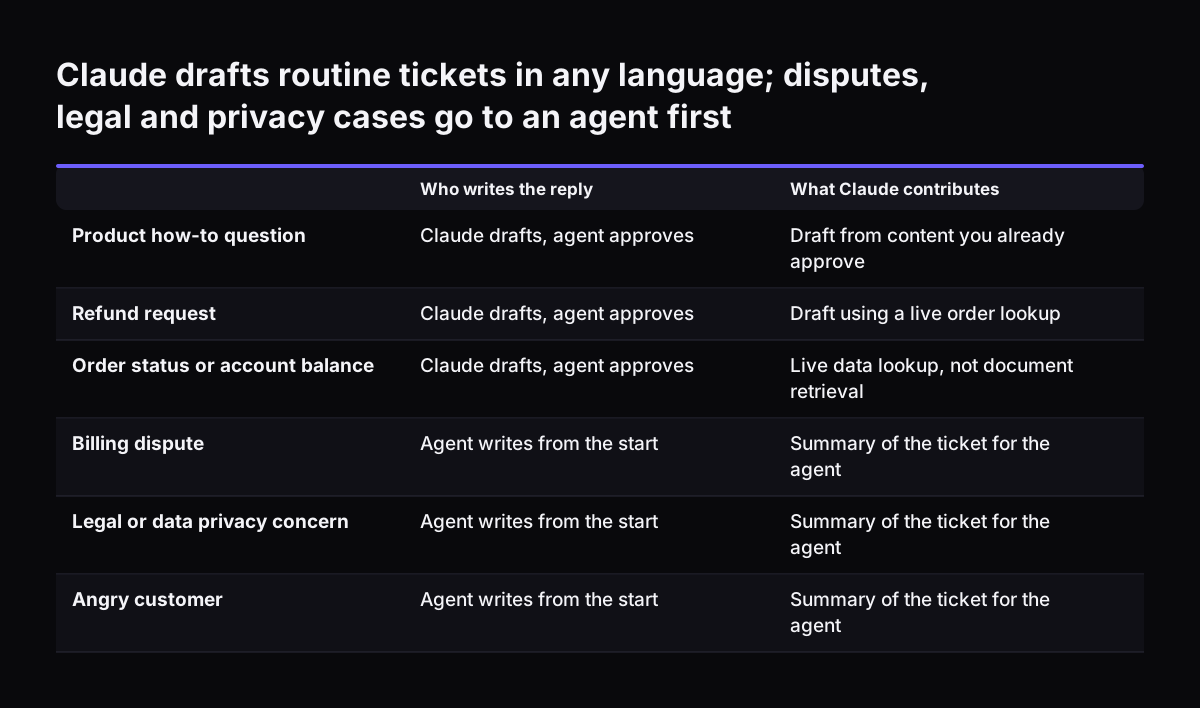
Claude should draft routine tickets in every language. Sensitive tickets should go to an agent first, with Claude only summarising them. The aibox365 guide recommends flagging billing disputes, legal concerns, data privacy issues and angry customers for human review. The same guide describes Claude as well suited to sensitive issues and refund requests where brand tone matters.

Live data needs its own rule. Anthropic's support guide says embedding-based RAG is not enough for questions that need real-time information, such as account balances or policy details. RAG, retrieval-augmented generation, means fetching relevant documents and adding them to the prompt. For live answers like order status, Claude needs a direct lookup through tool use instead.

Ticket typeWho writes the first versionWhat Claude needs
Product how-to questionsClaude draftsApproved help content, retrieved per ticket
Order or account statusClaude draftsA live lookup through tool use, not stored documents
Refund requestsClaude drafts, agent checks policyYour refund policy and the order record
Billing disputesAgent writesClaude summarises the thread in English
Legal concernsAgent writesClaude summarises the thread in English
Data privacy requestsAgent writesClaude summarises the thread in English
Angry customersAgent writesClaude summarises and flags the tone

Sorting tickets into these types takes a classification step. Anthropic's guide notes that a separate intent classifier means one more call to Claude, which can add latency. That cost is usually acceptable when a person reviews the draft anyway.

Claude drafts routine tickets in any language; disputes, legal and privacy cases go to an agent first. Who writes the reply / What Claude contributes. Product how-to question: Claude drafts, agent approves / Draft from content you already approve; Re

The human check before sending: how an agent reviews a Claude draft

The human check is the step where an agent reads, edits and approves each Claude draft before the customer sees it. In this design, the check is never optional. The aibox365 guide notes that most support teams use AI to assist agents, not to replace them.

A good review takes the agent through four checks, in this order:

  1. Read the English summary and confirm that it matches what the customer asked.
  2. Check every fact in the draft against the ticket, the order record or the policy.
  3. Check glossary terms and the form of address against the market's tone rules.
  4. Edit if needed, then send from the ticket as usual.

Language skills decide who can do step three. Where possible, route German, Romanian and Italian drafts to an agent who reads that language. Where nobody does, the English summary still lets the agent confirm the meaning. Ask the market owner to sample those replies each week.

Escalation should carry context with it. One vendor of a Claude-based inbox describes Claude handing complex cases to human agents with a conversation summary. The same idea works in Zoho Desk. When a ticket moves to a specialist, the English summary moves with it.

For a working example of Claude in front of a helpdesk, see our post on a Teams service desk built on Claude and Zoho Desk.

Choosing a Claude model for multilingual drafting: price, context and retirement dates

Anthropic's models overview says to start with Claude Opus 5.5 for most workloads if you are unsure which model to use. For drafting replies that a person reviews, Claude Sonnet 5.5 or Claude Haiku 4.5 can be enough. Test each language before you decide. The support guide frames the choice as a trade-off between cost, accuracy and response time.

ModelPrice per million tokens (input / output)Context windowRetired not sooner than
Claude Fable 5.1$10 / $501M tokens1 September 2027
Claude Opus 5.5$4 / $201M tokens22 September 2027
Claude Sonnet 5.5$2 / $101M tokens28 September 2027
Claude Haiku 4.5$1 / $5200K tokens15 October 2026

Claude Haiku 4.5 is the cheapest model, but its retirement date is close. If you build on it, plan the move to a newer model now. Anthropic says Claude Sonnet 5.5 runs 30% faster and costs up to 30% less than its predecessor for most work. Opus 5.5 costs 40% less to run than Claude Opus 5.

Quality differs by language. Anthropic publishes multilingual scores as a percentage of English performance and says the strongest results come in widely spoken languages. In that table, Haiku 4.5 scores 52.7% on Yoruba, so less common languages deserve their own tests. Our post on moving from Claude Opus 5 to Opus 5.5 covers how to test a model change.

Worked example: a German refund request from incoming ticket to sent reply

A German refund request shows how the pieces fit together. A customer in Germany writes to your support address in German. They quote an English order confirmation and ask for a refund on a damaged item. Zoho Desk creates the ticket, and the contact record already shows German as the customer's language.

  1. The classification step labels the ticket as a refund request. Under the table above, Claude may draft it.
  2. The integration builds the system prompt with "German" as the language and loads the German glossary and tone rules.
  3. Claude fetches the order through a live lookup. In many setups the order sits in Zoho CRM, reached as described in our guide to connecting Claude to Zoho CRM with MCP.
  4. Claude writes the draft in German and keeps the product name in English as the glossary requires. It adds a two-line English summary for the agent.
  5. The refund policy does not say whether photos are needed. Claude notes that gap for the agent instead of inventing a rule.
  6. A German-speaking agent checks the order details and the form of address, adds the photo request and sends the reply.

The quoted English text in the email did not change the reply language, because the language came from the record. The missing policy detail did not become a promise to the customer, because the prompt told Claude to report gaps. The agent's edit took one sentence, not a full reply.

Measuring whether Claude's drafts are good enough in each language

Measure draft quality separately for each language. A good average can hide one weak market. Anthropic's support guide gives targets you can adapt for drafts that a person reviews:

  • Query comprehension accuracy of 95% or higher.
  • Escalation accuracy of 95% or higher.
  • Maintained or improved customer sentiment in 90% of interactions.
  • A customer satisfaction score of 4 out of 5 or higher.

Escalation accuracy is the share of tickets correctly sent to a person, compared with those that should have been sent but were not. For this workflow, that means a billing dispute in Italian is caught as reliably as one in English. The same guide also recommends 100% accuracy for basic company and product information. Your glossary is where that accuracy starts.

The aibox365 guide adds measures your team will recognise. These are first response time, resolution time, CSAT and agent time saved per ticket. Track each one by language.

One extra measure is worth tracking: how much agents change each draft. If agents rewrite most Romanian drafts but only adjust German ones, the Romanian glossary or tone rules need work. The model may not be the problem. Review those edits with the market owner each month and update the files.

What multilingual drafting means for a UK, German, Romanian or Italian company

Multilingual drafting changes who your support team needs, not whether you need one. A UK company selling into Germany, Romania and Italy can draft replies in all four languages from one Zoho Desk. It no longer needs a fluent writer for every market on every shift. It still needs someone who owns each language.

A company based in Germany, Romania or Italy usually starts from the other end. It has fluent agents for its home market and writes English replies to export customers less confidently. The same setup works in reverse. English becomes one more market with its own glossary and tone rules.

Three practical points apply whichever country you work from:

  • Name an owner for each language who approves the glossary and samples sent replies.
  • Check how customer data reaches Claude before you go live, using our GDPR checklist for Claude.
  • Keep your source content, such as the help centre and policies, in one language. Let Claude draft from it, so you maintain one version of the facts.

The last point matters more than it seems. If your refund policy exists in four separately edited versions, Claude will draft four slightly different policies. One source document with a glossary for each market keeps every customer on the same terms.

Next steps: start with one market, one ticket type and a named reviewer

Start small: one language beyond your main one, one ticket type and one reviewer who reads that language. Product how-to questions are a good first choice, because the answers come from content you already approve.

  1. Pick the market and ask its owner to write the glossary and tone rules.
  2. Add a language value to your Zoho Desk contacts or tickets, and fill it for existing customers in that market.
  3. Adapt the system prompt template above and test it on past tickets before any live customer sees a draft.
  4. Run live drafts with the reviewer approving every one, and track the edits.
  5. Add the next ticket type, then the next language, once the edit rate settles.

If your team also handles incoming email outside the helpdesk, our guide to email triage and drafting with Claude applies the same drafting pattern there. For an overview of where Claude fits across a support operation, read AI for customer support, explained.

Sources

  1. 1. Anthropic newsroom
  2. 2. Models overview, Claude Platform Docs
  3. 3. Multilingual support, Claude Platform Docs
  4. 4. Customer support agent, Claude Platform Docs
  5. 5. Best AI for Customer Support 2026, aibox365
  6. 6. Claude AI Connector: Automate Support 2026, LetsBot

Related articles