
Svennis AI
10 min read

Claude in Slack for internal support that routes tickets properly

The Slack chat window is the easy part. This guide shows how to wire Claude into your ticketing system so internal requests are routed, logged and escalated, not just answered.

Abstract flowing lines converging from many small points into one ordered stream that splits into separate lanes

What Claude in Slack for internal support actually involves

Claude in Slack for internal support means putting Anthropic's assistant in the Slack channels where your staff already ask for help with laptops, access, expenses or policies. The appeal is plain. People stop hunting for the right form, and the first answer arrives quickly.

The chat window is the easy part. A workspace administrator installs the Claude app from the Slack App Marketplace, and the assistant can reply in a channel the same day. What decides whether it helps is what sits behind it: the ticketing system that records each request, routes it to the right team and keeps a history you can audit.

An assistant that only answers creates a second, invisible support queue. Nobody counts the questions, nobody sees the answers that were wrong, and the requests that needed a person disappear into a thread. Your support team then works from two places and trusts neither.

This guide explains how to avoid that. It covers which Slack option fits your Claude plan, what the assistant may answer from, how it hands work to a person, and how logging and review work. It ends with a go-live checklist, including the data protection items a UK company should complete before staff start using it.
The terms you need first

A few words appear throughout this post. Here is what each one means.

  • Claude Tag. Anthropic's organisation-managed @Claude in Slack. It runs as your organisation's shared identity with access configured by an administrator, rather than under any one member's account. Anyone in a channel can tag @Claude and delegate a task to it.
  • Claude Code in Slack. The earlier Slack integration, built around coding tasks. Each session runs under the individual user's own Claude account and plan limits.
  • Routing mode. A setting in Claude Code in Slack. "Code only" sends every @mention to a coding session. "Code + Chat" analyses each message and sends coding tasks to Claude Code and writing, analysis and general questions to Claude Chat.
  • Model Context Protocol (MCP). An open standard for connecting AI tools to external data sources. It is the usual way to give Claude controlled access to a system such as a helpdesk.
  • Ticketing system. The helpdesk software where support requests are recorded, assigned, tracked and closed.
  • Routing. In this post, the support meaning: deciding which team or person should handle a request, and putting it in their queue.

Note that the two routings are different things. The Slack routing mode decides which part of Claude handles a message. Support routing decides which of your people handles a request. This guide is about the second.

Which Slack option fits your Claude plan

Your Claude plan decides which Slack integration you can use. Anthropic introduced Claude Tag in beta for Claude Enterprise and Team customers, starting on Slack, where Claude joins as a team member. Claude Tag replaces the existing Claude in Slack app, and administrators can opt in to migrate within 30 days.

Claude Tag is not available on Pro and Max individual plans. For those plans, Claude Code in Slack remains the setup path, and it has limits that matter for a support desk.

PointClaude TagClaude Code in Slack
PlansTeam and Enterprise, in betaPro, Max, Team or Enterprise with Claude Code access
Whose identityThe organisation's shared @ClaudeEach user's own account and plan limits
Access controlAdministrators set tools and information per channelPer user, through connected repositories
Built forDelegating tasks from a channelCoding tasks, with repositories on GitHub
Where it worksSlack channelsPublic or private channels, not direct messages

For a shared internal support channel, Claude Tag is the better fit. A support assistant should behave the same way whoever asks, and it should draw on sources the organisation chose, not on whatever one employee has connected. If you are on individual plans, treat Slack as a place for personal help rather than a support desk.

Decide what the assistant may answer from

Before anyone tags @Claude, write down what it is allowed to use. With Claude Tag, administrators specify which tools and information Claude can access in which channels, and everything, including its memories, stays scoped to the channels the administrators define. That gives you a clean way to keep the support channel separate from, say, finance.

Claude can also learn from other Slack channels and data sources if it is granted permission, though Anthropic states it does not report from private channels. Be deliberate here. A busy general channel is full of guesses and outdated advice, and you do not want those repeated as fact.

A sensible first scope

  • Your published IT and HR knowledge articles, in their current approved versions.
  • Read access to ticket status, so staff can ask "where is my request?"
  • Permission to create tickets, but not to close or reassign them.
  • No access to payroll, personnel files or anything a manager would not share in an open channel.

Keep channel membership tight as well. Anthropic's Slack documentation warns that Claude may follow directions from other messages in the conversation, so it should only be used in trusted conversations. A support channel open to guests or external contractors is not a trusted conversation.

Wire it into the ticketing system, not beside it

This is the part that decides whether the project works. Every request that reaches the assistant should end up as a record in your ticketing system, whether Claude answered it in full or not. An answered question becomes a ticket that is opened and resolved in one step. A request that needs a person becomes a ticket in the right queue.

In practice that means giving Claude a tool that can create and look up tickets in your helpdesk, for example Zoho Desk. The usual route is an MCP server that exposes a small set of actions: create ticket, set category and priority, add a note, read status. Keep the list short. Our guide to scoping an MCP server for your own system explains how to decide which actions to expose.

Routing then becomes a design decision you control. Define the categories your support teams actually use, the fields each ticket needs, and which queue each category lands in. Claude fills those fields from the conversation, and your helpdesk rules do the rest.

At Svennis we define the ticket fields and escalation rules before the assistant answers a single question in the channel. Where we see this go wrong at clients, the bot was installed first and the ticketing connection was left for later, which usually means never.

For a worked version of the same pattern in Microsoft Teams, see our Teams service desk example.

Escalation to a person

An internal support assistant needs a clear rule for when it stops and hands over. Without one, it keeps trying, and staff lose patience or accept a poor answer. Write the rule down and put it in the assistant's instructions for the channel.

When to hand over

  • The approved sources do not cover the question.
  • The request needs an approval, such as new software, extra access or a purchase.
  • The request touches personal or sensitive matters, such as health, pay or a grievance.
  • The person asks for a human, or repeats the same question after an answer.

How to hand over

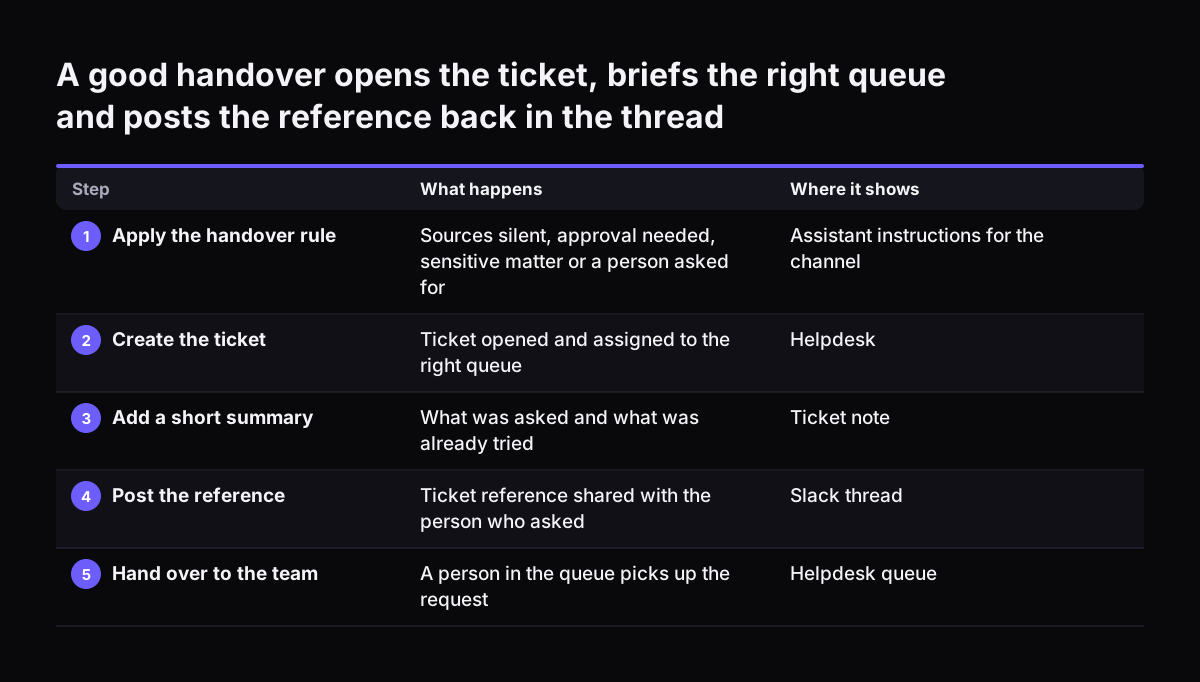
A good handover creates the ticket, assigns it to the right queue, adds a short summary of what was asked and what was already tried, and replies in the thread with the ticket reference. The person then knows the request exists and where it is. The agent picking it up does not have to ask the same questions again.

Claude Tag has an optional "ambient" behaviour. When it is enabled, Claude proactively flags information and follows up on threads or tasks that have gone quiet without being resolved. In a support channel that can catch requests that slipped, but decide first whether you want the assistant chasing your own staff. Start with it off and turn it on once the routing is reliable.

A good handover opens the ticket, briefs the right queue and posts the reference back in the thread. What happens / Where it shows. 1. Apply the handover rule: Sources silent, approval needed, sensitive matter or a person asked for / Assistant instru

A worked example: the #it-help channel

Take a company with a Slack channel called #it-help and Claude on a Team plan. Here is how a well-wired setup handles one request.

  1. Setup. A workspace administrator installs the Claude app from the Slack App Marketplace and opts in to Claude Tag. In the Claude Tag settings, the administrator scopes #it-help to two sources: the IT knowledge articles and the helpdesk tool with create and read actions. A token spend limit is set for the channel.
  2. The request. A sales manager posts: "@Claude my VPN will not connect since this morning."
  3. The answer. Claude finds the VPN troubleshooting article and replies in the thread with the steps. It creates a ticket in the category "Network", marks it resolved by the assistant, and gives the reference.
  4. The follow-up. The manager replies that the steps did not work. Claude reopens the ticket, adds a note of what was tried, sets it to the network queue, and tells the manager a person will pick it up.
  5. The human step. An IT engineer takes the ticket in the helpdesk, sees the full history, and fixes a certificate problem.
  6. The review. On Friday, the IT lead compares the Claude Tag action log with the week's tickets from #it-help and checks that each request has a matching ticket.

Nothing in this example depends on Claude being clever. It depends on the scope, the ticket fields and the handover rule being set before go-live.

Logging, review and spend

Logging has two layers, and you need both. The first is in Claude. With Claude Tag, administrators can view a log of everything @Claude has done and who requested each task. That tells you what the assistant did and on whose behalf.

The second layer is your ticketing system. It holds the business record: category, priority, queue, resolution and time taken. Only this layer lets you report on support volumes and spot patterns, such as a rise in password resets after a system change.

A weekly review routine

  • Match the Claude action log against tickets created from the channel. Any gap means a request was answered without a record.
  • Sample a handful of resolved-by-assistant tickets and check the answer against the approved article.
  • Read the escalated tickets and ask whether the assistant should have handled any of them, or handed over sooner.
  • Update the knowledge articles where answers were weak.

Cost needs the same attention. Administrators can set token spend limits for the whole organisation and for individual channels, so a support channel cannot quietly consume the budget meant for other teams. Keep one control in reserve as well: removing the Claude app from a workspace immediately revokes access for all users in that workspace.

What Anthropic says about retention

Take retention facts from Anthropic's own privacy pages, not from resellers or procurement listings. The relevant page on how long Anthropic stores data covers its consumer products, such as Claude Free, Pro and Max. If staff use individual plans in Slack, these rules apply to them.

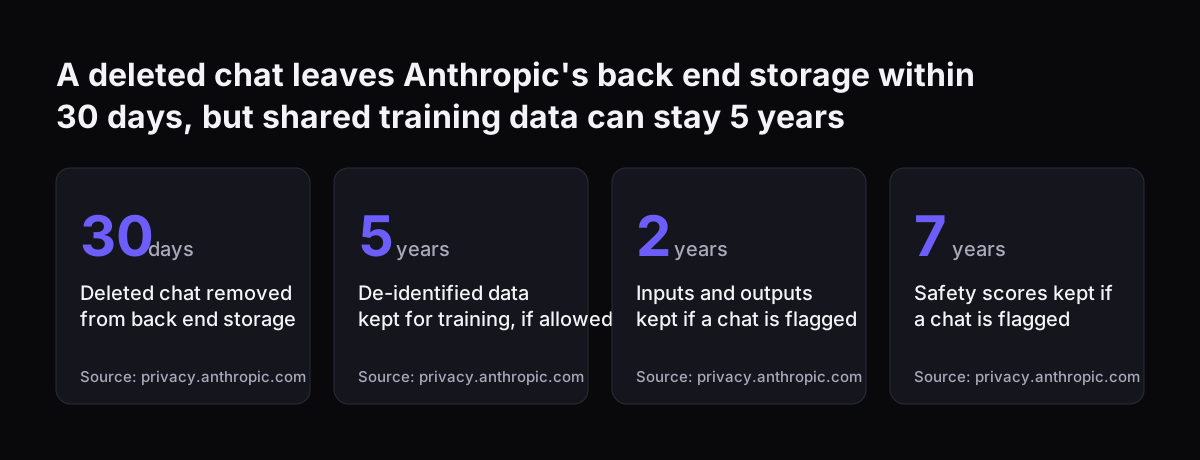
  • A deleted conversation is removed from chat history immediately and from back-end storage within 30 days.
  • If a user allows chats to be used to improve Claude, Anthropic may keep that data in de-identified form for up to 5 years in model training pipelines.
  • Turning the model improvement setting off stops previous and new chats being used for future training, though data stays in training runs already in progress and in models already trained.
  • If a chat is flagged as violating the Usage Policy, inputs and outputs are kept for up to 2 years and trust and safety classification scores for up to 7 years.
  • Data tied to feedback, such as a thumbs up or down, is kept for 5 years.

The consumer page does not describe Team and Enterprise plans, which Claude Tag requires. For those, read Anthropic's commercial terms and its own trust documentation for retention, certifications and data locations before you sign off. Our GDPR checklist for Claude sets out what to look for.

A deleted chat leaves Anthropic's back end storage within 30 days, but shared training data can stay 5 years: Deleted chat removed from back end storage 30 days, De-identified data kept for training, if allowed 5 years, Inputs and outputs kept if a c
Source: privacy.anthropic.com

What this means for a company in the UK

An internal support channel processes personal data about your own staff: names, roles, device details and sometimes the content of their problems. That puts it within your data protection obligations as an employer, even though no customer is involved.

Five pieces of paperwork matter most. Add the assistant to your record of processing, stating what staff data flows to Anthropic and why. Confirm that Anthropic's data processing terms cover Claude Tag, because UK GDPR requires a written contract with any processor that handles personal data on your behalf.

Update the privacy notice for staff so employees know an AI assistant handles support requests and that its actions are logged. Confirm the transfer safeguard that covers personal data leaving the UK, using the terms Anthropic offers for your plan. Decide whether you need a full DPIA and write down the decision and your reasons, particularly if the assistant can see HR matters.

Two practical points follow from the product facts. Claude Tag is in beta, so review the setup again when Anthropic changes it, and note the 30-day window to migrate from the older Slack app. Second, check which plans your staff actually use. A mix of company Team seats and personal Pro accounts in the same Slack workspace means two sets of retention rules for the same kind of conversation.

Go-live checklist

Use this table before you open the channel to staff. Each row should have an owner and a date.

AreaWhat must be true before go-live
Plan and appTeam or Enterprise plan, Claude app installed by a workspace administrator, Claude Tag enabled
ChannelOne dedicated support channel, members limited to staff, no external guests
Answer sourcesApproved knowledge articles listed and scoped to the channel, sensitive sources excluded
Ticketing connectionTool connected to the helpdesk with create, update note and read status actions only
RoutingCategories, required fields and target queues defined and tested with sample requests
EscalationWritten handover rule, ticket reference always posted in the thread
Ambient behaviourOff at launch, reviewed after the first month
SpendToken spend limit set for the channel and the organisation
Logging and reviewWeekly match of the Claude action log against helpdesk tickets, named reviewer
Data protectionRecord of processing updated, Anthropic's data processing terms confirmed to cover Claude Tag, privacy notice for staff updated, transfer safeguard confirmed, DPIA decision recorded
ExitNamed person who can remove the app, which revokes access for everyone immediately

Practical next steps

Start with the ticketing side, not the chat side. List the ten or so request types your support team handles most often, the category and queue for each, and the fields a ticket needs. That list becomes the routing design and the test set.

Then check your plan. If you are on Team or Enterprise, review the Claude Tag settings and the migration window for the older app. If your staff are on individual plans, decide whether a shared support desk justifies moving to a Team plan, because Claude Tag is not available on Pro or Max.

Next, write the scope and the handover rule on one page and have your support lead and your data protection lead sign it. Build the helpdesk connection, test it against the request list, and open the channel to a small group for two weeks before everyone else.

If you want to see how an assistant fits into a support operation more widely, including customer-facing channels, read our overview of AI for customer support. It sets out the same principle this guide rests on: the answer matters less than the record it leaves behind.

Sources

  1. 1. Anthropic Privacy Center: How long do you store my data?
  2. 2. Claude Code Docs: Claude Code in Slack
  3. 3. Anthropic: Introducing Claude Tag
  4. 4. Claude Code Docs: Overview

Related articles