Skip to content
SVENNISAIWe speak Claude.
Blog · AI ticketing

AI ticketing explained: what an AI service desk assistant does and who it suits

An AI service desk assistant reads each ticket, routes it to the right person and answers what your documents cover. Here is what it does, and which teams it suits.

9 min read

Book a 30-minute call · with a Claude Certified Architect from our team.

Article · 9 min read
Abstract streams of shapes sorting into separate lanes, suggesting requests routed to the right team

AI ticketing: what an AI service desk assistant does

AI ticketing is software that reads each incoming support request and sorts it. It then answers the request or sends it to the right person. An AI service desk assistant does this inside the tools your staff already use, such as Microsoft Teams and Zoho Desk. It suits teams whose bottleneck is getting each ticket to the right person the first time.

A service desk is where colleagues' internal requests arrive. Typical examples are a locked account, a laptop that will not connect, or a question about a policy. An assistant, in the sense used here, answers from your company's documents and hands sensitive cases to a colleague. An AI agent goes further and takes over a whole process, such as handling orders.

This guide is part 1 of a three-part series, and it covers what the assistant is and who it suits. Part 2, Setting up an AI helpdesk assistant: knowledge, routing, escalation, covers the build. Part 3, Why service desk automation pays: first-time-right routing and fewer escalations, covers the business case.

Traditional ticketing stores requests; AI ticketing interprets them

A traditional ticketing system stores requests, routes them by fixed rules and tracks them to closure. NexaGenesisLabs, in its comparison of AI helpdesks and traditional ticketing systems, notes that such a system can still leave agents doing all the interpretation manually. Someone has to read each ticket, work out what it means and decide who should own it.

AI ticketing adds that interpretation. AI helpdesk software helps teams understand urgency, customer tone and likely next steps. eesel AI notes that AI can route incoming tickets by what they say, how urgent they are and how the customer seems to feel. In practice, the first read of every ticket moves from a person to the model.

You do not always need a new ticketing system to get this. NexaGenesisLabs points out that many teams add AI assistance around their existing ticket workflows. That is the approach this guide describes: keep the desk you already run, and put the reading and sorting in front of it.

Triage, routing and answers: the three jobs of an AI service desk assistant

An AI service desk assistant does three jobs on every request, in this order:

  1. Triage. It reads the message, names the type of request and judges how urgent it is. It can also read sentiment, to flag an urgent or unhappy message so someone picks it up at once.
  2. Routing. It sends the ticket to the team or person who owns that type of request, based on what the message says and how urgent it is.
  3. Answering. Where your documents hold the answer, it replies directly. Where they do not, or the case is sensitive, it passes the ticket on.

Around these jobs sit smaller tasks that save agent time. According to eesel AI, AI assistants can draft replies from the ticket content and the knowledge base. They can summarise long threads, so an agent sees the problem and its history at a glance. They can also spot gaps in the knowledge base by noting questions they could not answer.

Routing is the job that most often decides whether an assistant works. A good answer that reaches the wrong team still waits in the wrong queue. That is why the rest of this guide treats routing as the main measure.

Working inside Microsoft Teams and Zoho Desk, not a new portal

The Svennis AI service desk assistant works in Zoho Desk or Microsoft Teams. Staff ask for help where they already work, and tickets stay in the desk your support team already runs. Nobody learns a new portal, and your reporting stays where it is.

The handoff between the assistant and a person matters most. eesel AI advises that the important details from the AI conversation carry over to the human agent, so nobody has to repeat themselves. When the assistant creates or updates a ticket, it should write the summary, the category and what it has already tried.

Connecting Claude to your desk is a design choice, not a fixed recipe. For each connection, Svennis builds a connector, an MCP server, a plugin or a skill, shows you the options with their cost, and you choose. An MCP server is a piece of software that lets Claude work with one of your programs under rules you set.

The assistant runs on your company's own Anthropic or AWS account, with your keys, never on the supplier's. That keeps the account, the keys and the usage records with you.

Worked example: two Teams messages, two different routes

Take two messages that reach an IT service desk in Microsoft Teams on the same morning. The messages are illustrative, but the rules the assistant follows are the ones described in this guide.

Message one: a question the documents answer

A new starter writes: "How do I connect to the VPN on my new laptop?" The assistant classifies it as a how-to request with normal urgency. Your setup guide covers it, so the assistant replies in Teams with the steps from that guide. If the colleague says the steps did not work, the assistant opens a ticket in Zoho Desk with the conversation attached.

Message two: a security case that goes to a person

A finance colleague writes: "Someone emailed asking for my login, and I may have replied." The assistant classifies it as a security matter with high urgency. Anything about security always goes to a colleague, so the assistant does not try to answer. It creates the ticket in Zoho Desk, routes it to the team that owns security, and tells the colleague a person will contact them.

Both messages get the same core treatment: read once, classify correctly, and place the ticket in the right queue first time. The engineer who opens the second ticket sees the summary already written. They can act straight away instead of asking the colleague to explain again.

Sensitive cases always go to a person

An AI service desk assistant should hand over, not hold on, when a case is sensitive. On the Svennis service, sensitive cases go to a colleague by rule: requests about someone's personal data, complaints, and anything about money or security.

The research supports keeping people in the loop. An AnswerConnect survey of 6,000 adults found that 83% prefer to speak with a human when contacting a business. In G2's 2026 vendor survey, none of the AI customer service companies surveyed had moved to a fully autonomous model. eesel AI reports both findings in its review of what AI customer service costs and what breaks. It also cites a California Management Review article in which some sources name "no easy path to a human" as the single biggest irritant in customer service automation.

For an internal service desk the logic is the same. A colleague with a locked payroll account or a possible data breach needs a person who can act and take responsibility. The assistant's job is to get that ticket to that person quickly, with the facts already written down. A clear escalation rule also protects trust: staff use an assistant more when they know it will not trap them.

Who an AI service desk assistant suits, and who it does not

An AI service desk assistant suits teams with enough tickets that sorting them takes real time, and a known set of owners to route them to. HappyFox lists handling 1,000+ tickets a month with response times slipping as a sign that a team needs AI help desk features. Use the table below to check your own situation.

Your situationFitWhy
Tickets often land in the wrong queue and get reassignedStrong fitRouting first time is the assistant's core job
Staff ask the same questions, and your documents answer themGood fitIt answers from your documents and passes on the rest
You already run Zoho Desk or Microsoft TeamsGood fitIt works inside both, so nothing moves
A handful of tickets a month, handled by one personWeak fitThere is little to sort and nobody else to route to
Most requests involve payroll, complaints or securityWeak fitThose always go to a person, so the assistant mainly sorts
You need a public chat on your website or WhatsAppDifferent serviceThat is a customer assistant, not a service desk

If your main need is answering customers on your website or on WhatsApp, the AI customer assistant for web and WhatsApp is the closer fit. If you want software to run a whole process end to end, such as orders, you need an AI agent rather than an assistant.

First-time-right routing in production: the Asset Services Group result

First-time-right routing means a ticket lands with the team that will resolve it, with no reassignment. It is the number most worth watching, because every misrouted ticket waits twice. G2's 2026 vendor survey found that accuracy concerns, not cost, are the number one scaling challenge teams hit.

Asset Services Group (Message Direct) runs an IT service desk on Claude inside Microsoft Teams, in front of Zoho Desk, which Svennis built. Their Head of Technology reports 99.7% first-time-right routing and a 40% efficiency gain in the published Asset Services Group case study.

The lesson for your decision is where that gain came from. The assistant did not replace the desk; it put an accurate first read in front of it. Judge any assistant the same way, by tickets routed right and resolved, not by how many chats it holds. Our post on measuring an AI assistant by outcomes rather than chat volume sets out how.

eesel AI suggests tracking deflection rate, first contact resolution, response and resolution time, CSAT and agent productivity. Deflection rate is the share of questions the AI answers without a human stepping in. First contact resolution is how often a problem is solved the first time someone asks.

Which Claude model handles ticket routing

Ticket routing is quick, high-volume work, and Anthropic has a model positioned for it. Its models overview places Claude Haiku 5.5 for high-volume, latency-sensitive tasks such as classification, extraction and routing. Claude Sonnet 5.5 is described as the best combination of speed and intelligence, which suits drafting fuller answers. If you are unsure, Anthropic recommends starting with Claude Opus 5.5 for most workloads.

Cost matters as much as speed at this volume. Anthropic describes Claude Haiku 5.5 as designed for high-volume, cost-sensitive work. Splitting the work, a small model to sort and a larger one to answer, keeps the bill in line with the task.

All current Claude models support several languages and tool use. Tool use is what lets an assistant create and update tickets in your desk, not just talk about them. Model usage is not included in the Svennis subscription. It is billed to your own account, so you see exactly what routing costs you.

What AI ticketing means for a UK company: billing, data and disclosure

For a UK business, an AI service desk assistant brings two bills in two currencies. Claude seats, where a seat is one user's licence on a Claude plan, are billed directly by Anthropic in pounds. An agent's model usage is billed by Amazon Web Services in US dollars, on use. That usage is not capped unless you set a budget, so set one before go-live.

Data handling is the second check: you need processor terms with each supplier. Where a supplier outside the UK can access the data, the transfer needs cover. That means UK adequacy regulations where they apply, as for the EEA or a US supplier certified under the UK Extension to the EU-US Data Privacy Framework. Otherwise it means the IDTA (International Data Transfer Agreement) or the UK Addendum, together with a transfer risk assessment showing the protection is not materially lower than in the UK. Anthropic's commercial terms state that it does not train its models on content sent through its API. Usage through AWS is covered by AWS's own service terms; check both before go-live. The assistant runs on your company's own Anthropic or AWS account, with your keys, so access and usage records stay with you.

If the assistant talks to staff or customers in the EU, check the EU AI Act as well. Article 50 of the EU AI Act, which has applied since 2 August 2026, requires AI systems that talk to people to tell them they are dealing with an AI, unless that is obvious. That duty sits with the provider, which can include a business that puts the assistant into service under its own name. The UK has no equivalent AI Act. Article 50(5) requires the AI disclosure to be clear, distinguishable and accessible, and given at the first interaction at the latest. Where the Act applies, Article 4 also asks providers and deployers to take measures that support their staff's AI literacy. It sets no required level and no certificate.

Language and reach also affect cost. A second channel or a second language is priced separately on the Svennis service. A UK firm with offices abroad should list both before scoping the work.

Next steps: check your routing, then decide

Before you speak to any supplier, gather four facts from your own service desk:

  1. How many tickets arrived last month, and how many were reassigned at least once.
  2. Which questions come up again and again, and whether a document already answers them.
  3. Which request types are sensitive in your business and must always reach a person.
  4. Where your staff ask for help today: Teams, Zoho Desk, email, or all three.

If reassignment is your bottleneck, an assistant is likely to help. eesel AI recommends starting with simple, repetitive requests and adding complex cases gradually. It also advises testing thoroughly before a full rollout.

Svennis builds and runs this service for you. The AI service desk assistant service page explains the setup, which takes two weeks from kickoff to go-live, and the monthly subscription has no minimum term. Published prices, and the four steps from the Workshop to monthly operations, are on the Svennis services and prices page.

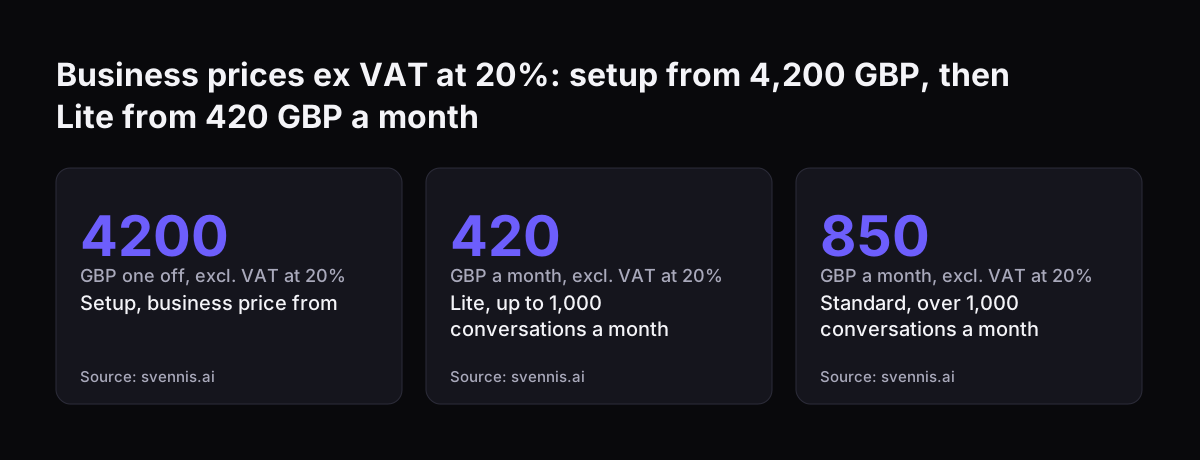
Business prices ex VAT at 20%: setup from 4,200 GBP, then Lite from 420 GBP a month: Setup, business price from 4200 GBP one off, excl. VAT at 20%, Lite, up to 1,000 conversations a month 420 GBP a month, excl. VAT at 20%, Standard, over 1,000 conver
Source: svennis.ai

Sources

  1. AI service desk assistant on Claude, by the month (Svennis AI)
  2. Models overview, Claude Platform Docs (Anthropic)
  3. Newsroom (Anthropic)
  4. AI Helpdesk vs Traditional Ticketing System (NexaGenesisLabs)
  5. How to use AI helpdesk tools to transform support (eesel AI)
  6. AI for customer service: what it costs and what breaks (eesel AI)
  7. AI Agents in Customer Service: 2026 Guide with Real Data (BoldDesk)
  8. AI-Powered Help Desk: Must-Have Features for Enterprise Support (HappyFox)
Free, 30 minutes

Pick a time. Bring the process this article made you think of.

You leave with a clear yes or no on putting Claude on it, and the step that fits from our published prices. You speak to someone who builds the agents, not a salesperson.

Prefer to call? +44 7588 772736 · Not ready to talk? See it on your business first.

30 minutes · video call · free
  1. 1Time
  2. 2Details
  3. 3Booked