
Svennis AI
9 min read

Which Zoho CRM numbers Claude should report, and which to leave to Zoho

Claude should explain figures Zoho CRM has already calculated, not add up raw records itself. How to choose six or seven measures, define them once and prove each one.

Abstract grid of steady columns with flowing lines passing between them, suggesting figures turned into words

Which Zoho CRM numbers Claude should report: figures Zoho has already calculated

Which Zoho CRM numbers should Claude report? Claude should report only the figures that Zoho CRM has already calculated. These include pipeline value, deal counts by stage, overdue activities and a few other measures you define in advance. Claude explains and summarises those figures. It does not add up raw records or build forecasts of its own.

A calculated figure is a number that Zoho CRM has worked out itself, in a report or dashboard your team can open, before Claude sees it. The split is simple to state. The number comes from Zoho. The words come from Claude.

This guide is part 1 of a three-part series on reporting from Zoho CRM with Claude. It covers which numbers are worth reporting at all. That means choosing six or seven measures, writing each definition down once and finding where each figure lives. It also means proving Claude's figure against Zoho's and spotting measures that look useful and are not.

The connection itself is covered in our guide to connecting Claude to Zoho CRM with MCP. The daily note built on these measures is part 2.
Why totals and forecasts belong to Zoho CRM, not to Claude

Totals and forecasts belong to Zoho CRM because Zoho applies the same filters, stages and rules every time it calculates them. A total that Claude adds up itself depends on which records it fetched and how it read each field. Two people asking the same question on the same day can get two different totals.

A report is only trusted if anyone can check it. You can open a figure from a Zoho CRM report, filter it and trace it back to the deals behind it. You cannot trace a total that Claude computed in a conversation in the same way. A manager who doubts that total has nowhere to look.

Forecasts carry the same risk, only more so. A forecast mixes assumptions about probability, timing and deal size. If those assumptions live in Claude's reasoning rather than in Zoho, nobody can review them. They may also shift from one run to the next.

Claude is still useful for reporting, and the useful part is language. Once Zoho CRM has calculated the figures, Claude does these jobs well:

  • Explaining what changed since last week, using two figures Zoho reported.
  • Summarising which stages hold most of the pipeline.
  • Listing overdue activities by owner so a manager can follow up.
  • Writing a plain paragraph for readers who will not open a chart.

Choosing six or seven measures your business will act on

Choose six or seven measures, and include only those a named person will act on. A measure earns its place when a change in it makes someone do something different this week. That might mean calling a customer, moving a deal or chasing an overdue task. If nobody would act on a change, leave the measure out.

The table below is a starting set for a sales team using Zoho CRM. Adjust the definitions to your own stages and rules, but keep the shape. Each row has one measure, one definition, one source and one person who acts.

MeasureDefinition to write downWhere the figure comes fromWho acts on it
Open pipeline valueSum of amounts on open deals, in one currency, excluding deals marked won or lostA saved Zoho CRM report on dealsSales manager
Deals by stageCount of open deals in each stage when the report runsA Zoho CRM report grouped by stageSales manager
Overdue activitiesTasks and calls past their due date and not completedA Zoho CRM report on activitiesEach deal owner
Deals won this monthDeals marked won within the calendar monthA Zoho CRM report filtered by close dateDirector
New leads this weekLeads created in the week, split by sourceA Zoho CRM report on leadsMarketing lead
Deals with no recent activityOpen deals with no logged activity in a period you chooseA Zoho CRM report on deals and activitiesDeal owner

Seven measures is a ceiling, not a target. A short list that people read every week does more than a long one they skim.

Writing each measure's definition once, in the place Claude reads

Write each definition down once, in one place, and make Claude read it from there every time. Suppose "pipeline" means open deals in January but all deals in February. The month-on-month comparison is then worthless, however well Claude words it.

A Claude project is a good home for the definitions. Anthropic's help centre describes projects as "self-contained workspaces with their own chat histories and knowledge bases". You can also set project instructions to tailor Claude's responses. Put the definitions in the knowledge base and one rule in the instructions: report only figures returned by Zoho CRM, and name where each figure came from.

Projects are available on every plan, and free accounts can create a maximum of five. On Team and Enterprise plans you can share a project with colleagues at "Can view" or "Can edit" level. Give managers Can view, so they can use the definitions but not change them. Keep Can edit for the one person who owns the list.

Teams building on the API can hold the same rules in a custom Agent Skill. An Agent Skill is a folder of instructions, scripts and resources that extends what Claude can do. Pin the Skill version. Anthropic warns that if the version is omitted or set to latest, "a version uploaded by anyone in the workspace immediately changes what your production agents run". Our guide to Claude projects and skills for a small team covers both.

Where each figure comes from: Zoho CRM data reached through MCP

Each figure should come from Zoho CRM itself, and Claude reaches Zoho CRM through MCP. MCP, the Model Context Protocol, is the protocol that gives Claude access to outside services and tools. A remote MCP server provides that access over the internet. Zoho publishes remote MCP servers for Zoho CRM.

Zoho's Claude setup guide for Zoho CRM MCP lists four servers:

  • Data Insights
  • Data Operations
  • Module Customization
  • Workflow & Process Automation

For reporting, Data Insights is the natural starting point, because reporting reads data rather than changing it. Connect only what reporting needs. A reporting assistant has no reason to change your modules or workflows.

Anthropic's documentation says connection instructions are specific to each server and that you need the right authentication credentials. With Zoho, you add the server in Claude Desktop and then authenticate your Zoho CRM organisation. Decide which Zoho user will authenticate the connection. Record that choice next to your definitions, so everyone knows whose access the figures reflect.

Worked example: proving Claude's pipeline figure against a Zoho CRM report

Before anyone trusts a figure from Claude, prove it once against the same figure in Zoho CRM. The check below uses open pipeline value and the setup steps in Zoho's guide.

  1. In Claude Desktop, go to Customize > Connector, click the Add icon and choose Add Custom Connector.
  2. Name the server, paste the Data Insights URL from Zoho's guide into the Remote MCP Server URL field, and click Add.
  3. Select the new server in the connectors list and click Connect to authenticate your Zoho CRM organisation.
  4. In Zoho CRM, open the saved report that matches your open pipeline value definition. Note the total, the currency and the time you ran it.
  5. In your reporting project, ask Claude for open pipeline value as defined in the knowledge base. Ask it to say which Zoho CRM data it used.
  6. Compare the two figures. If they match, record the date of the check next to the definition.

When the figures differ, look for a gap in the definition before you suspect the data. Check the filters first: stages included, deal owner, date range and currency. Fix the definition, not the number, and run the check again.

At Svennis we do not let a measure into a client's report until this check has passed for it. We run the check again whenever someone changes a stage or a filter in Zoho CRM.

Measures that look useful in a report and are not

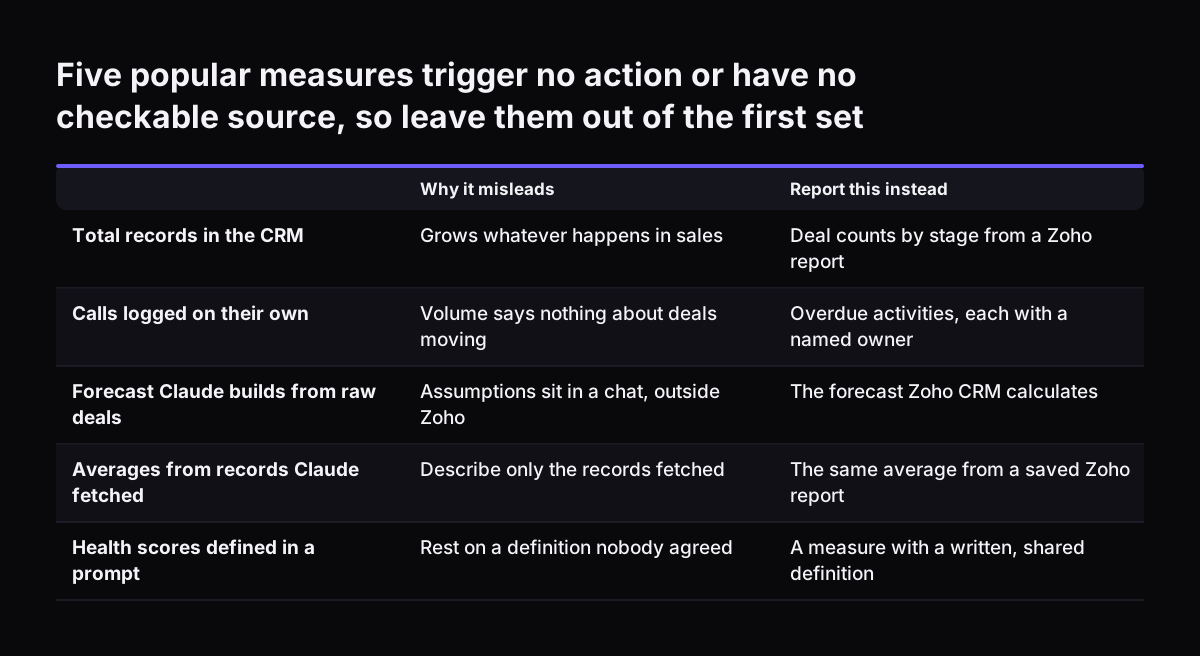
Some measures look informative in a report but change nobody's behaviour, or nobody can check them. Leave these out of your first set:

  • Total records in the CRM. The count grows whatever happens and triggers no action.
  • Activity counts on their own, such as calls logged. Volume says nothing about whether deals moved.
  • A forecast Claude builds from raw deals. The assumptions sit in a conversation, not in Zoho, so nobody can review them.
  • Averages Claude computes from records it fetched. If Claude fetched only part of the data, the average describes only that part.
  • Health or sentiment scores invented in a prompt. They sound precise but rest on a definition nobody agreed.

A measure belongs in the report when three things are true. Someone acts on it. Zoho CRM calculates it. You have proved at least once that Claude's figure matches Zoho's.

Claude can still comment on patterns, such as a stage that keeps growing. That commentary is useful as long as it rests on figures Zoho reported. Claude should present it as a reading of those figures, not as a new number.

Five popular measures trigger no action or have no checkable source, so leave them out of the first set. Why it misleads / Report this instead. Total records in the CRM: Grows whatever happens in sales / Deal counts by stage from a Zoho report; Calls

What reporting from Zoho CRM with Claude means for a UK company

For a UK company, the same rule applies to every fact that has an official home. Company details about customers and suppliers have a public source of record at Companies House. Companies House is an executive agency of the Department for Business and Trade, and it makes company information available to the public.

The Companies House API lets you retrieve information about limited companies, and the data it returns is live and real-time. If a report needs a customer's company details, take them from that source or from Zoho CRM. Do not take them from Claude's memory.

Personal data is the second point. Reports built from Zoho CRM draw on names, contact details and deal notes. Before you connect, check what Claude may process under your data protection duties. Our GDPR checklist for European firms using Claude sets out what to check.

The third point is the reader. In a small limited company, the directors may read the management pack themselves. Commentary from Claude around Zoho's figures gives them a report they can read quickly. They can still check any figure in Zoho if they doubt it.

Next steps: fix your Zoho CRM measures before building the daily note

Fix your measures before you automate anything. Five steps get you there:

  1. List six or seven measures and the person who acts on each.
  2. Write each definition once and store it in a Claude project's knowledge base.
  3. Build or find the matching saved report in Zoho CRM for each measure.
  4. Connect Claude to Zoho CRM with the Data Insights server, following our Zoho CRM MCP connection guide.
  5. Prove each figure once against its Zoho report and record the date of the check.

When every measure has passed, you are ready for part 2 of this series, the daily note. For the longer reporting cycle, see weekly and monthly board reports with Claude. That guide drafts board reports from the same live Zoho data.

Sources

  1. 1. Zoho CRM MCP - Claude Setup Guide
  2. 2. What are projects? Claude Help Center
  3. 3. Using Agent Skills with the API, Claude Platform Docs
  4. 4. Remote MCP servers, Claude Platform Docs
  5. 5. Companies House Developer Hub

Related articles