Skip to content
SVENNISAIWe speak Claude.
Blog · Claude for legal

Claude for legal teams: contract review, research and what stays with a lawyer

Claude can check contracts against your playbook, summarise, draft from precedents and research with sources. Here is what stays with a lawyer and which settings to fix first.

9 min read

Book a 30-minute call · with a Claude Certified Architect from our team.

Article · 9 min read
Abstract layered shapes passing through a narrow checkpoint, suggesting documents reviewed before approval

What Anthropic offers legal teams: plugins, Word and Outlook, connectors

Anthropic's legal offer has three parts. Plugins carry the legal know-how, Word and Outlook are where the work happens, and connectors bring in your systems. The Claude legal solutions page says Claude can review counterparty paper against your playbook with tracked changes, inside Word and Outlook. Your team already drafts and negotiates in those programs.

Legal plugins

A legal plugin is a package that combines tools, skills and integrations to tune Claude to a practice area. Anthropic lists plugins for contract review, NDA triage and compliance workflows. Claude's announcement on LinkedIn counts 12 one-click plugins, covering commercial legal, corporate legal, IP and litigation. Artificial Lawyer's review of the launch describes them as sets of natural-language instructions you can modify.

Deeper customisation means editing markdown files on GitHub. The article says most teams will need technical help for that.

Connectors and templates

The same LinkedIn post lists more than 20 direct connections to legal tools. The Model Context Protocol (MCP) is the open standard that links Claude to other systems. Through MCP you can bring contract systems, document repositories and matter data into Claude. Anthropic also provides legal artifacts, which are ready-made templates you edit to make your own.

Tasks Claude handles well: playbook review, summaries, precedent drafting, research

Claude is strongest on four tasks. Each one has a clear input and an output a lawyer can check quickly.

First-pass review against a playbook

A playbook is your written list of positions on each clause: what you accept, what you push back on and where you walk away. Claude reads the counterparty draft against it. It marks deviations as tracked changes, so the lawyer starts from a marked-up document rather than a blank read.

Summarising

All current Claude models have a 1M-token context window, according to Anthropic's models overview. A long agreement with its schedules therefore fits in one session. Claude can produce a summary of obligations, dates and termination rights for the business owner of the contract.

Drafting from a precedent

Give Claude your approved precedent and the deal terms, and it produces a first draft in your house style. The precedent keeps it anchored. Ask for the changes to be listed so the reviewer can see every departure.

Research with sources

The current models have a reliable knowledge cutoff of June 2026. Anything later has to come from a source you give Claude, a connected database or web search. Always ask for the source behind each point, and have someone check it. If you want contract data extracted into your business systems instead, see our guide to processing invoices and contracts with Claude in a Zoho workflow.

What stays with a qualified lawyer, and why sign-off has to be designed

A qualified lawyer keeps every decision that commits the organisation or a client. That covers the legal judgement on a clause, the advice given to the business or client, and the decision to accept a risk. It also covers the concessions made in negotiation, the final wording and the signature. Claude prepares the material for those decisions. It does not make them.

The weak point in most deployments is accountability, not the software. One commenter on Claude's legal announcement, who works on AI implementation, wrote that legal AI pilots stall because "the governance around the tooling was never designed". Decide in advance who reviews each type of output, and record that the review happened.

A post on the r/legaltech forum offers a useful set of questions to ask before you buy any legal AI tool:

  • What workflow does this actually improve?
  • Where does human review happen?
  • What does the audit trail show?
  • What system of record does it touch?
  • What happens when it is wrong?

Answer these for each task before you switch it on. The same author argues that "Claude-powered" or "MCP-ready" is a bad starting point for buying anything. Start from the workflow and the review step instead.

Who signs off each legal task: a table for your team

The table below sets out the common legal tasks, the part Claude plays in each, and who approves the result. Adapt the right-hand column to your own structure. In a small company, the director who handles contracts may need an external solicitor for the rows marked "qualified lawyer".

TaskClaude's partWho signs off
NDA triage against the playbookMarks deviations as tracked changes and lists themContract manager, or a lawyer for any walk-away point
Summary of a signed agreementExtracts obligations, dates and termination rightsBusiness owner of the contract, checked against the original
First draft from a precedentFills in deal terms and lists departures from the precedentQualified lawyer before it leaves the organisation
Research noteCollects points with sources from connected databases or the webQualified lawyer, after checking each source
Advice to the business or a clientPrepares background material onlyQualified lawyer, always
Negotiation concessions and signatureNone beyond drafting the marked-up versionAuthorised signatory under your delegation rules

Put this table into your team's written procedure. It tells a new starter what they may rely on, and it shows an auditor where the human review sits.

Settings to fix before the first contract: plan, training, retention, memory, tools

Settle five settings before anyone pastes a contract into Claude. Each one is set by an administrator, not by individual users, and each is easier to get right on day one than to correct later.

  • Plan. Use a business plan, not personal accounts. The Claude pricing page lists Team for 2 to 150 people and Enterprise for larger organisations, with the current price for your country.
  • Training on your content. On Team and Enterprise, Anthropic does not train on your content by default. Check that nobody has changed the default.
  • Retention. Enterprise admins set how long content is retained. If your firm has a retention policy for matter files, this setting is where Claude follows it.
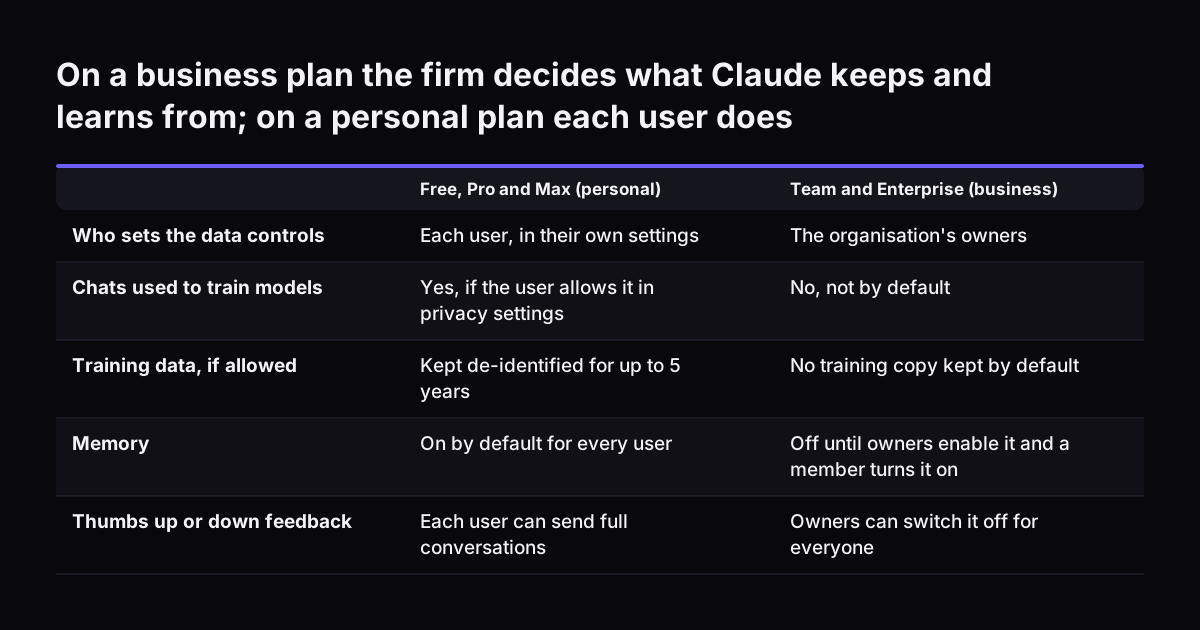
  • Memory. Memory is off by default for Team and Enterprise organisations, but on by default for Free, Pro and Max. That difference alone is a reason to keep client work off personal plans.
  • Tools. Administrators can disable tools such as web search. Decide whether research may use the open web or only connected sources.

Our comparison of Claude Team and Enterprise helps you choose between the two plans. Our guide to what Claude costs and how to start covers the full cost picture.

On a business plan the firm decides what Claude keeps and learns from; on a personal plan each user does. Free, Pro and Max (personal) / Team and Enterprise (business). Who sets the data controls: Each user, in their own settings / The organisation's

Client confidentiality and privilege: decide who may share what with Claude

Your lawyers already owe clients a duty of confidentiality and must protect legal privilege, and the settings above do not change either. The settings only control where the data goes. You still need a written rule on what goes in, who puts it there and where the output is kept.

Your confidentiality rule should answer four questions:

  1. Which documents may go into Claude: the company's own contracts only, or client and counterparty material as well?
  2. Who may connect which repository, and with whose permissions?
  3. How are matters kept apart, so that one client's material is not in front of Claude while it works on another?
  4. Where is the output filed, so the matter record stays complete?

Many teams keep matters apart with a separate Project per matter or client. Check how sharing works on your plan before you rely on it. Our guide to Claude Projects and skills for a small team walks through the setup.

Firms that build Claude into their own systems have further controls. The legal solutions page says the SDK offers sandboxed containers, network controls, credential isolation and audit logging. When your lawyers have doubts about a category of document, keep it out until they have decided.

Worked example: a playbook check of an incoming NDA

A playbook check of an NDA is the best first task for a legal team on Claude. NDAs are frequent and short, and most teams already know their positions. Here is the check from start to finish for a supplier's mutual NDA.

  1. Write the playbook. List your positions as short rows: mutual or one-way, the definition of confidential information, the length of the confidentiality period, the permitted disclosures, the governing law and any non-solicitation clause. For each row, state the preferred position, the acceptable fallback and the walk-away point.
  2. Load the playbook. Add the NDA triage plugin and give it your playbook. You can also save the playbook as a skill, which is a way to teach Claude a repeatable workflow.
  3. Open the draft in Word. Run the review from Claude inside Word. Claude marks each deviation as a tracked change, with a comment naming the playbook row it breaches.
  4. Read the deviations list. The reviewer accepts, rejects or edits each change. Anything at a walk-away point goes to a qualified lawyer.
  5. Send and file. The reviewer sends the marked-up NDA from Outlook and files both versions on the matter.

The quality of the check depends on the playbook, not the model. At Svennis we ask the legal team to write the playbook as a short table of positions, fallbacks and walk-away points before we build any skill, because the review can only flag what the playbook states. Teams that skip this step get vague comments back and stop trusting the tool. If your team works mainly in Microsoft 365, our guide to Claude in Microsoft 365 and Teams covers the connector setup.

What Claude for legal means in the UK: DPIA and data rights

A UK firm or in-house team should check whether its use of Claude needs a data protection impact assessment (DPIA). A DPIA is a documented assessment of the risks a type of processing creates for the people whose data it involves. The ICO's guidance on when you need a DPIA puts AI on its list as an innovative technology. A DPIA is required where that processing is combined with any of the criteria from the European guidelines.

The ICO is plain about borderline cases: "If in any doubt, we would always recommend that you do a DPIA." If you decide one is not needed, document your reasons. The guidance also notes that an individual lawyer processing client data is not processing on a large scale. That matters for a sole practitioner, but less so for a team rolling Claude out across its contract work.

Data rights still apply to anything Claude touches. Under the right to erasure, an organisation has one calendar month to respond to a request. It can refuse where keeping the data is necessary for establishing, exercising or defending legal claims, or where it is legally obliged to keep it. Your retention setting and matter filing need to support both outcomes. The ICO notes that this guidance is under review after the Data (Use and Access) Act, so check it again before you finalise your procedure.

Next steps: write the playbook, choose the plan, start with one contract type

Start small, and make the review step visible from the first day. Five steps cover it:

  1. Write the playbook for one contract type, usually the NDA, with positions, fallbacks and walk-away points.
  2. Choose Team or Enterprise, and confirm the training, retention, memory and tool settings with your administrator.
  3. Write the confidentiality rule: what goes in, who connects what, how matters stay apart and where output is filed.
  4. Copy the sign-off table into your procedure and name a reviewer for each row.
  5. Check with your data protection lead whether a DPIA is needed, and record the decision. In the same review, confirm that Anthropic's commercial terms include a data processing agreement and a valid UK route for transferring data outside the UK, and record how the transfer is covered.

Once the NDA check runs reliably, add a second contract type. Then consider connecting your document store or contract system. For each connection there are several routes: a connector, an MCP server, a plugin or a skill. Compare them on cost and on how much control your team keeps.

If you want help, Svennis works in four steps: a Workshop, a pilot, the department Activation, then monthly operations. For a legal team the usual pilot is Pilot Claude B, which sets up Claude Team for the whole team in 30 days, with the playbook, settings and sign-off rules agreed in the Workshop.

Sources

  1. Claude legal solutions (Anthropic)
  2. Plans and pricing (Anthropic)
  3. Release notes (Claude Help Center)
  4. Models overview (Claude Platform Docs)
  5. Claude tools for legal teams (Claude on LinkedIn)
  6. AL View: Claude For Legal Moves Centre Stage (Artificial Lawyer)
  7. Claude for Legal discussion (r/legaltech)
  8. When do we need to do a DPIA? (ICO)
  9. Your right to get your data deleted (ICO)
  10. Is my data used for model training? Consumer plans (Anthropic Privacy Center)
  11. Is my data used for model training? Commercial products (Anthropic Privacy Center)
  12. How long do you store my data? (Anthropic Privacy Center)
  13. Use Claude's chat search and memory (Claude Help Center)
Free, 30 minutes

Pick a time. Bring the process this article made you think of.

You leave with a clear yes or no on putting Claude on it, and the step that fits from our published prices. You speak to someone who builds the agents, not a salesperson.

Prefer to call? +44 7588 772736 · Not ready to talk? See it on your business first.

30 minutes · video call · free
  1. 1Time
  2. 2Details
  3. 3Booked