Skip to content
SVENNISAIWe speak Claude.
Blog · Claude

Claude for Word: drafting, editing and review inside your documents

A guide for UK offices to Claude for Word: what the add-in does, which paid plans include it, a worked proposal example, and the review step before a document leaves.

10 min read

Book a 30-minute call · with a Claude Certified Architect from our team.

Article · 10 min read
Abstract layered panels with a narrow side column feeding marked lines into a larger page

Claude for Word is an add-in that drafts and edits inside the document

Claude for Word is Anthropic's add-in that puts Claude in a sidebar inside Microsoft Word. You use it to draft from notes, rewrite to your house style, summarise, and suggest edits as tracked changes that a person accepts or rejects. Anthropic lists it as generally available on all paid Claude plans.

Claude for Word is one part of a wider product that Anthropic calls Claude for Microsoft 365. That product works inside Excel, PowerPoint, Word and Outlook. Context carries between those apps within one conversation, so an email you read in Outlook can shape a draft in Word. Claude for Outlook is still in beta on all paid plans.

Anthropic's own Claude for Microsoft 365 page describes three things Claude for Word does in a document:

  • It edits with tracked changes.
  • It responds to comment threads.
  • It updates content using your company styles.

The same page says Claude inherits your heading styles and numbering. CNET reported that Claude for Word can also generate new documents from templates and identify broken cross-references.

Claude for Word does not decide what your company commits to in writing. A named person still reads every document before it goes out. If you are new to the assistant itself, start with our plain guide to what Claude is.
Which Claude plans include Claude for Word, and what each costs

Claude for Word is generally available on every paid Claude plan, according to Anthropic's product page. Early coverage told a narrower story. CNET's launch report described a beta open to Team and Enterprise customers. Anthropic's own page is the current source, so plan on the basis that any paid seat includes Claude for Word.

The prices below come from Anthropic's pricing page and are in US dollars.

PlanWho it suitsPrice listed by Anthropic
ProOne person$17 a month billed annually ($200 up front), or $20 billed monthly
MaxOne heavy userFrom $100 a month, with a choice of 5x or 20x the usage of Pro
Team, standard seatTeams of 2 to 150$20 per seat a month billed annually, or $25 billed monthly
Team, premium seatHeavy users inside a team$100 per seat a month billed annually, or $125 billed monthly, with 5x the usage of a standard seat
EnterpriseLarger organisationsUS$20 per seat a month billed annually, 20 seat minimum, plus usage at API rates

For a company, the Team plan is the usual starting point. On Team and Enterprise, Anthropic does not train models on your content by default. Every plan has usage limits that reset on a rolling five-hour window, and paid plans add weekly limits on top. A long document session counts against those limits like any other work.

For the full yearly picture, including setup, see our guide to what Claude costs a business and how to start.

Installing Claude for Word and rolling it out to a team

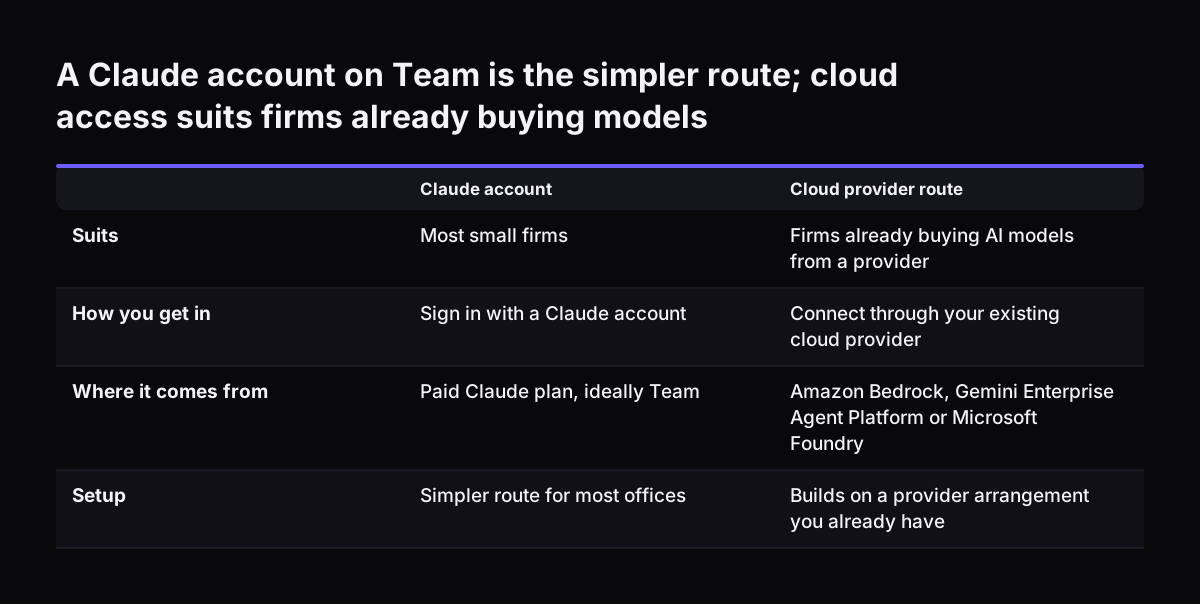
Claude for Word offers two ways in: you sign in with a Claude account, or you connect through your existing cloud provider. Anthropic lists Amazon Bedrock, Gemini Enterprise Agent Platform and Microsoft Foundry as the cloud routes. For most small firms, a Claude account on the Team plan is the simpler route. The cloud route suits a company that already buys AI models through one of those providers.

A rollout goes better when you treat Claude for Word as a change in how documents are produced, not as a download. The order we suggest is below.

  1. Give seats first to the people who write proposals, reports or letters most often.
  2. Agree with whoever manages your Microsoft 365 how the add-in will reach each person's Word, then test it with one person.
  3. Have each person sign in with their Team account, not a personal one.
  4. Decide on memory. Anthropic's release notes say memory is off by default for Team and Enterprise organisations. Leave it off until your policy covers it.
  5. Build one shared skill for your first document type, such as client proposals.
  6. Name the reviewer for that document type before the first real draft.

The first two steps decide most of the result. A tool given to everyone at once tends to be used lightly by most people. A tool given to the three people who write the most documents shows within weeks whether it saves time.

A Claude account on Team is the simpler route; cloud access suits firms already buying models. Claude account / Cloud provider route. Suits: Most small firms / Firms already buying AI models from a provider; How you get in: Sign in with a Claude acco

Drafting a document in Claude for Word from notes and a template

Claude for Word drafts best when you give it two inputs: the facts and the shape. The facts are your notes, a brief or a source document. The shape is a Word template that already holds your headings, numbering and fixed text.

For the facts, Anthropic's page says you can drop a PDF or document into the sidebar. Claude then reads it alongside the open file. That means a call note, a tender document or last year's report can sit next to the draft without being pasted into it.

For the shape, open your template first. Claude inherits the heading styles and numbering in the document, so a new section lands in the right format. A template built with proper Word styles gives Claude something to follow. A template formatted by hand, line by line, gives it far less.

A clear instruction to Claude for Word names four things:

  • which sections to write;
  • roughly how long each should be;
  • which source to draw on;
  • what to do where the source is silent.

The last point matters most. Ask Claude to mark gaps for a person to fill, rather than guess. Once a draft exists, you can refine it in place. CNET quotes Anthropic's examples: highlight a paragraph and tell Claude to "tighten it, shift the tone or cut passive voice". You can also ask for a short summary of a long document for the covering email.

Keeping to house style in Claude for Word with company styles and a shared skill

House style is your company's agreed way of writing and laying out documents: headings, numbering, spelling, tone, and the phrases you use or avoid. Claude for Word handles house style on two layers, and you set up each one differently.

The formatting layer: Word styles

The formatting layer lives in Word itself. Anthropic says Claude for Word updates content using company styles and inherits heading styles and numbering. Your job is to make sure the template uses real styles. Then a heading Claude writes looks like a heading your team writes.

The writing layer: a skill

The writing layer lives in a skill. Anthropic's release notes define skills as a way to teach Claude repeatable workflows tailored to how you work. On the Claude for Microsoft 365 page, Anthropic says that when a process is right, you save it as a skill, and the team can use it the same way in Word, Excel, PowerPoint and Outlook.

A house style skill for Claude for Word usually holds these items:

  • British spelling, with examples such as organisation and licence;
  • the exact names of your products and services;
  • words and claims your company never uses;
  • how you write dates, money and percentages;
  • the standard opening and closing of client documents.

Keep the skill short and specific. One person should own it and change it when the style changes. Two competing versions of house style produce documents that look like they came from two companies.

Redlining with tracked changes and comment threads in Claude for Word

Redlining is the marked-up revision of a document, where every insertion and deletion stays visible until someone accepts or rejects it. Claude for Word works in that mode. Anthropic says it edits with tracked changes, so its suggestions arrive as revisions, not silent rewrites. That is the main reason to use Claude inside Word rather than paste text in and out of a chat window.

Claude for Word also works with comments. Anthropic's page says it responds to comment threads, and CNET reports that Claude can read and analyse comments and then respond to them as instructed. In practice a colleague leaves comments in the margin, and you ask Claude to address each one with a tracked change. The author then accepts or rejects each change in Word as normal.

Two checks suit Claude for Word well on long documents:

  • finding broken cross-references, which CNET lists among its abilities;
  • making terms consistent, such as one name for the client throughout.

Redlining with Claude does not replace the person who owns the content. On a contract or a set of terms, Claude can propose wording. Whoever signs for the company decides what stays. If your documents arrive in volume, such as invoices or supplier forms, that is a different job, covered on our AI for document processing page.

Worked example: a client proposal drafted in Claude for Word from a call note and a template

This worked example follows one client proposal through Claude for Word, from call note to approved draft. Picture an account manager at a small consultancy who has just finished a discovery call and typed up notes.

  1. Open the template. The proposal template has the company heading styles, numbered sections, and a fee table left blank.
  2. Add the call note. Drop the call note into the Claude sidebar. Claude reads it alongside the open template.
  3. Give the instruction. Use something like the prompt below.
Draft sections 2 to 4 of this proposal from the attached call note: the client's situation, our proposed approach, and the timeline. Keep the existing heading styles and numbering. Use our house style skill. Where the note does not say something, write [TO CONFIRM] instead of guessing. Leave the fee table empty.
  1. Refine in place. Highlight the approach section and ask Claude to tighten it and cut passive voice.
  2. Send it for review. The reviewer reads the draft and leaves comments, such as "the client said phase one only".
  3. Answer the comments. Ask Claude to respond to each comment thread with a tracked change.
  4. Accept, reject, complete. The account manager accepts or rejects each change, clears every [TO CONFIRM] marker, and types the fees from the company price list.
  5. Save the process. Once the steps work, save them as a "client proposal" skill so the next person runs them the same way.

The fees stay with a person on purpose. Claude for Word works from the files you give it. Prices belong in your own price list, typed or checked by someone accountable for them.

The review step before a document leaves the company

Every document drafted in Claude for Word needs a named person who checks it before it leaves the company. Tracked changes make edits easy to see. They do not make the edits right.

The checklist below works for proposals, reports and letters.

CheckWhat to look forWho checks
Facts and figuresEvery name, date and number matches the source note or your own systemsAuthor
CommitmentsScope, deadlines, fees and terms are ones the company will honourOwner of the client relationship
GapsNo [TO CONFIRM] markers or placeholder text leftAuthor
House styleSpelling, headings, numbering and product names follow the skillAuthor
Open revisionsNo unresolved tracked changes or comment threadsReviewer
Confidential contentNothing from another client's file or an internal noteReviewer

When Svennis sets up Claude for Word for a team, we name one reviewer for each document type before the first draft is written, because a draft that belongs to everyone tends to be checked by nobody.

Anthropic applies the same principle in Outlook. Its page says Claude cannot send an email without you seeing it first: drafts open in Outlook's compose form and wait for you to click send. Treat Word documents the same way. Claude prepares, a person releases.

What Claude for Word means for a UK office

For a UK office, Claude for Word raises four practical points: spelling, budget, data and scope.

Spelling. Write British English into your house style skill with examples, so drafts say organisation and licence. Check the first few drafts closely until you trust the skill.

Budget. Anthropic lists its prices in US dollars. Convert at the rate on the day and budget in pounds, with a margin for movement.

Data. On Team and Enterprise, Anthropic does not train models on your content by default, and memory is off by default. Your staff still decide what goes into each document they share with Claude. Write down what may and may not be used, such as other clients' files or personal data, before the rollout.

Scope. Larger UK firms are moving too. Anthropic announced that Barclays is expanding its strategic collaboration to integrate AI across its global operations. For a small or mid-sized office, the question is narrower: which document type first, and who checks it.

Claude for Word is the right tool when the work happens inside one Word document. When a task spans many files on a desktop, such as assembling a report from a folder, look at Claude Cowork, which works across your local files. Many offices end up using both, each for the job it suits.

Next steps: start Claude for Word with one document type

The quickest way to judge Claude for Word is to run it on one document type your team writes every week. Proposals, client reports and standard letters all work well. Follow these steps in order.

  1. Pick the document type and the two or three people who write it most.
  2. Check that each of them has a paid Claude seat, ideally on the Team plan.
  3. Clean up the Word template so it uses proper heading styles and numbering.
  4. Write a short house style skill and give it one owner.
  5. Name the reviewer and agree the checklist from the review step.
  6. Run real documents for a few weeks, then decide whether to extend to the next document type.

If your company already pays for Claude seats that sit unused, our Claude Relaunch service puts paid seats to work, starting with tasks like this one. If you are starting from scratch, our work runs in four steps. The Workshop comes first. Then Pilot Claude A, an AI agent on Claude for one process, or Pilot Claude B, Claude Team for the whole team. Next comes the department Activation, then monthly operations.

The Claude for business guide sets out what each stage costs.

Sources

  1. Claude for Microsoft 365 (Anthropic)
  2. Plans and pricing (Anthropic)
  3. Release notes, Claude Help Center
  4. Anthropic's AI Assistant Claude Is Now Available in Microsoft Word (CNET)
  5. Anthropic Newsroom
Free, 30 minutes

Pick a time. Bring the process this article made you think of.

You leave with a clear yes or no on putting Claude on it, and the step that fits from our published prices. You speak to someone who builds the agents, not a salesperson.

Prefer to call? +44 7588 772736 · Not ready to talk? See it on your business first.

30 minutes · video call · free
  1. 1Time
  2. 2Details
  3. 3Booked