
Skip to content
SVENNISAIWe speak Claude.
Blog · Claude Team

Claude vs ChatGPT decided? Rolling out Claude Team to a whole team: the steps that matter

Buying Claude Team seats is the easy part. This guide covers who goes first, what to agree about data and usage, how to set up shared Projects and when to connect Claude to your CRM.

10 min read

Book a 30-minute call · with a Claude Certified Architect from our team.

Article · 10 min read
Abstract shapes moving from a small cluster outward into a wide, orderly formation linked by lines

Rolling out Claude Team to a whole team: the short answer

Rolling out Claude Team to a whole team: the steps that matter come in a fixed order. Start with a small pilot group. Agree data and usage rules in writing. Build shared Projects around real tasks.

Then check sign-in, roles, connectors, spending limits and reporting before everyone joins. If your claude vs chatgpt comparison came out in favour of Claude, buying seats is the easy part.

This guide is part 2 of a three-part series on Claude Team for the whole team. Part 1, Claude Pro or Claude Team: which plan a company needs, covers the choice of plan. Part 3, Why the company account matters: data, rules and the cost of personal AI accounts, covers the reasons behind the company account. This part covers how the rollout is done, step by step, and who does what.

Claude Team is Anthropic's plan for businesses: per-person seats, an admin, and one company account that holds the team's work. Claude Enterprise is the plan for larger companies, with more controls for IT. The steps below apply to both plans.

After the Claude vs ChatGPT decision, buying seats is not a rollout

Buying seats does not roll Claude out. A team only gets value when its seats are used for its recurring work. A Claude Team rollout is the work of moving a whole team onto the company account with agreed rules, shared setups and a named owner. Seats are the per-person licences, bought directly from Anthropic on the company account.

The gap between buying AI and using it well is wide. Anthropic's Enterprise AI Transformation Guide reports that 92% of companies plan to invest in AI over the next 3 years. Yet only 1 percent believe their investments have reached full maturity.

Anthropic's guide sets out three steps. First, lay a foundation with clear governance and stakeholder alignment. Second, launch targeted pilots that show value. Third, drive impact through structured training. A Claude Team rollout follows the same order on a smaller scale.

The rest of this guide takes each part of a Claude Team rollout in turn. It covers who goes first, what gets agreed about data and usage, how shared Projects are set up, how the result is checked, and when a team needs Claude connected to its other systems.

Who goes first: a small pilot group, a named owner and two Claude ambassadors

The first people on Claude Team should be a small pilot group with clear, recurring work, not the whole company on day one. One adoption guide offers a useful filter, the 5x rule: if a task or question comes up five times a month, it is a candidate for automation. Pick the people who own those tasks.

Three roles matter on the company's side of a Claude Team rollout:

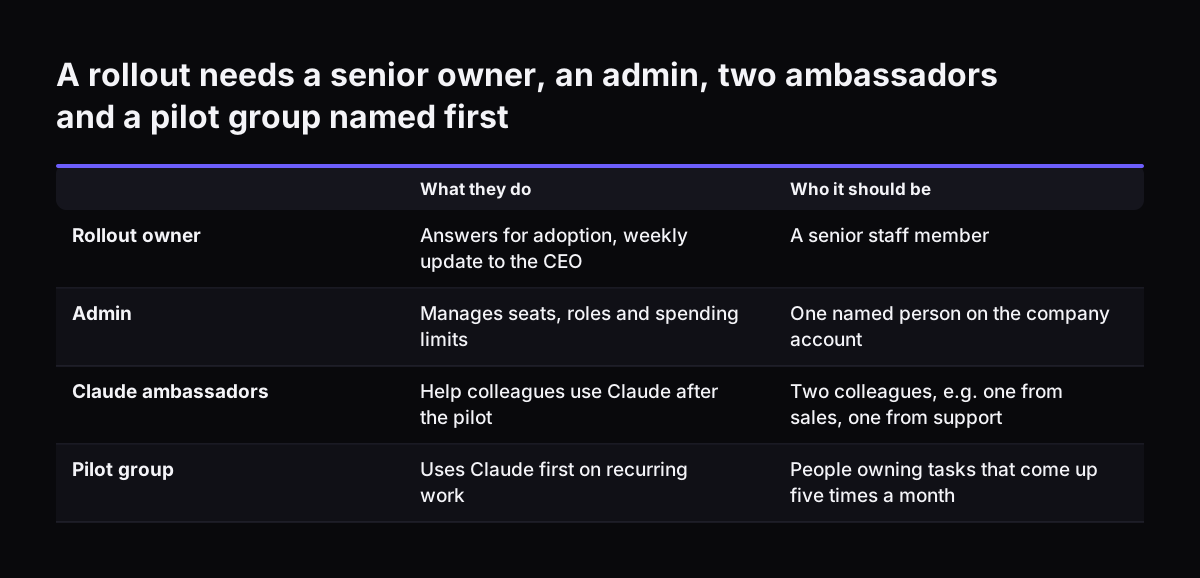
  • A rollout owner: a senior person who answers for adoption. The same adoption guide recommends giving a senior staff member that responsibility, with weekly updates to the CEO.
  • An admin: the person who manages seats, roles and spending limits on the company account.
  • Two Claude ambassadors: colleagues on your team who help the others once the outside help has left.

Anthropic's guide also covers building executive alignment and assembling an AI steering committee. In a small company, that committee can be the rollout owner, the admin and one manager from each department in the pilot. The guide gives tips for choosing pilots that demonstrate value in 30-60 days. Keep the pilot group on tasks that can show a result inside that window.

Claude ambassadors matter most after the pilot ends. When the wider team joins, the ambassadors are the first people colleagues ask. Their answers come from someone who has already used Claude Team on the same work.

A rollout needs a senior owner, an admin, two ambassadors and a pilot group named first. What they do / Who it should be. Rollout owner: Answers for adoption, weekly update to the CEO / A senior staff member; Admin: Manages seats, roles and spending

What to agree about data and usage before anyone logs in

Before anyone logs in to Claude Team, the company should agree in writing which data may go into Claude, who holds which role, and how much each seat may spend. Leaving those points open puts every person in the position of guessing.

Data categories

List your data categories and mark each one as allowed, allowed with care, or kept out. Anthropic's own documentation says where Claude Team and Enterprise data is stored and processed. Check its current terms before you mark any category as allowed. Our page on how Claude runs in your company explains the setup. Any category that has to stay in the UK needs a different route, covered in the section on UK companies.

Roles and spending limits

Name the admin and decide who else needs admin rights. Set spending limits on the company account. Usage then stays inside a budget you chose, rather than one you discover at the end of the month.

The everyday model

Agree which model is the default for everyday work. Anthropic's models overview describes Claude Sonnet 5.5 as the best combination of speed and intelligence. The same page suggests starting with Claude Opus 5.5 for most workloads if you are unsure.

Setting up shared Claude Projects so the team starts from real work

Shared Projects should exist before the wider team arrives, each one built around a single recurring task. A Project in Claude is a shared workspace that holds a team's reference files and standing instructions. Every chat inside a Project starts from the same context.

Give each shared Project four things:

  • one task, named in plain words, such as answering one type of customer question;
  • an owner, who keeps the files current;
  • the reference files the task needs, such as price lists, policies, templates and worked examples;
  • short instructions that say what a good answer looks like and what Claude must not do.

At Svennis we build the first shared Project together with the pilot group, before the wider team gets seats. Colleagues who join later then open a Project that already answers real questions, instead of an empty chat box.

Keep the number of Projects small at first. A Project nobody owns goes stale. Stale reference files produce confident answers based on old prices or old policies. Our guide to setting up Claude Projects and skills for a small team covers the settings in detail.

A worked example: a sales and support team rolling out Claude Team

This worked example shows the rollout steps for a company whose sales team works in Zoho CRM and whose support team answers tickets in Zoho Desk. The company is illustrative. The stages and checks come from the Pilot B plan.

  1. Kickoff. The kickoff is the first working session, and the 30 days count from it. The company names a rollout owner, an admin and two Claude ambassadors, one from sales and one from support.
  2. Agreements. The team marks customer contact details as allowed with care and payment data as kept out. The admin sets spending limits on the account.
  3. Projects. Sales gets a Project called "Quote follow-ups", holding the current price list, approved email templates and a note on discount rules. Support gets "Ticket replies", holding the returns policy and model answers to frequent questions.
  4. Connectors. Claude is connected to Zoho read-only. The pilot group can ask about a deal or a ticket, and Claude cannot change a record.
  5. Three real tasks. By day 30, three real tasks are done, for example a batch of follow-up emails drafted from live deals. The company also has a written review.
  6. Wider team. The Claude ambassadors run the first sessions for colleagues, who start inside the existing Projects.

Nothing in the worked example needs a developer. Connecting Claude more deeply to the sales and support systems is a separate decision, covered in the section on outgrowing the chat app.

The day-30 checklist: SSO, roles, connectors, spending limits, reporting, ambassadors

A Claude Team rollout is ready for the whole team when six items are confirmed: SSO, roles, connectors, spending limits, reporting and the Claude ambassadors. SSO, or single sign-on, means staff sign in to Claude with their company login instead of a personal account. The table shows what each item covers, who owns it and how it is checked.

ItemWhat it coversWho owns it on your sideHow it is checked on day 30
SSOSign-in through the company loginIT leadEach pilot user signs in with the company login, with no personal accounts in use
RolesWho is admin and who is a memberAdminThe role list matches the agreed list of names
ConnectorsMicrosoft 365, Google Workspace, Zoho, Xero, read-only at firstThe owner of each programEach connector answers a real question and cannot change records
Spending limitsThe budget each seat and the account may useFinanceLimits are set and visible to the admin
ReportingUsage and results of the pilotRollout ownerThe written review covers the three real tasks
Claude ambassadorsTwo colleagues who help the othersTeam leadsBoth have used Claude Team on real work and can show colleagues the Projects

Reporting should measure more than logins. Anthropic's guide covers measuring success across adoption, efficiency, quality and satisfaction. Those four headings make a sensible structure for the written review. If any row fails, the wider team waits until it passes.

What goes wrong in a Claude Team rollout, and how to check for it

Four failure points come up in a Claude Team rollout, and each one has a simple check.

No time set aside to learn

People often say they have "no time" to experiment with AI, and one adoption guide calls that one of the strongest headwinds to adoption. Its fix is weekly coworking sessions, made mandatory. The same author estimates that people who rarely use LLMs can boost their individual output by 5-50% with 5-50 hours of focussed learning. Check: the weekly session is in the calendar, and people attend it.

Rules that are too loose or too tight

A vague data rule leaves staff guessing what they may paste into Claude. An over-cautious rule has its own cost. The same author describes two organisations that each overreacted to the OpenAI NYT lawsuit with a costly policy. Check: every data category on your list carries a clear mark.

Usage running past the budget

Heavy daily use can run past the budget you expected. Check: during the pilot, the admin reads usage weekly against the spending limits.

Projects nobody owns

A shared Project with old files gives old answers. Check: every Project has a named owner and a date when its files were last updated.

When a team has outgrown the chat app and needs Claude connected to its CRM or helpdesk

A team has outgrown the Claude Team chat app when people copy the same data in from the CRM or helpdesk every day, or when a step must happen without anyone opening a chat. Typical signs include:

  • staff paste records from the CRM into chats to ask the same questions;
  • tickets need sorting and routing before anyone reads them;
  • a task runs many times a day, and the answer must land back in the system.

The first move is still a small one. Pilot B connects existing connectors such as Microsoft 365, Google Workspace, Zoho and Xero, read-only at first. When read-only access stops being enough, each connection needs its own decision. Svennis builds a connector, an MCP server, a plugin or a skill for each connection, shows the options with their cost, and you choose. An MCP server is a small service that gives Claude defined access to one of your programs.

For one process that should run on its own, the route is Pilot A, an AI agent on Claude for one process. Anthropic's models overview describes Claude Haiku 5.5 as built for high-volume, latency-sensitive tasks such as classification, extraction and routing. An agent's model usage is billed by Amazon Web Services in US dollars, on use, and is not capped unless you set a budget. If your team works in Teams, our post on connecting Claude in Microsoft 365 and Teams to the systems behind it covers that route.

What a UK company should settle: data location, billing in pounds and plan size

A UK company rolling out Claude Team should settle three things early: where its data sits, how seats are billed, and whether the team fits Claude Team or needs Claude Enterprise.

Data location

Anthropic's own documentation says where Claude Team and Enterprise data is stored and processed, so check its current terms before kickoff. If a category has to stay in the UK, the route is Pilot A: an AI agent in your own AWS account, set up in the London region and using a model that runs there. Map each data category against that rule before kickoff, not after the wider team has started. Personal data sent to the US also needs a transfer mechanism, so check which one Anthropic's terms rely on.

Billing

Claude seats are paid to Anthropic directly, in pounds, on the company account. The partner running the rollout does not resell seats or add to their price. Seat cost and rollout cost therefore stay as separate lines in your budget.

Plan size and several countries

Claude Enterprise is the plan for larger companies, with more controls for IT. Our comparison of Claude Team and Claude Enterprise sets out where the line falls. If your team spans offices in other countries, read our guide to rolling out Claude across several countries before choosing who goes first.

Next steps for rolling out Claude Team in your company

The next step for rolling out Claude Team is a written one: put names and lists on paper before you buy more seats. Work through these five items in order:

  1. Name the rollout owner, the admin and two Claude ambassadors.
  2. List the tasks that come up five times a month or more, and choose the pilot group around them.
  3. Mark each data category as allowed, allowed with care, or kept out, and flag any that must stay in the UK.
  4. Draft one shared Project for the most common task.
  5. Copy the day-30 checklist into your own tracker and assign an owner to each row.

If you want the rollout run with you, Svennis does this as Claude Pilot B, Claude Team set up in 30 days. Pilot B is one part of a four-step offer. The steps are the Workshop, then Pilot A (an AI agent on Claude for one process) or Pilot B (Claude Team for the whole team), then the department Activation, then monthly operations. The Pilot B page carries the published prices. A pilot signed within 60 days of the Workshop has the Workshop fee taken off in full.

Sources

  1. Svennis AI: Claude Pilot B, Claude Team set up in 30 days
  2. Anthropic: The Enterprise AI Transformation Guide
  3. Anthropic: Models overview, Claude Platform Docs
  4. AI Wow: How to support AI adoption on your team
Free, 30 minutes

Pick a time. Bring the process this article made you think of.

You leave with a clear yes or no on putting Claude on it, and the step that fits from our published prices. You speak to someone who builds the agents, not a salesperson.

Prefer to call? +44 7588 772736 · Not ready to talk? See it on your business first.

30 minutes · video call · free
  1. 1Time
  2. 2Details
  3. 3Booked