Skip to content
SVENNISAIWe speak Claude.
Blog · Claude Enterprise

Data retention and deletion settings in Claude for business deployments

Where Claude's retention and deletion controls sit on Team and Enterprise, what each one removes, and how to set and record them before Claude touches CRM, helpdesk or accounting data.

10 min read

Book a 30-minute call · with a Claude Certified Architect from our team.

Article · 10 min read
Abstract layers fading out in sequence along a timeline, suggesting stored records expiring on schedule

Data retention and deletion settings in Claude depend on your plan

Data retention and deletion settings in Claude depend on the plan. On the Team plan, Claude keeps conversations so members can see their history, and each member deletes chats from that history. On the Enterprise plan, an Owner can also set custom retention periods for chats, projects and artifacts, with a minimum of 30 days.

Set those controls before you connect Claude to CRM, helpdesk or accounting data. The order matters for two reasons. Without a custom period, Enterprise data is kept indefinitely. And when you shorten a period later, Claude deletes the older data permanently, with no way back.

The owner of the company and the data protection lead need four answers before the first connection goes live:

  • How long chats, projects and files stay in Claude on your plan.
  • What a custom retention period on Enterprise changes, and what it leaves alone.
  • What deleting a chat actually removes.
  • What to write about Claude in the company's data protection records.

Each section below answers one of those questions and can be read on its own. The facts come from Anthropic's help centre and Privacy Center, with two secondary reports flagged as such.
Retention, deletion and backend copies are three different things

Data retention in Claude is how long Anthropic keeps your organisation's chats, projects and files before it deletes them. Retention is a rule the system applies. Deletion is an action a person takes. Backend copies are what Anthropic keeps in its own systems, separate from what users see on screen.

The help centre separates the three clearly. On Team and Enterprise, prompts and conversations are maintained in the product so you can see your conversation history. You can delete your chats to remove them from your visible history. Anthropic also states that it retains data in its backend systems, as described in the Data Handling and Retention section of the Anthropic Privacy Center. That section holds 11 articles.

A few more terms appear throughout this guide:

  • Custom data retention controls are Enterprise settings that manage how long Claude stores conversation, project and artifact data.
  • Projects are shared workspaces in Claude that group related chats together.
  • Standalone chats are chats that sit outside any project.
  • Artifacts are pieces of content Claude produces in a chat, which people can open, edit and publish with a public link.

Keep the three ideas apart when you write policy. A member deleting a chat does not set a retention period. A retention period does not cover every Claude feature. Neither statement tells you what sits in Anthropic's backend.

On the Team plan, chat history stays until members delete it

On the Team plan, conversations are kept so members can see their history, and deletion is in each member's hands. Anthropic describes custom data retention controls as a feature for Enterprise plan customers. A Team plan owner therefore has no organisation-wide retention period to set.

The Team plan is Anthropic's paid plan for the Claude chat experience. It needs at least two members and supports up to 150 seats, according to the Team plan help article. It includes SSO, domain capture, role-based permissioning and connectors to Google Drive, Gmail, Google Calendar, GitHub, Microsoft 365 and Slack. Team plan members also get access to Cowork, which you can read about in our guide to Claude Cowork for UK firms.

Team is a commercial plan, so the consumer training choice does not apply to it. The Free, Pro and Max opt-in to model training, introduced in 2025, applies only to consumer plans and not to Claude for Work, according to a Medium summary of the change.

The practical consequence is simple. On Team, retention depends on people's habits. If your business needs chats to disappear after a set time, write a deletion routine into your staff rules, or move to Enterprise where a period can be enforced. Our guide to what Claude costs and how to start sets out the plans side by side.

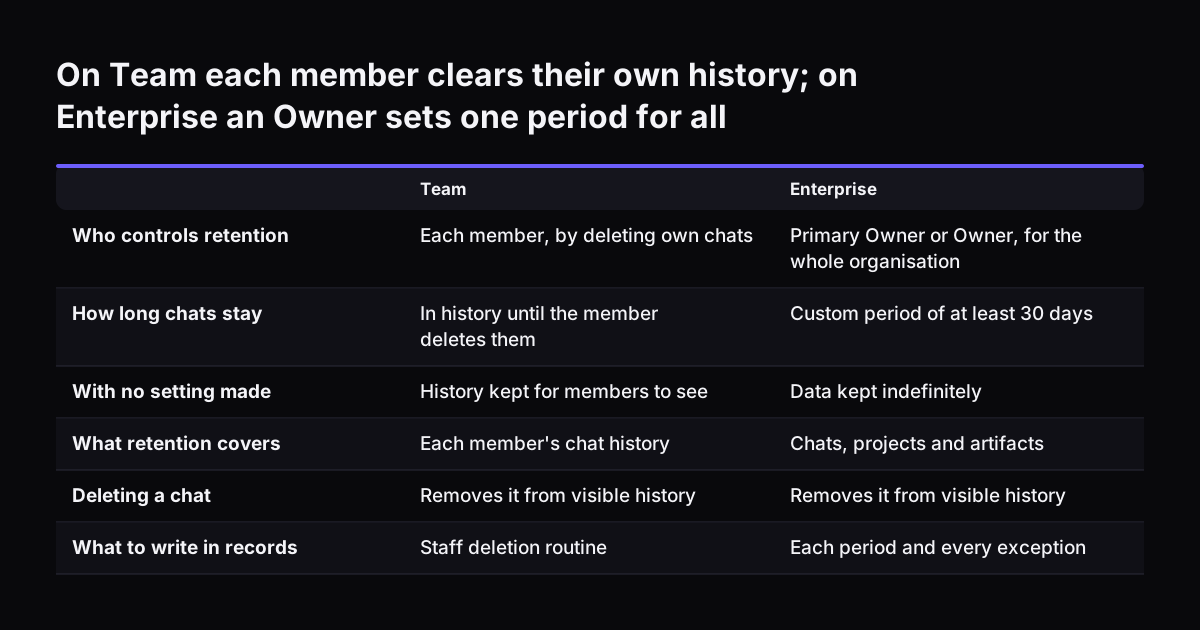
On Team each member clears their own history; on Enterprise an Owner sets one period for all. Team / Enterprise. Who controls retention: Each member, by deleting own chats / Primary Owner or Owner, for the whole organisation; How long chats stay: In

Enterprise custom retention: who sets it and the 30-day minimum

On Enterprise, a Primary Owner or Owner sets custom retention periods for the whole organisation. No other role can change them. The full rules are in Anthropic's article on configuring custom data retention controls for Enterprise plans.

The numbers are few and fixed:

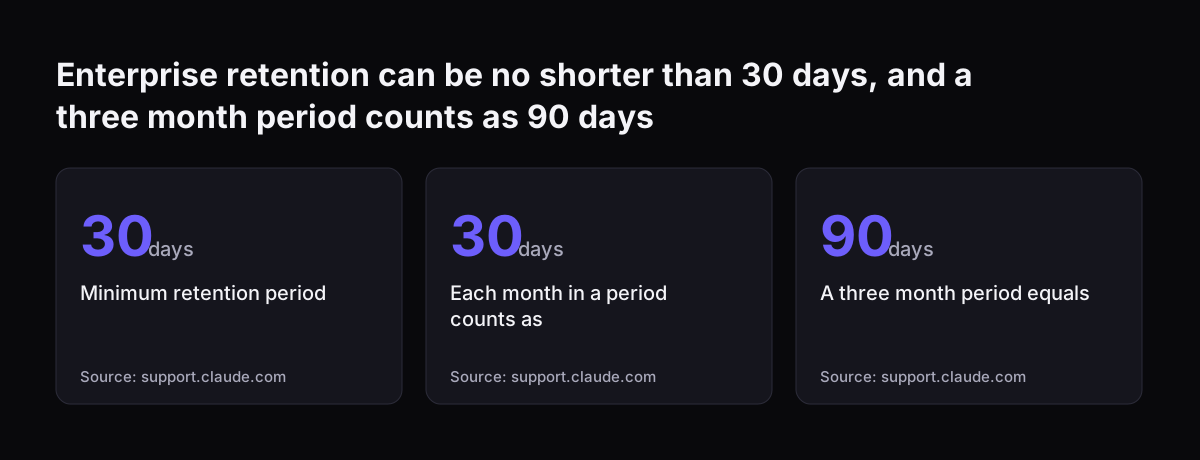
  • The minimum retention period is 30 days.
  • Each month counts as 30 days, so a three-month period equals 90 days.
  • Without a custom period, data is retained indefinitely.

Shortening a period has immediate effect. When you save the change, data outside the new period is scheduled for permanent deletion. A daily background process then removes it, which can take several days for large amounts of data. Anthropic warns you not to rely on that delay to reverse the change. Data past its retention period cannot be recovered.

Every retention-related action and change is tracked automatically in audit logs. That gives your data protection lead evidence of who changed what, and when.

The Enterprise plan help article lists two more controls that matter here. The Compliance API gives programmatic access to activity logs, chat histories and file content, filtered by user and time range. Customer-managed encryption keys let Anthropic protect your chats, projects and files with a key held in your own cloud provider. Enterprise needs at least 20 seats self-serve, or 50 seats sales-assisted.

Enterprise retention can be no shorter than 30 days, and a three month period counts as 90 days: Minimum retention period 30 days, Each month in a period counts as 30 days, A three month period equals 90 days
Source: support.claude.com

When each retention clock starts for chats, projects and artifacts

Claude's Enterprise retention period does not start from the day content was created. Each type of content has its own clock, and a project's period overrides the period for the chats inside it. Your settings only behave as you expect once you know which clock applies.

The table sets out the rules from Anthropic's custom retention article:

ContentWhen the clock startsWhat else applies
Standalone chatsMost recent activity in the chat, or in any cloud session Claude started from itThe chat retention period applies
Chats inside a projectGoverned by the projectProject retention always takes precedence over chat retention
ProjectsRetained indefinitely by defaultViewing a project, opening a chat in it or starting a local Cowork session does not reset the period
ArtifactsLast time someone opened or edited the artifactArtifacts published with a public link are not deleted

Two rows catch people out. First, a chat that sits in a project ignores your chat period entirely. If you leave projects at the indefinite default, every chat inside them stays too. Second, simply looking at a project does not keep it alive. Reading it, or starting a local Cowork session from it, does not reset the project's period.

Set the project period deliberately, because project chats tend to hold the most business context.

What custom retention in Claude does not delete

A custom retention period on Enterprise covers chats, projects and artifacts, but several things fall outside it. Your records should name each exception rather than imply that one setting covers everything.

Anthropic's custom retention article lists these exclusions:

  • Public-link artifacts. A retention period that covers artifacts does not delete artifacts published with a public link.
  • Flagged or legally required content. Anthropic may retain content flagged by its trust and safety systems, or content it must keep by law.
  • Some features entirely. Custom periods do not apply to standalone Claude Design at claude.ai/design, Claude Tag, Claude Managed Agents, or any feature that runs Claude Code in the cloud.

Two further gaps sit outside the product settings. The first is staff using personal accounts. Consumer plans follow a different regime: a user who opted in to training saw retention extend from 30 days to 5 years for new or resumed conversations, according to the Medium summary of the 2025 change. Your staff rules should keep company data out of personal accounts.

The second gap is Anthropic's backend. The help centre says Anthropic retains data in backend systems as described in its Privacy Center. Read that section and record what it says, rather than assuming your setting reaches it. If you use the Claude apps on staff machines, our guide to Claude desktop install and admin settings covers the rest of the admin side.

What deleting a chat in Claude removes, and what it leaves

Deleting a chat in Claude removes it from the user's visible history. The help centre article on deleting data sent through Team and Enterprise plans says exactly that, and no more. Anthropic's backend retention is described separately, in the Privacy Center.

Memory is the second point to watch. According to a Medium analysis by Automation Labs, Anthropic rebuilt Claude's memory on 10 July 2026, in a release note titled "Updated memory for Claude". Under the old behaviour, deleting a chat removed it from what Claude remembered about you. Under the new behaviour, the conversation goes but the memory it produced stays.

The same report adds three qualifiers, as of its July 2026 date:

  • The new memory was reaching personal accounts but had not reached Team or Enterprise tenants.
  • The change concerns Claude chat on web, desktop and mobile.
  • Memory was not available in Cowork at all.

Treat this as a secondary report and check your own tenant before you rely on it. If memory is switched on for your organisation, a deleted chat may leave a memory entry behind. Tell staff to remove that entry too.

Deleting a project is less well documented in the pack of Anthropic pages behind this guide. What is documented is that chats inside a project follow the project's retention period. Test deletion on a dummy project before you write anything about it in your records.

Worked example: retention set before connecting Zoho CRM, Desk and Books

Take a distribution company on Claude Enterprise that wants Claude to read its Zoho CRM deals, its Zoho Desk tickets and its Zoho Books invoices. Customer names, support histories and amounts owed will start to flow into chats. The retention settings go in first.

  1. Confirm the role. The person making the change holds the Primary Owner or Owner role.
  2. Choose the chat period. The company picks three months, which Claude counts as 90 days from the last activity.
  3. Choose the project period. The team works in projects, so the company sets 12 months, counted as 360 days, instead of the indefinite default.
  4. Decide on artifacts. The period covers artifacts, and staff rules ban public links on anything that contains customer data.
  5. Save and check. The Owner saves, knowing older data is now scheduled for permanent deletion, then confirms the change in the audit log.
  6. Connect. Only now do the connections to the three Zoho apps go live.

At Svennis we set the retention periods and write the records line before the first connection to a client's CRM, helpdesk or accounting system goes live, because a shortened period deletes on save and cannot be undone afterwards. For each connection we build a connector, an MCP server, a plugin or a skill, show the client the options with their cost, and the client chooses.

How to write the Claude retention line in your company's records

The retention line for Claude should state the system, the plan, each period and every exception in plain terms. Your data protection lead owns it, and it should match the settings an Owner can show in the audit log.

Here is the line for the company in the worked example, which you can adapt:

  • System: Claude Enterprise (Anthropic), connected to Zoho CRM, Zoho Desk and Zoho Books.
  • Standalone chats: deleted 90 days after the last activity in the chat or any cloud session started from it.
  • Projects and their chats: 360-day project retention period, which overrides the chat period.
  • Artifacts: deleted 90 days after last opened or edited; public links not permitted for customer data.
  • Exceptions: artifacts with a public link; content flagged by Anthropic's trust and safety systems or kept by law; Claude Design, Claude Tag, Claude Managed Agents and cloud Claude Code features; memory entries left behind when a chat is deleted, project memory, and the memory of members who have left; Cowork cloud sessions started directly, scheduled tasks and Cowork history on staff computers; Anthropic backend retention as set out in its Privacy Center.
  • Evidence: retention changes recorded in Claude audit logs. Owner: named Primary Owner.

On the Team plan the line looks different. There is no organisation-wide period, so the line records that history is kept until a member deletes a chat, and it points to the staff rule that says when they must.

Review the line whenever someone changes a period, adds a connection or switches on a new Claude feature. The audit log tells you when the first of those happened.

What Claude retention means for a UK company and its data protection lead

For a UK company, Claude's retention settings are one input to records your data protection lead already keeps. The settings decide how long Claude holds data. The records explain why that period fits your purpose and where the exceptions lie. Our page on where your data sits, layer by layer covers the wider picture.

Three checks are specific to a business in the UK:

  • Availability. The Team plan is available in certain supported locations, so confirm yours before you plan around it.
  • Server location. The Anthropic Privacy Center has an article on where its servers are and whether it hosts models on EU servers. Read it and record the answer next to your retention line.
  • Zero data retention. The Privacy Center also has an article on which products a zero data retention agreement with Anthropic applies to. If your organisation has such an agreement, check which Claude features it covers.

Personal accounts deserve a firm rule. Consumer plans sit under a different retention and training regime from Claude for Work. A UK firm whose staff paste customer data into a personal account cannot point to its Enterprise settings for that data.

The data protection lead should also hold the audit log access. When a regulator or a customer asks how long Claude keeps their data, the answer is then a setting and a log entry, not a guess.

Next steps: check the plan, set the periods, record them, then connect

The right order for Claude retention is check, set, record, connect. Each step takes little time, and doing them in that order avoids the one mistake you cannot undo.

  1. Check your plan. On Team, write a deletion routine into staff rules. On Enterprise, confirm who holds the Owner or Primary Owner role.
  2. Set the periods. Choose chat, project and artifact periods of at least 30 days. Remember that the project period overrides the chat period.
  3. Read the Privacy Center. Note what it says about backend retention, server location and zero data retention.
  4. Write the records line. Use the example above and list every exception.
  5. Brief staff. Cover public links, memory entries and personal accounts.
  6. Connect your systems last. Only once the settings are saved and logged.

If your company already pays for seats that sit half used, our Claude Relaunch service starts with these settings before anything else. For a new deployment, the guide to what Claude costs and how to start lays out the plans and the first step, the Workshop.

Sources

  1. What is the Team plan? (Claude Help Center)
  2. What is the Enterprise plan? (Claude Help Center)
  3. Configure custom data retention controls for Enterprise plans (Claude Help Center)
  4. Deleting a Claude chat no longer deletes what Claude remembers (Automation Labs, Medium)
Free, 30 minutes

Pick a time. Bring the process this article made you think of.

You leave with a clear yes or no on putting Claude on it, and the step that fits from our published prices. You speak to someone who builds the agents, not a salesperson.

Prefer to call? +44 7588 772736 · Not ready to talk? See it on your business first.

30 minutes · video call · free
  1. 1Time
  2. 2Details
  3. 3Booked