
Svennis AI
10 min read

EU AI Act duties for small firms: an AI assistant built to document and explain itself

A builder's guide for small firms deploying an AI assistant: keep a person on significant decisions, log every AI decision, tell people, and document it all before launch.

Abstract layered shapes moving through a series of gates, suggesting decisions checked and recorded step by step

EU AI Act duties for small firms: what to build before launch

EU AI Act duties for small firms apply when you place AI systems on the EU market or your AI output is used there. In the UK, UK GDPR and ICO guidance already apply. The same design serves both: a person decides anything significant, every AI decision is logged, and people are told when AI is involved. Check your exact risk tier against the regulation's own text.

This guide does not restate the Act's articles or classify your system for you. That classification depends on the regulation's wording and on what your assistant actually does, so read it at the source with your adviser. What follows is a builder's view of an assistant that is cheap to keep compliant. The design rests on rules UK regulators already publish for AI and personal data.

An AI assistant, in this guide, is a Claude-based system that reads requests from customers or staff, suggests or takes an action, and writes the result into a system you already run, such as Zoho Desk. There is no general UK legal definition of an AI system. The Data (Use and Access) Act 2025 uses one only for its reports on copyright and AI. It describes a machine-based system that infers from its input how to generate outputs such as predictions, content, recommendations or decisions.
Risk tier of a support assistant: classify it from the Act's text and record the reasoning

The risk tier of a support or internal service assistant depends on what the assistant decides and about whom. Classify the tier from the regulation's own text, not from a vendor summary or a blog post, this one included. Then write your reasoning down in one page that you keep with the system's other documents.

A tier is easier to defend when the system's purpose is narrow and stated in writing. An assistant that sorts IT requests into categories and drafts replies does a different job from one that decides who gets a refund or a job interview. Write the purpose in plain words: what the assistant reads, what it may change, and what it may never do.

Three questions shape that one-page record:

  • Who is affected by the assistant's output: staff, customers or members of the public?
  • Does the output change anything for that person, or does it only help a member of staff decide?
  • Which systems can the assistant write to, and which can it only read?

Keep the answers short and specific. If the purpose of the assistant changes later, the record is the first thing you update. A change of purpose can mean a change of tier, so the classification has to be repeated whenever the job changes.

Decision-support versus automated decisions: the line that sets most duties

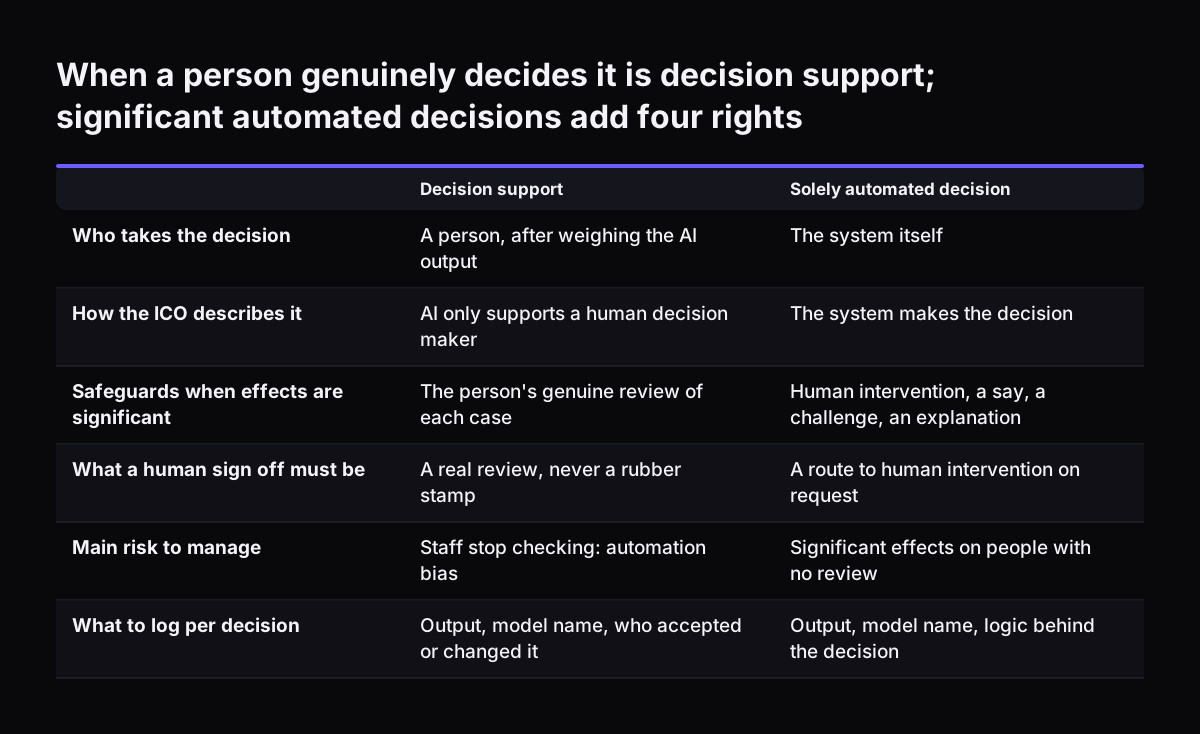
Whether your assistant supports a person or decides on its own is the single design choice that sets most of your obligations. The ICO calls the first case decision-support: the AI system only supports a human decision-maker in their deliberation. Automated decision-making is the second case, where the system makes the decision itself.

Solely automated decisions with legal or similarly significant effects carry extra safeguards under UK data protection law. The ICO's guidance on individual rights in AI systems covers them. As a minimum, people must be told about these decisions and be able to give their view, obtain human intervention and challenge the decision.

A human signature on an AI decision does not by itself make it decision-support. Since February 2026, Article 22A of the UK GDPR treats a decision as solely automated unless a person is meaningfully involved. The ICO says that involvement must be active, not a token gesture. The reviewer must have the information, the time and the authority to decide differently.

For a small firm, the practical rule is simple. Let the assistant classify, route and draft. Keep refunds, account closures, disciplinary matters and anything else that changes a person's position with a named member of staff who reads the case before acting.

When a person genuinely decides it is decision support; significant automated decisions add four rights. Decision support / Solely automated decision. Who takes the decision: A person, after weighing the AI output / The system itself; How the ICO des

Telling people about the AI: transparency built into the assistant itself

Transparency is cheapest when the assistant states it in its own messages rather than in a policy nobody reads. The ICO publishes practical advice on explaining processes, services and decisions delivered or assisted by AI to the individuals affected. That advice is a sound basis for the wording your assistant uses.

Build three statements into the assistant's replies and templates:

  • That the first response or the routing was prepared by an AI system.
  • Which kinds of decision a person always takes.
  • How to reach that person or ask for a review.

Training data needs its own notice. The ICO says individuals must be informed if their personal data will be used to train an AI system. Where the data was not obtained from them, the Article 14 information should reach them within a reasonable period, one month at the latest. Most small firms avoid this duty entirely by not training models on customer data, and they say so in the system record.

Rights requests still apply when AI is involved. The ICO says requests should not be treated as manifestly unfounded or excessive just because they are harder to fulfil in an AI context. Design the logs so that a person's data can be found by name or email address.

Staff who understand the assistant: training against automation bias

Staff training matters because the main failure in decision-support systems is people who stop checking. The ICO names this automation bias, also called automation-induced complacency. Users routinely rely on the output of a decision-support system and stop using their own judgement or stop questioning whether the output might be wrong.

A short, specific briefing works better than a general AI course. Each person who works alongside the assistant should know four things. They should know what the assistant reads and writes. They should know which decisions stay with them.

They should also know how to overrule the assistant and where that override is recorded. Finally, they should know how to report an output that looked wrong.

Write the briefing down and date it. A one-page note per role, signed off when someone starts, is enough for most firms of under 50 people. Repeat the briefing when the assistant gains a new tool or a new system to write to.

Measure whether people still check. If staff accept every suggestion without a single override over several weeks, that is a sign of automation bias rather than a perfect assistant. Our guide to measuring an AI assistant by outcomes covers which numbers to watch.

Records of every AI decision: the log to build before launch

A decision log is the most useful compliance document a small firm can have, and the hardest to add later. For automated decisions, the ICO says organisations are required to keep a record of all decisions made by an AI system as part of their accountability and documentation obligations. Logging decision-support output the same way is good practice. Build the log into the assistant rather than relying on staff to write notes.

Each logged decision should hold:

  • The input the assistant received, or a reference to it.
  • The output: the category, the routing or the draft.
  • The model used, by its exact name.
  • Whether a person accepted, changed or rejected the output, and who.

The model name matters because models are retired. Anthropic's models overview lists Claude Haiku 4.5 for retirement not sooner than 15 October 2026. Claude Sonnet 5.5 follows not sooner than 28 September 2027. A log that records the model lets you show which system produced which decision after a switch.

At Svennis we write the decision log into the build from the first day: every routing choice the assistant makes lands on the ticket as a note with its reason, so the record already exists when someone asks for it. Staff see the same note, which also makes their review faster.

Choosing and contracting the AI service: what the controller must check

The firm that deploys the assistant remains responsible for personal data, whatever the vendor's design. The ICO puts it directly: when procuring an AI service, you must choose one that allows individual rights to be protected and enabled. A poorly designed service does not remove your obligations as a controller.

The contract is the second check. The ICO says your contract with the processor must stipulate that the processor assists you in responding to rights requests. Read the vendor's data processing terms for that clause before you sign up, not after the first request arrives.

Plan settings are the third check. Anthropic's release notes confirm several controls that help a small firm:

  • Memory is off by default for Team and Enterprise organisations, and on by default for Free, Pro and Max.
  • Enterprise admins can organise users into groups, manually or via SCIM, and give each group a custom role defining which Claude capabilities it may use.
  • Any organisation can buy an Enterprise plan directly on Anthropic's website without a sales conversation.

Record which plan you use, which settings you changed and why. Personal Free or Pro accounts used for company work leave memory on by default and leave you with no admin control, which is reason enough to avoid them.

Worked example: an IT request assistant in front of Zoho Desk at a 30-person firm

Take a firm of 30 staff. Staff email IT requests to a shared mailbox. A Claude assistant reads each request, chooses a category and a team, and creates a ticket in Zoho Desk with a drafted first reply.

The design choices that keep the duties light are these:

  1. Model. Claude Sonnet 5.5, which Anthropic describes as the best combination of speed and intelligence. The model name is written to every ticket note.
  2. Mailbox access. The Microsoft 365 connector can draft, send and organise email once write tools are enabled. For the first weeks, the assistant drafts and a person sends.
  3. Teams. The connector keeps Teams read-only, so the assistant cannot post there on anyone's behalf.
  4. Decisions kept by people. Account deletions and access to payroll or HR systems always go to a named administrator.
  5. Notice. Every drafted reply opens with one line saying it was prepared by an AI assistant and checked by the IT team.
  6. Plan. A Team or Enterprise plan, with memory left off.

Each of these is one line in the system record. Together they show the assistant supports decisions rather than making significant ones, and they show where the evidence sits.

Pre-launch checklist: what to document and where each item comes from

The pre-launch file for a small firm's AI assistant fits in a handful of short documents. The table lists each one, what it must contain and the published rule or source behind it. Keep the file in one folder and date every document.

DocumentWhat it containsBasis
Purpose and tier recordWhat the assistant reads, writes and never does; your tier reasoningThe EU AI Act's own text, read with your adviser
Data protection impact assessmentThe risks the assistant creates for people and how you reduce them, completed before launchArticle 35 UK GDPR; ICO guidance that a DPIA is likely to be required when AI processes personal data
Decision boundaryWhich decisions a person always takes, and whoArticles 22A to 22D of the UK GDPR and ICO guidance on meaningful human involvement
Decision log designInput, output, model name, human action per decisionICO: record of all decisions made by an AI system
User notice wordingAI involvement, human decisions, how to ask for reviewICO advice on explaining AI-assisted decisions
Staff briefing per roleWhat to check, how to override, how to report errorsICO description of automation bias
Vendor and contract checkA processor contract that meets Article 28 UK GDPR, including help with rights requests; the safeguard for any transfer outside the UK, such as the IDTA or the UK Addendum; plan and settingsArticle 28 and Articles 44 to 46 UK GDPR; ICO procurement guidance; Anthropic release notes
Model registerModel in use and its earliest retirement dateAnthropic models overview

The ICO's artificial intelligence guidance hub also offers an AI and data protection risk toolkit. The toolkit supports organisations assessing the risks their own AI systems create for individual rights and freedoms. It is a useful structure for the purpose record if you have never written one.

What this means for a UK company deploying an AI assistant

A UK company deploying an AI assistant already works under UK GDPR, and the ICO's AI guidance applies to it today. The guidance is written for businesses in the public, private and third sectors. Whether the EU AI Act also reaches your firm is a question to settle with your adviser using the regulation's text. It can apply when you place AI systems on the EU market or your AI output is used in the EU.

UK data law changed in 2025. The Data (Use and Access) Act 2025 is chapter 18 of that year. It covers the processing of personal data, privacy and electronic communications, and establishes the Information Commission. The ICO notes that its guidance on individual rights in AI systems is under review because of the Act and may change. Check the page date before you rely on any detail.

The ICO's guidance for organisations includes advice for small and medium organisations. It is also the place to pay the data protection fee or report a breach.

For most small UK firms, the design in this guide serves both regimes at once. A person on significant decisions, a decision log, clear notices and a sound processor contract are what UK GDPR expects. The same records answer the questions any AI regulation asks first: what the system does, who checks it and where the evidence is.

Next steps for a small firm planning an AI assistant

The next step is to write the one-page purpose record before anyone builds anything. Name the requests the assistant will handle, the systems it may write to and the decisions it may never take. That page drives the tier question, the decision boundary and the notice wording.

Then work through the rest of the file in this order:

  1. Choose a Team or Enterprise plan and confirm memory and role settings.
  2. Read the vendor's processing terms for the rights request clause.
  3. Design the decision log so each entry lands in the system staff already use.
  4. Write the user notice and the staff briefing for each role.
  5. Record the model name and its earliest retirement date.

If you want to see how an assistant sits inside the tools you already run, our guide to AI for small business inside your existing systems shows the pattern. To find the task worth starting with, browse AI by business task. When you are ready to scope a build, the AI automation for growing businesses page explains how a project runs from first conversation to a system in production.

Sources

  1. 1. Data (Use and Access) Act 2025, copyright works and artificial intelligence systems
  2. 2. Data (Use and Access) Act 2025
  3. 3. ICO: How do we ensure individual rights in our AI systems?
  4. 4. ICO: Artificial intelligence
  5. 5. ICO: For organisations
  6. 6. Anthropic: Models overview
  7. 7. Anthropic: Claude apps release notes

Related articles